
Solved catastrophic hard drive problem

@crawfish

Think of me as a determined idiot with a screwdriver, with heavy emphasis on "idiot", who is just describing the stupid thing he did on a rainy, nostalgic afternoon.

Well your one step above me Crawfish, at least your smart enough to wait till a rainy day :)
I do appreciate you taking the time to describe how you did it.

But I took yours and others advice and tried something first... I yanked the drive out of the computer and took it into the friendly neighboorhood computer store, and asked them to mount it into a dock.... low and behold when doing that they were able to see and access all my files that I had been working on the last 2 weeks... so they are now securily on an external harddrive waiting to be transfered to my new harddrive that shipped today under warantee. So my wallet is $49.00 lighter, but a lot of hard work has been recovered.

So I'm sorry to say I won't be able to try your method, but it was a fun "war story" to read about.

I'll have to wait and see if I have any installation problems with the new drive.... so until then, thank you for all your help guys.
 

My Computer My Computer

Computer type
PC/Desktop
Computer Manufacturer/Model Number
SYX SG-103
OS
Windows 7 home premium 64 bit sp1
CPU
Intel Core I7-2600 3.4 Ghz 1155 8M 95W CPU
Motherboard
MSI P67A-C43 (B3) ATX
Memory
16 gb DD3 1333MHZ
Graphics Card(s)
Nvidea Gforce GTX 550Ti
Sound Card
Realtek ALC892 integrated
Monitor(s) Displays
acer 23"
Screen Resolution
1920 x 1080
Hard Drives
Hitachi 1 TB 3.5" SATA 3G 7200rpm
Seagate ST32000641AS baracuda XT , 2 TB 3.5" 7200 rpm
Western digital My Book 1 tb USB2 external
Western digital My Book 3 tb USB3 external
PSU
500 Watt 80 plus
Case
Cooler Master Elite 310 RC-310-BWN1-GP
Keyboard
Logitech MK 200 Keybard
Mouse
Logitech MK200 mouse
Other Info
24x DVDRW Dual Layer SATA optical drive
But I took yours and others advice and tried something first... I yanked the drive out of the computer and took it into the friendly neighboorhood computer store, and asked them to mount it into a dock.... low and behold when doing that they were able to see and access all my files that I had been working on the last 2 weeks... so they are now securily on an external harddrive waiting to be transfered to my new harddrive that shipped today under warantee. So my wallet is $49.00 lighter, but a lot of hard work has been recovered.

That's great. It's always worth it to try with different equipment and/or OS before dipping into the desperate measures. Hopefully it was just an intermittent problem confined to that one drive, and it just happened to work when they tried it.
 

My Computer My Computer

Computer type
PC/Desktop
OS
Windows 7 Ultimate x64
@crawfish

Think of me as a determined idiot with a screwdriver, with heavy emphasis on "idiot", who is just describing the stupid thing he did on a rainy, nostalgic afternoon.

Well your one step above me Crawfish, at least your smart enough to wait till a rainy day :)
I do appreciate you taking the time to describe how you did it.

But I took yours and others advice and tried something first... I yanked the drive out of the computer and took it into the friendly neighboorhood computer store, and asked them to mount it into a dock.... low and behold when doing that they were able to see and access all my files that I had been working on the last 2 weeks... so they are now securily on an external harddrive waiting to be transfered to my new harddrive that shipped today under warantee. So my wallet is $49.00 lighter, but a lot of hard work has been recovered.

So I'm sorry to say I won't be able to try your method, but it was a fun "war story" to read about.

I'll have to wait and see if I have any installation problems with the new drive.... so until then, thank you for all your help guys.

Well, that's sorts out like big relief from a horrible headache. Though if I were you in that case I would have definitely set my data drive with RAID 1 set up to ensure I have always a full back up of those large important files with no sweat in case one of the hard drive fails.
 

My Computer My Computer

Computer type
PC/Desktop
Computer Manufacturer/Model Number
Hewlett-Packard
OS
Windows 7 Ultimate x64
CPU
Intel Core i5-2410M
Motherboard
Hewlett-Packard 1651
Memory
2 x 4 GB ELPIDA 667Mhz 1.5V
Graphics Card(s)
Radeon (TM) HD 7650M
Hard Drives
750GB WD7500BPVT
@frozwire On the computer before this one, I actually had a raid 5 system and it saved my ass many times as I started having harddrives fail. I am going to look into purchasing another 2 tb drive and mirror the data.

On that subject, how can I determine if my current power supply, which currently powers a pretty decent video card, two harddrives, and other stuff could handle a 3rd harddrive? Are there any utilities I can download that would figure it out somehow?

New drive is supposed to arrive today.... fingers crossed
 

My Computer My Computer

Computer type
PC/Desktop
Computer Manufacturer/Model Number
SYX SG-103
OS
Windows 7 home premium 64 bit sp1
CPU
Intel Core I7-2600 3.4 Ghz 1155 8M 95W CPU
Motherboard
MSI P67A-C43 (B3) ATX
Memory
16 gb DD3 1333MHZ
Graphics Card(s)
Nvidea Gforce GTX 550Ti
Sound Card
Realtek ALC892 integrated
Monitor(s) Displays
acer 23"
Screen Resolution
1920 x 1080
Hard Drives
Hitachi 1 TB 3.5" SATA 3G 7200rpm
Seagate ST32000641AS baracuda XT , 2 TB 3.5" 7200 rpm
Western digital My Book 1 tb USB2 external
Western digital My Book 3 tb USB3 external
PSU
500 Watt 80 plus
Case
Cooler Master Elite 310 RC-310-BWN1-GP
Keyboard
Logitech MK 200 Keybard
Mouse
Logitech MK200 mouse
Other Info
24x DVDRW Dual Layer SATA optical drive
On that subject, how can I determine if my current power supply, which currently powers a pretty decent video card, two harddrives, and other stuff could handle a 3rd harddrive? Are there any utilities I can download that would figure it out somehow?

Hard drives use less than 10 watts, so don't worry about that. If you want a 3rd hard drive, you need to confirm that your power supply in fact has a spare connector for the 3rd drive, that you have the appropriate cables, that your motherboard has a port for a 3rd drive, and that you have a drive bay in which to mount the drive in the case. That's about it.
 

My Computer My Computer

Computer type
PC/Desktop
Computer Manufacturer/Model Number
Ignatz Special; 4 speed manual gearbox; factory air conditioning; one of one
OS
Windows 7 Home Premium SP1, 64-bit
CPU
Intel Skylake i5-6600K, not overclocked
Motherboard
AsRock Z170M Extreme 4, micro ATX
Memory
8 GB HyperX DDR4-2666 (2 x 4 GB)
Graphics Card(s)
none; graphics are integrated on CPU
Sound Card
onboard: Realtek ALC1150; external: USB Behringer UF0-202
Monitor(s) Displays
Dell S2340M 23 inch IPS
Screen Resolution
1600 x 900
Hard Drives
System: Crucial MX100 series SSD, 128 GB;
Data: Samsung Spinpoint 103SJ, 1 TB;
Backup: WD Caviar Green WD30EZRX-00D8PB0, 3 TB
PSU
Rosewill SilentNight 500 watt fanless, semi-modular
Case
Antec Solo II
Cooling
Noctua NH-U12S; Noctua F12 intake, Noctua S12A exhaust
Keyboard
Microsoft 200 6JH-00001 USB
Mouse
Dell or Microsoft optical wired; USB
Antivirus
Microsoft Security Essentials and Malwarebytes Premium
Browser
Pale Moon
Other Info
All fans PWM; speeds at idle: CPU circa 500 rpm; intake circa 600 rpm; exhaust circa 600 rpm; CPU temps 27 idle and 47 C load in a warm room (27 C/81 F) when running Intel Extreme Tuning Utility stress test.
Well you can refer to this >>PSU Wattage Calculator<< . It gives you an ideal power supply wattage based on your computer build requirements.
 

My Computer My Computer

Computer type
PC/Desktop
Computer Manufacturer/Model Number
Hewlett-Packard
OS
Windows 7 Ultimate x64
CPU
Intel Core i5-2410M
Motherboard
Hewlett-Packard 1651
Memory
2 x 4 GB ELPIDA 667Mhz 1.5V
Graphics Card(s)
Radeon (TM) HD 7650M
Hard Drives
750GB WD7500BPVT
If you want a 3rd hard drive, you need to confirm that your power supply in fact has a spare connector for the 3rd drive

You bring up a very good point, I know I have some extra power cords, but they might be the older kind of power with 4 pins... are there adaptors that convert that kind of plug to a sata power plug?

I'll need to break open the box when my harddrive arrives and take a closer look. I know that I have a number of available sata ports (see diagram on post #12) Only 3 of them are being used. (thats assuming I can plug a 3rd harddrive into any of those ports)

@frozwire I have a 500w powersupply and used the calculator based on my current equipment it said I should have a minimum of 450 w
 

My Computer My Computer

Computer type
PC/Desktop
Computer Manufacturer/Model Number
SYX SG-103
OS
Windows 7 home premium 64 bit sp1
CPU
Intel Core I7-2600 3.4 Ghz 1155 8M 95W CPU
Motherboard
MSI P67A-C43 (B3) ATX
Memory
16 gb DD3 1333MHZ
Graphics Card(s)
Nvidea Gforce GTX 550Ti
Sound Card
Realtek ALC892 integrated
Monitor(s) Displays
acer 23"
Screen Resolution
1920 x 1080
Hard Drives
Hitachi 1 TB 3.5" SATA 3G 7200rpm
Seagate ST32000641AS baracuda XT , 2 TB 3.5" 7200 rpm
Western digital My Book 1 tb USB2 external
Western digital My Book 3 tb USB3 external
PSU
500 Watt 80 plus
Case
Cooler Master Elite 310 RC-310-BWN1-GP
Keyboard
Logitech MK 200 Keybard
Mouse
Logitech MK200 mouse
Other Info
24x DVDRW Dual Layer SATA optical drive
If you want a 3rd hard drive, you need to confirm that your power supply in fact has a spare connector for the 3rd drive

You bring up a very good point, I know I have some extra power cords, but they might be the older kind of power with 4 pins... are there adaptors that convert that kind of plug to a sata power plug?

I'll need to break open the box when my harddrive arrives and take a closer look. I know that I have a number of available sata ports (see diagram on post #12) Only 3 of them are being used. (thats assuming I can plug a 3rd harddrive into any of those ports)

Yeah, you can buy adapters to convert those old Molex connectors to SATA if necessary but I'd guess your PSU has SATA connectors if it has any spares at all. You need to get in there and look.

I guess you bought another SATA cable the other day, so you should be good to go when your drive arrives.

Not sure how your motherboard SATA ports are set up, but it's possible that some of those ports run off a slower controller. Look at your manual or better yet go to the manufacturer's web site and dig into the motherboard documentation for detailed info about those ports and the controllers. You'd naturally want to connect your hard drives to a fast and reliable controller if at all possible.
 

My Computer My Computer

Computer type
PC/Desktop
Computer Manufacturer/Model Number
Ignatz Special; 4 speed manual gearbox; factory air conditioning; one of one
OS
Windows 7 Home Premium SP1, 64-bit
CPU
Intel Skylake i5-6600K, not overclocked
Motherboard
AsRock Z170M Extreme 4, micro ATX
Memory
8 GB HyperX DDR4-2666 (2 x 4 GB)
Graphics Card(s)
none; graphics are integrated on CPU
Sound Card
onboard: Realtek ALC1150; external: USB Behringer UF0-202
Monitor(s) Displays
Dell S2340M 23 inch IPS
Screen Resolution
1600 x 900
Hard Drives
System: Crucial MX100 series SSD, 128 GB;
Data: Samsung Spinpoint 103SJ, 1 TB;
Backup: WD Caviar Green WD30EZRX-00D8PB0, 3 TB
PSU
Rosewill SilentNight 500 watt fanless, semi-modular
Case
Antec Solo II
Cooling
Noctua NH-U12S; Noctua F12 intake, Noctua S12A exhaust
Keyboard
Microsoft 200 6JH-00001 USB
Mouse
Dell or Microsoft optical wired; USB
Antivirus
Microsoft Security Essentials and Malwarebytes Premium
Browser
Pale Moon
Other Info
All fans PWM; speeds at idle: CPU circa 500 rpm; intake circa 600 rpm; exhaust circa 600 rpm; CPU temps 27 idle and 47 C load in a warm room (27 C/81 F) when running Intel Extreme Tuning Utility stress test.
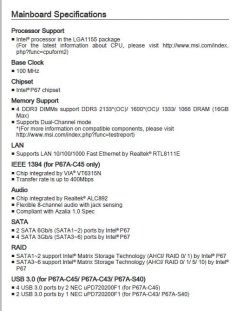
I did find the manual for the motherboard and you were correct about the differences. It appears the two sata ports I am using now are the ones that are the sata 6gb. So unfortunately if I did add a third internal it would have to go into one of the 3gb slots. Not sure what the implications of that would be.
 

Attachments

  • motherboard_specs.JPG
    motherboard_specs.JPG
    53.7 KB · Views: 14

My Computer My Computer

Computer type
PC/Desktop
Computer Manufacturer/Model Number
SYX SG-103
OS
Windows 7 home premium 64 bit sp1
CPU
Intel Core I7-2600 3.4 Ghz 1155 8M 95W CPU
Motherboard
MSI P67A-C43 (B3) ATX
Memory
16 gb DD3 1333MHZ
Graphics Card(s)
Nvidea Gforce GTX 550Ti
Sound Card
Realtek ALC892 integrated
Monitor(s) Displays
acer 23"
Screen Resolution
1920 x 1080
Hard Drives
Hitachi 1 TB 3.5" SATA 3G 7200rpm
Seagate ST32000641AS baracuda XT , 2 TB 3.5" 7200 rpm
Western digital My Book 1 tb USB2 external
Western digital My Book 3 tb USB3 external
PSU
500 Watt 80 plus
Case
Cooler Master Elite 310 RC-310-BWN1-GP
Keyboard
Logitech MK 200 Keybard
Mouse
Logitech MK200 mouse
Other Info
24x DVDRW Dual Layer SATA optical drive
I did find the manual for the motherboard and you were correct about the differences. It appears the two sata ports I am using now are the ones that are the sata 6gb. So unfortunately if I did add a third internal it would have to go into one of the 3gb slots. Not sure what the implications of that would be.

Hard drives are a lot slower than 3 Gb/s, so no problem.
 

My Computer My Computer

Computer type
PC/Desktop
OS
Windows 7 Ultimate x64
Well good news today, I got the new hard drive installed, and a terrabyte worth of data transfered... so 1 day old and it's already 1/2 full :)

One final question regarding the possiblity of adding a 3rd internal hard drive to use as raid for my data disc.

-as mentioned earlier I did find an available molex power cord

-I could not find any additional sata power cords, however, the power cord that attaches to my second harddrive has additional connectors on the SAME line. Would it be safe to connect both those harddrives using the same power line?

-I would like to mark this thread solved, not sure how you do that? But I really appreciate everyones help.
 

My Computer My Computer

Computer type
PC/Desktop
Computer Manufacturer/Model Number
SYX SG-103
OS
Windows 7 home premium 64 bit sp1
CPU
Intel Core I7-2600 3.4 Ghz 1155 8M 95W CPU
Motherboard
MSI P67A-C43 (B3) ATX
Memory
16 gb DD3 1333MHZ
Graphics Card(s)
Nvidea Gforce GTX 550Ti
Sound Card
Realtek ALC892 integrated
Monitor(s) Displays
acer 23"
Screen Resolution
1920 x 1080
Hard Drives
Hitachi 1 TB 3.5" SATA 3G 7200rpm
Seagate ST32000641AS baracuda XT , 2 TB 3.5" 7200 rpm
Western digital My Book 1 tb USB2 external
Western digital My Book 3 tb USB3 external
PSU
500 Watt 80 plus
Case
Cooler Master Elite 310 RC-310-BWN1-GP
Keyboard
Logitech MK 200 Keybard
Mouse
Logitech MK200 mouse
Other Info
24x DVDRW Dual Layer SATA optical drive
Shouldn't be any problem. I've heard of 4 and more on the same cable. SSDs use very little power. A standard hard drive uses under 10 watts. SSDs way less than that.

Not sure about the solved thing, but it's probably somewhere on your screens. I think only you or an admin can do it, but most threads are never officially marked.
 

My Computer My Computer

Computer type
PC/Desktop
Computer Manufacturer/Model Number
Ignatz Special; 4 speed manual gearbox; factory air conditioning; one of one
OS
Windows 7 Home Premium SP1, 64-bit
CPU
Intel Skylake i5-6600K, not overclocked
Motherboard
AsRock Z170M Extreme 4, micro ATX
Memory
8 GB HyperX DDR4-2666 (2 x 4 GB)
Graphics Card(s)
none; graphics are integrated on CPU
Sound Card
onboard: Realtek ALC1150; external: USB Behringer UF0-202
Monitor(s) Displays
Dell S2340M 23 inch IPS
Screen Resolution
1600 x 900
Hard Drives
System: Crucial MX100 series SSD, 128 GB;
Data: Samsung Spinpoint 103SJ, 1 TB;
Backup: WD Caviar Green WD30EZRX-00D8PB0, 3 TB
PSU
Rosewill SilentNight 500 watt fanless, semi-modular
Case
Antec Solo II
Cooling
Noctua NH-U12S; Noctua F12 intake, Noctua S12A exhaust
Keyboard
Microsoft 200 6JH-00001 USB
Mouse
Dell or Microsoft optical wired; USB
Antivirus
Microsoft Security Essentials and Malwarebytes Premium
Browser
Pale Moon
Other Info
All fans PWM; speeds at idle: CPU circa 500 rpm; intake circa 600 rpm; exhaust circa 600 rpm; CPU temps 27 idle and 47 C load in a warm room (27 C/81 F) when running Intel Extreme Tuning Utility stress test.
Back
Top