
LegacyFate
New member
- Local time
- 11:47 AM
- Messages
- 1
Greetings, I have the following issue with my current OS:
Windows 7 Pro x64 bit with Service Pack 1
I've been trying to update IE8 to the latest version of IE11, so I thought I'd just download it straight from the Microsoft website. However, that hasn't succeeded even though the download finished and asked me to restart my PC.
My IE stays at IE8 even though the installer says to have successfully downloaded IE11. I even got a "Welcome to your new browser" message when opening up IE to check, indicating that it somehow noticed I installed a new version or such, but nothing has changed.
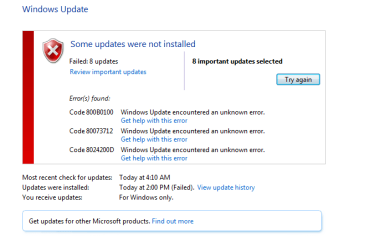
Then, I try to run it through Windows Update, that also failed with numerous errors. Also, now that I have checked, whenever I open the "Turn Windows Features On and Off" in the Programs under Control Panel, it produces a little window that says "Please Wait..." for several seconds before turning into a blank box (since I was trying to see if there was anything in there related to IE11 or IE8, etc.)
This is where I start running into walls with solutions, so here I am looking for help, just to update to IE11.
Ran "sfc /scannow" in a cmd prompt, that didn't produce any error messages. Did a restart, nothing changed. Moving on from that.
Ran a System Update Readiness tool and received a lot of corrupted registry items. The CBS folder with the most recent scan is down below in the Sendspace link.
Ran SFCFix, here's the final report:
And here is the Sendspace link to a .zip of my CBS folder.
https://www.sendspace.com/file/6dzwhy
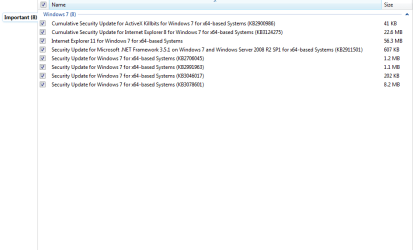
Also, here are screenshots of the Windows Update Errors I get when I try to install these updates, help would be much appreciated!
Windows 7 Pro x64 bit with Service Pack 1
I've been trying to update IE8 to the latest version of IE11, so I thought I'd just download it straight from the Microsoft website. However, that hasn't succeeded even though the download finished and asked me to restart my PC.
My IE stays at IE8 even though the installer says to have successfully downloaded IE11. I even got a "Welcome to your new browser" message when opening up IE to check, indicating that it somehow noticed I installed a new version or such, but nothing has changed.
Then, I try to run it through Windows Update, that also failed with numerous errors. Also, now that I have checked, whenever I open the "Turn Windows Features On and Off" in the Programs under Control Panel, it produces a little window that says "Please Wait..." for several seconds before turning into a blank box (since I was trying to see if there was anything in there related to IE11 or IE8, etc.)
This is where I start running into walls with solutions, so here I am looking for help, just to update to IE11.
Ran "sfc /scannow" in a cmd prompt, that didn't produce any error messages. Did a restart, nothing changed. Moving on from that.
Ran a System Update Readiness tool and received a lot of corrupted registry items. The CBS folder with the most recent scan is down below in the Sendspace link.
Ran SFCFix, here's the final report:
SFCFix version 3.0.0.0 by niemiro.Start time: 2017-11-19 12:36:52.124
Microsoft Windows 7 Service Pack 1 - amd64
Not using a script file.
AutoAnalysis::
SUMMARY: Some corruptions could not be fixed automatically. Seek advice from helper or sysnative.com.
CBS & SFC total detected corruption count: 0
CBS & SFC total unimportant corruption count: 0
CBS & SFC total fixed corruption count: 0
SURT total detected corruption count: 155
SURT total unimportant corruption count: 0
SURT total fixed corruption count: 0
AutoAnalysis:: directive completed successfully.
Successfully processed all directives.
Failed to generate a complete zip file. Upload aborted.
SFCFix version 3.0.0.0 by niemiro has completed.
Currently storing 0 datablocks.
Finish time: 2017-11-19 12:46:23.564
----------------------EOF-----------------------
And here is the Sendspace link to a .zip of my CBS folder.
https://www.sendspace.com/file/6dzwhy
Also, here are screenshots of the Windows Update Errors I get when I try to install these updates, help would be much appreciated!
Attachments
My Computer
At a glance
Windows 7 Pro x64 (64 bit)AMD FX 8350Kingston HyperX FURY 8GB 1600MHz DDR3 CL10 DIMMNVIDIA GeForce GTX 960
- Computer type
- PC/Desktop
- Computer Manufacturer/Model Number
- Custom Build
- OS
- Windows 7 Pro x64 (64 bit)
- CPU
- AMD FX 8350
- Motherboard
- M5A78L-M/USB3 Micro ATX AM3+ Motherboard
- Memory
- Kingston HyperX FURY 8GB 1600MHz DDR3 CL10 DIMM
- Graphics Card(s)
- NVIDIA GeForce GTX 960
- Hard Drives
- Seagate 1TB
- Antivirus
- Malwarebytes
- Browser
- Google Chrome


