CCC.exe won't work, win 7 64bit

philipt

New member
Local time
3:11 AM
Messages
17
Hi,

Last time I was experiencing BSODs and ePeen suggested that I should uninstall my graphics driver and re-install them again. Well after I've re-installed them my CCC.exe won't work at all. Each time I double clicked it, my cursor loads something and then nothing happens. I've tried opening it through many ways and it doesn't work.
for reports I've uploaded about the install errors check here:
http://www.sevenforums.com/crashes-debugging/215636-bsod-mostly-while-playing-full-screen-games.html

I've tried using Atiman, drive sweeper, etc. but that CCC.exe won't work at all. The real problem is that my graphic card performance has been reduced very drastically to the point that I lag on almost every games, videos, etc.

This never happened before I uninstalled my graphic driver.

Thanks for you help,
Philip
 

My Computer

OS
Windows 7 Home Premium 64 bit
Hi.

Did you tried this method using the exact these steps?


[FONT=&quot]Download and install the new version of [/FONT][FONT=&quot]Driver Sweeper.[/FONT][FONT=&quot]


Download the most recent software\driver for your ati
[/FONT][FONT=&quot]AMD Graphics Drivers & Software[/FONT][FONT=&quot]

Uninstall ati software\driver,restart in safe mode,run driver sweeper,choose only AMD-Display and clean,restart in normal mode.


Install the new ati software\driver,restart.


Update
[/FONT][FONT=&quot] DirectX [/FONT][FONT=&quot] if needed.[/FONT]
 

My Computer

Computer Manufacturer/Model Number
Custom Built by me.
OS
Windows 7 Ultimate 64bit SP1
CPU
Intel Core 2 Quad Q6600
Motherboard
Gigabyte GA-X38-DS4
Memory
2X2GB DDR2 PC6400 800MHZ DUAL CHANNEL
Graphics Card(s)
XFX RADEON HD 6850 1GB GDDR5
Sound Card
2/4/5.1/7.1-channel Realtek High Definition
Monitor(s) Displays
Samsung LE40A656F1 1080p 100Hz LCD HD TV 50,000:1
Screen Resolution
1366x768 in Desktop,1920x1080p in gaming and video
Hard Drives
C:\WD VelociRaptor 150 GB,10,000 RPM
E:\WESTERN DIGITAL WD15EADS 1.5TB CAVIAR GREEN SATA2 F:\WESTERN DIGITAL WD15EADS 1.5TB CAVIAR GREEN SATA2
PSU
THERMALTAKE W0229 TOUGHPOWER XT 750W
Case
A-Case Twin Engine BB
Cooling
3 x thermaltake smart case fan II + 1 arctic cooling fan
Keyboard
Wireless Logitech LX710
Mouse
Logitech Wireless Gaming Mouse G700
Internet Speed
ADSL 12000 plus
Other Info
Mouse Logitech G700,with 13 buttons who needs keyboard in RPG?

D:\Sony high speed sata Dvd Rewriter
Logitech Cordless Rumblepad 2
Normally and all ways recommended; you must first uninstall all said drivers and software before installing new driver and software, which all ways involves a reboot in both incidents.
 

My Computer

Computer Manufacturer/Model Number
Custom built
OS
Windows 7 Ultimate 64 bit
CPU
AMD Phenom II X4 965 Black Edition
Motherboard
Gigabyte GA-MA790X-DS4
Memory
GSkill 4 X 2 GB PC 8500
Graphics Card(s)
XFX Radeon HD 6790 D
Sound Card
On board RealTek HD
Monitor(s) Displays
Dual monitors:Samsung SyncMaster S20B300
Screen Resolution
1600 X 900
Hard Drives
Seagate Barracuda 1TB (primary)
Seagate Barracuda 2 X 320 GB
PSU
Ultra X4 750 watt fully modular
Case
Thermaltake Overseer RX 1 full tower
Cooling
Core-Contact 92 mm CPU Cooler
Keyboard
Logitech G510
Mouse
Razor DeathAdder
Internet Speed
50/5 Mbps UL/DL
Other Info
Optical: Super Muliti DVD burner w/lightscribe, Hauppauge WinTV HVR-1800
Hello again, Philip! I'm very sorry hear you're having said issues :(

I've had the same issue as you before unforunately and it required a clean install of Windows 7, but let's try and get you squared off without doing so! Please follow the suggestion panais has listed.

Just a question to you, are you sure you're installing the LATEST drivers and not HOTFIX drivers? The latest drivers are currently 12.1 (1/25/2012).
 

My Computer

OS
Windows 7 Ultimate x64
CPU
i7-2600K
Motherboard
Asus P8P67 Pro B3 (Rev 3.1)
Memory
Corsair Vengeance 8GB DDR3 @ 1600Mhz (9-9-9-24)
Graphics Card(s)
Asus Radeon HD 5850 (Crossfire)
Sound Card
X-Fi Titanium Fata1ity Professional
Monitor(s) Displays
Acer Eyefinity
Screen Resolution
5040x1050
Hard Drives
Samsung Spinpoint F3 1TB
PSU
Corsair CMPSU-750TX 750W
Case
LIAN LI Lancool PC-K56
Cooling
Corsair H70
Keyboard
Ducky Shine / Das Ultimate Blank
Mouse
Razer Lachesis
@ePeen: what do you mean by HOTFIX drivers? I installed the mobility version of the ati drivers: "12-1_mobility_vista_win7_64_dd_ccc_ocl.exe" from the link: ATI Catalyst
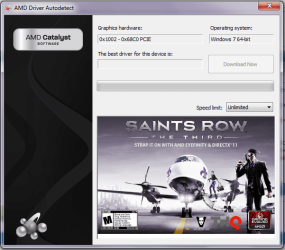
When I use the amd driver auto detect it downloads the: "12-1_vista_win7_64_dd_ccc.exe" which for some reason does not contain the graphic driver and the CCC after it finishes the install.
@panais: "Uninstall ati software\driver,restart in safe mode,run driver sweeper,choose only AMD-Display and clean,restart in normal mode."

that's what I did, but what do you mean by choose only AMD-display? Basically what I did was run the program, check the amd box, and press run, then after that, clean. After it finishes I check the amd box again and analyze to see if there's any leftoves. Yes it is all done in safe mode and done after I uninstalled everything amd/ati related in normal mode.

and i did try downloading the latest DirectX and it says that I already have the latest version (u can check my version from the dxdiag.txt).

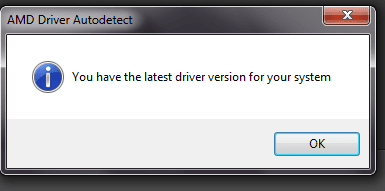
I've included an attachment showing the result of the amd-auto detect when its run and it also shows that i already have the latest driver...

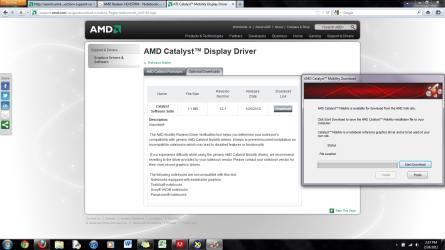
I've also included a screenshot of what i get when I'm trying to download the driver, as you can see from the second Mozilla Firefox tab, my video card is AMD Radeon HD 6750M, which when I input that into the amd website it links me to that page, and when I download and run that software, it downloads the mobility software.. so i guess I've downloaded the correct driver, yes?
Now the only problem here is that I can't get CCC.exe to work and it does not appear in my control panel..

I've tried all the steps u have mentioned and it still doesn't work.
 

Attachments

  • autodetect.png
    autodetect.png
    63.6 KB · Views: 38
  • autodetect2.png
    autodetect2.png
    6.1 KB · Views: 24
  • download page.png
    download page.png
    248.3 KB · Views: 62
Last edited:

My Computer

OS
Windows 7 Home Premium 64 bit
Oh, wow! I was going to actually recommend that at one point after some Googling to try and assist you further, but I'm very glad you've solved your issue :)
 

My Computer

OS
Windows 7 Ultimate x64
CPU
i7-2600K
Motherboard
Asus P8P67 Pro B3 (Rev 3.1)
Memory
Corsair Vengeance 8GB DDR3 @ 1600Mhz (9-9-9-24)
Graphics Card(s)
Asus Radeon HD 5850 (Crossfire)
Sound Card
X-Fi Titanium Fata1ity Professional
Monitor(s) Displays
Acer Eyefinity
Screen Resolution
5040x1050
Hard Drives
Samsung Spinpoint F3 1TB
PSU
Corsair CMPSU-750TX 750W
Case
LIAN LI Lancool PC-K56
Cooling
Corsair H70
Keyboard
Ducky Shine / Das Ultimate Blank
Mouse
Razer Lachesis
Back
Top