Computer information: Alienware Aurora ALX
OS: Windows 7 64bit
Prossesor: Intel i7 2.80GHz
Video Card: ATI Radeon dual HD 5800 series
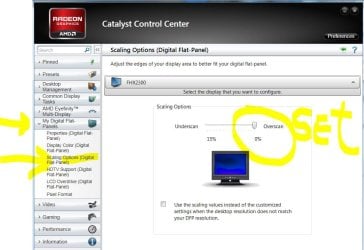
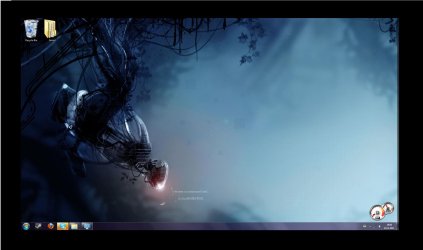
At first I did not know how to update my video card drivers, so I basicly looked online and found Cataclyst control panel, and it was supposed to update my drivers (I now found out I can update them via the device manager too). My screen resolution was 1920x1080, but after the update the screen pretty much shrank to about 1776x1000 (making a large black margin around my screen) and making all my icons smaller. When I right click on my desktop and I chose Screen Resolution it says its already on its highest (1920x1080) while in fact as I said above it is smaller. Although when I set it down one bit to 1776x1000 the black margin around the screen remains the same, but the icons become of normal size as I would have seen it in normal 1920x1080. This is ofcourse not a solution for me because I want to use my full screen. I have included a file where I took a screenshot of my desktop and painted abit around it to show you what I see when looking at my screen.
I have a theory that you can change this resolution in the CCC, however as things are never made easy the CCC won't open when I try to start it up.
A forum I found before may descibe my problem abit too: http://www.sevenforums.com/graphic-cards/3351-how-can-i-fix-my-messed-up-screen-resolution.html
This has happend before, but I managed to reverse it and get my screen back to normal, but I pretty much didn't update my drivers sinse I bought the pc with the fear that the screen would go small again. Now I can't seem to reverse it anymore.
I have updated the drivers via device manager and installed (and deinstalled and installed it again multiple times) Cataclyst on my pc. So maybe if I roll back the drivers in the device manager, and then delete Cataclyst on my pc and reboot I can get my normal screen back, but I still want to be able to update my graphical cards.
So basicly, how to I open the Cataclyst control panel? Is the CCC the solution to my resolution? If not how to I reverse this?
I'm not very good with long detailed complex answers so keep it abit simple, and try not to make me destroy my pc .
.
Thanks in advance
Sensen
OS: Windows 7 64bit
Prossesor: Intel i7 2.80GHz
Video Card: ATI Radeon dual HD 5800 series
At first I did not know how to update my video card drivers, so I basicly looked online and found Cataclyst control panel, and it was supposed to update my drivers (I now found out I can update them via the device manager too). My screen resolution was 1920x1080, but after the update the screen pretty much shrank to about 1776x1000 (making a large black margin around my screen) and making all my icons smaller. When I right click on my desktop and I chose Screen Resolution it says its already on its highest (1920x1080) while in fact as I said above it is smaller. Although when I set it down one bit to 1776x1000 the black margin around the screen remains the same, but the icons become of normal size as I would have seen it in normal 1920x1080. This is ofcourse not a solution for me because I want to use my full screen. I have included a file where I took a screenshot of my desktop and painted abit around it to show you what I see when looking at my screen.
I have a theory that you can change this resolution in the CCC, however as things are never made easy the CCC won't open when I try to start it up.
A forum I found before may descibe my problem abit too: http://www.sevenforums.com/graphic-cards/3351-how-can-i-fix-my-messed-up-screen-resolution.html
This has happend before, but I managed to reverse it and get my screen back to normal, but I pretty much didn't update my drivers sinse I bought the pc with the fear that the screen would go small again. Now I can't seem to reverse it anymore.
I have updated the drivers via device manager and installed (and deinstalled and installed it again multiple times) Cataclyst on my pc. So maybe if I roll back the drivers in the device manager, and then delete Cataclyst on my pc and reboot I can get my normal screen back, but I still want to be able to update my graphical cards.
So basicly, how to I open the Cataclyst control panel? Is the CCC the solution to my resolution? If not how to I reverse this?
I'm not very good with long detailed complex answers so keep it abit simple, and try not to make me destroy my pc
.Thanks in advance
Sensen
Attachments
My Computer
- Computer Manufacturer/Model Number
- Alienware Aurora ALX
- OS
- Windows 7 64bit
- CPU
- Intel i7 2.80GHz
- Graphics Card(s)
- X-fire Radeon 5800 HD series