
Ccleaner and Thunderbird

Roderunner

Exterminator
Guru
Gold Member
VIP
Local time
11:14 AM
Messages
2,362
Location
Scotland
Hi Folks,
what settings do you use for Thunderbird in Ccleaner? these are my default settings.
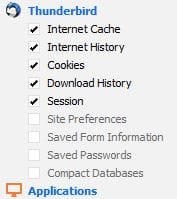
TB.JPG
 

My Computer

Computer Manufacturer/Model Number
Look in my Signature.
OS
Win7 H.Prem. 32bit+SP1
Hi:

As a general principle, do not let CCleaner touch either Firefox or Thunderbird.

CCleaner is a good program and I use it myself, but....
It has long been discussed at the mozilla user fora over the years that it is liable to break these programs.
It's one of the first things the gurus ask about when users report issues with either of these programs.
Moreover, both Firefox and Thunderbird are quite capable of taking care of themselves.
(If needed or desired, most of the functions handled by CCleaner can be set within Fx or TB directly.)

I would disable (un-check) all the options in CCleaner for both Firefox and Thunderbird.

Cheers,

MM
 

My Computer

Computer type
PC/Desktop
Computer Manufacturer/Model Number
Dell Studio XPS 8500
OS
OEM Windows 7 Ult (x64) SP1
CPU
Intel Core-i7 3770 @ 3.4 GHz
Motherboard
"Dell" branded
Memory
16 GB DDR3 SDRAM @ 1333 MHz
Graphics Card(s)
NVidia GeForce GT620 1 GB
Sound Card
THX TruStudio PC
Monitor(s) Displays
Dell U2410 Full HD
Hard Drives
2.0 TB SATA2 @ 7200 RPM
PSU
350W
Keyboard
MS 4000 Ergon - Wired
Mouse
Logitech Anywhere MX
Internet Speed
Cable HSI w/Turbo (router)
Antivirus
KIS-MBAM Premium-MBAE Premium
Browser
Fx (current version); IE
Other Info
And a Win7/64 Pro laptop; And a Win10/64 Pro desktop.
Hi, I reckon you should select "Compact Databases" for sure - it will improve performance.

Here's my settings but I use CCEnhancer so there are extras.

CCleaner.jpg
 

My Computer

Computer type
Laptop
Computer Manufacturer/Model Number
ASUS
OS
Microsoft Windows 7 Home Premium 64-bit 7601 Multiprocessor Free Service Pack 1
CPU
AMD C-60 APU with Radeon(tm) HD Graphics
Motherboard
ASUSTeK COMPUTER INC. X501U
Memory
4.00 GB
Graphics Card(s)
AMD Radeon HD 6290 Graphics
Sound Card
(1) AMD High Definition Audio Device (2) Realtek High Defi
Screen Resolution
1366 x 768 x 32 bits (4294967296 colors) @ 60 Hz
Hard Drives
Hitachi HTS545050A7E380 SATA Disk Device
Antivirus
Comodo CIS & FW, SecureAplus App Whitelisting, Threatfire
Browser
Cyberfox 64bit, Opera 64bit, Airfox
Other Info
Spy-The-Spy, HitmanPro.Alert, Norton Connect Safe, MJRegWatcher, BitDefender TrafficLight, Voodoo Shield, Zemana AntiMalware
Hi:

It's up to the user, of course.
And each computer is unique.

FWIW, compacting folders (an important feature, to be sure) is already handled by TB by default (with options to customize those settings, if desired) and can be done manually from within TB, as well.
There is no need to use a 3rd-party app for this.

If you do opt to use the CCleaner options for Fx or TB, I suggest backing up your profile before running it, just in case. YMMV, but there is a long history of CCleaner mucking up both Fx and TB.

>>>Your choice, of course.<<<


:)

MM
 

My Computer

Computer type
PC/Desktop
Computer Manufacturer/Model Number
Dell Studio XPS 8500
OS
OEM Windows 7 Ult (x64) SP1
CPU
Intel Core-i7 3770 @ 3.4 GHz
Motherboard
"Dell" branded
Memory
16 GB DDR3 SDRAM @ 1333 MHz
Graphics Card(s)
NVidia GeForce GT620 1 GB
Sound Card
THX TruStudio PC
Monitor(s) Displays
Dell U2410 Full HD
Hard Drives
2.0 TB SATA2 @ 7200 RPM
PSU
350W
Keyboard
MS 4000 Ergon - Wired
Mouse
Logitech Anywhere MX
Internet Speed
Cable HSI w/Turbo (router)
Antivirus
KIS-MBAM Premium-MBAE Premium
Browser
Fx (current version); IE
Other Info
And a Win7/64 Pro laptop; And a Win10/64 Pro desktop.
Hi:

As a general principle, do not let CCleaner touch either Firefox or Thunderbird.

Cheers,

MM

I have always let Ccleaner clean FF for years but have only just started using TB
Hi, I reckon you should select "Compact Databases" for sure - it will improve performance.

Here's my settings but I use CCEnhancer so there are extras.
I have never heard of CCEnhancer till now.

Hi:

It's up to the user, of course.
And each computer is unique.

FWIW, compacting folders (an important feature, to be sure) is already handled by TB by default (with options to customize those settings, if desired) and can be done manually from within TB, as well.
There is no need to use a 3rd-party app for this.

If you do opt to use the CCleaner options for Fx or TB, I suggest backing up your profile before running it, just in case. YMMV, but there is a long history of CCleaner mucking up both Fx and TB.

>>>Your choice, of course.<<<


:)

MM

There is one item I forgot to mention, I use TB portable.
 

My Computer

Computer Manufacturer/Model Number
Look in my Signature.
OS
Win7 H.Prem. 32bit+SP1
Old post but see screenshots here:

Thunderbird Links don't work

RE: CCEnhancer. See "Tip" here:

Latest CCleaner Version Released

It's probably not going to be worth installing unless you can work out what each addition does. The only way to know for sure is to open the winapp2.ini file with a text editor and inspect it.

For example this could cause a problem:

299883d1388613828t-privazer-pc-cleaner-2014-01-01-21_51_46-piriform-ccleaner.jpg


Also see: Latest CCleaner Version Released
 

My Computer

Computer type
Laptop
Computer Manufacturer/Model Number
ASUS
OS
Microsoft Windows 7 Home Premium 64-bit 7601 Multiprocessor Free Service Pack 1
CPU
AMD C-60 APU with Radeon(tm) HD Graphics
Motherboard
ASUSTeK COMPUTER INC. X501U
Memory
4.00 GB
Graphics Card(s)
AMD Radeon HD 6290 Graphics
Sound Card
(1) AMD High Definition Audio Device (2) Realtek High Defi
Screen Resolution
1366 x 768 x 32 bits (4294967296 colors) @ 60 Hz
Hard Drives
Hitachi HTS545050A7E380 SATA Disk Device
Antivirus
Comodo CIS & FW, SecureAplus App Whitelisting, Threatfire
Browser
Cyberfox 64bit, Opera 64bit, Airfox
Other Info
Spy-The-Spy, HitmanPro.Alert, Norton Connect Safe, MJRegWatcher, BitDefender TrafficLight, Voodoo Shield, Zemana AntiMalware
FWIW, I have my ccleaner set to only delete cache files.
 
Last edited:

My Computer

Computer type
PC/Desktop
Computer Manufacturer/Model Number
Antec desktop; Acer Aspire laptops
OS
Windows 7 Professional 64-bit
CPU
Desktop i5; Acers i5 & i7
Memory
desktop 16GB; 1 Acer 8GB & 1 Acer 16GB
Hard Drives
1TB split into 2 equal partitions [OS and data] usable by RJS
Internet Speed
AT&T DSL
Browser
FF, GChrome, msIE
Other Info
Windows 7 Firewall, Emsisoft AM/AV, MSE [scan-only], SpywareBlaster, Ruiware/BillP combine
Back
Top