CCleaner - Delete Junk Files

How to Use CCleaner to Clean Out Junk Files in Windows

   Information
This Guide will show you how to use CCleaner to clean out Junk files. This program does not delete anything related to personal files or anything to do with your personal data. (Such as documents or music for example.)

   Tip
For a complete understanding of what is checked to clean and what it does, see here.
Piriform - Windows Tab
Remember the default settings selected are safe and fine to use. This just gives more information on what is actually cleaned, letting you decide if you want CCleaner to clean it or not.


CLEANER
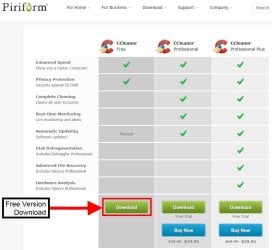
1.) Download CCleaner from the official site.

Download


319288d1401053888t-ccleaner-delete-junk-files-ccleaner-dl.jpg


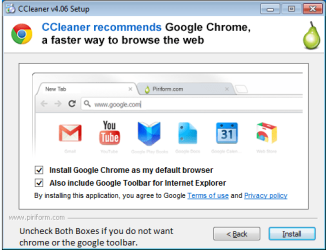
Once downloaded, run the installer as you would install any other application. This is just CCleaner you are installing, so do not accept to install chrome or any other suggested software.
You are offered chrome during the install, (if you already have it you won't be asked)
you can uncheck the boxes and choose not to install it. See image below:
ccleaner install.PNG
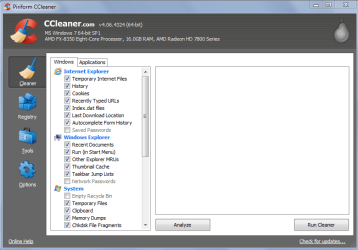
2.) Now that is done, Open ccleaner. You will see this screen:
ccleaner1.PNG

In the screenshot, the options that can be safely checked for the average user are shown. You may stick with the default settings ccleaner has, or include what is in the screenshot. This is up to you.

Simple version: Open ccleaner, click run cleaner. More information is below.

Please note that Empty recycle bin is unchecked by default, as well as saved passwords are unchecked in internet explorer.
The reason is if these are checked the recycle bin will be emptied as well as all of your saved passwords on websites deleted. By default CCleaner will delete cookies.
*You can choose what cookies to keep under the options section in the guide.*

IF you want more information on cookies, see here: What is a cookie?
If you not want this to happen, make sure they are unchecked. As always, read before you hit clean. :)


   Tip
Make sure to close out of all programs and browsers before starting the cleaning

The application tab under cleaner provides other browsers to clean as well. Such as Firefox or Chrome. Antivirus software and other items might be included in the list.

Do not change anything from the default except other web browsers you have installed.

3.) Click Run Cleaner. CCleaner will confirm you want to clean up the system. Click ok. CCleaner will then run.
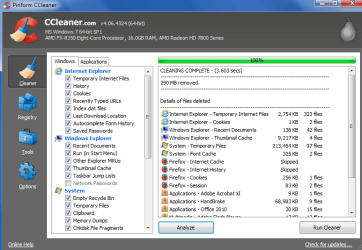
Once it completes you will see this screen below.
success clean.PNG
4.) CCleaner will give you a explanation on what was deleted, as well as how much space has been restored, and how much has been cleaned up. Just to let you know, if ccleaner is showing over 1GB or more removed, your system really needed a cleaning. :) After a restart you might even notice a performance boost.


You are all done with the basic cleaning. Hope this helps you. :)
REGISTRY
   Warning
Continuing further with this guide means that you want to do more then just a basic cleaning. You accept that by continuing you know what you are doing. This requires that you know what each option does and what you are about to do.

If you are not a advanced user do not do the below without asking for help. Only do the following if asked by a forum helper.

Myself, Seven forums, or the maker(s) of this software will not be held liable if something goes wrong. Always back up your files and system before continuing.

   Warning
CCleaner has a Registry option. The registry option is a cleaner that cleans out only the registry keys that are not linked to anything. It is quite safe, since it only deletes key that are not linked to any files or programs anymore. However, having said that; no program is perfect and I highly suggest you backup your files before proceeding.
Note: On most systems this is highly unnecessary unless you are having problems completely removing a program and would like CCleaner to find the old registry remnents of said program.


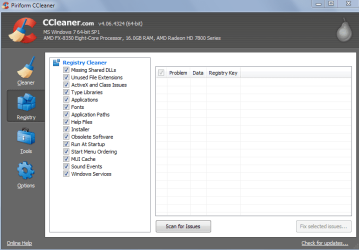
1.) CCleaner can clean the registry. While in Ccleaner click the registry tab. You will see a screen as shown below.
ccleaner registry option.PNG

2.) Click scan for issues. Keep in mind that anything that shows up here is what CCleaner has determined to be a missing key. This does not mean you should delete everything you see in this list.
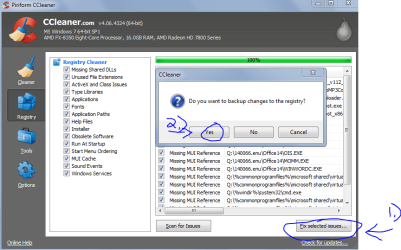
Select the items you want to delete, and click fix selected issues. CCleaner will ask you to backup your registry.
ccleaner reg backup.PNG

   Tip
I highly recommend you back up your registry before continuing.


3.) Click yes when CCleaner asks to save a backup, and then choose where to save the backup. Then click save. Choose fix all selected issues. Then click close.
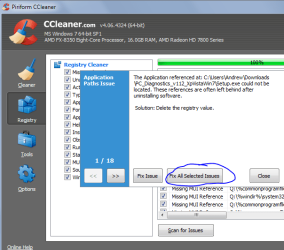
registry ccleaner.PNG
TOOLS

tools menu ccleaner showing startup options.PNG

CCleaner provides several tools that are built into the program that help you configure options such as the following:
1.) Uninstalling a program
This uses the windows built in uninstaller, but supports custom command line commands as well as allowing entries to be renamed or deleted in the uninstall list. There is also a save to text file option that will record/save a log showing all your installed software. This is helpful when diagnosing problems on some systems.

2.) Startup
This Will show you all the programs that your PC starts when it boots up. This is useful and easier to get to for some users compared to msconfig. CCleaner also allows you to delete entries, where msconfig only allows disabling them. This is a very useful function that many times I have recommended people use. There is also a save to text file option that will record/save a log showing all your startup entries. This is helpful when diagnosing slow boot up times.

There are other options as well within the startup tools option.

-The internet explorer tab will show all addons that are installed in internet explorer. (Same with firefox)
-The scheduled tasks tab lists all scheduled tasks in windows.
-The context menu Tab lists all the programs that have added themselves to the right click option.
This can be useful to clean up a long right click menu.

See this tutorial for more information on startup programs: http://www.sevenforums.com/tutorials/1401-startup-programs-change.html

3.) File finder
File finder allows you to search for duplicate files of the same file types and extensions.

4.) System restore
This function allows you to see all your restore points individually. You can delete certain ones that are no longer needed, verses deleting all of them. Which is the only option windows provides. (Windows does not delete the latest system restore point unless system protection is turned off.)
CCleaner allows you to delete certain restore points or all of them. (Except the latest restore point)

5.) Drive wiper

This allows you to wipe any drive (excluding the drive windows is installed on) and format the drive securely. There are also options to delete and wipe just the free space on the drive.
This can be useful if you wish to make it impossible to recover a deleted file using third party recovery tools.
OPTIONS

Options is options.

1.) *Under Options/Cookies, users can choose which cookies to keep, say, for site logins.*
You can find more information about this here: Piriform - Choosing which cookies to keep
   Tip
If you would like to schedule CCleaner to run automatically for you, you can see the link below for steps on how to do this.

Piriform - Scheduling CCleaner


Might expand into the options later if necessary, but a normal user would not go in here.
(Or have a reason too)


CCleaner has a FAQ site, please see here: CCleaner - FAQ

That's it,

-Andrew

If there are any questions or you feel I could explain better, please leave a comment here. Also suggest the rewritten text as well please.


Attachments
  • ccleaner.PNG
    ccleaner.PNG
    24.2 KB · Views: 121
Last edited:
Andrew I would include Options, that's where program settings are, what drives to clean, what cookies to save, delete only temp flies older than 24 hours, how many cleaning passes, etc.
 

My Computer

Computer type
PC/Desktop
Computer Manufacturer/Model Number
Home Built Desktop By DataTech
OS
Windows 7 Ultimate X64 SP1
CPU
Intel i5-2550K, Differing ~4.4-4.8GHz No built in GPU
Motherboard
ASUS P8Z68-V PRO/GEN3
Memory
16GB G.Skill Sniper 1866MHz @ 2133MHz 2x8GB
Graphics Card(s)
ASUS GTX650TIB-DC2OC-2GD5, (650TI Boost)
Sound Card
Onboard Realtek 5-1
Monitor(s) Displays
Samsung P2570HD
Screen Resolution
1920x1080
Hard Drives
Samsung 840 Pro 256GB SSD for OS, 500GB Seagate Constellation (Enterprise drive) for Data
PSU
Corsair HX650W
Case
Inwin Dragon Rider
Cooling
Hyper 212 EVO w/two Noctua fans, push-pull, @1300 RPM
Keyboard
E-Z Eyes, bright yellow keys with large characters
Mouse
steelseries SENSEI Laser Pro Gaming
Internet Speed
48-51Mbs Mbs down, 11 Mbs up Xfinity Cable
Antivirus
Norton Internet Security 2013
Browser
IE 10, Opera, Pale Moon if needed
Other Info
4 case fans, LG BluRay-RE, ASUS DVD-RW, Mr. Fusion power supply, 1.21 gigawatts.
Nice tutorial. One suggestion I have is to clean-up the images by using Jing or similar to make nicer boxes/arrows/text annotations.....it just makes everthing look more professional.
 

My Computer

Computer type
PC/Desktop
Computer Manufacturer/Model Number
Golden Mk. I.4
OS
Windows 10 Pro x64 ; Xubuntu x64
CPU
Intel i7 860 @ 2.80 GHz O/C'ed to 4.0GHz
Motherboard
Gigabyte P55A-UD3R Rev.1. Award BIOS F13
Memory
16GB Corsair Vengance DDR3 @ 661 MHz Dual Channel (9-9-9-24)
Graphics Card(s)
EVGA NVidia GTX 560 1024MB
Sound Card
Realtek Integrated
Monitor(s) Displays
Dual Samsung SyncMaster 2494HS
Screen Resolution
1920*1080 and 1920*1080
Hard Drives
1*Samsung 840 EVO 120GB SSD;
1*OCZ Vertex 2 60GB SSD;
2*Samsung F3 SpinPoint 1TB in RAID0;
1*Samsung F1 SpinPoint 1TB;
2*Western Digital 1TB External USB 3.0
1*Western Digital 500GB External USB 3.0
1*Seagate 500GB External USB 2.0
PSU
Thermaltake ToughPower QFan 750W
Case
Thermaltake Element S VK60001W2Z
Cooling
Corsair H60 Water Cooling, 2*230mm and 2*80mm case fans
Keyboard
Logitech G110
Mouse
Logitech MX518
Andrew I know loads of folks use the reg cleaners that usually turn the OS into a nightmare and end up in threads to be sorted out.
So I as well as the tip on backing up the registry - which I always do straight after an install and things have settled down - found this way to reinstall the reg items that have been fixed is this as described by piriform CCleaner - How do I restore registry backups? as rule I usually keep the last four or five reg back ups.

I have never had to use it but have tested it on the test machine I have with no probs. I think it is worth adding this to the tutorial for the folks who are going to use the registry fix feature come what may.
 

My Computer

Computer type
PC/Desktop
Computer Manufacturer/Model Number
Own build (new) Desk1 / Asus ROG Win 7 / Desk2 1st build
OS
Desk1 7 Home Prem / Desk2 10 Pro / Main lap Asus ROG 10 Pro 2 laptop Toshiba 7 Pro Asus P2520 7 & 10
CPU
Desk1 i5 3750K / Laptop i7 GTX 860M / Desk2 i5 2500
Motherboard
Desk1 Asus P877-V / Desk2 Gigabyte H67 UD3H / Laptop ?
Memory
Desk1 8GB (1866) / Desk2 16GB (1333) / Laptop 8Gb DDR3
Graphics Card(s)
Desk 1& 2NVidia GTX 650 & Laptops on board Intel
Sound Card
Desk 1 & 2 -XONAR DG Realtek High Def audio Laptop
Monitor(s) Displays
Desk 1 Benq HD 2450 / Desk2 Philips 24" / Laptop 17.5"
Screen Resolution
1920x1080 D1 & D2 & Laptop 1
Hard Drives
Desk1 Samsung 120GB 830 SSD
Asus ROG 256GB 850 Pro SSD
Desk2 Samsung 840 256 SSD
Toshiba 120GB EVO
PSU
Desk 1 Corsair HX 1050/ Laptop ? / Desk 2 Corsair HX 650
Case
Desk 1 Cooler HAF XM ? Toshiba laptop / Desk2 Coolermaster
Cooling
Fans on all Desk1 -2 Desk2 - all Coolermasters 5 Laptop ?
Keyboard
Desk 1 MS Sidewinder X6 Desk 2 MS Sidewinder X 4
Mouse
Desk 1&2 - Gigabyte MS 900 gamer - laptop - Logitec wireless
Internet Speed
ADSL2+
Other Info
One other Desktop (tester) and spare Toshba laptop both with SSD's
Running Kaspersky 2016 ISS on all machines config'd identically
Logitec audio stereo systems on each machine (x3)
Canon MG5250MFC
Router/modem TP-Link running WPA2SK
Hello,

That's some guide you've written there, I was of the opinion that we just press a single button and 'go'. You have certainly opened my eyes. Why do you people go to all this trouble for absolutely 'free' ? Amazing !!!

Best Wishes to you all,

Illiterate.
 

My Computer

Computer type
Laptop
Computer Manufacturer/Model Number
Fujitsu and Compaq and Hewlett Packard
OS
Windows 7 home premium 32 bit and Windows 7 64 bit
CPU
Various
Motherboard
Various
Memory
4 gig
Graphics Card(s)
On board graphics
Hard Drives
Various
Antivirus
Norton on two laptops nothing on the fujitsu yet
Browser
Internet Explorer
We enjoy giving good, and proper, advice to help people. :D
 

My Computer

Computer type
PC/Desktop
Computer Manufacturer/Model Number
Home Built Desktop By DataTech
OS
Windows 7 Ultimate X64 SP1
CPU
Intel i5-2550K, Differing ~4.4-4.8GHz No built in GPU
Motherboard
ASUS P8Z68-V PRO/GEN3
Memory
16GB G.Skill Sniper 1866MHz @ 2133MHz 2x8GB
Graphics Card(s)
ASUS GTX650TIB-DC2OC-2GD5, (650TI Boost)
Sound Card
Onboard Realtek 5-1
Monitor(s) Displays
Samsung P2570HD
Screen Resolution
1920x1080
Hard Drives
Samsung 840 Pro 256GB SSD for OS, 500GB Seagate Constellation (Enterprise drive) for Data
PSU
Corsair HX650W
Case
Inwin Dragon Rider
Cooling
Hyper 212 EVO w/two Noctua fans, push-pull, @1300 RPM
Keyboard
E-Z Eyes, bright yellow keys with large characters
Mouse
steelseries SENSEI Laser Pro Gaming
Internet Speed
48-51Mbs Mbs down, 11 Mbs up Xfinity Cable
Antivirus
Norton Internet Security 2013
Browser
IE 10, Opera, Pale Moon if needed
Other Info
4 case fans, LG BluRay-RE, ASUS DVD-RW, Mr. Fusion power supply, 1.21 gigawatts.
:ditto:
 

My Computer

Computer type
PC/Desktop
Computer Manufacturer/Model Number
Custom Built
OS
Windows 10 Pro
CPU
AMD Ryzen 5 2400G Processor with Radeon RX Vega 11 Graphics
Motherboard
ASRock X470 Master SLI/AC AM4 AMD Promontory X470 SATA 6Gb/s
Memory
G.SKILL Ripjaws V Series 16GB (2 x 8GB) 288-Pin DDR4 SDRAM D
Graphics Card(s)
2047MB NVIDIA GeForce GTX 1060 6GB (EVGA)
Sound Card
Motherboard Built in
Monitor(s) Displays
Acer R240HY bidx 23.8-Inch IPS HDMI DVI VGA (1920 x 1080) Wi
Screen Resolution
1920 x 1080
Hard Drives
1TB Sandisk SSD PLUS (Main drive)
500 GB Seagate 7200 RPM (Games)
500 GB Western Digital 7200 RPM (Virtual Machines)
PSU
CORSAIR TX Series TX650M 650W 80+ Gold Modular Power Supply
Case
CORSAIR CARBIDE SPEC-02 Mid-Tower Gaming Case, Red LED Fan
Cooling
220mm, two 120mm, and four 60mm fans
Keyboard
Wired Dell keyboard
Mouse
Wireless Logitech mouse
Internet Speed
250mb down, 30mb up
Antivirus
Panda Cloud Antivirus
Browser
Chrome-ish x64
Other Info
Your awesome for reading this.
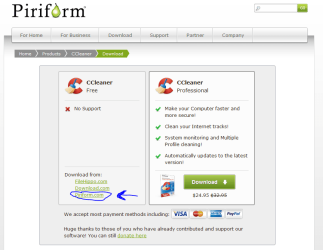
Here's a nice snip of the Piriform D/L page.

CCleaner DL.JPG
 

My Computer

Computer type
PC/Desktop
Computer Manufacturer/Model Number
Home Built Desktop By DataTech
OS
Windows 7 Ultimate X64 SP1
CPU
Intel i5-2550K, Differing ~4.4-4.8GHz No built in GPU
Motherboard
ASUS P8Z68-V PRO/GEN3
Memory
16GB G.Skill Sniper 1866MHz @ 2133MHz 2x8GB
Graphics Card(s)
ASUS GTX650TIB-DC2OC-2GD5, (650TI Boost)
Sound Card
Onboard Realtek 5-1
Monitor(s) Displays
Samsung P2570HD
Screen Resolution
1920x1080
Hard Drives
Samsung 840 Pro 256GB SSD for OS, 500GB Seagate Constellation (Enterprise drive) for Data
PSU
Corsair HX650W
Case
Inwin Dragon Rider
Cooling
Hyper 212 EVO w/two Noctua fans, push-pull, @1300 RPM
Keyboard
E-Z Eyes, bright yellow keys with large characters
Mouse
steelseries SENSEI Laser Pro Gaming
Internet Speed
48-51Mbs Mbs down, 11 Mbs up Xfinity Cable
Antivirus
Norton Internet Security 2013
Browser
IE 10, Opera, Pale Moon if needed
Other Info
4 case fans, LG BluRay-RE, ASUS DVD-RW, Mr. Fusion power supply, 1.21 gigawatts.
Andrew I know loads of folks use the reg cleaners that usually turn the OS into a nightmare and end up in threads to be sorted out.
So I as well as the tip on backing up the registry - which I always do straight after an install and things have settled down - found this way to reinstall the reg items that have been fixed is this as described by piriform CCleaner - How do I restore registry backups? as rule I usually keep the last four or five reg back ups.

I have never had to use it but have tested it on the test machine I have with no probs. I think it is worth adding this to the tutorial for the folks who are going to use the registry fix feature come what may.
I'd suggest you also have an acceptable system image as well in case things go wrong.
I've had problems restoring the registry backup following the recommended guidelines. It's probably something I'm doing wrong but the error from memory is along the lines of "cannot access registry" even from the main administrator account. I'm storing the registry backups on a separate internal HDD.
 

My Computer

Computer type
PC/Desktop
Computer Manufacturer/Model Number
Own build
OS
Windows 7x64 Home Premium SP1
CPU
Intel i7 2600k
Motherboard
ASUS P8Z68 Deluxe
Memory
G.Skill Ripjaws (DDR3-1600) 2x4GB
Graphics Card(s)
Nvidia GeForce GTS 450; Intel HD Graphics 3000(GT2+)
Monitor(s) Displays
Dell Ultrasharp IPS panel U2311H, Samsung SyncMaster P2350
Screen Resolution
1920x1080
Hard Drives
Samsung 850 Pro SSD 256GB, Samsung SSD 840 120GB, Seagates 1TB Barracuda ST31000528AS x2
PSU
Seasonic M12II 520W
Case
Lian Li Lancool PC-K60
Cooling
Case: 1x120mm, 3x140mm CPU: Hyper 212+
Keyboard
Logitech MK520 (wireless)
Mouse
Logitech MK520
Internet Speed
6-7 Mbps
Antivirus
Norton Security Premium, Malwarebytes on 2 (MSE on 3rd PC)
Browser
FireFox
Other Info
Audio: Logitech Z523 2.1
Thank you Britton30. Edited and added.

@mjf

Agreed.
 

My Computer

Computer type
PC/Desktop
Computer Manufacturer/Model Number
Custom Built
OS
Windows 10 Pro
CPU
AMD Ryzen 5 2400G Processor with Radeon RX Vega 11 Graphics
Motherboard
ASRock X470 Master SLI/AC AM4 AMD Promontory X470 SATA 6Gb/s
Memory
G.SKILL Ripjaws V Series 16GB (2 x 8GB) 288-Pin DDR4 SDRAM D
Graphics Card(s)
2047MB NVIDIA GeForce GTX 1060 6GB (EVGA)
Sound Card
Motherboard Built in
Monitor(s) Displays
Acer R240HY bidx 23.8-Inch IPS HDMI DVI VGA (1920 x 1080) Wi
Screen Resolution
1920 x 1080
Hard Drives
1TB Sandisk SSD PLUS (Main drive)
500 GB Seagate 7200 RPM (Games)
500 GB Western Digital 7200 RPM (Virtual Machines)
PSU
CORSAIR TX Series TX650M 650W 80+ Gold Modular Power Supply
Case
CORSAIR CARBIDE SPEC-02 Mid-Tower Gaming Case, Red LED Fan
Cooling
220mm, two 120mm, and four 60mm fans
Keyboard
Wired Dell keyboard
Mouse
Wireless Logitech mouse
Internet Speed
250mb down, 30mb up
Antivirus
Panda Cloud Antivirus
Browser
Chrome-ish x64
Other Info
Your awesome for reading this.
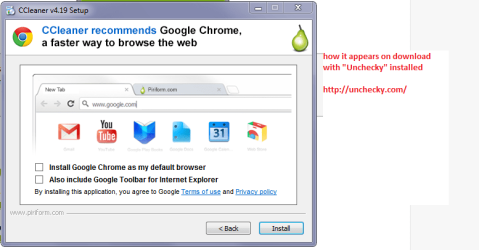
Maybe and only if you like I use Unchecky Unchecky - Keeps your checkboxes clear to avoid the downloading of the
"extras" perhaps a mention of it would help.
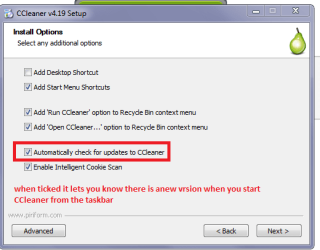
I also set it up with the update reminder ticked. I am only making these suggestions as it is your tutorial:cool:
 

Attachments

  • CC.PNG
    CC.PNG
    11.4 KB · Views: 395
  • CC2.PNG
    CC2.PNG
    24.2 KB · Views: 276

My Computer

Computer type
PC/Desktop
Computer Manufacturer/Model Number
Own build (new) Desk1 / Asus ROG Win 7 / Desk2 1st build
OS
Desk1 7 Home Prem / Desk2 10 Pro / Main lap Asus ROG 10 Pro 2 laptop Toshiba 7 Pro Asus P2520 7 & 10
CPU
Desk1 i5 3750K / Laptop i7 GTX 860M / Desk2 i5 2500
Motherboard
Desk1 Asus P877-V / Desk2 Gigabyte H67 UD3H / Laptop ?
Memory
Desk1 8GB (1866) / Desk2 16GB (1333) / Laptop 8Gb DDR3
Graphics Card(s)
Desk 1& 2NVidia GTX 650 & Laptops on board Intel
Sound Card
Desk 1 & 2 -XONAR DG Realtek High Def audio Laptop
Monitor(s) Displays
Desk 1 Benq HD 2450 / Desk2 Philips 24" / Laptop 17.5"
Screen Resolution
1920x1080 D1 & D2 & Laptop 1
Hard Drives
Desk1 Samsung 120GB 830 SSD
Asus ROG 256GB 850 Pro SSD
Desk2 Samsung 840 256 SSD
Toshiba 120GB EVO
PSU
Desk 1 Corsair HX 1050/ Laptop ? / Desk 2 Corsair HX 650
Case
Desk 1 Cooler HAF XM ? Toshiba laptop / Desk2 Coolermaster
Cooling
Fans on all Desk1 -2 Desk2 - all Coolermasters 5 Laptop ?
Keyboard
Desk 1 MS Sidewinder X6 Desk 2 MS Sidewinder X 4
Mouse
Desk 1&2 - Gigabyte MS 900 gamer - laptop - Logitec wireless
Internet Speed
ADSL2+
Other Info
One other Desktop (tester) and spare Toshba laptop both with SSD's
Running Kaspersky 2016 ISS on all machines config'd identically
Logitec audio stereo systems on each machine (x3)
Canon MG5250MFC
Router/modem TP-Link running WPA2SK
I use unchecky as well. Most people would not have it though, so that is why I include that.
 

My Computer

Computer type
PC/Desktop
Computer Manufacturer/Model Number
Custom Built
OS
Windows 10 Pro
CPU
AMD Ryzen 5 2400G Processor with Radeon RX Vega 11 Graphics
Motherboard
ASRock X470 Master SLI/AC AM4 AMD Promontory X470 SATA 6Gb/s
Memory
G.SKILL Ripjaws V Series 16GB (2 x 8GB) 288-Pin DDR4 SDRAM D
Graphics Card(s)
2047MB NVIDIA GeForce GTX 1060 6GB (EVGA)
Sound Card
Motherboard Built in
Monitor(s) Displays
Acer R240HY bidx 23.8-Inch IPS HDMI DVI VGA (1920 x 1080) Wi
Screen Resolution
1920 x 1080
Hard Drives
1TB Sandisk SSD PLUS (Main drive)
500 GB Seagate 7200 RPM (Games)
500 GB Western Digital 7200 RPM (Virtual Machines)
PSU
CORSAIR TX Series TX650M 650W 80+ Gold Modular Power Supply
Case
CORSAIR CARBIDE SPEC-02 Mid-Tower Gaming Case, Red LED Fan
Cooling
220mm, two 120mm, and four 60mm fans
Keyboard
Wired Dell keyboard
Mouse
Wireless Logitech mouse
Internet Speed
250mb down, 30mb up
Antivirus
Panda Cloud Antivirus
Browser
Chrome-ish x64
Other Info
Your awesome for reading this.
I use unchecky as well. Most people would not have it though, so that is why I include that.

Sorry hadn't noticed it in the tutorial :o and just saw mention of it in the replies. The other bit I added I find the best feature though because it flicks up any new update when I start CCleaner.
 

My Computer

Computer type
PC/Desktop
Computer Manufacturer/Model Number
Own build (new) Desk1 / Asus ROG Win 7 / Desk2 1st build
OS
Desk1 7 Home Prem / Desk2 10 Pro / Main lap Asus ROG 10 Pro 2 laptop Toshiba 7 Pro Asus P2520 7 & 10
CPU
Desk1 i5 3750K / Laptop i7 GTX 860M / Desk2 i5 2500
Motherboard
Desk1 Asus P877-V / Desk2 Gigabyte H67 UD3H / Laptop ?
Memory
Desk1 8GB (1866) / Desk2 16GB (1333) / Laptop 8Gb DDR3
Graphics Card(s)
Desk 1& 2NVidia GTX 650 & Laptops on board Intel
Sound Card
Desk 1 & 2 -XONAR DG Realtek High Def audio Laptop
Monitor(s) Displays
Desk 1 Benq HD 2450 / Desk2 Philips 24" / Laptop 17.5"
Screen Resolution
1920x1080 D1 & D2 & Laptop 1
Hard Drives
Desk1 Samsung 120GB 830 SSD
Asus ROG 256GB 850 Pro SSD
Desk2 Samsung 840 256 SSD
Toshiba 120GB EVO
PSU
Desk 1 Corsair HX 1050/ Laptop ? / Desk 2 Corsair HX 650
Case
Desk 1 Cooler HAF XM ? Toshiba laptop / Desk2 Coolermaster
Cooling
Fans on all Desk1 -2 Desk2 - all Coolermasters 5 Laptop ?
Keyboard
Desk 1 MS Sidewinder X6 Desk 2 MS Sidewinder X 4
Mouse
Desk 1&2 - Gigabyte MS 900 gamer - laptop - Logitec wireless
Internet Speed
ADSL2+
Other Info
One other Desktop (tester) and spare Toshba laptop both with SSD's
Running Kaspersky 2016 ISS on all machines config'd identically
Logitec audio stereo systems on each machine (x3)
Canon MG5250MFC
Router/modem TP-Link running WPA2SK
Unchecky:
- a little risky in that some sneakware (by other programs) use double negative options.
- ie, check to not install extras

CCleaner:-
- I use portable version of CCleaner dedicated to the one PC to minimise registry entries
- I do not use the portable version between machines
- portable version saves white lists to CCleaner.ini (file)
Why ?
- CCleaner update notifications link to the PRO version, for the unwary you can end up with a trial version.
- simplest way to update CCleaner portable is to replace the extracted ZIP contents, new for old ...
How:
- close portable CCleaner located on your PC
- copy save the old ccleaner.ini file to a safe location ... A MUST ... !
- extract the new downloaded version of CCleaner to a safe location
- copy all new/update files to the old location (or delete all old files in your old CCleaner folder first)
- then replace the new ccleaner.ini with the old ccleaner.ini file you saved above
- without changing the old folder name your shortcuts to CCleaner. exe will still work
TIP:
I name all program folders that hold portable programs with a trailing "_p"
eg. "CCleaner_p" ... makes it easy to identify portables from installed programs/apps
- or a dedicated folder for portable programs/apps eg, C:\ProgramsPortable
 

My Computer

Computer type
PC/Desktop
Computer Manufacturer/Model Number
Toshiba, Lenovo (laptops) + 4 rigs
OS
XP Pro (x86) | 7 HP (x86) & (x64) | 7 Pro (x64)
Yes mate I have been using Unchecky for some time now saves an awful lot of missed tick boxes eh?
 

My Computer

Computer type
PC/Desktop
Computer Manufacturer/Model Number
Own build (new) Desk1 / Asus ROG Win 7 / Desk2 1st build
OS
Desk1 7 Home Prem / Desk2 10 Pro / Main lap Asus ROG 10 Pro 2 laptop Toshiba 7 Pro Asus P2520 7 & 10
CPU
Desk1 i5 3750K / Laptop i7 GTX 860M / Desk2 i5 2500
Motherboard
Desk1 Asus P877-V / Desk2 Gigabyte H67 UD3H / Laptop ?
Memory
Desk1 8GB (1866) / Desk2 16GB (1333) / Laptop 8Gb DDR3
Graphics Card(s)
Desk 1& 2NVidia GTX 650 & Laptops on board Intel
Sound Card
Desk 1 & 2 -XONAR DG Realtek High Def audio Laptop
Monitor(s) Displays
Desk 1 Benq HD 2450 / Desk2 Philips 24" / Laptop 17.5"
Screen Resolution
1920x1080 D1 & D2 & Laptop 1
Hard Drives
Desk1 Samsung 120GB 830 SSD
Asus ROG 256GB 850 Pro SSD
Desk2 Samsung 840 256 SSD
Toshiba 120GB EVO
PSU
Desk 1 Corsair HX 1050/ Laptop ? / Desk 2 Corsair HX 650
Case
Desk 1 Cooler HAF XM ? Toshiba laptop / Desk2 Coolermaster
Cooling
Fans on all Desk1 -2 Desk2 - all Coolermasters 5 Laptop ?
Keyboard
Desk 1 MS Sidewinder X6 Desk 2 MS Sidewinder X 4
Mouse
Desk 1&2 - Gigabyte MS 900 gamer - laptop - Logitec wireless
Internet Speed
ADSL2+
Other Info
One other Desktop (tester) and spare Toshba laptop both with SSD's
Running Kaspersky 2016 ISS on all machines config'd identically
Logitec audio stereo systems on each machine (x3)
Canon MG5250MFC
Router/modem TP-Link running WPA2SK
@ ICIT2LOL

Hi John, :)
How does Unchecky identify double negative (trick) options ?
- I never assume that checkboxes "unchecked" means ... "do not install extras"
- some installs also use option buttons (and not checkboxes) , how does Unchecky handle option buttons ?

It is about 2 years (more or less) since I trialed Unchecky.
- at the time it was not very reliable. I got caught with "Open Candy" thru a double negative option. :cry:
 

My Computer

Computer type
PC/Desktop
Computer Manufacturer/Model Number
Toshiba, Lenovo (laptops) + 4 rigs
OS
XP Pro (x86) | 7 HP (x86) & (x64) | 7 Pro (x64)
Well I must admit I have been caught a couple of times by things that are missed by Unchecky and I am not really up on how it picks out the check boxed sites either.

I like it for when I am installing and you have to get Adobe stuff for example on as it always has those wretched add ons I think it is for Goolge toolbar or some such.

The stuff I really am peed off with are the sites you go to download the gear and click on what you think is the site but is some wretched PC Tune site and the download site you are wanting is stuck way down below and tiny compared to the Reg cleaner or whatever.

I am also not a great lover of zipped stuff either I know it decreases the download but heck getting some of the stuff you want out them is a nightmare - to me anyway.
 

My Computer

Computer type
PC/Desktop
Computer Manufacturer/Model Number
Own build (new) Desk1 / Asus ROG Win 7 / Desk2 1st build
OS
Desk1 7 Home Prem / Desk2 10 Pro / Main lap Asus ROG 10 Pro 2 laptop Toshiba 7 Pro Asus P2520 7 & 10
CPU
Desk1 i5 3750K / Laptop i7 GTX 860M / Desk2 i5 2500
Motherboard
Desk1 Asus P877-V / Desk2 Gigabyte H67 UD3H / Laptop ?
Memory
Desk1 8GB (1866) / Desk2 16GB (1333) / Laptop 8Gb DDR3
Graphics Card(s)
Desk 1& 2NVidia GTX 650 & Laptops on board Intel
Sound Card
Desk 1 & 2 -XONAR DG Realtek High Def audio Laptop
Monitor(s) Displays
Desk 1 Benq HD 2450 / Desk2 Philips 24" / Laptop 17.5"
Screen Resolution
1920x1080 D1 & D2 & Laptop 1
Hard Drives
Desk1 Samsung 120GB 830 SSD
Asus ROG 256GB 850 Pro SSD
Desk2 Samsung 840 256 SSD
Toshiba 120GB EVO
PSU
Desk 1 Corsair HX 1050/ Laptop ? / Desk 2 Corsair HX 650
Case
Desk 1 Cooler HAF XM ? Toshiba laptop / Desk2 Coolermaster
Cooling
Fans on all Desk1 -2 Desk2 - all Coolermasters 5 Laptop ?
Keyboard
Desk 1 MS Sidewinder X6 Desk 2 MS Sidewinder X 4
Mouse
Desk 1&2 - Gigabyte MS 900 gamer - laptop - Logitec wireless
Internet Speed
ADSL2+
Other Info
One other Desktop (tester) and spare Toshba laptop both with SSD's
Running Kaspersky 2016 ISS on all machines config'd identically
Logitec audio stereo systems on each machine (x3)
Canon MG5250MFC
Router/modem TP-Link running WPA2SK
Ccleaner updates

I use unchecky as well. Most people would not have it though, so that is why I include that.

Sorry hadn't noticed it in the tutorial :o and just saw mention of it in the replies. The other bit I added I find the best feature though because it flicks up any new update when I start CCleaner.

In my opinion the best method of updating Ccleaner is to uncheck the auto update option and when an update becomes available (check manually for this) - wait a few days then visit this page:

CCleaner - Builds

Only download the Slim Build and ignore the others.

The Slim Build has no toolbars or add ons and is only made available a few days after each new release.

Edit: The Slim Build only appears on the page when it's available. It won't be displayed at all times.
 
Last edited:

My Computer

Computer type
Laptop
Computer Manufacturer/Model Number
ASUS
OS
Microsoft Windows 7 Home Premium 64-bit 7601 Multiprocessor Free Service Pack 1
CPU
AMD C-60 APU with Radeon(tm) HD Graphics
Motherboard
ASUSTeK COMPUTER INC. X501U
Memory
4.00 GB
Graphics Card(s)
AMD Radeon HD 6290 Graphics
Sound Card
(1) AMD High Definition Audio Device (2) Realtek High Defi
Screen Resolution
1366 x 768 x 32 bits (4294967296 colors) @ 60 Hz
Hard Drives
Hitachi HTS545050A7E380 SATA Disk Device
Antivirus
Comodo CIS & FW, SecureAplus App Whitelisting, Threatfire
Browser
Cyberfox 64bit, Opera 64bit, Airfox
Other Info
Spy-The-Spy, HitmanPro.Alert, Norton Connect Safe, MJRegWatcher, BitDefender TrafficLight, Voodoo Shield, Zemana AntiMalware
@ ICIT2LOL

Hi John, :)
How does Unchecky identify double negative (trick) options ?
- I never assume that checkboxes "unchecked" means ... "do not install extras"
- some installs also use option buttons (and not checkboxes) , how does Unchecky handle option buttons ?

It is about 2 years (more or less) since I trialed Unchecky.
- at the time it was not very reliable. I got caught with "Open Candy" thru a double negative option. :cry:

You do realize it is one guy working on it right?

It is better than nothing.

For what it does I think it does a great job. Could it be better? Sure. Anything can. He has to update each installer to work with it. I heard on his blog though he is working on identifying the more risky installers and blocking them entirely. It's free and donation supported.
 

My Computer

Computer type
PC/Desktop
Computer Manufacturer/Model Number
Custom Built
OS
Windows 10 Pro
CPU
AMD Ryzen 5 2400G Processor with Radeon RX Vega 11 Graphics
Motherboard
ASRock X470 Master SLI/AC AM4 AMD Promontory X470 SATA 6Gb/s
Memory
G.SKILL Ripjaws V Series 16GB (2 x 8GB) 288-Pin DDR4 SDRAM D
Graphics Card(s)
2047MB NVIDIA GeForce GTX 1060 6GB (EVGA)
Sound Card
Motherboard Built in
Monitor(s) Displays
Acer R240HY bidx 23.8-Inch IPS HDMI DVI VGA (1920 x 1080) Wi
Screen Resolution
1920 x 1080
Hard Drives
1TB Sandisk SSD PLUS (Main drive)
500 GB Seagate 7200 RPM (Games)
500 GB Western Digital 7200 RPM (Virtual Machines)
PSU
CORSAIR TX Series TX650M 650W 80+ Gold Modular Power Supply
Case
CORSAIR CARBIDE SPEC-02 Mid-Tower Gaming Case, Red LED Fan
Cooling
220mm, two 120mm, and four 60mm fans
Keyboard
Wired Dell keyboard
Mouse
Wireless Logitech mouse
Internet Speed
250mb down, 30mb up
Antivirus
Panda Cloud Antivirus
Browser
Chrome-ish x64
Other Info
Your awesome for reading this.
No I didn't Andrew thanks for the heads up and as you say it does a great job just that I like to keep half an eye out for the downloads one tries for that land on a link that is really not what one wants and there seem to be a lot of that on mirror sites which I try to avoid but it seems increasingly difficult to find direct downloads. ;)
 

My Computer

Computer type
PC/Desktop
Computer Manufacturer/Model Number
Own build (new) Desk1 / Asus ROG Win 7 / Desk2 1st build
OS
Desk1 7 Home Prem / Desk2 10 Pro / Main lap Asus ROG 10 Pro 2 laptop Toshiba 7 Pro Asus P2520 7 & 10
CPU
Desk1 i5 3750K / Laptop i7 GTX 860M / Desk2 i5 2500
Motherboard
Desk1 Asus P877-V / Desk2 Gigabyte H67 UD3H / Laptop ?
Memory
Desk1 8GB (1866) / Desk2 16GB (1333) / Laptop 8Gb DDR3
Graphics Card(s)
Desk 1& 2NVidia GTX 650 & Laptops on board Intel
Sound Card
Desk 1 & 2 -XONAR DG Realtek High Def audio Laptop
Monitor(s) Displays
Desk 1 Benq HD 2450 / Desk2 Philips 24" / Laptop 17.5"
Screen Resolution
1920x1080 D1 & D2 & Laptop 1
Hard Drives
Desk1 Samsung 120GB 830 SSD
Asus ROG 256GB 850 Pro SSD
Desk2 Samsung 840 256 SSD
Toshiba 120GB EVO
PSU
Desk 1 Corsair HX 1050/ Laptop ? / Desk 2 Corsair HX 650
Case
Desk 1 Cooler HAF XM ? Toshiba laptop / Desk2 Coolermaster
Cooling
Fans on all Desk1 -2 Desk2 - all Coolermasters 5 Laptop ?
Keyboard
Desk 1 MS Sidewinder X6 Desk 2 MS Sidewinder X 4
Mouse
Desk 1&2 - Gigabyte MS 900 gamer - laptop - Logitec wireless
Internet Speed
ADSL2+
Other Info
One other Desktop (tester) and spare Toshba laptop both with SSD's
Running Kaspersky 2016 ISS on all machines config'd identically
Logitec audio stereo systems on each machine (x3)
Canon MG5250MFC
Router/modem TP-Link running WPA2SK
Ok I have a almost full drive on my main desktop and done most of those features except the File Finder one - I am just wondering though it free space wipe might clean some bits and pieces??
 

My Computer

Computer type
PC/Desktop
Computer Manufacturer/Model Number
Own build (new) Desk1 / Asus ROG Win 7 / Desk2 1st build
OS
Desk1 7 Home Prem / Desk2 10 Pro / Main lap Asus ROG 10 Pro 2 laptop Toshiba 7 Pro Asus P2520 7 & 10
CPU
Desk1 i5 3750K / Laptop i7 GTX 860M / Desk2 i5 2500
Motherboard
Desk1 Asus P877-V / Desk2 Gigabyte H67 UD3H / Laptop ?
Memory
Desk1 8GB (1866) / Desk2 16GB (1333) / Laptop 8Gb DDR3
Graphics Card(s)
Desk 1& 2NVidia GTX 650 & Laptops on board Intel
Sound Card
Desk 1 & 2 -XONAR DG Realtek High Def audio Laptop
Monitor(s) Displays
Desk 1 Benq HD 2450 / Desk2 Philips 24" / Laptop 17.5"
Screen Resolution
1920x1080 D1 & D2 & Laptop 1
Hard Drives
Desk1 Samsung 120GB 830 SSD
Asus ROG 256GB 850 Pro SSD
Desk2 Samsung 840 256 SSD
Toshiba 120GB EVO
PSU
Desk 1 Corsair HX 1050/ Laptop ? / Desk 2 Corsair HX 650
Case
Desk 1 Cooler HAF XM ? Toshiba laptop / Desk2 Coolermaster
Cooling
Fans on all Desk1 -2 Desk2 - all Coolermasters 5 Laptop ?
Keyboard
Desk 1 MS Sidewinder X6 Desk 2 MS Sidewinder X 4
Mouse
Desk 1&2 - Gigabyte MS 900 gamer - laptop - Logitec wireless
Internet Speed
ADSL2+
Other Info
One other Desktop (tester) and spare Toshba laptop both with SSD's
Running Kaspersky 2016 ISS on all machines config'd identically
Logitec audio stereo systems on each machine (x3)
Canon MG5250MFC
Router/modem TP-Link running WPA2SK
Back
Top