
CCleaner odd Issues -- Ahhhh!!!

DarkDavil

Avatar thanks to BFK :D
Power User
Local time
3:21 PM
Messages
432
Location
Illinois...India?
Check out ALL of these registry issues --> Can i delete all of them?
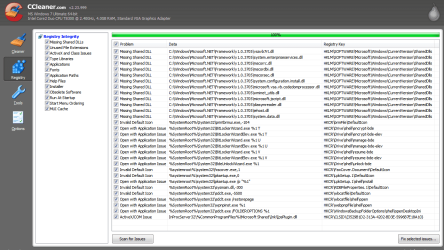
Capture.PNG


RAWR!

Thanks ;)

EDIT: Those are the missing keys on a CLEAN Iinstall -- o.O
 
Last edited:

My Computer

Computer Manufacturer/Model Number
HP dv6000t CTO Entertainment Lappy |My Desktop @ Bottom
OS
7 x64/ Back-Track 4
CPU
Intel Core 2 Duo CPU 8300@ 2.4 Ghz
Motherboard
HP's Own
Memory
4096 MB DDR2
Graphics Card(s)
Nvidia 8400M GS
Sound Card
Altec Lansing (The usual on Laptops )
Monitor(s) Displays
Laptop Screen. 17' Wide.
Screen Resolution
1280 x 800
Hard Drives
150 GB HDD.
Cooling
2 External Fans, Undervolted, Coolant
Keyboard
Norm. Cheap Random Keyboard
Mouse
Norm. Cheap Random Mouse
Other Info
This is my Homemade Desktop :)
HDD: Western Digital Caviar Blue 320GB 16MB 7200RPM SATA2
And more to come in a bit! :D
Before deleting hit yes to backup the registry. If anything will go bad after that you can restore them.
I never had problems deleting registry with CCleaner.
 

My Computer

Computer Manufacturer/Model Number
MasterB/Custom
OS
Windows 7 Professional x64
CPU
QuadCore AMD Phenom II X4 Black Edition 955 3.2 GHz
Motherboard
Asus M4A785TD-V Evo
Memory
8 GB Crucial DDR3
Graphics Card(s)
SAPPHIRE Radeon HD 4890 1GB HDMI New Edition
Sound Card
VIA VT1708S HD Audio 7.1 onboard/ ATI HDMI video card
Monitor(s) Displays
Acer H233H 23'' LCD HDMI
Screen Resolution
1920x1080
Hard Drives
1x 500GB and 1x 1TB 7200RPM 32MB Cache WD Caviar Black
PSU
CORSAIR CMPSU-620HX 620W
Case
COOLER MASTER Storm Scout SGC-2000
Cooling
2x 140mm and 1x 120mm case fans, Stock CPU fan
Keyboard
Logitech MX 3200
Mouse
Logitech MX 3200
Internet Speed
15 Mbps
Other Info
My first build!
yea everything is safe to delete
 

My Computer

OS
Windows 7 32bit RTM
No disrespect intended...

Because you have to ask the question, the answer must be - Do not use a registry cleaner. You are only asking for trouble.

I will provide an alternative response - No, they are not safe to delete. And no, I did not even look at them.
 
I can tell you about the bitlocker entries, if you delete those listed, it will erase the turn on bitlocker context menu entry when you right click on a storage device. Not that you might ever use it, but still..

bitlocker.JPG
 

My Computer

Computer type
PC/Desktop
Computer Manufacturer/Model Number
Airbot 2.0
OS
Windows 7 Ultimate x64 SP1
CPU
Core i7 920 (D0) @ 4Ghz, *26c idle *65c full load on air
Motherboard
Asus P6X58D Premium - Sata 6Gb/s - USB 3.0
Memory
12GB DDR3 Corsair Dominator -CMD12GX3M6A1600C8 at 1600MHz
Graphics Card(s)
Zotac Geforce GTX 770
Sound Card
ASUS Xonar D2X
Monitor(s) Displays
1 LG 24" Flatron W2453V-PF 1 Samsung 24" P2450H both 2ms RT
Screen Resolution
1920x1080@60hz
Hard Drives
1 Samsung 250GB 840 Evo SSD
1 OCZ Vertex2 180GB SSD
1 TB Samsung Spinpoint F1 7200RPM 32MB cache
2 500GB WD Caviar Blacks 7200RPM 32MB cache (WD5001AALS)

Pioneer DVD Burner DVR-S18M
PSU
Corsair HX1000W
Case
Cooler Master HAF 932
Cooling
Case Fans *3 230mm, *1 140mm/CPU - *Tuniq Tower 120 Extreme
Keyboard
Logitech Wireless MK700
Mouse
Logitech Wireless MK700
Internet Speed
DL 15 Mbps UL 0.98 Mbps
Antivirus
None
Browser
Firefox Nightly
Other Info
Processor-7.7 *RAM- 7.9 *Graphics-7.9 *Gaming Graphics- 7.9 *SSD- 7.8 W.E.I final score= 7.7
*Phone- LG Nexus 5
No disrespect intended...

Because you have to ask the question, the answer must be - Do not use a registry cleaner. You are only asking for trouble.

I will provide an alternative response - No, they are not safe to delete. And no, I did not even look at them.

What Antman said.

If your aim is to damage the OS installation, there are easier ways of doing it than running "registry cleaners".
 

My Computer

Computer Manufacturer/Model Number
Multiple machines in various stages of decomposition.
OS
Win7x64
I can tell you about the bitlocker entries, if you delete those listed, it will erase the turn on bitlocker context menu entry when you right click on a storage device. Not that you might ever use it, but still..

View attachment 29520

nope deleted mine(way back) I still have the context menu and everthing is fine o.o!

*no offense to people who think registry cleaners sucks lol*

for me CCleaner is awesome ;D
but Im still waiting for tuneup utilities 2010 now ;D... I just got news letter about it today =D!
 

My Computer

OS
Windows 7 32bit RTM
Also untick unused extensions, its best to leave extensions alone.
 

My Computer

Computer Manufacturer/Model Number
self built
OS
Windows 7 Professional 64-bit
CPU
Intel E8400 3GHz
Motherboard
Intel DX48BT2
Memory
Kingston PC3-10700H 4Gb
Graphics Card(s)
XFX Radeon HD 5850 BlackEd.
Sound Card
Asus Xonar DG
Monitor(s) Displays
2x Samsung SM-T220HD 22"
Screen Resolution
1680x1050 on two monitors
Hard Drives
OCZ Vertex 2 120gb 3.5" (OS)
Seagate Momentus XT 500gb
Samsung F3 1Tb (games)
2x Samsung F1 1Tb
PSU
Thermaltake ToughPower 850w
Case
Thermaltake Armor
Cooling
Scythe Mugen II
Keyboard
Microsoft Comfort Curve USB
Mouse
Razer Diamondback 3G
Internet Speed
8128/443
Lol - Okay I'll leave those un-used extensions alone

@Antman -- Reg. Cleaners have been EXTREMLY helpful to me... Im a guy who is constantly installing/uninstalling things off of my W7 lappy.

But anyway, Thanks for response, Rep for all ^^
 
Last edited:

My Computer

Computer Manufacturer/Model Number
HP dv6000t CTO Entertainment Lappy |My Desktop @ Bottom
OS
7 x64/ Back-Track 4
CPU
Intel Core 2 Duo CPU 8300@ 2.4 Ghz
Motherboard
HP's Own
Memory
4096 MB DDR2
Graphics Card(s)
Nvidia 8400M GS
Sound Card
Altec Lansing (The usual on Laptops )
Monitor(s) Displays
Laptop Screen. 17' Wide.
Screen Resolution
1280 x 800
Hard Drives
150 GB HDD.
Cooling
2 External Fans, Undervolted, Coolant
Keyboard
Norm. Cheap Random Keyboard
Mouse
Norm. Cheap Random Mouse
Other Info
This is my Homemade Desktop :)
HDD: Western Digital Caviar Blue 320GB 16MB 7200RPM SATA2
And more to come in a bit! :D
As far as it goes, I just pop open the registry after uninstalling a program and look for anything that mentions said program and delete it. Much safer that way.
 

My Computer

Computer Manufacturer/Model Number
Zen Productions
OS
Windows 7 Ultimate x64
CPU
Intel i7-860
Motherboard
Gigabyte GA-P55A-UD4P
Memory
Corsair Dominator 1600Mhz, 8-8-8-24 1.65v 2x2GB
Graphics Card(s)
ATI Radeon 5770 HD
Sound Card
Intel High Definition Sound
Monitor(s) Displays
Samsung P2570HD
Screen Resolution
1920x1080
Hard Drives
Western Digital Caviar Black 500gb
PSU
Corsair CMPSU-750HX 750W
Case
Antec p183
Cooling
Corsair H50 Water Cooler
Keyboard
Logitech G110
Mouse
Logitech MX Revolution
Internet Speed
768 mb/s
As far as it goes, I just pop open the registry after uninstalling a program and look for anything that mentions said program and delete it. Much safer that way.
True - I'll probably stick to doin it that way from now on too :)
 

My Computer

Computer Manufacturer/Model Number
HP dv6000t CTO Entertainment Lappy |My Desktop @ Bottom
OS
7 x64/ Back-Track 4
CPU
Intel Core 2 Duo CPU 8300@ 2.4 Ghz
Motherboard
HP's Own
Memory
4096 MB DDR2
Graphics Card(s)
Nvidia 8400M GS
Sound Card
Altec Lansing (The usual on Laptops )
Monitor(s) Displays
Laptop Screen. 17' Wide.
Screen Resolution
1280 x 800
Hard Drives
150 GB HDD.
Cooling
2 External Fans, Undervolted, Coolant
Keyboard
Norm. Cheap Random Keyboard
Mouse
Norm. Cheap Random Mouse
Other Info
This is my Homemade Desktop :)
HDD: Western Digital Caviar Blue 320GB 16MB 7200RPM SATA2
And more to come in a bit! :D
Slightly OT but be sure to update CCleaner to the latest version (2.24). Oh, and update your graphics drivers. :)
 

My Computer

Computer Manufacturer/Model Number
Self Assembled
OS
Win7 RTM, XP Pro, Arch Linux, Puppy (Quad boot)
CPU
Core i7 920 (OCed @ 3.8Ghz)
Motherboard
ASUS P6T Dlx
Memory
OCZ Gold 6GB DDR3-1600
Graphics Card(s)
Sapphire Radeon HD 5870 1GB (OCed @ 935/1300)
Sound Card
On-board
Monitor(s) Displays
Samsung 24"
Hard Drives
WD Caviar Black 1TB, WD Velociraptor 300GB, Maxtor 250GB
PSU
Corsair HX620W
Case
Antec 1200
Cooling
Noctua U12P
There's nothing wrong with using CCleaner to remove junk left behind from removed software. I've been using it extensively for three years now, and have even used it on my company systems that I roll out to aid in clean up, removing of malware, and assiting in removing old versions of Office, to make way for new versions, etc. Not once have I had any issues with it removing something useful, and if you are worried about it, you can always restore your backup. No MSCE needed. CCleaner has other useful parts as well, such as the tool to disable start up items as well. It's a great program, and one of the first things I install on all of my systems.
As far as it goes, I just pop open the registry after uninstalling a program and look for anything that mentions said program and delete it. Much safer that way.
That would be great, if all programs clearly labeled and named all of their registry entries. There's no harm in using a reputable reg cleaner. The days of fearing those apps are in the past, again, assuming you use a known good one.
 

My Computer

OS
Windows 7 Ultimate x64 SP1
CPU
Intel Core i7-2600
Motherboard
Gigabyte GA-P67A-UD3P-B3
Memory
12 GB Patriot Extreme DDR3-1333
Graphics Card(s)
Nvidia GTX 470
Monitor(s) Displays
Dell UltraSharp 2209WA
Hard Drives
OCZ Agility3 240 GB, WD5001AALS, WD7501AALS
PSU
OCZ ModStream 700W
Case
CoolerMaster HAF 912 Advanced
Cooling
CoolerMaster Hyper 212 Plus
recently i formatted my system due to bad effects of c cleaner
 

My Computer

Computer Manufacturer/Model Number
dell vostro 1510
OS
windows 7
Been using CCleaner for more then a year, using all its features and i never had any kind of problem, in fact it fixed my problems and keeping my OS fast and clean. :D
 

My Computer

Computer Manufacturer/Model Number
MSI
OS
Windows 7 Ultimate x86 SV-SE
CPU
Intel Core 2 Duo E6550
Motherboard
MSI P35 Neo
Memory
4x 1GB Corsair
Graphics Card(s)
XFX Radeon 4770
Sound Card
Realtek
Monitor(s) Displays
Fujitsu Siemens 24 HD
Screen Resolution
1920x1280
Hard Drives
2x 500gb Seagate Barracuda
PSU
350w ****
Case
Cheap ****
Cooling
dont have any special
Keyboard
Logitech G11
Mouse
Logitech MX518
Internet Speed
24/1
Other Info
Well, it works! d;
Just wanted to mention that I've been using CCleaner for years and not once have I had issues with the registry cleaning. I will say though, that the registry cleaner in CCleaner is probably a bit conservative. (Especially for Vista and 7)
 

My Computer

Computer Manufacturer/Model Number
Custom
OS
Windows 7 Ultimate x64 RTM
CPU
Core 2 Duo E8500 @ 3.92 GHz
Motherboard
EVGA 790i FTW
Memory
8GB G.Skill DDR3 1600
Graphics Card(s)
EVGA Nvidia 260 GTX
Monitor(s) Displays
2 x 24" Dell S2409W
Screen Resolution
1920 x 1080
Hard Drives
Seagate 802.11 1.5TB
PSU
Thermaltake Toughpower 800 Watt
Case
Raidmax Smilodon
Cooling
Passive
Keyboard
Logitech BT MX5500
Internet Speed
22Mbps/1.5Mbps
I've used CCleaner for years also, on XP systems. Before the recent update I have heard that there were some problems, but I didn't use it before updating it, and have seen no problems.

FWIW, IObit 360 IObit Security 360 | Free Anti-malware | Free Download has a similar feature in it under Tools > Privacy Sweeper.
 

My Computer

Computer Manufacturer/Model Number
Gateway, Toshiba Laptop, and Home Brew
OS
Windows 7 x64 HP, Windows 7 HP, Windows 7 Ult
CPU
Intel I3, Cerelon, Pentium 4 @ 3Ghz
Motherboard
Intel, Intel, Asus
Memory
8G, 3G, 3G
Graphics Card(s)
On-board Intel, On-board nVidia, nVIDIA card
Sound Card
on-board, on-board, SoundBlaster
Monitor(s) Displays
Hannspree HF237, Toshiba, SyncMaster 931B
Screen Resolution
default (all)
Hard Drives
1T internal, 320G internal, 160G internal, 1T networked
PSU
300w, unk, 650w
Case
black, black, grey
Cooling
air (all)
Keyboard
standard wired (all)
Mouse
standard wired (all)
Internet Speed
6M down, 768K up
Other Info
Home LAN through Linksys hub to 4 port and wireless switch/router. Networked HP 2600n. Wife's computer running Windows 7, and spare laptop running Ubuntu "Karmic Kola" (9.10).
If you want freeware use CCleaner but you could have some troubles with it: bad support and options that missing as selective deleting and shred options.

If you want to give, I think $29.00 but to get really stable and custom software with the richest base of supported internet/browsers tracks, use Mil Shield.

Teerex, obviously do you have not the remotest idea about this free-month trial software.
 

My Computer

OS
Vista

My Computer

Computer Manufacturer/Model Number
Gateway/NV7923u & NV79C52u Laptops
OS
windows 7 professional & ultimate 64bit laptops
CPU
2.27 boost to 2.53 & 2.53 boost to 2.80
Motherboard
Mobile Intel® HM55 Express Chipset ???
Memory
4GB
Graphics Card(s)
Intel® Graphics Media Accelerator HD
Sound Card
realtek High-definition audio support
Monitor(s) Displays
17.3 " HD 1600 x 900
Hard Drives
hatachi Travelstar 5400 500GB & west digital 500GB
Internet Speed
35MB fios
Back
Top