CD command not working.

TobbenTM

New member
Local time
12:11 AM
Messages
29
Location
Norway
Hi all

Don't know wether it's me doing something wrong or if something has broke.
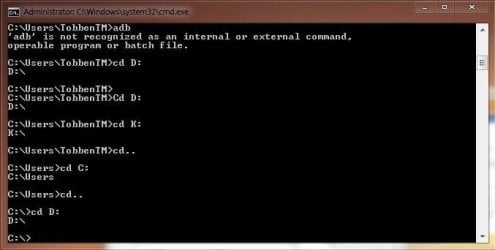
Whenever I want to navigate to another drive it won't actually change path.
I am able to navigate to another folder within the C: drive, for example C:\Windows, but not to other drives..
Included a picture.

Help.
 

Attachments
  • cmd.JPG
    cmd.JPG
    28.5 KB · Views: 359

My Computer

Computer Manufacturer/Model Number
Custom
OS
Windows 7 Ultimate 64bit
CPU
Intel i5 750
Motherboard
Gigabyte P55a-UD6
Memory
8GB (4x2GB) Corsair Dominator
Graphics Card(s)
ATI 5850
Sound Card
Intergrated in Motherboard
Monitor(s) Displays
BenQ HD2412D (x2)
Screen Resolution
1920x1080
Hard Drives
Samsung 320GB
Samsung 500GB
WD 1TB
Seagate 1TB
PSU
650W Chieftec
Case
Cooler Master Elite 310
Cooling
Noctua NH-U12P SE2
Keyboard
Fujitsu Siemens Wireless Keyboard
Mouse
Fujitsu Siemens Wireless Mouse
Internet Speed
10/10Mbits
Well from that snip, it appears you are indeed able to navigate to the other drives D: and K: , whats the problem?
 

My Computer

Computer Manufacturer/Model Number
Too many to describe...
OS
Windows 7 x64 pro/ Windows 7 x86 Pro/ XP SP3 x86
Yeah, it shows the drive, but then again it returns to C:\Users\TobbenTM .
Before I can do anything..

At least I thought it would show for example D:\ instead of C:\Users\TobbenTM all the time.
 

My Computer

Computer Manufacturer/Model Number
Custom
OS
Windows 7 Ultimate 64bit
CPU
Intel i5 750
Motherboard
Gigabyte P55a-UD6
Memory
8GB (4x2GB) Corsair Dominator
Graphics Card(s)
ATI 5850
Sound Card
Intergrated in Motherboard
Monitor(s) Displays
BenQ HD2412D (x2)
Screen Resolution
1920x1080
Hard Drives
Samsung 320GB
Samsung 500GB
WD 1TB
Seagate 1TB
PSU
650W Chieftec
Case
Cooler Master Elite 310
Cooling
Noctua NH-U12P SE2
Keyboard
Fujitsu Siemens Wireless Keyboard
Mouse
Fujitsu Siemens Wireless Mouse
Internet Speed
10/10Mbits
Can you post a snip of the disk management window? Click on Start button, type diskmgmt.msc then hit Enter. Use windows snipping tool to take a snip.
 

My Computer

Computer Manufacturer/Model Number
Too many to describe...
OS
Windows 7 x64 pro/ Windows 7 x86 Pro/ XP SP3 x86
proper syntax is CD C:\
untitled.PNG
 

My Computer

Computer Manufacturer/Model Number
SMN-Productions
OS
Windows 7 x86/x64, Server 2008r2, Web Server 2008
CPU
i7 v2 3930K Steping stone 2
Motherboard
ASUS Rampage IV Extreme
Memory
G.SKILL Ripjaws Z Series 32GB
Graphics Card(s)
AMD HD 5770
Monitor(s) Displays
Acer 21" and Samsung 20"
Hard Drives
Patriot Pyro 80GB
PSU
1000 Watt
Case
HAF-X
Cooling
4 Fans
Keyboard
Black Widow Ultimate
Well, found out the problem, figures it's me forgetting that you don't use cd to change drives, only folders.
 

My Computer

Computer Manufacturer/Model Number
Custom
OS
Windows 7 Ultimate 64bit
CPU
Intel i5 750
Motherboard
Gigabyte P55a-UD6
Memory
8GB (4x2GB) Corsair Dominator
Graphics Card(s)
ATI 5850
Sound Card
Intergrated in Motherboard
Monitor(s) Displays
BenQ HD2412D (x2)
Screen Resolution
1920x1080
Hard Drives
Samsung 320GB
Samsung 500GB
WD 1TB
Seagate 1TB
PSU
650W Chieftec
Case
Cooler Master Elite 310
Cooling
Noctua NH-U12P SE2
Keyboard
Fujitsu Siemens Wireless Keyboard
Mouse
Fujitsu Siemens Wireless Mouse
Internet Speed
10/10Mbits
Oh hang on, you're using the wrong syntax. If you want to change drives just type the drive letter. To change to D:, just type D: .
 

My Computer

Computer Manufacturer/Model Number
Too many to describe...
OS
Windows 7 x64 pro/ Windows 7 x86 Pro/ XP SP3 x86
Yeah, what i said. :D
Stupid me..
 

My Computer

Computer Manufacturer/Model Number
Custom
OS
Windows 7 Ultimate 64bit
CPU
Intel i5 750
Motherboard
Gigabyte P55a-UD6
Memory
8GB (4x2GB) Corsair Dominator
Graphics Card(s)
ATI 5850
Sound Card
Intergrated in Motherboard
Monitor(s) Displays
BenQ HD2412D (x2)
Screen Resolution
1920x1080
Hard Drives
Samsung 320GB
Samsung 500GB
WD 1TB
Seagate 1TB
PSU
650W Chieftec
Case
Cooler Master Elite 310
Cooling
Noctua NH-U12P SE2
Keyboard
Fujitsu Siemens Wireless Keyboard
Mouse
Fujitsu Siemens Wireless Mouse
Internet Speed
10/10Mbits
At least I had the right syntax, wrong time to use it :P
 

My Computer

Computer Manufacturer/Model Number
SMN-Productions
OS
Windows 7 x86/x64, Server 2008r2, Web Server 2008
CPU
i7 v2 3930K Steping stone 2
Motherboard
ASUS Rampage IV Extreme
Memory
G.SKILL Ripjaws Z Series 32GB
Graphics Card(s)
AMD HD 5770
Monitor(s) Displays
Acer 21" and Samsung 20"
Hard Drives
Patriot Pyro 80GB
PSU
1000 Watt
Case
HAF-X
Cooling
4 Fans
Keyboard
Black Widow Ultimate
Adding the /D switch would have made the expected action happen
"CD /D X:\"
 

My Computer

Computer type
PC/Desktop
Computer Manufacturer/Model Number
Alienware Aurora ALX R4
OS
Windows 10 Pro (x64)
CPU
Intel Core i7-3930K (3.2GHz - 4.5GHz)
Motherboard
Alienware Aurora-R4 x79
Memory
4x Samsung 4GB PC3-12800 DDR3 (16GB 1600MHz)
Graphics Card(s)
Nvidia Geforce GTX 690
Sound Card
SteelSeries Siberia Elite
Monitor(s) Displays
Dell UltraSharp U3011
Screen Resolution
2560x1600
Hard Drives
Samsung 850 Pro 256 GB, Seagate 1TB Desktop Hybrid HDD, 2x Western Digital 4TB Green HDD
PSU
875W Some Dell PSU <.<
Case
Alienware Aurora ALX
Cooling
Custom Liquid Cooling (EK CPU & GPU blocks) dual EK 480RAD
Keyboard
Logitech G710+ Mechanical
Mouse
Logitech G700s
Internet Speed
Verizon Fios (50 mbps average)
Other Info
Server: Intel NUC D54250WYK: i5-4250U, 16GB, 256 GB mSATA, Windows Server 2012 R2
Ok, thanks anyways. :)
 

My Computer

Computer Manufacturer/Model Number
Custom
OS
Windows 7 Ultimate 64bit
CPU
Intel i5 750
Motherboard
Gigabyte P55a-UD6
Memory
8GB (4x2GB) Corsair Dominator
Graphics Card(s)
ATI 5850
Sound Card
Intergrated in Motherboard
Monitor(s) Displays
BenQ HD2412D (x2)
Screen Resolution
1920x1080
Hard Drives
Samsung 320GB
Samsung 500GB
WD 1TB
Seagate 1TB
PSU
650W Chieftec
Case
Cooler Master Elite 310
Cooling
Noctua NH-U12P SE2
Keyboard
Fujitsu Siemens Wireless Keyboard
Mouse
Fujitsu Siemens Wireless Mouse
Internet Speed
10/10Mbits
Back
Top