CD/DVD has stoped working. I do not know why or when.

Ceira

New member
Local time
5:41 PM
Messages
20
Hi,

Could somebody help me please with my CD/DVD drive as it stopped working for no reason? It rejects every CD/DVD.

It is on a Packard Bell all in one pc. It is running windows 7 home premium.

I attached a portable CD/DVD drive and it reads ok but it will not burn.


I inserted a CD and it says drag your file here to burn; and then it says insert cd to burn. Eh!


Somebody suggest reinstall windows 7, but that sound a bit drastic. I do not know when it stopped working so a restore is not an option.

Could somebody help?

Many thanks

Ceira
 

My Computer My Computer

OS
64
hi so you are saying the internal cd/dvd drive does not read any type of disk? it's possible the drive has just failed. but you could try the fixit here. </title> <link href="//az623152.vo.msecnd.net/cdnresources/1.51/content/smccss.css" rel="stylesheet" /> <link href="//az623152.vo.msecnd.net/cdnresources/1.51/common/css/default/fixit.css" rel="stylesheet" /> <link href="//az623152.vo.msecnd.net/cdnr
and for the external drive are you sure the drive is a burner not just a cd/dvd drive? whats the make and model number of the external drive?
 

My Computer My Computer

Computer type
PC/Desktop
Computer Manufacturer/Model Number
dell xps 9000
OS
win 10
Thanks Oscer1,

The external drive, (good question), does write to CD and DVD it has worked very reliably in the past.

I ran the program you suggested. It failed, regardless of what cd or dvd I tested the result was the same.

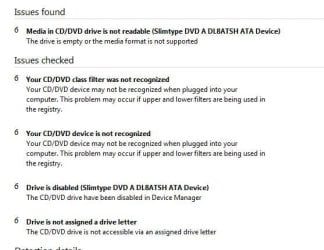
CD or DVD not recognised. I attach the error report in as an attachment. The computer is telling me that cds or Dvds are at fault. A month ago, I through out many cds and dvd believing this to be the case. I know now they are not.

I appreciate your help,
Thanks, Ceira.
 

Attachments

  • dvd.jpg
    dvd.jpg
    31.6 KB · Views: 15

My Computer My Computer

OS
64
Hi,

Sorry for being slow to reply, I am having problems logging in. Every time it asks me to change password.

Anyway, yes, I tried the device manager. It says drivers are up to date.
it is Slimtype DVD A DL*ATSH ATA Device if that means anything. No error chevron on anything obvious. No Yellow exclamation point on CD/DVD in Device Manager
I have tried the troubleshooter and the software still CD not recognised.

I am going to try a few things and report back. Hardware changes have not been Identified?

I have managed to reinstall drivers. That did not work either.

Thanks anyway, I will report back

Ceira
 

My Computer My Computer

OS
64
Have you tried Uninstal the drive in device manager and restart computer
 

My Computer My Computer

Computer type
PC/Desktop
Computer Manufacturer/Model Number
dell xps 9000
OS
win 10
Thanks for your help ocasr1.

I tried that as well. I deleted the drivers, restarted the PC and same old problem.

I have almost given up. I just to not want it to return it to factory in case that does not solve it. A bit extreme.

But thanks for staying with me.

Ceira
 

My Computer My Computer

OS
64
Are you able to boot with a Bootable disk like a windows disk
 

My Computer My Computer

Computer type
PC/Desktop
Computer Manufacturer/Model Number
dell xps 9000
OS
win 10
Back
Top