CD/DVD-ROM makes weird noises when opening certain programmes.

conhaqu3

New member
Member
Local time
8:41 PM
Messages
36
Hi,

I have an Asus laptop about 4 months-old and out of the sudden, the CD-Rom driver started to make a noise when I reboot, when windows loads into desktop and sometimes after about 3 minutes within windows loads completely. That's 3 noises everytime I reboot!

The BD-Rom driver also makes a noise the exact moment I open certain programmes such as windows disk desfragmentation or even when I open Counter-Strike.

The noise sounds exactly as if I inserted a disk in the driver, its not a weird sound or anything like that.

This is very strange which is why I would like to solve this and get your feedback as to why this noise started happening in the first place.


Rgrds,
conhaqu3
 
Last edited:

My Computer

OS
windows 7 home premium 64bit
Is there by chance a disk in the drive? A driver is a piece of software, I assume you mean motor.
 

My Computer

Computer type
PC/Desktop
Computer Manufacturer/Model Number
Home Built Desktop By DataTech
OS
Windows 7 Ultimate X64 SP1
CPU
Intel i5-2550K, Differing ~4.4-4.8GHz No built in GPU
Motherboard
ASUS P8Z68-V PRO/GEN3
Memory
16GB G.Skill Sniper 1866MHz @ 2133MHz 2x8GB
Graphics Card(s)
ASUS GTX650TIB-DC2OC-2GD5, (650TI Boost)
Sound Card
Onboard Realtek 5-1
Monitor(s) Displays
Samsung P2570HD
Screen Resolution
1920x1080
Hard Drives
Samsung 840 Pro 256GB SSD for OS, 500GB Seagate Constellation (Enterprise drive) for Data
PSU
Corsair HX650W
Case
Inwin Dragon Rider
Cooling
Hyper 212 EVO w/two Noctua fans, push-pull, @1300 RPM
Keyboard
E-Z Eyes, bright yellow keys with large characters
Mouse
steelseries SENSEI Laser Pro Gaming
Internet Speed
48-51Mbs Mbs down, 11 Mbs up Xfinity Cable
Antivirus
Norton Internet Security 2013
Browser
IE 10, Opera, Pale Moon if needed
Other Info
4 case fans, LG BluRay-RE, ASUS DVD-RW, Mr. Fusion power supply, 1.21 gigawatts.
Is there by chance a disk in the drive? A driver is a piece of software, I assume you mean motor.

There's no disk in the drive, but the noise it makes is exactly the same as when I put a disk into the drive.
 

My Computer

OS
windows 7 home premium 64bit
It happens everytime I turn the pc on, when the pc wakes from sleep mode and also from hibernation..it's almost as if the BD/DVD Rom drive is activated as I also can see the drive's green light flashing.
 

My Computer

OS
windows 7 home premium 64bit
It's possibly looking for a bootable disk before it goes to the HDD. Go in your BIOS and set the HDD as the 1st boot device and try it.
 

My Computer

Computer type
PC/Desktop
Computer Manufacturer/Model Number
Home Built Desktop By DataTech
OS
Windows 7 Ultimate X64 SP1
CPU
Intel i5-2550K, Differing ~4.4-4.8GHz No built in GPU
Motherboard
ASUS P8Z68-V PRO/GEN3
Memory
16GB G.Skill Sniper 1866MHz @ 2133MHz 2x8GB
Graphics Card(s)
ASUS GTX650TIB-DC2OC-2GD5, (650TI Boost)
Sound Card
Onboard Realtek 5-1
Monitor(s) Displays
Samsung P2570HD
Screen Resolution
1920x1080
Hard Drives
Samsung 840 Pro 256GB SSD for OS, 500GB Seagate Constellation (Enterprise drive) for Data
PSU
Corsair HX650W
Case
Inwin Dragon Rider
Cooling
Hyper 212 EVO w/two Noctua fans, push-pull, @1300 RPM
Keyboard
E-Z Eyes, bright yellow keys with large characters
Mouse
steelseries SENSEI Laser Pro Gaming
Internet Speed
48-51Mbs Mbs down, 11 Mbs up Xfinity Cable
Antivirus
Norton Internet Security 2013
Browser
IE 10, Opera, Pale Moon if needed
Other Info
4 case fans, LG BluRay-RE, ASUS DVD-RW, Mr. Fusion power supply, 1.21 gigawatts.
It's possibly looking for a bootable disk before it goes to the HDD. Go in your BIOS and set the HDD as the 1st boot device and try it.

But shouldn't it be set like that as default? I've never even accessed the BIOS Menu since I got this laptop...
 
Last edited:

My Computer

OS
windows 7 home premium 64bit
Not necessarily, if you were to put in a bootable CD/DVD, you would want it to boot first. You'll have to check you BIOS. Has it always done this or did your bang it somehow?
 

My Computer

Computer type
PC/Desktop
Computer Manufacturer/Model Number
Home Built Desktop By DataTech
OS
Windows 7 Ultimate X64 SP1
CPU
Intel i5-2550K, Differing ~4.4-4.8GHz No built in GPU
Motherboard
ASUS P8Z68-V PRO/GEN3
Memory
16GB G.Skill Sniper 1866MHz @ 2133MHz 2x8GB
Graphics Card(s)
ASUS GTX650TIB-DC2OC-2GD5, (650TI Boost)
Sound Card
Onboard Realtek 5-1
Monitor(s) Displays
Samsung P2570HD
Screen Resolution
1920x1080
Hard Drives
Samsung 840 Pro 256GB SSD for OS, 500GB Seagate Constellation (Enterprise drive) for Data
PSU
Corsair HX650W
Case
Inwin Dragon Rider
Cooling
Hyper 212 EVO w/two Noctua fans, push-pull, @1300 RPM
Keyboard
E-Z Eyes, bright yellow keys with large characters
Mouse
steelseries SENSEI Laser Pro Gaming
Internet Speed
48-51Mbs Mbs down, 11 Mbs up Xfinity Cable
Antivirus
Norton Internet Security 2013
Browser
IE 10, Opera, Pale Moon if needed
Other Info
4 case fans, LG BluRay-RE, ASUS DVD-RW, Mr. Fusion power supply, 1.21 gigawatts.
Not necessarily, if you were to put in a bootable CD/DVD, you would want it to boot first. You'll have to check you BIOS. Has it always done this or did your bang it somehow?

I don't recall this happening in the beginning. Maybe after I did the system recovery dvd, that windows ask you to do when you first log on in your laptop, that this became happening.

I will now go to BIOS menu to see what it is set to boot.
 

My Computer

OS
windows 7 home premium 64bit
I went there and it said the primary boot is set to be Hitachi54..something - I guess is the HDD - and as a second option it is set the CD/DVD drive.

I've watched closely and the drive made the noise when the Asus screen came up and also about 1 minute after the windows had logged completely.
 

My Computer

OS
windows 7 home premium 64bit
Boot order sounds OK. It may be a failing/failed CD/DVD drive too, although it should not run at every startup like that nor after Windows is booted.
I'll ask for more eyes on this.
 

My Computer

Computer type
PC/Desktop
Computer Manufacturer/Model Number
Home Built Desktop By DataTech
OS
Windows 7 Ultimate X64 SP1
CPU
Intel i5-2550K, Differing ~4.4-4.8GHz No built in GPU
Motherboard
ASUS P8Z68-V PRO/GEN3
Memory
16GB G.Skill Sniper 1866MHz @ 2133MHz 2x8GB
Graphics Card(s)
ASUS GTX650TIB-DC2OC-2GD5, (650TI Boost)
Sound Card
Onboard Realtek 5-1
Monitor(s) Displays
Samsung P2570HD
Screen Resolution
1920x1080
Hard Drives
Samsung 840 Pro 256GB SSD for OS, 500GB Seagate Constellation (Enterprise drive) for Data
PSU
Corsair HX650W
Case
Inwin Dragon Rider
Cooling
Hyper 212 EVO w/two Noctua fans, push-pull, @1300 RPM
Keyboard
E-Z Eyes, bright yellow keys with large characters
Mouse
steelseries SENSEI Laser Pro Gaming
Internet Speed
48-51Mbs Mbs down, 11 Mbs up Xfinity Cable
Antivirus
Norton Internet Security 2013
Browser
IE 10, Opera, Pale Moon if needed
Other Info
4 case fans, LG BluRay-RE, ASUS DVD-RW, Mr. Fusion power supply, 1.21 gigawatts.
I have just opened Counter-Strike to play and guess what: the drive also automatically ran for no reason...I seriously don't know what can have caused these unexpected issues.

Everytime I reboot, everytime windows finishes logging into desktop, everytime I run CS...I just don't understand..
 

My Computer

OS
windows 7 home premium 64bit

My Computer

Computer type
PC/Desktop
Computer Manufacturer/Model Number
Home Built Desktop By DataTech
OS
Windows 7 Ultimate X64 SP1
CPU
Intel i5-2550K, Differing ~4.4-4.8GHz No built in GPU
Motherboard
ASUS P8Z68-V PRO/GEN3
Memory
16GB G.Skill Sniper 1866MHz @ 2133MHz 2x8GB
Graphics Card(s)
ASUS GTX650TIB-DC2OC-2GD5, (650TI Boost)
Sound Card
Onboard Realtek 5-1
Monitor(s) Displays
Samsung P2570HD
Screen Resolution
1920x1080
Hard Drives
Samsung 840 Pro 256GB SSD for OS, 500GB Seagate Constellation (Enterprise drive) for Data
PSU
Corsair HX650W
Case
Inwin Dragon Rider
Cooling
Hyper 212 EVO w/two Noctua fans, push-pull, @1300 RPM
Keyboard
E-Z Eyes, bright yellow keys with large characters
Mouse
steelseries SENSEI Laser Pro Gaming
Internet Speed
48-51Mbs Mbs down, 11 Mbs up Xfinity Cable
Antivirus
Norton Internet Security 2013
Browser
IE 10, Opera, Pale Moon if needed
Other Info
4 case fans, LG BluRay-RE, ASUS DVD-RW, Mr. Fusion power supply, 1.21 gigawatts.
Download Process Monitor. There is nothing to install - just copy the exe from the compressed folder to your desktop and run it to see what app or apps are hitting that DVD drive. Once you do something that causes the DVD to spin up, you can halt the data collection via Process Monitor and use the filter buttons to remove all activity except file access.
 

My Computer

Computer type
Laptop
Computer Manufacturer/Model Number
Employer provided Dell Latitude
OS
W7 Pro SP1 64bit
CPU
i7
Memory
8GB
Graphics Card(s)
Intel HD Graphics
Hard Drives
crappy SSD
Antivirus
Employer mandated Symantec Endpoint Protection
Browser
Pale Moon 64bit, IE11 64bit & Chrome 64bit
If the above recommendations don't work, try re-seating the CD/DVD player, there is usually a switch on the bottom of the laptop, remove the CD/DVD player and firmly re-connect it.
Check the Asus Driver Support site and install the CD/DVD device driver.
 

My Computer

Computer type
PC/Desktop
Computer Manufacturer/Model Number
76~2.0
OS
Windows 7 Ult x64 - SP1/ Windows 8 Pro x64
CPU
Intel Core i5-3570K 4.6GHz
Motherboard
Gigabyte GA-Z77X UD3H, f18
Memory
8GB (2X4GB) DDR3 1600 Corsair Vengeance CL8 1.5v
Graphics Card(s)
Sapphire HD 7770 Vapor-X OC 1GB DDR5
Sound Card
Onboard VIA VT2021
Monitor(s) Displays
22" LCD Dell
Screen Resolution
1680x1050
Hard Drives
Samsung 840Pro 128GB SSD,
Seagate Barracuda 500GB SATA2 7200rpm 32MB cache, Seagate Barracuda 1TB SATA2 7200rpm 32MB cache,
PSU
Corsair HX650W
Case
Cooler Master Storm Scout
Cooling
Corsair H80 2x12cm Noctua NF P12 , 2x14cm case fans
Keyboard
Logitech Wave
Mouse
CM Sentinel
Internet Speed
Dismal
Antivirus
Avast
Browser
Opera Next
Other Info
Haswell laptop: HP Envy 17t-j, i7-4700MQ, GeForce 740M 2GB DDR3, 17.3" Full HD 1920x1080, 16GB RAM, Samsung 840 Pro 128GB, 1TB Hitachi 7200 HDD,
Desktop: eSATA ports,
External eSATA Seagate 500GB SATA2 7200rpm,
External WD USB 500GB
Download Process Monitor. There is nothing to install - just copy the exe from the compressed folder to your desktop and run it to see what app or apps are hitting that DVD drive. Once you do something that causes the DVD to spin up, you can halt the data collection via Process Monitor and use the filter buttons to remove all activity except file access.

First of all, thank you very much for assisting me with this annoying issue that's has been causing me headaches.

Secondly, how do I see those DVD drive apps? I'm not sure what's the name to look into that list (it just keeps filling and filling with more items).

What does "halt the data collection means" ?

What you are basically saying to me is that I must run all the processes that keep hitting the DVD drive right and then search for them, right?

I apologise for asking so many questions, I just never worked in a programme like that.
 

My Computer

OS
windows 7 home premium 64bit
When process monitor starts for the first time, it starts collecting data (excluding data on itself and a few other things).

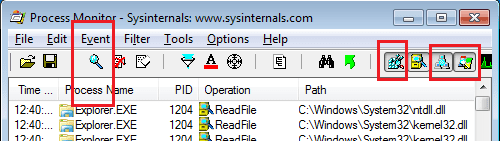
You can halt that collection of the data by pressing the magnifying glass shown on the left side of the image below:
pm1.png
You can also click on the icons that I've highlighted on the right side of the image above. Doing so show leave you with only info about apps that accessed files.

Move you mouse over each icon and you should see a tool tip explaining what it does.

Clear any data collected
Start the data collection process by clicking on the magnifying glass
Start the game that you mentioned

As soon as you hear something access the DVD - get back to the process monitor app and stop the data collection process by clicking on the magnifying glass again.

Then scroll to the bottom of the list of things showing in process monitor and work your way up until you find what app is asking for info from that DVD drive.
 

My Computer

Computer type
Laptop
Computer Manufacturer/Model Number
Employer provided Dell Latitude
OS
W7 Pro SP1 64bit
CPU
i7
Memory
8GB
Graphics Card(s)
Intel HD Graphics
Hard Drives
crappy SSD
Antivirus
Employer mandated Symantec Endpoint Protection
Browser
Pale Moon 64bit, IE11 64bit & Chrome 64bit
Same thing on my HP laptop. Bugs me, but I just live with it.
I've replaced the OD drive and all drivers are up to date.

Your machine is most likely still under warranty, I would contact Asus (great tech support) and see what they say.
My machine will be sent back to HP for a myriad of reasons once I finish up some important work.
 

My Computer

Computer type
Laptop
Computer Manufacturer/Model Number
HP Pavilion dv6-6c10us
OS
x64 (6.3.9600) Win8.1 Pro & soon dual boot x64 (6.1.7601) Win7_SP1 HomePrem
CPU
AMD A6-3420M APU with Radeon(tm) HD Graphics
Motherboard
Hewlett-Packard 1805
Memory
6.00 GB
Graphics Card(s)
AMD Radeon(TM) HD 6520G
Sound Card
(1) AMD High Definition Audio Device (2) IDT High Definiti
Monitor(s) Displays
HP W2072a 20" LCD (1600 x 900) @ 60 Hz
Screen Resolution
1366 x 768 x 32 bits (4294967296 colors) @ 60 Hz
Hard Drives
ST640LM0 00 HM641JI SATA Disk Device
Keyboard
Logitech k520 wireless KB
Mouse
Logitech m320 wireless mouse (bundled with KB)
Internet Speed
15/5 | 54 MB Wireless 'n'
Antivirus
Realtime: Defender or Avast | On-demand: Malwarebytes, ESET
Browser
IE 11 on Win8, IE 10 on win 7
Other Info
Media: [Gimp, Audacity, VLC] || Comm: [WEmail 2012, Skype] || Productivity: [OpenOffice,| Textpad] || Utils: [Sysinternals, cCleaner, Speccy, Defraggler]
When process monitor starts for the first time, it starts collecting data (excluding data on itself and a few other things).

You can halt that collection of the data by pressing the magnifying glass shown on the left side of the image below:
View attachment 253341
You can also click on the icons that I've highlighted on the right side of the image above. Doing so show leave you with only info about apps that accessed files.

Move you mouse over each icon and you should see a tool tip explaining what it does.

Clear any data collected
Start the data collection process by clicking on the magnifying glass
Start the game that you mentioned

As soon as you hear something access the DVD - get back to the process monitor app and stop the data collection process by clicking on the magnifying glass again.

Then scroll to the bottom of the list of things showing in process monitor and work your way up until you find what app is asking for info from that DVD drive.

Ok, I did what you have asked using windows disk desfragmentation that also causes my drive to be activated.

I noticed that some apps have a path set to "E:" drive which is the DVD drive. I highlighted those apps and I zipped and uploaded it for you to analyse.

I don't know how to save the logfile with the highlights still on it, so I put it into a separated logfile.
 

Attachments

My Computer

OS
windows 7 home premium 64bit
Thanks for the log files. I tested using the Windows disk defragmentation tool too and it seems to be normal for that tool to query all drives via svchost.exe. Maybe you could test again using the game Counter-Strike that you mentioned in post #11.
 

My Computer

Computer type
Laptop
Computer Manufacturer/Model Number
Employer provided Dell Latitude
OS
W7 Pro SP1 64bit
CPU
i7
Memory
8GB
Graphics Card(s)
Intel HD Graphics
Hard Drives
crappy SSD
Antivirus
Employer mandated Symantec Endpoint Protection
Browser
Pale Moon 64bit, IE11 64bit & Chrome 64bit
Ok, I will do that, but what about the disk desfragmentation? What I am supposed to do to stop the drive from being activated? Were those highlight apps that I sent you causing it? What should I do about it?

I will now proceed the same way with Counter-Strike and upload the logfiles.
 

My Computer

OS
windows 7 home premium 64bit
Back
Top