
Solved CD/DVD tray opens on start-up

pivo11

New member
Member
Local time
10:39 AM
Messages
46
G'day,

Suddenly, for no obvious reason, the CD/DVD tray is opening when I boot up the computer. At the end of the boot cycle, the tray opens and I get a small window asking me to "insert a disc" and a large blank window with no title. (see screenshot below) This has no effect on the operation of the machine, but is annoying and I would like to correct it. I have googled the problem and tried many things, all to no avail. All and any help with this would be greatly appreciated. Thanks up front.

My system is Win 7 Home Premium 64bit, 8 Gb RAM, The DVD is a Samsung Super Writemaster.
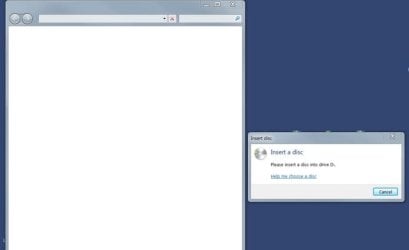
Disc1.jpg

Cheers,
Fritz
 
Last edited:

My Computer My Computer

Computer type
PC/Desktop
OS
Microsoft Windows 7 Professional 64-bit 7601 Multiprocessor Free Service Pack 1
CPU
Intel(R) Core(TM) i7-4790K CPU @ 4.00GHz
Motherboard
ASUSTeK COMPUTER INC. Z97-P
Memory
24.00 GB
Graphics Card(s)
NVIDIA GeForce GTX 960
Sound Card
(1) High Definition Audio Device (2) Sound Blaster Z (3)
Screen Resolution
1920 x 1080 x 32 bits (4294967296 colors) @ 60 Hz
Hard Drives
(1) Samsung SSD 850 EVO 1TB SCSI Disk Device (2) Samsung SSD 850 EVO 500G SCSI Disk Device (3) Generic- Compact Flash USB Device (4) Generic- MS/MS-Pro USB Device (5) Generic- SD/MMC USB Device (6) Generic- SM/xD-Picture USB Device
G'day,

Suddenly, for no obvious reason, the CD/DVD tray is opening when I boot up the computer. At the end of the boot cycle, the tray opens and I get a small window asking me to "insert a disc" and a large blank window with no title. (see screenshot below) This has no effect on the operation of the machine, but is annoying and I would like to correct it. I have googled the problem and tried many things, all to no avail. All and any help with this would be greatly appreciated. Thanks up front.

My system is Win 7 64bit, 8 Gb RAM, The DVD is a Samsung Super Writemaster.

View attachment 242287

Cheers,
Fritz

Sometimes the cause is due to a disk being removed and for some reason the DVD doesn't recognize the removal and fails to close down properly. I have found that if you insert a disk, I generally use an audio CD, and let it load then remove it, the behavior stops.

HTH
 

My Computer My Computer

Computer type
PC/Desktop
Computer Manufacturer/Model Number
Custom Built
OS
Windows 7 Professional x64
CPU
Intel i5 quad processor
Motherboard
DP67BG
Memory
16 GB
Graphics Card(s)
Radeon HD 5770
Sound Card
Realtek High Definition Audio
Monitor(s) Displays
Samsung SyncMaster
Screen Resolution
1920X1080
Hard Drives
WD 2TB (SATA Internal)
WD 1TB (USB External)
PSU
Corsair GS800
Case
Tower (Generic)
Cooling
3 Internal Fans
Keyboard
MS Wireless
Mouse
MS Optical Wired
Internet Speed
54 mbps
Antivirus
Emsisoft
Browser
IE-Version 9, Palemoon-Version 24.2.0
Thanks much, Sir George. I did try that but, alas, it didn't help. I've looked in the start-up menu and the registry but don't see anything at all that appears to be related.

Cheers,
Fritz
 

My Computer My Computer

Computer type
PC/Desktop
OS
Microsoft Windows 7 Professional 64-bit 7601 Multiprocessor Free Service Pack 1
CPU
Intel(R) Core(TM) i7-4790K CPU @ 4.00GHz
Motherboard
ASUSTeK COMPUTER INC. Z97-P
Memory
24.00 GB
Graphics Card(s)
NVIDIA GeForce GTX 960
Sound Card
(1) High Definition Audio Device (2) Sound Blaster Z (3)
Screen Resolution
1920 x 1080 x 32 bits (4294967296 colors) @ 60 Hz
Hard Drives
(1) Samsung SSD 850 EVO 1TB SCSI Disk Device (2) Samsung SSD 850 EVO 500G SCSI Disk Device (3) Generic- Compact Flash USB Device (4) Generic- MS/MS-Pro USB Device (5) Generic- SD/MMC USB Device (6) Generic- SM/xD-Picture USB Device
Long time ago there used to be a prank executable called cupholder<dot>exe. Some variations were drinkholder<dot>exe, freecupholder<dot>exe, etc. Usually delivered via email and when the recipient opened the file the CD/DVD tray would open. Each time the computer was rebooted the tray would open. Double check for malware by running a full scan with your installed anti-virus suite. A couple of free on-demand scanners wouldn't hurt, either.

Malwarebytes

ESET Online Scanner

You may also have a damaged or corrupt tray driver. These may help.

http://www.sevenforums.com/tutorials/43216-installing-updating-drivers-7-a.html

CD/DVD tray keeps opening - Microsoft Community

And there could be dust or dirt in the tray that's causing issues. Can of compressed air may help.
 

My Computer My Computer

Computer type
Laptop
Computer Manufacturer/Model Number
Sony Vaio VPCEB47GM Laptop
OS
Win 7 Pro 64-bit
CPU
Intel i5 2.4 Ghz
Memory
8GB DDR3
Graphics Card(s)
Intel HD 3000
Sound Card
IDT High Definition
Monitor(s) Displays
15.6 WGXA Anti-Glare LED
Screen Resolution
1280x800
Hard Drives
640Gb 7200rpm
Antivirus
MSE
Browser
Opera (primary) with IE9 backup
Good you looked into startup menu to decipher anything suspicious of triggering the problem.

Now I shall give you a tool that could do a better job.:)

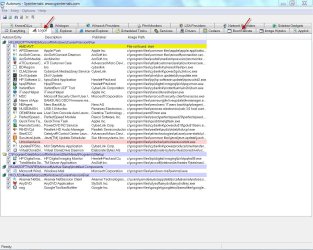
Download autoruns for Windows v11.34 Autoruns , extract it to folder and run autoruns.exe.

The tabs that should be of interest are Logon and Boot Exe.

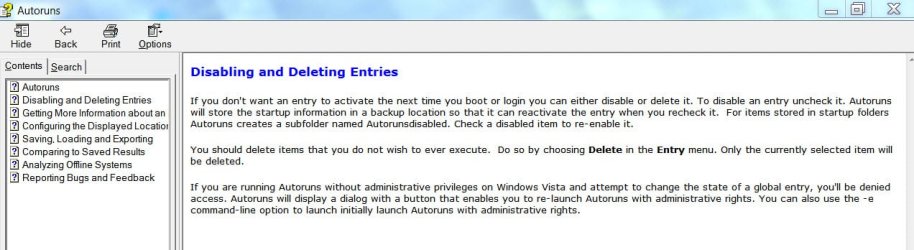
Uncheck whatever you suspect, reboot and do your research to find out the culprit, if any.

autorun.jpg

disableentries.jpg
 

My Computer My Computer

OS
Windows 7 Home Premium 32 bit
Marsmimar, Jumanji, appreciate your help, many thanks. I tried "autoruns", but don't see anything suspicious and I have scanned the system with Malwarebytes, but that came up clean. I shall go back and do everything one more time and check into the drivers and let you know. Thanks again for your help with this.

Cheers,
Fritz
 

My Computer My Computer

Computer type
PC/Desktop
OS
Microsoft Windows 7 Professional 64-bit 7601 Multiprocessor Free Service Pack 1
CPU
Intel(R) Core(TM) i7-4790K CPU @ 4.00GHz
Motherboard
ASUSTeK COMPUTER INC. Z97-P
Memory
24.00 GB
Graphics Card(s)
NVIDIA GeForce GTX 960
Sound Card
(1) High Definition Audio Device (2) Sound Blaster Z (3)
Screen Resolution
1920 x 1080 x 32 bits (4294967296 colors) @ 60 Hz
Hard Drives
(1) Samsung SSD 850 EVO 1TB SCSI Disk Device (2) Samsung SSD 850 EVO 500G SCSI Disk Device (3) Generic- Compact Flash USB Device (4) Generic- MS/MS-Pro USB Device (5) Generic- SD/MMC USB Device (6) Generic- SM/xD-Picture USB Device
Check the app you use to create optical discs, Windows might have files to copy and is waiting for the disc.

Or insert a disc when you boot and see if starts copying.
 

My Computer My Computer

Computer Manufacturer/Model Number
HP p6370t
OS
Windows 7 Home Premium 64bit
CPU
i3-530
Motherboard
MSI - IONA
Memory
8 Gb
Graphics Card(s)
onboard
Sound Card
onboard
Monitor(s) Displays
Dell ST2400
Screen Resolution
1920x1080
Hard Drives
Intell 520 SSD 120Gb, WD6400AAKS, 640Gb & WD USB MyBook 1Tb
Internet Speed
1.5 Mmbps, Hughes Satellite
Right then, I found the source of the problem. It was "Adobe Gamma Loader". Why this would cause the tray to open like it did, I have no idea, I have had Photoshop installed for ages and never had any trouble until recently. Since it's a monitor calibration tool that I have never used, disabling it isn't a problem.

Thanks to everyone for your swift and useful suggestions and help.

Best,
Fritz
 

My Computer My Computer

Computer type
PC/Desktop
OS
Microsoft Windows 7 Professional 64-bit 7601 Multiprocessor Free Service Pack 1
CPU
Intel(R) Core(TM) i7-4790K CPU @ 4.00GHz
Motherboard
ASUSTeK COMPUTER INC. Z97-P
Memory
24.00 GB
Graphics Card(s)
NVIDIA GeForce GTX 960
Sound Card
(1) High Definition Audio Device (2) Sound Blaster Z (3)
Screen Resolution
1920 x 1080 x 32 bits (4294967296 colors) @ 60 Hz
Hard Drives
(1) Samsung SSD 850 EVO 1TB SCSI Disk Device (2) Samsung SSD 850 EVO 500G SCSI Disk Device (3) Generic- Compact Flash USB Device (4) Generic- MS/MS-Pro USB Device (5) Generic- SD/MMC USB Device (6) Generic- SM/xD-Picture USB Device
Good that you found the culprit.

Now to share a secret, I did recommend autoruns to you after reading this Aug 2010 post elsewhere.

"I think I have solved the problem. I downloaded and ran Autoruns that Patcooke recommended. Under the logon tab I noticed that Adobe Bridge was being launched at logon. (Adobe Bridge is associated with Photoshop CS4.) I recalled I had observed a similar condition when opening bridge in the past. I unchecked Adobe Bridge in Autoruns. Re booted and the tray did not open. I opened Photoshop and went to the bridge. Immediately, the tray opened, and the window asking for me to insert a disck appeared. I went into the Adobe's cache settings and cleared the cashe for the U drive and the problem went away."

Perhaps, I should have mentioned Adobe, but theoretically it could be anything else (similar) too. If one religiously starts unchecking the startups one by one and reboot, one should be able to get at the culprit.

In future, we will make it a point to check on Adobe for a problem of this sort. Thanks for sharing the info.

EDIT: Please mark the thread as solved.
 

My Computer My Computer

OS
Windows 7 Home Premium 32 bit
Glad to hear you found the problem. Thanks for posting back.
 

My Computer My Computer

Computer type
Laptop
Computer Manufacturer/Model Number
Sony Vaio VPCEB47GM Laptop
OS
Win 7 Pro 64-bit
CPU
Intel i5 2.4 Ghz
Memory
8GB DDR3
Graphics Card(s)
Intel HD 3000
Sound Card
IDT High Definition
Monitor(s) Displays
15.6 WGXA Anti-Glare LED
Screen Resolution
1280x800
Hard Drives
640Gb 7200rpm
Antivirus
MSE
Browser
Opera (primary) with IE9 backup

My Computer My Computer

Computer type
PC/Desktop
OS
Microsoft Windows 7 Professional 64-bit 7601 Multiprocessor Free Service Pack 1
CPU
Intel(R) Core(TM) i7-4790K CPU @ 4.00GHz
Motherboard
ASUSTeK COMPUTER INC. Z97-P
Memory
24.00 GB
Graphics Card(s)
NVIDIA GeForce GTX 960
Sound Card
(1) High Definition Audio Device (2) Sound Blaster Z (3)
Screen Resolution
1920 x 1080 x 32 bits (4294967296 colors) @ 60 Hz
Hard Drives
(1) Samsung SSD 850 EVO 1TB SCSI Disk Device (2) Samsung SSD 850 EVO 500G SCSI Disk Device (3) Generic- Compact Flash USB Device (4) Generic- MS/MS-Pro USB Device (5) Generic- SD/MMC USB Device (6) Generic- SM/xD-Picture USB Device
Back
Top