CD player not found in VM

doc47

New member
How do I bring my cd player into the VM environment?
I loaded my favorite game while in VM and that went fine.
When I then tried to play the game, a pop-up box says
"cannot find cd player". How do I fix this?
btw, the game does not run in Windows 7.
Thanks
 

My Computer

Computer Manufacturer/Model Number
local build
OS
windows 7 professional
CPU
intel i5 cpu 750
Motherboard
asus p7p55 lx
Memory
crucial ddr3 8 gb
Graphics Card(s)
nvidia gts250
Sound Card
on mb
Monitor(s) Displays
hp vs17e
Screen Resolution
1280 x 1024
Hard Drives
(2) wd 500 gb sata II
Case
antec sonata III w/ 500w ps
Can't answer your question

But I will tell you that you should let others know what type of VM you're using and what type of disc drive you have.
 

My Computer

Computer Manufacturer/Model Number
Apple Macbook Pro (April 2009)
OS
W7 Ult. x64 | OS X
CPU
Intel Mobile Core 2 Duo 2.93Ghz [T9800 Penryn]
Motherboard
NVIDIA nForce 730i Rev. B1 [Mac-F2268EC8 (U2E1)]
Memory
4096MB Samsung DDR3 Dual Channel [PC3-8500F 1066Mhz]
Graphics Card(s)
NVIDIA GeForce 9600M GT 512MB [G96M Rev. C1]
Sound Card
SB X-Fi Surround 5.1 USB | Onboard Realtek (Disabled)
Monitor(s) Displays
Acer x223wbd 22" | Apple Anti-Glare 17" (Disabled)
Screen Resolution
{Current} 1440x900 {Acer} 1680x1050 {Apple} 1920x1200
Hard Drives
{Internal}
Seagate Momentus 320GB 2.5" 7200RPM [ST9320421AS]

{Externals}
LaCie 320GB USB 2.0 HDD [301284UR]
LaCie 750GB USB 2.0 FW400 eSATA HDD [301314U]
LaCie 1TB USB 2.0 HDD [301304UR]
PSU
Magsafe
Case
Aluminum/Unibody (MBP52)
Cooling
2 x 6000 RPM Fans
Keyboard
Logitech G-15v2 [PN 920-000379]
Mouse
Logitech G-9 [PN 910-000338]
Internet Speed
12Mbps/2.5Mbps w/ 24Mbps Speed Boost [Comcast]
Other Info
Logitech X-540 Speakers [PN 970223-0122]
Sennheiser PC-151 Headset
How do I bring my cd player into the VM environment?
I loaded my favorite game while in VM and that went fine.
When I then tried to play the game, a pop-up box says
"cannot find cd player". How do I fix this?
btw, the game does not run in Windows 7.
Thanks

Hi Doc47,

Also let us know which game you're trying to load. Many of us here, use VM environments for the same reason and some games have protection against virtual drives.

-Timo
 

My Computer

Computer Manufacturer/Model Number
Custom Hack job
OS
Windows 7 Ultimate 64 bit
CPU
Intel(R) Core(TM)2 Quad CPU Q8200 @ 2.33GHz
Motherboard
GigaByte EP45-UD3
Memory
8 GB Kingston
Graphics Card(s)
Nvidia GeForce 9600GT
Sound Card
Soundblaster Audigy
Monitor(s) Displays
AOC x2 22"
Hard Drives
2 x Samsung 500GB (RAID)
2 x Samsung 2TB
1 x WD Green 2TB
1 x Seagate 1TB
1 x Samsung 500GB
PSU
Thermaltake QFan 750W
Case
CM Scout Gaming
Cooling
Coolermaster V10
Keyboard
Microsoft Wireless Keyboard 1000
Mouse
Microsoft Wireless Optical 2000
Internet Speed
320
Other Info
Winfast PVR2000CP
LG DVD-RAM DVD/RW/DL Super Multi
Linksys WMP300Nx2 Wireless Adapter
Disk drive not found

Thanks for the responses.
I'm using Windows virtual pc in XP mode.
the drive is a Sony SATA DVDRW and I'm trying to play Command and Conquer- Generals Zero Hour. I also ran a SecurAble scan that tells me my cpu is capable of hardware virtualization.
 

My Computer

Computer Manufacturer/Model Number
local build
OS
windows 7 professional
CPU
intel i5 cpu 750
Motherboard
asus p7p55 lx
Memory
crucial ddr3 8 gb
Graphics Card(s)
nvidia gts250
Sound Card
on mb
Monitor(s) Displays
hp vs17e
Screen Resolution
1280 x 1024
Hard Drives
(2) wd 500 gb sata II
Case
antec sonata III w/ 500w ps
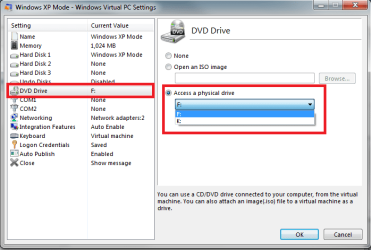
In XP Mode settings, choose DVD drive and choose the drive you want to use from the drop down list. After this, the drive you chose is shown as a DVD/CD drive on My Computer in XP Mode.

Kari

XPM_DVD.png
 

My Computer

Computer type
Laptop
Computer Manufacturer/Model Number
HP ENVY 17-1150eg
OS
Windows 10 Pro x64 EN-GB
CPU
1.6 GHz Intel Core i7-720QM Processor
Memory
6 GB
Graphics Card(s)
ATI Mobility Radeon HD 5850 Graphics
Sound Card
Beats sound system with integrated subwoofer
Monitor(s) Displays
17" laptop display, 22" LED and 32" Full HD TV through HDMI
Screen Resolution
1600*900 (1), 1920*1080 (2&3)
Hard Drives
Internal: 2 x 500 GB SATA Hard Disk Drive 7200 rpm
External: 2TB for backups, 3TB USB3 network drive for media
Cooling
As Envy runs a bit warm, I have it on a Cooler Master pad
Keyboard
Logitech diNovo Media Desktop Laser (bluetooth)
Mouse
Logitech Performance Mouse MX
Internet Speed
50/10 Mbps VDSL
Antivirus
Windows Defender 4.3.9431.0
Browser
Maxthon 3.5.2., IE11
Thanks for the responses.
I'm using Windows virtual pc in XP mode.
the drive is a Sony SATA DVDRW and I'm trying to play Command and Conquer- Generals Zero Hour. I also ran a SecurAble scan that tells me my cpu is capable of hardware virtualization.

You shouldn't use XP Mode like that. You are playing the game through an RDP interface.

According to Microsoft, that game is compatible with Windows 7. No need to run it in XP Mode anyway.

Windows 7 Compatibility for Command & Conquer: Generals Zero Hour: EA. Drivers, Updates, Downloads
 

My Computer

OS
Windows 7 Home Premium x64
CPU
Intel Core 2 Quad Q9450 @ 3.2GHz
Motherboard
Asus P5Q PRO Turbo
Memory
4GB DDR2-800
Graphics Card(s)
MSI Radeon HD 5850
Sound Card
Creative Labs Audigy2 ZS
Monitor(s) Displays
Samsung 225BW
Hard Drives
(2) 1TB Samsung F1, (2) 1.5TB Samsung F2, 1TB Samsung F2, 2TB Samsung F3
PSU
Corsair HX650
Case
Antec Nine Hundred
In XP Mode settings, choose DVD drive and choose the drive you want to use from the drop down list. After this, the drive you chose is shown as a DVD/CD drive on My Computer in XP Mode.

Kari

View attachment 83726

@doc47,
Apologies for not getting back to you sooner, I've been caught up for a few days.
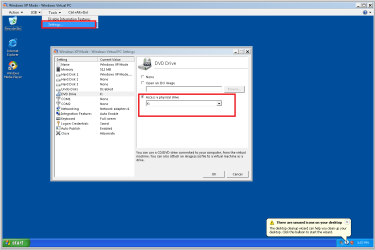
In addition to Kari's post, you find the settings on the Tools Menu.

@JonM33 - I surmise that Doc47 wishes to separate the game from the OS install which is fair enough.
 

Attachments

  • xpmode.png
    xpmode.png
    64.2 KB · Views: 8

My Computer

Computer Manufacturer/Model Number
Custom Hack job
OS
Windows 7 Ultimate 64 bit
CPU
Intel(R) Core(TM)2 Quad CPU Q8200 @ 2.33GHz
Motherboard
GigaByte EP45-UD3
Memory
8 GB Kingston
Graphics Card(s)
Nvidia GeForce 9600GT
Sound Card
Soundblaster Audigy
Monitor(s) Displays
AOC x2 22"
Hard Drives
2 x Samsung 500GB (RAID)
2 x Samsung 2TB
1 x WD Green 2TB
1 x Seagate 1TB
1 x Samsung 500GB
PSU
Thermaltake QFan 750W
Case
CM Scout Gaming
Cooling
Coolermaster V10
Keyboard
Microsoft Wireless Keyboard 1000
Mouse
Microsoft Wireless Optical 2000
Internet Speed
320
Other Info
Winfast PVR2000CP
LG DVD-RAM DVD/RW/DL Super Multi
Linksys WMP300Nx2 Wireless Adapter
Back
Top