
CD ripping question using WMPlayer

Sporus

New member
Local time
7:03 PM
Messages
23
So the scenario would be i bought a CD from a store, a legitimate real CD from FYE.

now i want to know what the file type is on THAT CD, does this vary? I hear .wav is the standard studio qual. filetype. When i pop in the store bought CD into my laptop's disk drive and go to "my computer" and look at the files they have the extension ".cda'

does this vary per Cd and label?

Really the end result i want is to have the WAV file to play from ym PC and the 320kbps MP3 for my ipod.

so if from this ".cda" i could rip using windows media player a real WAV a high fidelity or EXACT WAV file i would convert later to mp3 320kbps and do it that way, but first I need to know what files are on the CD i bought.


THE image below is of that disk in the drive, i see that the .cda's are KBs each meaning these cant be the real files there just so people dont , idk

but windows media player gives the option to RIP from a CD in the drive as MP3's and wavs and all sorts, so are those rips really the quality of what they should be?
 

Attachments
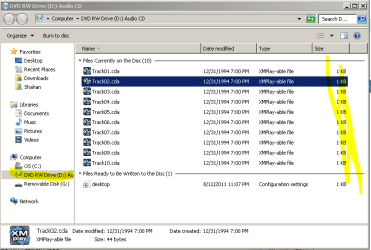
  • Capture.PNG
    Capture.PNG
    16 KB · Views: 12

My Computer

OS
Windows 7 Ultimate 64 bit
CDA files are the standard file type found on all commercial CDs. I've never seen anything else. I think the CDA is just a representation of the underlying file, for playback purposes---obviously the real sound file is larger than 1 KB

If you want the best sound quality, rip to WAV and then convert that WAV to mp3 as needed. Or just rip it a second time as mp3 directly, rather than convert.
 

My Computer

Computer type
PC/Desktop
Computer Manufacturer/Model Number
Ignatz Special; 4 speed manual gearbox; factory air conditioning; one of one
OS
Windows 7 Home Premium SP1, 64-bit
CPU
Intel Skylake i5-6600K, not overclocked
Motherboard
AsRock Z170M Extreme 4, micro ATX
Memory
8 GB HyperX DDR4-2666 (2 x 4 GB)
Graphics Card(s)
none; graphics are integrated on CPU
Sound Card
onboard: Realtek ALC1150; external: USB Behringer UF0-202
Monitor(s) Displays
Dell S2340M 23 inch IPS
Screen Resolution
1600 x 900
Hard Drives
System: Crucial MX100 series SSD, 128 GB;
Data: Samsung Spinpoint 103SJ, 1 TB;
Backup: WD Caviar Green WD30EZRX-00D8PB0, 3 TB
PSU
Rosewill SilentNight 500 watt fanless, semi-modular
Case
Antec Solo II
Cooling
Noctua NH-U12S; Noctua F12 intake, Noctua S12A exhaust
Keyboard
Microsoft 200 6JH-00001 USB
Mouse
Dell or Microsoft optical wired; USB
Antivirus
Microsoft Security Essentials and Malwarebytes Premium
Browser
Pale Moon
Other Info
All fans PWM; speeds at idle: CPU circa 500 rpm; intake circa 600 rpm; exhaust circa 600 rpm; CPU temps 27 idle and 47 C load in a warm room (27 C/81 F) when running Intel Extreme Tuning Utility stress test.
I've ripped all my favourite CD tracks in MP3 format and they sound fine on my iPod.

The default location for all your ripped tracks will be the My Music folder in your Music library.
 

My Computer

Computer Manufacturer/Model Number
HP Pavilion Elite 495UK
OS
Windows 7 Ultimate SP1 64-Bit
CPU
Intel Core i7 870 @ 2.93GHz
Motherboard
MSI 2A9C (CPU1)
Memory
8Gb Dual-Channel DDR3 @ 664MHz
Graphics Card(s)
nVidia GeForce GTX 460 1024MB dedicated RAM
Sound Card
Realtek HD Audio
Monitor(s) Displays
HP2310i
Screen Resolution
1920 x 1080
Hard Drives
1x1954GB Hitachi HDS22020ALA 330 (RAID), 1x1954GB Hitachi External for backup and storage
PSU
460W
Case
HP Elite
Cooling
Air cooled
Keyboard
Logitech K750 solar-powered keyboard
Mouse
Logitech Wireless M180 mouse
Internet Speed
2Mb
Other Info
Pure Avanti Flow Internet Radio with iPod Dock, 64Gb iPod, HP USB Speakers, Sony MDR-V500 Headphones, Sony Vaio F-Series Laptop
but the file underlying the .cda
what is that file?
 

My Computer

OS
Windows 7 Ultimate 64 bit

My Computer

Computer Manufacturer/Model Number
HP Pavilion Elite 495UK
OS
Windows 7 Ultimate SP1 64-Bit
CPU
Intel Core i7 870 @ 2.93GHz
Motherboard
MSI 2A9C (CPU1)
Memory
8Gb Dual-Channel DDR3 @ 664MHz
Graphics Card(s)
nVidia GeForce GTX 460 1024MB dedicated RAM
Sound Card
Realtek HD Audio
Monitor(s) Displays
HP2310i
Screen Resolution
1920 x 1080
Hard Drives
1x1954GB Hitachi HDS22020ALA 330 (RAID), 1x1954GB Hitachi External for backup and storage
PSU
460W
Case
HP Elite
Cooling
Air cooled
Keyboard
Logitech K750 solar-powered keyboard
Mouse
Logitech Wireless M180 mouse
Internet Speed
2Mb
Other Info
Pure Avanti Flow Internet Radio with iPod Dock, 64Gb iPod, HP USB Speakers, Sony MDR-V500 Headphones, Sony Vaio F-Series Laptop
CDA files are the standard file type found on all commercial CDs. I've never seen anything else. I think the CDA is just a representation of the underlying file, for playback purposes---obviously the real sound file is larger than 1 KB

If you want the best sound quality, rip to WAV and then convert that WAV to mp3 as needed. Or just rip it a second time as mp3 directly, rather than convert.

I've ripped all my favourite CD tracks in MP3 format and they sound fine on my iPod.

The default location for all your ripped tracks will be the My Music folder in your Music library.
ah i see thanks, yeah ive seen them there.

It's a shortcut file generated by Microsoft for each track on a CD - cda stands for compact disc audio.

File Extension .CDA Details

right but it IS a representation of another file right??? the one i cant see?
what is that file?
is it the highest quality file that can be ripped as WAV and whatnot?
is the cda file reresenting a WAV?
 

My Computer

OS
Windows 7 Ultimate 64 bit
but the file underlying the .cda
what is that file?

I don't know if it is a WAV or an equivalent to WAV.

But it ultimately doesn't matter. A WAV rip is the sonic equivalent (lossless) of whatever underlies that CDA file.
 

My Computer

Computer type
PC/Desktop
Computer Manufacturer/Model Number
Ignatz Special; 4 speed manual gearbox; factory air conditioning; one of one
OS
Windows 7 Home Premium SP1, 64-bit
CPU
Intel Skylake i5-6600K, not overclocked
Motherboard
AsRock Z170M Extreme 4, micro ATX
Memory
8 GB HyperX DDR4-2666 (2 x 4 GB)
Graphics Card(s)
none; graphics are integrated on CPU
Sound Card
onboard: Realtek ALC1150; external: USB Behringer UF0-202
Monitor(s) Displays
Dell S2340M 23 inch IPS
Screen Resolution
1600 x 900
Hard Drives
System: Crucial MX100 series SSD, 128 GB;
Data: Samsung Spinpoint 103SJ, 1 TB;
Backup: WD Caviar Green WD30EZRX-00D8PB0, 3 TB
PSU
Rosewill SilentNight 500 watt fanless, semi-modular
Case
Antec Solo II
Cooling
Noctua NH-U12S; Noctua F12 intake, Noctua S12A exhaust
Keyboard
Microsoft 200 6JH-00001 USB
Mouse
Dell or Microsoft optical wired; USB
Antivirus
Microsoft Security Essentials and Malwarebytes Premium
Browser
Pale Moon
Other Info
All fans PWM; speeds at idle: CPU circa 500 rpm; intake circa 600 rpm; exhaust circa 600 rpm; CPU temps 27 idle and 47 C load in a warm room (27 C/81 F) when running Intel Extreme Tuning Utility stress test.
I think the underlying file is a .wma file - wma I assume stands for Windows Media Player.

The important thing to remember is that the .cda file is just a shortcut to the underlying compressed .wma file.

http://www.fileinfo.com/extension/wma

Have a look at this article, which explains why it's better to rip your tracks in the high-quality AIFF format, and then convert them to MP3s later if you need to.

MP3s won't be of such high quality as AIFF files because of the compression they undergo during ripping or conversion.
 

My Computer

Computer Manufacturer/Model Number
HP Pavilion Elite 495UK
OS
Windows 7 Ultimate SP1 64-Bit
CPU
Intel Core i7 870 @ 2.93GHz
Motherboard
MSI 2A9C (CPU1)
Memory
8Gb Dual-Channel DDR3 @ 664MHz
Graphics Card(s)
nVidia GeForce GTX 460 1024MB dedicated RAM
Sound Card
Realtek HD Audio
Monitor(s) Displays
HP2310i
Screen Resolution
1920 x 1080
Hard Drives
1x1954GB Hitachi HDS22020ALA 330 (RAID), 1x1954GB Hitachi External for backup and storage
PSU
460W
Case
HP Elite
Cooling
Air cooled
Keyboard
Logitech K750 solar-powered keyboard
Mouse
Logitech Wireless M180 mouse
Internet Speed
2Mb
Other Info
Pure Avanti Flow Internet Radio with iPod Dock, 64Gb iPod, HP USB Speakers, Sony MDR-V500 Headphones, Sony Vaio F-Series Laptop
but the file underlying the .cda
what is that file?

I don't know if it is a WAV or an equivalent to WAV.

But it ultimately doesn't matter. A WAV rip is the sonic equivalent (lossless) of whatever underlies that CDA file.

oh i see so its a property of the .cda??? like i thought it could be possible that the file on the CD would not be a WAV, as far as i know in the non hyper tech world WAV is the highest quality and most likely on CDs right?

so i was afraid i was ripping not true WAVs... but youre saying ... wait like, a WAV rip is the sonic equiv? as in only in the case of cda and WAV its true WAV?
 

My Computer

OS
Windows 7 Ultimate 64 bit
but the file underlying the .cda
what is that file?

I don't know if it is a WAV or an equivalent to WAV.

But it ultimately doesn't matter. A WAV rip is the sonic equivalent (lossless) of whatever underlies that CDA file.

oh i see so its a property of the .cda??? like i thought it could be possible that the file on the CD would not be a WAV, as far as i know in the non hyper tech world WAV is the highest quality and most likely on CDs right?

so i was afraid i was ripping not true WAVs... but youre saying ... wait like, a WAV rip is the sonic equiv? as in only in the case of cda and WAV its true WAV?

The underlying file on the CD could be a yadayada file. So what?

A WAV rip of the yadayada file is the best you can do. Period.

A WAV rip of a yadayada file is a WAV file. Not a yadayada file. But they are equivalent from the standpoint of sound quality.

CDAs are not sound files per se--at least the 1 KB representation of them shown in Windows. I think of CDAs as more of a table of contents indicating a chapter in a book--rather than the text of the chapter found on other pages.
 

My Computer

Computer type
PC/Desktop
Computer Manufacturer/Model Number
Ignatz Special; 4 speed manual gearbox; factory air conditioning; one of one
OS
Windows 7 Home Premium SP1, 64-bit
CPU
Intel Skylake i5-6600K, not overclocked
Motherboard
AsRock Z170M Extreme 4, micro ATX
Memory
8 GB HyperX DDR4-2666 (2 x 4 GB)
Graphics Card(s)
none; graphics are integrated on CPU
Sound Card
onboard: Realtek ALC1150; external: USB Behringer UF0-202
Monitor(s) Displays
Dell S2340M 23 inch IPS
Screen Resolution
1600 x 900
Hard Drives
System: Crucial MX100 series SSD, 128 GB;
Data: Samsung Spinpoint 103SJ, 1 TB;
Backup: WD Caviar Green WD30EZRX-00D8PB0, 3 TB
PSU
Rosewill SilentNight 500 watt fanless, semi-modular
Case
Antec Solo II
Cooling
Noctua NH-U12S; Noctua F12 intake, Noctua S12A exhaust
Keyboard
Microsoft 200 6JH-00001 USB
Mouse
Dell or Microsoft optical wired; USB
Antivirus
Microsoft Security Essentials and Malwarebytes Premium
Browser
Pale Moon
Other Info
All fans PWM; speeds at idle: CPU circa 500 rpm; intake circa 600 rpm; exhaust circa 600 rpm; CPU temps 27 idle and 47 C load in a warm room (27 C/81 F) when running Intel Extreme Tuning Utility stress test.
Back
Top