Solved CDBurnerXP

huffman

New member
Pro User
Local time
9:58 AM
Messages
715
I have used this program for a long time and never had a problem with it.

This morning I was adding files to a DVD that already had files on it and after burning the new files when I put the DVD back in, the new files did NOT show. I know they are there because the availible space on the disk had been reduced by the right amount.

I made sure that "show Hidden files and folders" was turned on, so it should have seen the new files.

I then did the same thing using Roxio Classic and after adding the new files to the DVD the new files show up just fine.

Does anyone have an idea why new files are not showing on the DVD after adding files using CDBurnerXP?
 

My Computer

OS
Windows 7 Pro
CPU
Intel(R) Pentium(R) Duel CPU E2200 2.20 Ghz
Motherboard
GA-G41M-ES2L
Memory
4 gb 2.96 Usable
Graphics Card(s)
Onboard
Sound Card
Onboard
Hard Drives
2 - 1TB WD Sata Drives
I've never been a believer in multi-session or erasable CD/DVD. When I do use erasable, for movie test burns, I burn it as if it's a DVDR. IOW I always finalize it. Then I don't expect the data to be there. Even session free DVDR isn't all that dependable.

I also have used CDBurnerXP and never had a problem other than forgetting how to use a particular feature since I don't use it often. I don't use sessions so I can't attest how well or poorly it handles them.

I guess the short answer is, I don't know. :)
 

My Computer

Computer Manufacturer/Model Number
HP Media Center
OS
Windows 7 32 bit
CPU
AMD 5200+ dual core
Memory
2 GB
Graphics Card(s)
NVidia GeForce 6150SE 128 MB
Monitor(s) Displays
CRT
Screen Resolution
1280x1024
Hard Drives
500 GB Sata internal :

SIIG USB 3.0 docking stations w/WD Caviar Black 6 Gb/s drives
Keyboard
PS/2
Mouse
PS/2 Wheel Mouse
Other Info
SIIG USB 3.0 PCIexpress card.
The disk is NOT a DVD-RW; it is just a standard DVD+R which I had left the disk open after burning the first files.

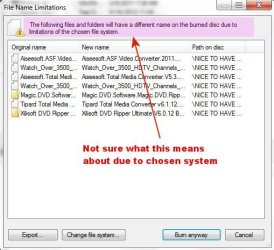
This morning I went to burn a CD with CDBurnerXP and got this:

CDburnerXP1.jpg

I have not idea why it wants to rename files because of the chosen system. I have used this process with Win 7 for a couple years now. The only thing I can think up is that CDBurnerXP is the latest version and I had just reinstalled Win 7 and this program a few days ago.

I may have to uninstall this version of CDBurnerXP and reinstall the older version I had used before.
 

My Computer

OS
Windows 7 Pro
CPU
Intel(R) Pentium(R) Duel CPU E2200 2.20 Ghz
Motherboard
GA-G41M-ES2L
Memory
4 gb 2.96 Usable
Graphics Card(s)
Onboard
Sound Card
Onboard
Hard Drives
2 - 1TB WD Sata Drives
Hi there
why bother even using physical media at all.

If you already have a DVD make a copy of it to DISK with a program like AnyDVD then mount the ISO with a virtual ISO mounter.

There's plenty of free CD / DVD burning software out there in any case. Ensure it creates a "Virtual" or ISO image.

NERO's QUIK BURN is FREE and works on W7.

You can save all your DVD's to HDD -- much much better -- I have loads on a small passport external disk --when I travel and want to watch a movie on a small laptop that doesn't have a DVD - just "Mount" the ISO copy and watch the movie.

Cheers
jimbo
 

My Computer

Computer type
PC/Desktop
Computer Manufacturer/Model Number
Custom built, several laptops HP/ASUS
OS
Linux CENTOS 7 / various Windows OS'es and servers
CPU
Intel i7 Intel i5
Memory
8GB, 16GB
Graphics Card(s)
On Motherboard
Sound Card
Realtek HD audio
Monitor(s) Displays
Apple Cinema display, Samsung LCD
Screen Resolution
1920 X 1080
Hard Drives
4 X 1TB SATA
Mouse
Toshiba wireless laser
Internet Speed
> 20MB up
The disk is NOT a DVD-RW; it is just a standard DVD+R which I had left the disk open after burning the first files.

I guess you missed the part about sessions being unreliable. Your best chance with burning is to finalize the disk. The fact that it worked for awhile is a false sense of security. It will come back to burn you. :devil:
 

My Computer

Computer Manufacturer/Model Number
HP Media Center
OS
Windows 7 32 bit
CPU
AMD 5200+ dual core
Memory
2 GB
Graphics Card(s)
NVidia GeForce 6150SE 128 MB
Monitor(s) Displays
CRT
Screen Resolution
1280x1024
Hard Drives
500 GB Sata internal :

SIIG USB 3.0 docking stations w/WD Caviar Black 6 Gb/s drives
Keyboard
PS/2
Mouse
PS/2 Wheel Mouse
Other Info
SIIG USB 3.0 PCIexpress card.
jimbo45 :p I have 100's of DVDs with this type of data. It would take a huge HDD to hold all of this information, not to mention it would take me a year to transfer all the DVD's I have to a HDD.

MilesAhead

I guess you missed the part about sessions being unreliable.

Yes I guess I did miss that. I know there is many burn softwares out there, but this is the one I have over time to be the most reliable. I will have reinstalled an older version of CDBurnerXP and will wait and see what happens. Worse comes to worse, Roxio is doing the job.

Thanks a lot guys.
 

My Computer

OS
Windows 7 Pro
CPU
Intel(R) Pentium(R) Duel CPU E2200 2.20 Ghz
Motherboard
GA-G41M-ES2L
Memory
4 gb 2.96 Usable
Graphics Card(s)
Onboard
Sound Card
Onboard
Hard Drives
2 - 1TB WD Sata Drives
Good luck with it. :)
 

My Computer

Computer Manufacturer/Model Number
HP Media Center
OS
Windows 7 32 bit
CPU
AMD 5200+ dual core
Memory
2 GB
Graphics Card(s)
NVidia GeForce 6150SE 128 MB
Monitor(s) Displays
CRT
Screen Resolution
1280x1024
Hard Drives
500 GB Sata internal :

SIIG USB 3.0 docking stations w/WD Caviar Black 6 Gb/s drives
Keyboard
PS/2
Mouse
PS/2 Wheel Mouse
Other Info
SIIG USB 3.0 PCIexpress card.
Back
Top