
CDFS format =vs= UDF format

techhead287

New member
Member
Local time
8:05 AM
Messages
66
Hello Seven Forums users,
I recently bought a 50 pack of 700MB CD-R's and I would like to turn one into a picture CD that I can play in a DVD player.

I would just like to know which format is better for me to use - CDFS or UDF.

Thankyou,
techhead287
 

My Computer

Computer type
PC/Desktop
Computer Manufacturer/Model Number
Custom Build
OS
Windows 7 Ultimate 64-bit
CPU
Intel Core i7
Motherboard
ASUS
Memory
32GB RAM
Monitor(s) Displays
2
Hard Drives
1TB HDD
160GB SSD
2TB HDD
Cooling
3 Fans, water cooling
Keyboard
Microsoft
Mouse
Microsoft
Internet Speed
Around 70mbps
Antivirus
AVG Internet Security 2014
Browser
IE11, Google Chrome (default browser is Chrome)
You should probably chose CDFS, UDF will probably most likely take up an ~200MB of data just for the formatting of the disk.
 

My Computer

Computer type
PC/Desktop
Computer Manufacturer/Model Number
HP Pavilion g7-1350dx
OS
Windows 7 Ultimate SP1 x64
CPU
AMD A6-3420M APU
Memory
4.0 Gb DDR3 838 MHz
Graphics Card(s)
AMD Radeon HD 6520G
Sound Card
IDT HD Audio
Screen Resolution
1600x 900
Hard Drives
500GB Hitachi HTS547550A9E384
OK, one more question. If I use CDFS format, and put the pictures on the disc using Windows Explorer by copying and pasting them, will the disc be finalized and I won't be able to copy any more pictures onto it?

Thanks,
techhead287
 

My Computer

Computer type
PC/Desktop
Computer Manufacturer/Model Number
Custom Build
OS
Windows 7 Ultimate 64-bit
CPU
Intel Core i7
Motherboard
ASUS
Memory
32GB RAM
Monitor(s) Displays
2
Hard Drives
1TB HDD
160GB SSD
2TB HDD
Cooling
3 Fans, water cooling
Keyboard
Microsoft
Mouse
Microsoft
Internet Speed
Around 70mbps
Antivirus
AVG Internet Security 2014
Browser
IE11, Google Chrome (default browser is Chrome)
I believe so, the best way to do it is to have all your pictures ready in advanced.
 

My Computer

Computer type
PC/Desktop
Computer Manufacturer/Model Number
HP Pavilion g7-1350dx
OS
Windows 7 Ultimate SP1 x64
CPU
AMD A6-3420M APU
Memory
4.0 Gb DDR3 838 MHz
Graphics Card(s)
AMD Radeon HD 6520G
Sound Card
IDT HD Audio
Screen Resolution
1600x 900
Hard Drives
500GB Hitachi HTS547550A9E384
OK. Thanks.
This is the last question, I promise.

Will UDF still work in a DVD player?

Thanks,
techhead287
 

My Computer

Computer type
PC/Desktop
Computer Manufacturer/Model Number
Custom Build
OS
Windows 7 Ultimate 64-bit
CPU
Intel Core i7
Motherboard
ASUS
Memory
32GB RAM
Monitor(s) Displays
2
Hard Drives
1TB HDD
160GB SSD
2TB HDD
Cooling
3 Fans, water cooling
Keyboard
Microsoft
Mouse
Microsoft
Internet Speed
Around 70mbps
Antivirus
AVG Internet Security 2014
Browser
IE11, Google Chrome (default browser is Chrome)
OK. Thanks.
This is the last question, I promise.

Will UDF still work in a DVD player?

Thanks,
techhead287
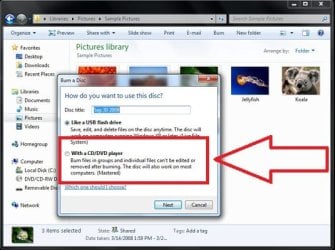
Its hard to say, over the years the UDF standards have changed, meaning it is up to the the manufacturer of the DVD player if they incorporate a specific version or standard.

By the way are you using windows 7? if so just select your photos, right click, select "send to DVD RW DRIVE" then select the following:
146622.image1.jpg
 

My Computer

Computer type
PC/Desktop
Computer Manufacturer/Model Number
HP Pavilion g7-1350dx
OS
Windows 7 Ultimate SP1 x64
CPU
AMD A6-3420M APU
Memory
4.0 Gb DDR3 838 MHz
Graphics Card(s)
AMD Radeon HD 6520G
Sound Card
IDT HD Audio
Screen Resolution
1600x 900
Hard Drives
500GB Hitachi HTS547550A9E384
Back
Top