JavaScript is disabled. For a better experience, please enable JavaScript in your browser before proceeding.
You are using an out of date browser. It may not display this or other websites correctly.
You should upgrade or use an
alternative browser .
Solved Certain applications will not work...
R.I.P Gary and Randy
Power User
VIP
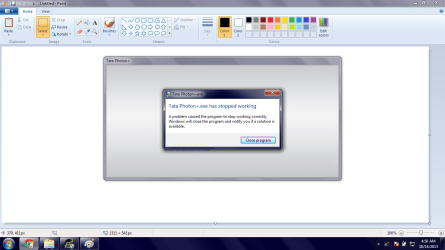
I've just noticed it yesterday that I'm getting 'this application has stopped working' errors on two applications. (screenshots below). Tried an SFC /SCANNOW but it found nothing. I don't know what is happening because my computer seemed fine before. I hope I get a reply soon because this problem is getting on my nerves. Thanks
notworking1.png
155.7 KB
· Views: 4
notworking2.png
122.6 KB
· Views: 2
Computer type Laptop Computer Manufacturer/Model Number Dell Inspiron N4030 OS Windows 10 Home 64-Bit CPU Intel Core i3 380M @ 2.53GHz Arrandale 32nm Technology Motherboard Dell Inc. 0K13WN (CPU 1) Memory Total RAM = 4.00 GB and Usable RAM = 3.80 GB Graphics Card(s) Generic PnP Monitor (1366x768@60Hz) Intel HD Graphics (Dell) Sound Card IDT High Definition Audio CODEC Bluetooth Hands-free Audio Monitor(s) Displays 1 Screen Resolution 1366 x 768 x 32 bits (4294967296 colors) @ 59 Hz Hard Drives ATA WDC WD3200BEVT-7 SCSI Disk Device Size = 320.00 GB Internet Speed 6-14 Mbps Max and 153 Kbps Min Antivirus MBAM Pro, Windows Defender, SuperAntiSpyware, SpyBot S&D Browser Microsoft Edge, IE11, Google Chrome, Firefox Other Info Your dude.
Confusion Therapist
Guru
VIP
Computer type PC/Desktop Computer Manufacturer/Model Number Own build (new) Desk1 / Asus ROG Win 7 / Desk2 1st build OS Desk1 7 Home Prem / Desk2 10 Pro / Main lap Asus ROG 10 Pro 2 laptop Toshiba 7 Pro Asus P2520 7 & 10 CPU Desk1 i5 3750K / Laptop i7 GTX 860M / Desk2 i5 2500 Motherboard Desk1 Asus P877-V / Desk2 Gigabyte H67 UD3H / Laptop ? Memory Desk1 8GB (1866) / Desk2 16GB (1333) / Laptop 8Gb DDR3 Graphics Card(s) Desk 1& 2NVidia GTX 650 & Laptops on board Intel Sound Card Desk 1 & 2 -XONAR DG Realtek High Def audio Laptop Monitor(s) Displays Desk 1 Benq HD 2450 / Desk2 Philips 24" / Laptop 17.5" Screen Resolution 1920x1080 D1 & D2 & Laptop 1 Hard Drives Desk1 Samsung 120GB 830 SSD PSU Desk 1 Corsair HX 1050/ Laptop ? / Desk 2 Corsair HX 650 Case Desk 1 Cooler HAF XM ? Toshiba laptop / Desk2 Coolermaster Cooling Fans on all Desk1 -2 Desk2 - all Coolermasters 5 Laptop ? Keyboard Desk 1 MS Sidewinder X6 Desk 2 MS Sidewinder X 4 Mouse Desk 1&2 - Gigabyte MS 900 gamer - laptop - Logitec wireless Internet Speed ADSL2+ Other Info One other Desktop (tester) and spare Toshba laptop both with SSD's
R.I.P Gary and Randy
Power User
VIP
Thread Starter
Computer type Laptop Computer Manufacturer/Model Number Dell Inspiron N4030 OS Windows 10 Home 64-Bit CPU Intel Core i3 380M @ 2.53GHz Arrandale 32nm Technology Motherboard Dell Inc. 0K13WN (CPU 1) Memory Total RAM = 4.00 GB and Usable RAM = 3.80 GB Graphics Card(s) Generic PnP Monitor (1366x768@60Hz) Intel HD Graphics (Dell) Sound Card IDT High Definition Audio CODEC Bluetooth Hands-free Audio Monitor(s) Displays 1 Screen Resolution 1366 x 768 x 32 bits (4294967296 colors) @ 59 Hz Hard Drives ATA WDC WD3200BEVT-7 SCSI Disk Device Size = 320.00 GB Internet Speed 6-14 Mbps Max and 153 Kbps Min Antivirus MBAM Pro, Windows Defender, SuperAntiSpyware, SpyBot S&D Browser Microsoft Edge, IE11, Google Chrome, Firefox Other Info Your dude.
Confusion Therapist
Guru
VIP
Computer type PC/Desktop Computer Manufacturer/Model Number Own build (new) Desk1 / Asus ROG Win 7 / Desk2 1st build OS Desk1 7 Home Prem / Desk2 10 Pro / Main lap Asus ROG 10 Pro 2 laptop Toshiba 7 Pro Asus P2520 7 & 10 CPU Desk1 i5 3750K / Laptop i7 GTX 860M / Desk2 i5 2500 Motherboard Desk1 Asus P877-V / Desk2 Gigabyte H67 UD3H / Laptop ? Memory Desk1 8GB (1866) / Desk2 16GB (1333) / Laptop 8Gb DDR3 Graphics Card(s) Desk 1& 2NVidia GTX 650 & Laptops on board Intel Sound Card Desk 1 & 2 -XONAR DG Realtek High Def audio Laptop Monitor(s) Displays Desk 1 Benq HD 2450 / Desk2 Philips 24" / Laptop 17.5" Screen Resolution 1920x1080 D1 & D2 & Laptop 1 Hard Drives Desk1 Samsung 120GB 830 SSD PSU Desk 1 Corsair HX 1050/ Laptop ? / Desk 2 Corsair HX 650 Case Desk 1 Cooler HAF XM ? Toshiba laptop / Desk2 Coolermaster Cooling Fans on all Desk1 -2 Desk2 - all Coolermasters 5 Laptop ? Keyboard Desk 1 MS Sidewinder X6 Desk 2 MS Sidewinder X 4 Mouse Desk 1&2 - Gigabyte MS 900 gamer - laptop - Logitec wireless Internet Speed ADSL2+ Other Info One other Desktop (tester) and spare Toshba laptop both with SSD's
R.I.P Gary and Randy
Power User
VIP
Thread Starter
Tata Photon is my ISP. That application is used to connect me to the internet ( though I can connect by just connecting the device and connect it from windows itself). Okay trying that.
Computer type Laptop Computer Manufacturer/Model Number Dell Inspiron N4030 OS Windows 10 Home 64-Bit CPU Intel Core i3 380M @ 2.53GHz Arrandale 32nm Technology Motherboard Dell Inc. 0K13WN (CPU 1) Memory Total RAM = 4.00 GB and Usable RAM = 3.80 GB Graphics Card(s) Generic PnP Monitor (1366x768@60Hz) Intel HD Graphics (Dell) Sound Card IDT High Definition Audio CODEC Bluetooth Hands-free Audio Monitor(s) Displays 1 Screen Resolution 1366 x 768 x 32 bits (4294967296 colors) @ 59 Hz Hard Drives ATA WDC WD3200BEVT-7 SCSI Disk Device Size = 320.00 GB Internet Speed 6-14 Mbps Max and 153 Kbps Min Antivirus MBAM Pro, Windows Defender, SuperAntiSpyware, SpyBot S&D Browser Microsoft Edge, IE11, Google Chrome, Firefox Other Info Your dude.
R.I.P Gary and Randy
Power User
VIP
Thread Starter
Okay I'm done with what you requested. SAS found 4 tracking cookies and two adware files. AdwCleaner found adware. My problem isn't fixed yet though.
Computer type Laptop Computer Manufacturer/Model Number Dell Inspiron N4030 OS Windows 10 Home 64-Bit CPU Intel Core i3 380M @ 2.53GHz Arrandale 32nm Technology Motherboard Dell Inc. 0K13WN (CPU 1) Memory Total RAM = 4.00 GB and Usable RAM = 3.80 GB Graphics Card(s) Generic PnP Monitor (1366x768@60Hz) Intel HD Graphics (Dell) Sound Card IDT High Definition Audio CODEC Bluetooth Hands-free Audio Monitor(s) Displays 1 Screen Resolution 1366 x 768 x 32 bits (4294967296 colors) @ 59 Hz Hard Drives ATA WDC WD3200BEVT-7 SCSI Disk Device Size = 320.00 GB Internet Speed 6-14 Mbps Max and 153 Kbps Min Antivirus MBAM Pro, Windows Defender, SuperAntiSpyware, SpyBot S&D Browser Microsoft Edge, IE11, Google Chrome, Firefox Other Info Your dude.
Confusion Therapist
Guru
VIP
Ok so the Tata I was just curious in case it may have been some photo freeware LOL!!
NET.PNG
34 KB
· Views: 22
Computer type PC/Desktop Computer Manufacturer/Model Number Own build (new) Desk1 / Asus ROG Win 7 / Desk2 1st build OS Desk1 7 Home Prem / Desk2 10 Pro / Main lap Asus ROG 10 Pro 2 laptop Toshiba 7 Pro Asus P2520 7 & 10 CPU Desk1 i5 3750K / Laptop i7 GTX 860M / Desk2 i5 2500 Motherboard Desk1 Asus P877-V / Desk2 Gigabyte H67 UD3H / Laptop ? Memory Desk1 8GB (1866) / Desk2 16GB (1333) / Laptop 8Gb DDR3 Graphics Card(s) Desk 1& 2NVidia GTX 650 & Laptops on board Intel Sound Card Desk 1 & 2 -XONAR DG Realtek High Def audio Laptop Monitor(s) Displays Desk 1 Benq HD 2450 / Desk2 Philips 24" / Laptop 17.5" Screen Resolution 1920x1080 D1 & D2 & Laptop 1 Hard Drives Desk1 Samsung 120GB 830 SSD PSU Desk 1 Corsair HX 1050/ Laptop ? / Desk 2 Corsair HX 650 Case Desk 1 Cooler HAF XM ? Toshiba laptop / Desk2 Coolermaster Cooling Fans on all Desk1 -2 Desk2 - all Coolermasters 5 Laptop ? Keyboard Desk 1 MS Sidewinder X6 Desk 2 MS Sidewinder X 4 Mouse Desk 1&2 - Gigabyte MS 900 gamer - laptop - Logitec wireless Internet Speed ADSL2+ Other Info One other Desktop (tester) and spare Toshba laptop both with SSD's
R.I.P Gary and Randy
Power User
VIP
Thread Starter
Before doing something like that I'd like to point out that skype doesn't work too.
Computer type Laptop Computer Manufacturer/Model Number Dell Inspiron N4030 OS Windows 10 Home 64-Bit CPU Intel Core i3 380M @ 2.53GHz Arrandale 32nm Technology Motherboard Dell Inc. 0K13WN (CPU 1) Memory Total RAM = 4.00 GB and Usable RAM = 3.80 GB Graphics Card(s) Generic PnP Monitor (1366x768@60Hz) Intel HD Graphics (Dell) Sound Card IDT High Definition Audio CODEC Bluetooth Hands-free Audio Monitor(s) Displays 1 Screen Resolution 1366 x 768 x 32 bits (4294967296 colors) @ 59 Hz Hard Drives ATA WDC WD3200BEVT-7 SCSI Disk Device Size = 320.00 GB Internet Speed 6-14 Mbps Max and 153 Kbps Min Antivirus MBAM Pro, Windows Defender, SuperAntiSpyware, SpyBot S&D Browser Microsoft Edge, IE11, Google Chrome, Firefox Other Info Your dude.
R.I.P Gary and Randy
Power User
VIP
Thread Starter
Sorry for double post - Check the previous post first! There were no yellow marks in device manager.
Computer type Laptop Computer Manufacturer/Model Number Dell Inspiron N4030 OS Windows 10 Home 64-Bit CPU Intel Core i3 380M @ 2.53GHz Arrandale 32nm Technology Motherboard Dell Inc. 0K13WN (CPU 1) Memory Total RAM = 4.00 GB and Usable RAM = 3.80 GB Graphics Card(s) Generic PnP Monitor (1366x768@60Hz) Intel HD Graphics (Dell) Sound Card IDT High Definition Audio CODEC Bluetooth Hands-free Audio Monitor(s) Displays 1 Screen Resolution 1366 x 768 x 32 bits (4294967296 colors) @ 59 Hz Hard Drives ATA WDC WD3200BEVT-7 SCSI Disk Device Size = 320.00 GB Internet Speed 6-14 Mbps Max and 153 Kbps Min Antivirus MBAM Pro, Windows Defender, SuperAntiSpyware, SpyBot S&D Browser Microsoft Edge, IE11, Google Chrome, Firefox Other Info Your dude.
Confusion Therapist
Guru
VIP
Well am running out of ideas here as we have been through most one more you could run is the TDSS Killler from this listing.
Scroll down the list until you get to that one. It doesn't take long meanwhile I am going to have a look somewhere else
Free Malware Removal Tools
Computer type PC/Desktop Computer Manufacturer/Model Number Own build (new) Desk1 / Asus ROG Win 7 / Desk2 1st build OS Desk1 7 Home Prem / Desk2 10 Pro / Main lap Asus ROG 10 Pro 2 laptop Toshiba 7 Pro Asus P2520 7 & 10 CPU Desk1 i5 3750K / Laptop i7 GTX 860M / Desk2 i5 2500 Motherboard Desk1 Asus P877-V / Desk2 Gigabyte H67 UD3H / Laptop ? Memory Desk1 8GB (1866) / Desk2 16GB (1333) / Laptop 8Gb DDR3 Graphics Card(s) Desk 1& 2NVidia GTX 650 & Laptops on board Intel Sound Card Desk 1 & 2 -XONAR DG Realtek High Def audio Laptop Monitor(s) Displays Desk 1 Benq HD 2450 / Desk2 Philips 24" / Laptop 17.5" Screen Resolution 1920x1080 D1 & D2 & Laptop 1 Hard Drives Desk1 Samsung 120GB 830 SSD PSU Desk 1 Corsair HX 1050/ Laptop ? / Desk 2 Corsair HX 650 Case Desk 1 Cooler HAF XM ? Toshiba laptop / Desk2 Coolermaster Cooling Fans on all Desk1 -2 Desk2 - all Coolermasters 5 Laptop ? Keyboard Desk 1 MS Sidewinder X6 Desk 2 MS Sidewinder X 4 Mouse Desk 1&2 - Gigabyte MS 900 gamer - laptop - Logitec wireless Internet Speed ADSL2+ Other Info One other Desktop (tester) and spare Toshba laptop both with SSD's
Do you have the latest versions of both programs?
Have you tried complete removal and reinstall of them?
Have you noticed any weird slowness or unusual jarring?
By the way, doing a SFC /SCANNOW is useless in this situation. It only detects corrupted windows files. Not programs you have installed.
Computer type PC/Desktop Computer Manufacturer/Model Number Custom Built OS Windows 10 Pro CPU AMD Ryzen 5 2400G Processor with Radeon RX Vega 11 Graphics Motherboard ASRock X470 Master SLI/AC AM4 AMD Promontory X470 SATA 6Gb/s Memory G.SKILL Ripjaws V Series 16GB (2 x 8GB) 288-Pin DDR4 SDRAM D Graphics Card(s) 2047MB NVIDIA GeForce GTX 1060 6GB (EVGA) Sound Card Motherboard Built in Monitor(s) Displays Acer R240HY bidx 23.8-Inch IPS HDMI DVI VGA (1920 x 1080) Wi Screen Resolution 1920 x 1080 Hard Drives 1TB Sandisk SSD PLUS (Main drive) PSU CORSAIR TX Series TX650M 650W 80+ Gold Modular Power Supply Case CORSAIR CARBIDE SPEC-02 Mid-Tower Gaming Case, Red LED Fan Cooling 220mm, two 120mm, and four 60mm fans Keyboard Wired Dell keyboard Mouse Wireless Logitech mouse Internet Speed 250mb down, 30mb up Antivirus Panda Cloud Antivirus Browser Chrome-ish x64 Other Info Your awesome for reading this.
In addition to what Andrew mentioned...
Do the event logs hold any clues?
http://www.sevenforums.com/tutorials/226084-event-viewer-open-use-windows-7-a.html
The logs might show the faulting module.
Also, your system specs indicate:
Antivirus Malwarebytes AntiMalware
That tool does not claim to be an antivirus application. If you have been running without any antivirus app installed, then you might want to scan your system with
an offline scanner . There are plenty of infections that (once installed) can hide from regular scanners.
If you don't want to do that, at least consider
an online scanner .
Computer type Laptop Computer Manufacturer/Model Number Employer provided Dell Latitude OS W7 Pro SP1 64bit CPU i7 Memory 8GB Graphics Card(s) Intel HD Graphics Hard Drives crappy SSD Antivirus Employer mandated Symantec Endpoint Protection Browser Pale Moon 64bit, IE11 64bit & Chrome 64bit
R.I.P Gary and Randy
Power User
VIP
Thread Starter
I found something in the event viewer logs for the tata photon thing. It says that the faulting module is mshtml.dll. Application version is 1.0.0.1. Skype seems to have the same faulting module. Every application is of the latest version. I'll try a TDSSKiller scan, reinstalling them both and then post back.
Computer type Laptop Computer Manufacturer/Model Number Dell Inspiron N4030 OS Windows 10 Home 64-Bit CPU Intel Core i3 380M @ 2.53GHz Arrandale 32nm Technology Motherboard Dell Inc. 0K13WN (CPU 1) Memory Total RAM = 4.00 GB and Usable RAM = 3.80 GB Graphics Card(s) Generic PnP Monitor (1366x768@60Hz) Intel HD Graphics (Dell) Sound Card IDT High Definition Audio CODEC Bluetooth Hands-free Audio Monitor(s) Displays 1 Screen Resolution 1366 x 768 x 32 bits (4294967296 colors) @ 59 Hz Hard Drives ATA WDC WD3200BEVT-7 SCSI Disk Device Size = 320.00 GB Internet Speed 6-14 Mbps Max and 153 Kbps Min Antivirus MBAM Pro, Windows Defender, SuperAntiSpyware, SpyBot S&D Browser Microsoft Edge, IE11, Google Chrome, Firefox Other Info Your dude.
What is the location of mshtml.dll as reported by the event log.
Computer type Laptop Computer Manufacturer/Model Number Employer provided Dell Latitude OS W7 Pro SP1 64bit CPU i7 Memory 8GB Graphics Card(s) Intel HD Graphics Hard Drives crappy SSD Antivirus Employer mandated Symantec Endpoint Protection Browser Pale Moon 64bit, IE11 64bit & Chrome 64bit
R.I.P Gary and Randy
Power User
VIP
Thread Starter
Computer type Laptop Computer Manufacturer/Model Number Dell Inspiron N4030 OS Windows 10 Home 64-Bit CPU Intel Core i3 380M @ 2.53GHz Arrandale 32nm Technology Motherboard Dell Inc. 0K13WN (CPU 1) Memory Total RAM = 4.00 GB and Usable RAM = 3.80 GB Graphics Card(s) Generic PnP Monitor (1366x768@60Hz) Intel HD Graphics (Dell) Sound Card IDT High Definition Audio CODEC Bluetooth Hands-free Audio Monitor(s) Displays 1 Screen Resolution 1366 x 768 x 32 bits (4294967296 colors) @ 59 Hz Hard Drives ATA WDC WD3200BEVT-7 SCSI Disk Device Size = 320.00 GB Internet Speed 6-14 Mbps Max and 153 Kbps Min Antivirus MBAM Pro, Windows Defender, SuperAntiSpyware, SpyBot S&D Browser Microsoft Edge, IE11, Google Chrome, Firefox Other Info Your dude.
I show that DLL in that folder to have a "Date Modified " of 22 Sept 2013. It looks like it was patched in this last round of updates.
Computer type Laptop Computer Manufacturer/Model Number Employer provided Dell Latitude OS W7 Pro SP1 64bit CPU i7 Memory 8GB Graphics Card(s) Intel HD Graphics Hard Drives crappy SSD Antivirus Employer mandated Symantec Endpoint Protection Browser Pale Moon 64bit, IE11 64bit & Chrome 64bit
R.I.P Gary and Randy
Power User
VIP
Thread Starter
Sorry for double post again. Read the previous post first! Reinstalled them and to no avail, they still show the same errors.
Computer type Laptop Computer Manufacturer/Model Number Dell Inspiron N4030 OS Windows 10 Home 64-Bit CPU Intel Core i3 380M @ 2.53GHz Arrandale 32nm Technology Motherboard Dell Inc. 0K13WN (CPU 1) Memory Total RAM = 4.00 GB and Usable RAM = 3.80 GB Graphics Card(s) Generic PnP Monitor (1366x768@60Hz) Intel HD Graphics (Dell) Sound Card IDT High Definition Audio CODEC Bluetooth Hands-free Audio Monitor(s) Displays 1 Screen Resolution 1366 x 768 x 32 bits (4294967296 colors) @ 59 Hz Hard Drives ATA WDC WD3200BEVT-7 SCSI Disk Device Size = 320.00 GB Internet Speed 6-14 Mbps Max and 153 Kbps Min Antivirus MBAM Pro, Windows Defender, SuperAntiSpyware, SpyBot S&D Browser Microsoft Edge, IE11, Google Chrome, Firefox Other Info Your dude.
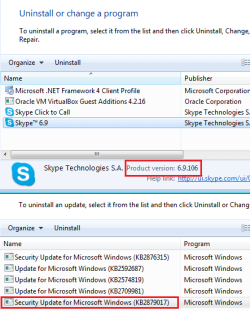
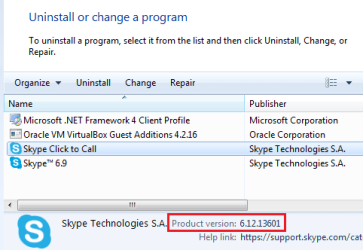
I did see that you had re-installed them... I just wanted to make sure that Skype did not barf after the latest OS/IE update/patch. Skype seems fine - so much for that theory.
All that I can suggest at this point is more types of scans for infections like I mentioned earlier.
Computer type Laptop Computer Manufacturer/Model Number Employer provided Dell Latitude OS W7 Pro SP1 64bit CPU i7 Memory 8GB Graphics Card(s) Intel HD Graphics Hard Drives crappy SSD Antivirus Employer mandated Symantec Endpoint Protection Browser Pale Moon 64bit, IE11 64bit & Chrome 64bit
R.I.P Gary and Randy
Power User
VIP
Thread Starter
Skype version is the same as you specified. The culprit is still mshtml.dll.
Computer type Laptop Computer Manufacturer/Model Number Dell Inspiron N4030 OS Windows 10 Home 64-Bit CPU Intel Core i3 380M @ 2.53GHz Arrandale 32nm Technology Motherboard Dell Inc. 0K13WN (CPU 1) Memory Total RAM = 4.00 GB and Usable RAM = 3.80 GB Graphics Card(s) Generic PnP Monitor (1366x768@60Hz) Intel HD Graphics (Dell) Sound Card IDT High Definition Audio CODEC Bluetooth Hands-free Audio Monitor(s) Displays 1 Screen Resolution 1366 x 768 x 32 bits (4294967296 colors) @ 59 Hz Hard Drives ATA WDC WD3200BEVT-7 SCSI Disk Device Size = 320.00 GB Internet Speed 6-14 Mbps Max and 153 Kbps Min Antivirus MBAM Pro, Windows Defender, SuperAntiSpyware, SpyBot S&D Browser Microsoft Edge, IE11, Google Chrome, Firefox Other Info Your dude.
R.I.P Gary and Randy
Power User
VIP
Thread Starter
Thank you very much to all of you who have helped! I uninstalled that update and after two restarts, the applications started to work! Thank you very much.
Computer type Laptop Computer Manufacturer/Model Number Dell Inspiron N4030 OS Windows 10 Home 64-Bit CPU Intel Core i3 380M @ 2.53GHz Arrandale 32nm Technology Motherboard Dell Inc. 0K13WN (CPU 1) Memory Total RAM = 4.00 GB and Usable RAM = 3.80 GB Graphics Card(s) Generic PnP Monitor (1366x768@60Hz) Intel HD Graphics (Dell) Sound Card IDT High Definition Audio CODEC Bluetooth Hands-free Audio Monitor(s) Displays 1 Screen Resolution 1366 x 768 x 32 bits (4294967296 colors) @ 59 Hz Hard Drives ATA WDC WD3200BEVT-7 SCSI Disk Device Size = 320.00 GB Internet Speed 6-14 Mbps Max and 153 Kbps Min Antivirus MBAM Pro, Windows Defender, SuperAntiSpyware, SpyBot S&D Browser Microsoft Edge, IE11, Google Chrome, Firefox Other Info Your dude.