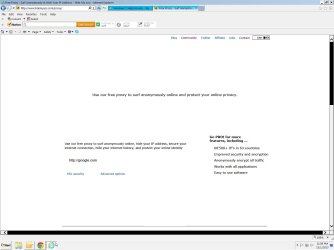
certain aspects of a webpage are 'invisible' unless using "Chrome"
I'm attaching a side-by-side screenshot to make the point visually. The issue is a broad one and occurs on different web sites when there's a button that takes some action (like 'download' etc. etc.); the button will appear when using 'Chrome' but when using IE or Mozilla.
IT TURNS OUT THAT THE THEME THAT CAME WITH THE PC WAS THE CULPRIT. ACER HAD PRE-CONFIGURED THEIR 'ACER' THEME AND WHEN THE WINDOWS 7 THEME WAS INSTALLED INSTEAD THINGS NORMALIZED!!
I'm attaching a side-by-side screenshot to make the point visually. The issue is a broad one and occurs on different web sites when there's a button that takes some action (like 'download' etc. etc.); the button will appear when using 'Chrome' but when using IE or Mozilla.
IT TURNS OUT THAT THE THEME THAT CAME WITH THE PC WAS THE CULPRIT. ACER HAD PRE-CONFIGURED THEIR 'ACER' THEME AND WHEN THE WINDOWS 7 THEME WAS INSTALLED INSTEAD THINGS NORMALIZED!!
Attachments
Last edited:
My Computer
At a glance
Microsoft Windows 7 Professional , Service Pa...Intel(R) Core(TM) i7-3770S CPU @ 3.10GHz8192 MBIntel(R) HD Graphics 4000
- Computer type
- PC/Desktop
- Computer Manufacturer/Model Number
- Acer
- OS
- Microsoft Windows 7 Professional , Service Pack 1 64 bit
- CPU
- Intel(R) Core(TM) i7-3770S CPU @ 3.10GHz
- Motherboard
- Chipset
- Memory
- 8192 MB
- Graphics Card(s)
- Intel(R) HD Graphics 4000
- Sound Card
- Realtek High Definition Audio
- Monitor(s) Displays
- Samsung SyncMaster 204B
- Hard Drives
- ST1000DM003-1CH162, 931.51 GB
- Keyboard
- Acer
- Mouse
- Acer
- Antivirus
- Norton 360
- Browser
- IE, Firefox, Chrome
- Other Info
- Malwarebytes installed