
Solved Certain Programs are blurry

freezepop

New member
Local time
7:38 PM
Messages
20
Hello
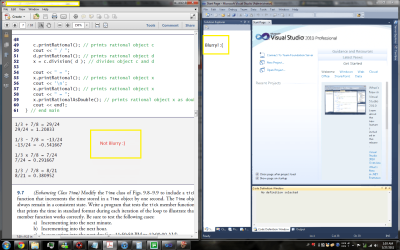
I recently came across this issue where some programs are oddly blurry and fuzzy. I never had this issue until recently, I have attached a comparison of two programs running at the same time; as you can see one of them is terribly fuzzy whilst the other has no issues. I would be grateful if someone can assist me with the matter. Thank you very much
 

Attachments
  • blurrry programs.png
    blurrry programs.png
    219.6 KB · Views: 1,096

My Computer

Computer Manufacturer/Model Number
Custom
OS
Windows 7 Pro (x64)
CPU
Core i-7 920
Motherboard
Foxconn Flaming Blade
Memory
6 GB OCZ DD3
Graphics Card(s)
ATI radeon HD 5770 1 GB memory
Sound Card
Realtek HD(built in)
Monitor(s) Displays
21 in Samsung SyncMaster 206BW
Screen Resolution
1680x1050
Hard Drives
400 GB Seagate Barracuda (IDE)
320 GB WD (SATA)
1 TB Samsung
1 TB Samsung
120 GB WD Passport (USB External)
PSU
NZXT HAL-E 650 Watt
Case
Cooler Master cs 960
Cooling
Zalman CNPS 9900 MAX
Keyboard
Logitech Illuminated Keyboard
Mouse
Razer copperhead
Internet Speed
15 mbps Optimum Online Cable (Broadband)
Hello
I recently came across this issue where some programs are oddly blurry and fuzzy. I never had this issue until recently, I have attached a comparison of two programs running at the same time; as you can see one of them is terribly fuzzy whilst the other has no issues. I would be grateful if someone can assist me with the matter. Thank you very much

Have you configured large fonts in the display control panel?
 

My Computer

Computer type
Laptop
Computer Manufacturer/Model Number
Apple
OS
El Capitan / Windows 10
CPU
i7-4980HQ
Memory
16GB
Graphics Card(s)
Iris 5200
Check out:

Control Panel\All Control Panel Items\Display - Adjust ClearType Text - ClearType tuning - will affect Windows fonts. Try it turned off and also try tuning it to suit your monitor display/graphics card and personal preferences.

Your C++ tutor window is a PDF, (is that Adobe Acrobat Pro?) and uses a different display technique - but reading Dietel and Dietel tends to make everything go blurry after a while anyway! :)
 

My Computer

Computer Manufacturer/Model Number
Acer 7520, Packard Bell dot se, Acer travelmate 2423
OS
Win 7 Ult + Starter, XP Pro +Home, 2kAS, Linux Mint 8, SuperOS
CPU
AMD 64 Athlon X2 , Intel Atom N450, Intel Celeron M 1.50 Ghz
Motherboard
Acer Fuquene
Memory
2.5GB ; 1GB; 2GB
Graphics Card(s)
Nvidia GeForce7000m; Intel; Intel
Sound Card
Realtek AC57
Monitor(s) Displays
17" ;10.1"; 19"
Screen Resolution
1440x900;1024x600;1440x900;
Hard Drives
WD 80, WD 320;
PSU
19v
Case
Laptop
Cooling
Air
Internet Speed
9.7Mb/s down 0.99Mb/s up
Other Info
ISP VIRGINMEDIA 10M cable broadband - D-Link DIR615 wireless router, 3Com OfficeConnect ASDL router used as wireless extender switch
Hello
I recently came across this issue where some programs are oddly blurry and fuzzy. I never had this issue until recently, I have attached a comparison of two programs running at the same time; as you can see one of them is terribly fuzzy whilst the other has no issues. I would be grateful if someone can assist me with the matter. Thank you very much

Have you configured large fonts in the display control panel?

The custom text size DPI is at smaller - 100% (default)

Check out:

Control Panel\All Control Panel Items\Display - Adjust ClearType Text - ClearType tuning - will affect Windows fonts. Try it turned off and also try tuning it to suit your monitor display/graphics card and personal preferences.

Your C++ tutor window is a PDF, (is that Adobe Acrobat Pro?) and uses a different display technique - but reading Dietel and Dietel tends to make everything go blurry after a while anyway! :)

Tried that but it doesn't seem to be working though, yeah that is Acrobat pro lol...Dietel is pretty bad lol but unfortunately my University class requires it.

Idk why this happens to only to selected few programs...and ironically VS 10 works fine on the windows 7 machines at my university

EDIT: Ok I fixed the issue. I checked to see if there was any hardware acceleration in VS and to my luck there was and it was enabled, so disabling it made the fuzziness go away. If my intuition is right, then I believe anyone with this problem should check to see if the program they are using has hardware acceleration and disable it to see if that fixes the issue. I figure this happens because as fafhrd mentioned some programs use different display techniq and hardware acceleration might be working nicely with those programs.

...
 
Last edited:

My Computer

Computer Manufacturer/Model Number
Custom
OS
Windows 7 Pro (x64)
CPU
Core i-7 920
Motherboard
Foxconn Flaming Blade
Memory
6 GB OCZ DD3
Graphics Card(s)
ATI radeon HD 5770 1 GB memory
Sound Card
Realtek HD(built in)
Monitor(s) Displays
21 in Samsung SyncMaster 206BW
Screen Resolution
1680x1050
Hard Drives
400 GB Seagate Barracuda (IDE)
320 GB WD (SATA)
1 TB Samsung
1 TB Samsung
120 GB WD Passport (USB External)
PSU
NZXT HAL-E 650 Watt
Case
Cooler Master cs 960
Cooling
Zalman CNPS 9900 MAX
Keyboard
Logitech Illuminated Keyboard
Mouse
Razer copperhead
Internet Speed
15 mbps Optimum Online Cable (Broadband)
Hello
I recently came across this issue where some programs are oddly blurry and fuzzy. I never had this issue until recently, I have attached a comparison of two programs running at the same time; as you can see one of them is terribly fuzzy whilst the other has no issues. I would be grateful if someone can assist me with the matter. Thank you very much

Have you configured large fonts in the display control panel?

The custom text size DPI is at smaller - 100% (default)

Check out:

Control Panel\All Control Panel Items\Display - Adjust ClearType Text - ClearType tuning - will affect Windows fonts. Try it turned off and also try tuning it to suit your monitor display/graphics card and personal preferences.

Your C++ tutor window is a PDF, (is that Adobe Acrobat Pro?) and uses a different display technique - but reading Dietel and Dietel tends to make everything go blurry after a while anyway! :)

Tried that but it doesn't seem to be working though, yeah that is Acrobat pro lol...Dietel is pretty bad lol but unfortunately my University class requires it.

Idk why this happens to only to selected few programs...and ironically VS 10 works fine on the windows 7 machines at my university

EDIT: Ok I fixed the issue. I checked to see if there was any hardware acceleration in VS and to my luck there was and it was enabled, so disabling it made the fuzziness go away. If my intuition is right, then I believe anyone with this problem should check to see if the program they are using has hardware acceleration and disable it to see if that fixes the issue. I figure this happens because as fafhrd mentioned some programs use different display techniq and hardware acceleration might be working nicely with those programs.

...

I figured some people might still have this issue, I have an ATI 5770 with CCC 11.4 installed and in order to get rid of the blurry programs w/o disabling hardware acceleration here is what I did:

go to Control center panel

*then Gaming > 3D Application Settings

* uncheck the box [] Morphological filtering (this is under the SMOOTH VISION HD: Anti-Aliasing)

and

* uncheck Enable Surface Format Optimization (under Catalyst A.I)

This should solve any blurry programs even with Hardware acceleration enabled.
 

My Computer

Computer Manufacturer/Model Number
Custom
OS
Windows 7 Pro (x64)
CPU
Core i-7 920
Motherboard
Foxconn Flaming Blade
Memory
6 GB OCZ DD3
Graphics Card(s)
ATI radeon HD 5770 1 GB memory
Sound Card
Realtek HD(built in)
Monitor(s) Displays
21 in Samsung SyncMaster 206BW
Screen Resolution
1680x1050
Hard Drives
400 GB Seagate Barracuda (IDE)
320 GB WD (SATA)
1 TB Samsung
1 TB Samsung
120 GB WD Passport (USB External)
PSU
NZXT HAL-E 650 Watt
Case
Cooler Master cs 960
Cooling
Zalman CNPS 9900 MAX
Keyboard
Logitech Illuminated Keyboard
Mouse
Razer copperhead
Internet Speed
15 mbps Optimum Online Cable (Broadband)
Freezepop that works,I was trying to fix it for months.........Thanks man.....
 

My Computer

Computer Manufacturer/Model Number
Asus
OS
Windows 7 Home 64bit
CPU
AMD Phenom11 1055t
Motherboard
Asus M4A 89GTD PRO/USB3
Memory
corsair 4gb
Graphics Card(s)
sapphire 6850
Sound Card
n/a
Monitor(s) Displays
samsung 1
Hard Drives
WD 1TB BLACK
PSU
CORSAIR HX650W
Case
HAF922
Cooling
Standard
Worked for me on Win 8

Have you configured large fonts in the display control panel?

The custom text size DPI is at smaller - 100% (default)

Check out:

Control Panel\All Control Panel Items\Display - Adjust ClearType Text - ClearType tuning - will affect Windows fonts. Try it turned off and also try tuning it to suit your monitor display/graphics card and personal preferences.

Your C++ tutor window is a PDF, (is that Adobe Acrobat Pro?) and uses a different display technique - but reading Dietel and Dietel tends to make everything go blurry after a while anyway! :)

Tried that but it doesn't seem to be working though, yeah that is Acrobat pro lol...Dietel is pretty bad lol but unfortunately my University class requires it.

Idk why this happens to only to selected few programs...and ironically VS 10 works fine on the windows 7 machines at my university

EDIT: Ok I fixed the issue. I checked to see if there was any hardware acceleration in VS and to my luck there was and it was enabled, so disabling it made the fuzziness go away. If my intuition is right, then I believe anyone with this problem should check to see if the program they are using has hardware acceleration and disable it to see if that fixes the issue. I figure this happens because as fafhrd mentioned some programs use different display techniq and hardware acceleration might be working nicely with those programs.

...

I figured some people might still have this issue, I have an ATI 5770 with CCC 11.4 installed and in order to get rid of the blurry programs w/o disabling hardware acceleration here is what I did:

go to Control center panel

*then Gaming > 3D Application Settings

* uncheck the box [] Morphological filtering (this is under the SMOOTH VISION HD: Anti-Aliasing)

and

* uncheck Enable Surface Format Optimization (under Catalyst A.I)

This should solve any blurry programs even with Hardware acceleration enabled.


Just adding to this: freezepop's method solved the problem for me too - including Windows 8 UI style applications.

Running on Windows 8 Pro x64 with Radeon 5770.
 

My Computer

OS
Windows 8 Pro x64
I know the problem is solved but would like to add that nvidias FXAA does the same thing, some things are blurry and some not when its activated, for instance playing SC2 with FXAA on will make your drivers crash and the text is blurry
 

My Computer

Computer type
PC/Desktop
OS
Windows 7 Home Premium x64
CPU
Intel Core i7 860 (Lynnfield)
Motherboard
Asus P7P55D (LGA1156)
Memory
Corsair Vengeance 9,9,9,24 1600Mhz 1.50v 2x4G
Graphics Card(s)
Asus nVidia 560 GTX
Sound Card
Asus Xonar DG
Monitor(s) Displays
Acer P235H & NEC E201W
Screen Resolution
1920x1080 & 900x1600
Hard Drives
2
PSU
Corsair 650 Modular
Case
Corsair 800D
Cooling
Corsair H80 with Noctua fans
Keyboard
Ducky Shine
Mouse
tT Theron
Internet Speed
100/100
Browser
IE10
I got help from this thread. The solution for me:

Catalyst Control Center > Workstation > Enable 10-bit pixel format support.
 

My Computer

Computer type
PC/Desktop
OS
Win 7 Pro 64 bit
Back
Top