Change aspect ratio

edithegodfather

New member
Member
Local time
1:22 AM
Messages
61
Umm, how do you change the aspect ratio for the desktop? I'm currently on 1680x1050 resolution on a 23' sort of winde screen but it's obvious that the image is stretched along it's height to fit the screen. Normally this would have been the recomended screen resolution but the monitor is not wide enough xD so untill a bit earlier i ran my screen in 1330x1024, it was a bit foggy but at least it fitted well.
I've uopdated my video driver (nvidia) to v190 and now everything's gone crazy, my old resolution doesn't work anymore, the aspect ration doesn't change from 16:9 (or 16:10, i don't know) to 4:3 and the image looks too squary and is sticked to the right side of the screen so there's a big black area in the left side.
The 1680 resolution doesn't look well either cuz it's too wide for my screen.
I need to know how to change the desktop aspect ration from 16:9/10 (don't know) to 4:3. Any info i might use?
I also have a screenshot
http://img136.imageshack.us/img136/262/43985370.png
hope you can see the stretching.

Thnx
 

My Computer

OS
windows 7
Hmm... Interesting.
If the native resolution of your monitor is 1680×1050, then it should look okay using that resolution, without any distortion, or stretching. If your monitors aspect ratio is 4:3, then the native resolution cant be 1680x1050.
In this case the screenshot is useless, can't be seen anything wrong on it.
Can you post a photo of your monitor instead of taking screenshot with the computer? Then we will see I think.

I don't know about nvidia video card settings, I have an ATI card. But in the card's settings, if i set a not native resolution, there is option to center, or stretch the display. There must be something like that in the Nvidia control panel too. Maybe that helps.
 

My Computer

Computer Manufacturer/Model Number
Toshiba Satellite A300-1NO
OS
Windows 7 Professional b7600
CPU
Core2 Duo T5800 @ 2.00GHz
Motherboard
Toshiba Satellite A300
Memory
3GB DDR2-800
Graphics Card(s)
ATI Mobility Radeon HD 3470
Hard Drives
Western Digital WD2500BEVS-26UST0 250GB
Umm, well the monitor's native resolution is 1680 but it doesn't look well (it looks a bit stretched vertically) at aspect ratio 16:9, only 4:3 resolutions look good. So before i updated my video driver i used resolutions that apply on that ratio (1330x1024 and/or 1365x1050) and it fitted, now the same resolutions will look as stretched vertically as 1680 and it will be a very big black area on the left side of the screen (using the monitor buttons to fit the image won't help cuz it's too discentered).
When i first installed windows 7 i kinda had the same problem with image not fitting well but it got solved after i installed the video driver (old one), now i updated it cuz when playing red faction guerrilla i got some video glitches and it's everything as it was before.
Also when playing some old crappy game with no resolution change (ex. starcraft) i'll get some vertical black stripes (like you get at the movies only they're not horizontal) and it's reeeeally reeeeally annoying.
Anyway, does this have to do with windows or with the video drivers?

PS: I'll try to make a photo but i don't have any fancy digital hd camera, only available device is my cell phone which is probably as good as those cameras in the 30's xD , i'll post one tomorrow, hope anyone can decipher anything.
 

My Computer

OS
windows 7
Could you please tell the make and the model of your monitor.

Kari
 

My Computer

Computer type
Laptop
Computer Manufacturer/Model Number
HP ENVY 17-1150eg
OS
Windows 10 Pro x64 EN-GB
CPU
1.6 GHz Intel Core i7-720QM Processor
Memory
6 GB
Graphics Card(s)
ATI Mobility Radeon HD 5850 Graphics
Sound Card
Beats sound system with integrated subwoofer
Monitor(s) Displays
17" laptop display, 22" LED and 32" Full HD TV through HDMI
Screen Resolution
1600*900 (1), 1920*1080 (2&3)
Hard Drives
Internal: 2 x 500 GB SATA Hard Disk Drive 7200 rpm
External: 2TB for backups, 3TB USB3 network drive for media
Cooling
As Envy runs a bit warm, I have it on a Cooler Master pad
Keyboard
Logitech diNovo Media Desktop Laser (bluetooth)
Mouse
Logitech Performance Mouse MX
Internet Speed
50/10 Mbps VDSL
Antivirus
Windows Defender 4.3.9431.0
Browser
Maxthon 3.5.2., IE11
A screen shot is a picture of what's going to the monitor .. Not what's on the monitor.

Just for another way to test your settings ....
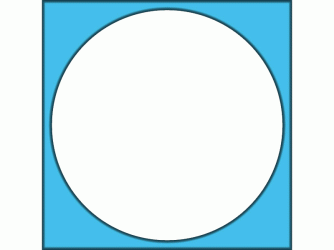
If the attached Circle/Square isn't displayed Round and Square ...
Your driver setting's aspect ratio doesn't match the monitor.
 

Attachments

  • Circle.gif
    Circle.gif
    24.6 KB · Views: 1,629

My Computer

Computer Manufacturer/Model Number
HP d4996t (upgraded)
OS
XP MCE .... XP Pro 64 .... W7 U x64
CPU
E6750, 2.67GHz C2D
Memory
4GB, PC2 6400
Graphics Card(s)
GeForce 9400GT
Monitor(s) Displays
Twin Samsung 2443BWT
Screen Resolution
1920x1200
Hard Drives
Many .. 3 Installed
PSU
460W
Internet Speed
Cable

My Computer

OS
windows 7
OK, one thing we definetely know now is that the native resolution for your monitor is 1680 * 1050, aspect ratio 16:10. If the the picture is not correctly presented using this resolution, you have to adjust the display settings in the monitor.

Go to settings menu of your monitor and adjust the settings for horizontal and vertical size and position. You could also try to reset your monitor from the menu.

Kari
 

My Computer

Computer type
Laptop
Computer Manufacturer/Model Number
HP ENVY 17-1150eg
OS
Windows 10 Pro x64 EN-GB
CPU
1.6 GHz Intel Core i7-720QM Processor
Memory
6 GB
Graphics Card(s)
ATI Mobility Radeon HD 5850 Graphics
Sound Card
Beats sound system with integrated subwoofer
Monitor(s) Displays
17" laptop display, 22" LED and 32" Full HD TV through HDMI
Screen Resolution
1600*900 (1), 1920*1080 (2&3)
Hard Drives
Internal: 2 x 500 GB SATA Hard Disk Drive 7200 rpm
External: 2TB for backups, 3TB USB3 network drive for media
Cooling
As Envy runs a bit warm, I have it on a Cooler Master pad
Keyboard
Logitech diNovo Media Desktop Laser (bluetooth)
Mouse
Logitech Performance Mouse MX
Internet Speed
50/10 Mbps VDSL
Antivirus
Windows Defender 4.3.9431.0
Browser
Maxthon 3.5.2., IE11
I tried those they didn't work. But here's a thing i found out, the problem can be solved if i go into timing at nvidia's control panel>create custom resolution window, there if i choose gtf the resolution will fit the screen perfectly :party: .
 

My Computer

OS
windows 7
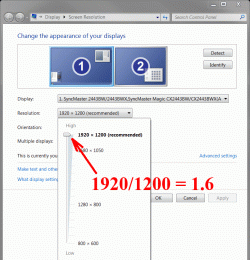
Not sure I understand ???
If the ratio of these numbers = 1.6 .. it should've worked.
M$ could've made it easier and showed us the Ratio
 

Attachments

  • Clip.gif
    Clip.gif
    70.4 KB · Views: 430

My Computer

Computer Manufacturer/Model Number
HP d4996t (upgraded)
OS
XP MCE .... XP Pro 64 .... W7 U x64
CPU
E6750, 2.67GHz C2D
Memory
4GB, PC2 6400
Graphics Card(s)
GeForce 9400GT
Monitor(s) Displays
Twin Samsung 2443BWT
Screen Resolution
1920x1200
Hard Drives
Many .. 3 Installed
PSU
460W
Internet Speed
Cable
My best ratio is somewhere between 1.3-1.4. Anyway, i solved the desktop issue but i didn't solve the old-crappy-games-with-no-resolution-change issue :D , the game appears with black stripes on the edges, that goes for diablo 2 and starcraft.

[Edit]

Solved this one too, you just have to make another resolution of 800x600 on gtf preset and at 16-bit color, even if you're not going to use it still the game will recognize it ;) .
 
Last edited:

My Computer

OS
windows 7
Back
Top