
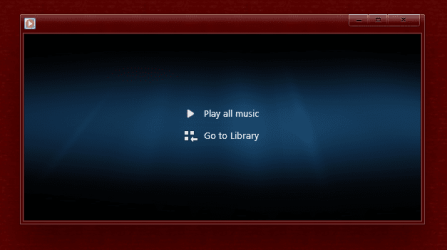
Change background in WMP 12 in "Playing Now" mode

Cov

Banned
Local time
12:21 PM
Messages
140
Location
Europe
Hi,

sometimes small things can be a big challenge.
I'm looking to change the background of Windows Media Player 12 in NOW PLAYING mode into pitch black.
Have searched high and low, but meh ...

any ideas please?
 

Attachments

  • wmp 12.png
    wmp 12.png
    25.6 KB · Views: 27

My Computer My Computer

At a glance

Windos 7 x64i5 3570K2 x 8GB G.SkillHD4000
OS
Windos 7 x64
CPU
i5 3570K
Motherboard
Intel DH77DF
Memory
2 x 8GB G.Skill
Graphics Card(s)
HD4000
Sound Card
on board
Monitor(s) Displays
LG IPS236 x 2
Screen Resolution
1920 x 1200
Hard Drives
Samsung 840 Pro 256GB
PSU
BeQuiet 480 E9 CM Modular
Case
Lian Li PC-Q25 Silver
Cooling
Titan
Keyboard
Dell
Mouse
Microsoft Basic Optical Mouse
Internet Speed
6 MB
Other Info
Don't talk if you can't improve the silence.
Hi,

sometimes small things can be a big challenge.
I'm looking to change the background of Windows Media Player 12 in NOW PLAYING mode into pitch black.
Have searched high and low, but meh ...

any ideas please?

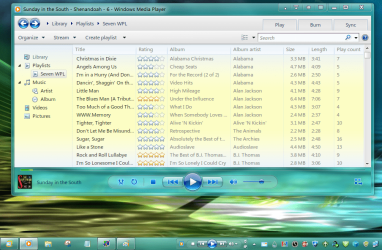
What are you using to edit WMP? In the past, I have changed a lot of elements in WMP but have reverted back to the original with just some minor changes. I did leave the change I made for the Taskbar toolbar. After registering the dll for that, the Taskbar toolbar was a black image and clashed with my taskbar. Personally, I like the WMP 11 look better but after getting it to work, CPU tended to run a little higher.

Untitled.png

I have tossed all my notes I had at one time on what each element that I changed was. Looking at wmploc.dll with Resoruce Hacker, 257 > 5321 looks similar.
 

My Computer My Computer

At a glance

Windows 7 Professional 32-bit (6.1, Build 7600)Intel(R) Pentium(R) 4 3.00 GHz HT2.0 GBATI Mobility Radeon 9600 64MB
Computer Manufacturer/Model Number
Averatec 6130HS-20
OS
Windows 7 Professional 32-bit (6.1, Build 7600)
CPU
Intel(R) Pentium(R) 4 3.00 GHz HT
Memory
2.0 GB
Graphics Card(s)
ATI Mobility Radeon 9600 64MB
Sound Card
Realtek AC'97 Audio
Screen Resolution
1280 x 800
Hard Drives
Seagate 96023A 60GB 7200RPM -
Seagate FreeAgentDesktop 250GB
Cooling
20 Inch Box Fan
Mouse
Targus PAWM10 Wireless Optical Laptop Mouse

My Computer My Computer

At a glance

Windows 7 Ultimate x64 (main), Windows 8 Cons...
Computer Manufacturer/Model Number
ASUS K42JK
OS
Windows 7 Ultimate x64 (main), Windows 8 Consumer Preview x64
  • Like
Reactions: Cov
Found this on deviantART.

change the wmp background by ~yacine29 on deviantART

I haven't tried it myself though. For the pitch black background, you can probably just make one at paint.

Ah, so it was the 5321. The link mentions it as being .jpg. Way back when tinikering with this stuff, I could have sworn the image was .png. More than likely, it wouldn't matter either way though.
 

My Computer My Computer

At a glance

Windows 7 Professional 32-bit (6.1, Build 7600)Intel(R) Pentium(R) 4 3.00 GHz HT2.0 GBATI Mobility Radeon 9600 64MB
Computer Manufacturer/Model Number
Averatec 6130HS-20
OS
Windows 7 Professional 32-bit (6.1, Build 7600)
CPU
Intel(R) Pentium(R) 4 3.00 GHz HT
Memory
2.0 GB
Graphics Card(s)
ATI Mobility Radeon 9600 64MB
Sound Card
Realtek AC'97 Audio
Screen Resolution
1280 x 800
Hard Drives
Seagate 96023A 60GB 7200RPM -
Seagate FreeAgentDesktop 250GB
Cooling
20 Inch Box Fan
Mouse
Targus PAWM10 Wireless Optical Laptop Mouse
Found this on deviantART ...
Thank you very much !!
That's exactly what I was looking for :D


Change WMP Background

1. take control over wmploc.dll
2. open resource tuner* or resource hacker*
3. open windows ► system32 ► wmploc.dll ► 257 ► 5321 (within RT or RH)
4. Replace resource with any JPG 800 x 600
5. Save to different location
6. Close RT or RH, navigate to the storage folder and move to system32 folder
 

My Computer My Computer

At a glance

Windos 7 x64i5 3570K2 x 8GB G.SkillHD4000
OS
Windos 7 x64
CPU
i5 3570K
Motherboard
Intel DH77DF
Memory
2 x 8GB G.Skill
Graphics Card(s)
HD4000
Sound Card
on board
Monitor(s) Displays
LG IPS236 x 2
Screen Resolution
1920 x 1200
Hard Drives
Samsung 840 Pro 256GB
PSU
BeQuiet 480 E9 CM Modular
Case
Lian Li PC-Q25 Silver
Cooling
Titan
Keyboard
Dell
Mouse
Microsoft Basic Optical Mouse
Internet Speed
6 MB
Other Info
Don't talk if you can't improve the silence.
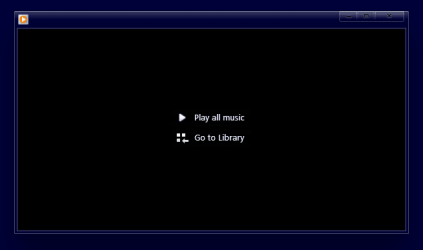
Result
 

Attachments

  • wmp 12 after.png
    wmp 12 after.png
    3.8 KB · Views: 36

My Computer My Computer

At a glance

Windos 7 x64i5 3570K2 x 8GB G.SkillHD4000
OS
Windos 7 x64
CPU
i5 3570K
Motherboard
Intel DH77DF
Memory
2 x 8GB G.Skill
Graphics Card(s)
HD4000
Sound Card
on board
Monitor(s) Displays
LG IPS236 x 2
Screen Resolution
1920 x 1200
Hard Drives
Samsung 840 Pro 256GB
PSU
BeQuiet 480 E9 CM Modular
Case
Lian Li PC-Q25 Silver
Cooling
Titan
Keyboard
Dell
Mouse
Microsoft Basic Optical Mouse
Internet Speed
6 MB
Other Info
Don't talk if you can't improve the silence.
Back
Top