Change boot settings

Win7exp

New member
Local time
11:55 AM
Messages
83
I cant seem to find the boot file in windows 7 build 7600,

i'm dual booting, when I installed 7, 7 was C: and vista became drive d:

but i have storage hard drive which is always drive d, so I made vista drive f

so how can I fix the boot file in 7 to change the drive letter for vista install?
 

My Computer

OS
Windows 7 b7600 x64
CPU
AMD Phenom X4 2.6ghz Black Edition
Motherboard
MSI K9A2 Neo-F
Memory
Corsair Dominator 4GB
Graphics Card(s)
ATI Radeon HD 4850
Sound Card
Realtek Onboard
Monitor(s) Displays
SyncMaster 19"
Screen Resolution
1280 x 1024
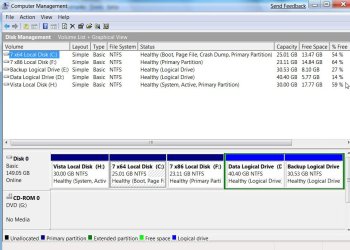
Post a screenshot of Disk Management, like this :

DISKMANAGEMENT2009-02-04_031947.jpg

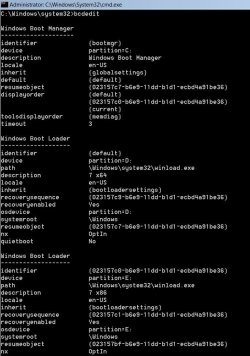
and bcdedit ( type cmd in start search , rt click it and run as admin - when it pops up, type bcdedit , then press enter. )

a102009-02-06_031225.jpg
 

My Computers

System One System Two

  • Computer type
    PC/Desktop
    OS
    7 X64
    CPU
    i5 8400
    Motherboard
    gigabyte b365m ds3h
    Memory
    2x8gb 3200mhz
    Hard Drives
    various
    PSU
    pure power 11 400w cm
    Case
    Coolermaster
    Cooling
    cryorig m9i
  • Computer type
    PC/Desktop
    OS
    7x64
    CPU
    g5400
    Motherboard
    ga b365m ds3h
    Memory
    8gb ddr4 2400
    PSU
    xfx pro 450w
One solution:
Right click MY COMPUTER
Select Manage
Disk Management
Right Click the Vista disk
Select Change Drive Letter and Paths
Select Remove

This will free up the drive letter designation and remove that drive from visibilty within Windows/Explorer.

You can now use the drive letter (freed up) as you please. You will not have access to your Vista Install.
 
thing is I NEED access to the vista install!
 

My Computer

OS
Windows 7 b7600 x64
CPU
AMD Phenom X4 2.6ghz Black Edition
Motherboard
MSI K9A2 Neo-F
Memory
Corsair Dominator 4GB
Graphics Card(s)
ATI Radeon HD 4850
Sound Card
Realtek Onboard
Monitor(s) Displays
SyncMaster 19"
Screen Resolution
1280 x 1024
Back
Top