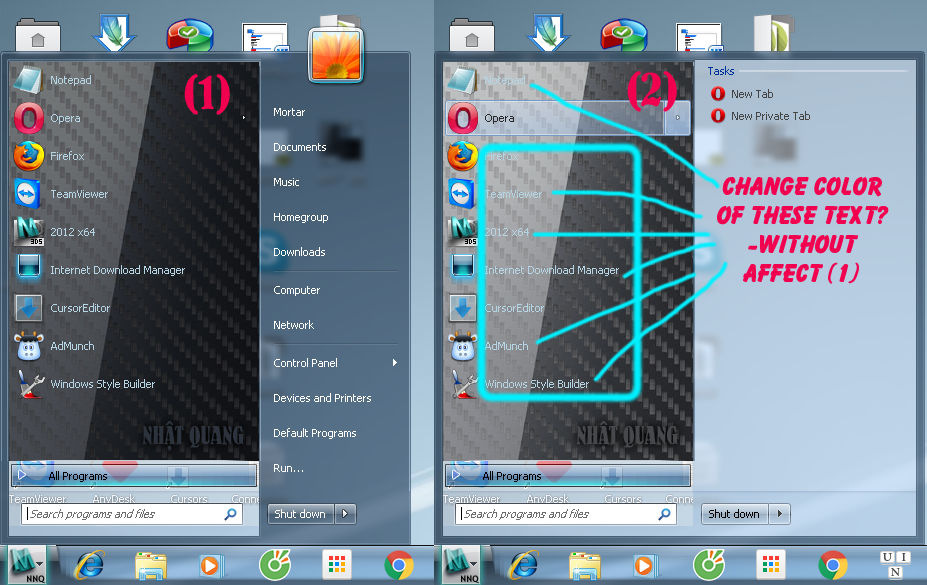
Change color of text in extended mode of start menu?

nnq2603

New member
Local time
5:45 AM
Messages
20
I was searching through many topics in (and outside) this forum, but I haven't find how to edit this text color. I believe it'd be

Start menu > Panel > Basic > Programslistextended > TEXTCOLOR:COLOR

But I modify its value and apply seeing no change. Try figure it out but unsucessfully. Any suggestion and help would be great. Thanks.
dSBIOtZ.gifv
dSBIOtZ.gif
8UtvQtr.jpg

Imgur: The most awesome images on the Internet
https://sendvid.com/hjogynx0

I'm asking about the text color of menu when it's in extended mode. I supposed it was separated from the text color in normal mode, right? See attachments for more details (if other link fails).
 

Attachments

Last edited:

My Computer My Computer

At a glance

Windows 7 Ultimate x64Intel(R) Core(TM) i5-6402P Skylake (14nm) 115...8.00 GB single DDR4 @ 1066MHzIntel(R) HD Graphics 510 (rev6)
OS
Windows 7 Ultimate x64
CPU
Intel(R) Core(TM) i5-6402P Skylake (14nm) 1151 LGA
Motherboard
MSI B150M MORTAR (MS-7972) 2.0
Memory
8.00 GB single DDR4 @ 1066MHz
Graphics Card(s)
Intel(R) HD Graphics 510 (rev6)
Sound Card
High Definition Audio Device
Monitor(s) Displays
HP S2032 1600x900 (60Hz)
Hard Drives
Model ST1000DM 003-1SB10C SCSI Disk Device
Changed the Text Color at Start Menu > Panels > Basic > ProgramsList

Jerry
 

My Computer My Computer

At a glance

Win 7 Pro x64 / Win 10 ProIntel(R) Core(TM) i7-3630QM CPU @ 2.40GHz12 GB(1) Intel(R) HD Graphics 4000 (2) NVIDIA GeFo...
Computer type
Laptop
Computer Manufacturer/Model Number
Sager NP9170
OS
Win 7 Pro x64 / Win 10 Pro
CPU
Intel(R) Core(TM) i7-3630QM CPU @ 2.40GHz
Motherboard
CLEVO P170EM
Memory
12 GB
Graphics Card(s)
(1) Intel(R) HD Graphics 4000 (2) NVIDIA GeForce GTX 675M
Sound Card
(1) Realtek High Definition Audio (2) Intel(R) Display Aud
Monitor(s) Displays
17.3
Screen Resolution
1920x1080
Hard Drives
(1) Samsung 860 EVO 500GB(OS) (1) Samsung 860 EVO 500GB(Data)
Keyboard
Backlite
Antivirus
MSE, Malwarebytes Pro
Browser
Firefox
Other Info
DESKTOP: Custom-built.
OS: Win 10 Pro x64.
CASE: Rosewill R5.
CPU: Intel I5 4670K CPU @ 3.40GHz.
CPU COOLER: Cool Master Hyper 212 EVO.
MOTHERBOARD: Asus Z87-A.
MEMORY: Kingston HyperX 2x4 GB.
GPU: Nvidia Geforce 650 TI.
PSU: Corsair TX750.
DRIVES: (1) Samsung 840 120 GB SSD (2) Western Digital blue 500 GB 7200 RPM.
Thanks Bongo, as I know it's text color of (1) but when I change it it change both (1)&(2)... (I already tried it before post question. Sorry if my question is unclear, I did make note about it in red text on screenshot above) So it's bind together? Also I see the path "Start Menu > Panels > Basic > ProgramsListExtended" and edit that text color but didn't see it affects menu... What use of programslistextended textcolor? Could you explain more about that?
 

My Computer My Computer

At a glance

Windows 7 Ultimate x64Intel(R) Core(TM) i5-6402P Skylake (14nm) 115...8.00 GB single DDR4 @ 1066MHzIntel(R) HD Graphics 510 (rev6)
OS
Windows 7 Ultimate x64
CPU
Intel(R) Core(TM) i5-6402P Skylake (14nm) 1151 LGA
Motherboard
MSI B150M MORTAR (MS-7972) 2.0
Memory
8.00 GB single DDR4 @ 1066MHz
Graphics Card(s)
Intel(R) HD Graphics 510 (rev6)
Sound Card
High Definition Audio Device
Monitor(s) Displays
HP S2032 1600x900 (60Hz)
Hard Drives
Model ST1000DM 003-1SB10C SCSI Disk Device
You're Welcome

So it's bind together?
Yes

What use of programslistextended textcolor?
I don't know, I don't see it change anything.

In your video it looks like the images are different at Start Menu > Panels > Aero > Top > ProgramsList & Start Menu > Panels > Aero > Top > ProgramsListExtended

Jerry
 

My Computer My Computer

At a glance

Win 7 Pro x64 / Win 10 ProIntel(R) Core(TM) i7-3630QM CPU @ 2.40GHz12 GB(1) Intel(R) HD Graphics 4000 (2) NVIDIA GeFo...
Computer type
Laptop
Computer Manufacturer/Model Number
Sager NP9170
OS
Win 7 Pro x64 / Win 10 Pro
CPU
Intel(R) Core(TM) i7-3630QM CPU @ 2.40GHz
Motherboard
CLEVO P170EM
Memory
12 GB
Graphics Card(s)
(1) Intel(R) HD Graphics 4000 (2) NVIDIA GeForce GTX 675M
Sound Card
(1) Realtek High Definition Audio (2) Intel(R) Display Aud
Monitor(s) Displays
17.3
Screen Resolution
1920x1080
Hard Drives
(1) Samsung 860 EVO 500GB(OS) (1) Samsung 860 EVO 500GB(Data)
Keyboard
Backlite
Antivirus
MSE, Malwarebytes Pro
Browser
Firefox
Other Info
DESKTOP: Custom-built.
OS: Win 10 Pro x64.
CASE: Rosewill R5.
CPU: Intel I5 4670K CPU @ 3.40GHz.
CPU COOLER: Cool Master Hyper 212 EVO.
MOTHERBOARD: Asus Z87-A.
MEMORY: Kingston HyperX 2x4 GB.
GPU: Nvidia Geforce 650 TI.
PSU: Corsair TX750.
DRIVES: (1) Samsung 840 120 GB SSD (2) Western Digital blue 500 GB 7200 RPM.
Yes, I use a brighter image to give a impression of highlight/splash effect in menu animation. And I thought text can be modified separately as menu background images. 2 images for background is still working in process, so I continually modify them, that's why you see different from videos and screenshot above.
 

My Computer My Computer

At a glance

Windows 7 Ultimate x64Intel(R) Core(TM) i5-6402P Skylake (14nm) 115...8.00 GB single DDR4 @ 1066MHzIntel(R) HD Graphics 510 (rev6)
OS
Windows 7 Ultimate x64
CPU
Intel(R) Core(TM) i5-6402P Skylake (14nm) 1151 LGA
Motherboard
MSI B150M MORTAR (MS-7972) 2.0
Memory
8.00 GB single DDR4 @ 1066MHz
Graphics Card(s)
Intel(R) HD Graphics 510 (rev6)
Sound Card
High Definition Audio Device
Monitor(s) Displays
HP S2032 1600x900 (60Hz)
Hard Drives
Model ST1000DM 003-1SB10C SCSI Disk Device
Back
Top