Change default extract folder

jfail

New member
Local time
5:46 PM
Messages
18
I often download files to a default folder of C:\My Downloads and then using the Windows 7 extract function extract the files to C:\Hold (my own created folder) to proceed with installation of a program etc. then I come back and delete all the files after finishing up.

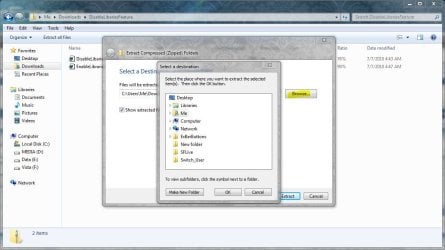
The extract function in Windows 7 always suggests a folder under the folder I downloaded to (C:\My Downloads\folder name) and I have to change it by typing in C:\hold.

Is there any way to set up a default folder of C:\Hold when I extract files so I don't have to type it in everytime ?
 

My Computer

OS
Windows 7
Windows 7 Extract function? I didn't even know there was one.

Download 7-Zip. It's free, quick, and easy. And you can pick a default extract location :)
 

My Computer

Computer Manufacturer/Model Number
Custom Built
OS
Windows 7 Ultimate
CPU
AMD Athlon II X2 245 2.90Ghz
Motherboard
Some Gigabyte one, dont remember model
Memory
3.00 GB
Graphics Card(s)
8800GTS 512MB
Sound Card
Sound Blaster X-Fi Titanium Fatal1ty
Monitor(s) Displays
Dual 22" widescreen
Hard Drives
250GB internal, 500GB internal
PSU
CORSAIR CMPSU-850TX 850W Power Supply
Case
Thermalkake Tsunami Dream
Cooling
Thermaltake Golden Orb II
Keyboard
Saitek Eclipse 2
Mouse
Logitech MX518
For those who don't know, intrinsic ZIP operations was built into Windows maybe 10 years ago, or so. It may have been with XP SP1 or SP2 - I don't remember exactly. Fire up W7 XP Mode and try it with no 7-Zip or WinZIP or WinRAR installed. ZIP files are just folders to XP, Vista and Windows 7.

Bye. :cool:
 

My Computer

Computer Manufacturer/Model Number
Home Brew
OS
Windows 7 Ultimate x64
CPU
i7 970
Motherboard
ASUS Rampage III GENE
Memory
9 GB
Graphics Card(s)
9600GT
Monitor(s) Displays
dual 24" Samsung
Screen Resolution
1920x1200
Hard Drives
VelociRaptor and 4TB of Hitachi RAID 0
PSU
Thermaltake toughpower W0104RU 650W
Case
Thermaltake LANBOX Lite
Internet Speed
30 Mbps Download 1 Mbps Upload (Speedtest.com)
  • Like
Reactions: JMH
Windows 7 Extract function? I didn't even know there was one.

Download 7-Zip. It's free, quick, and easy. And you can pick a default extract location :)

In Win 7 (and others) Just right click on the .zip file and select "Extract All..."
 

My Computer

OS
Windows 7
Try 7-Zip, I understand Windows has an extractor, 7-Zip allows more customization (plus its FREE and EASY) :) :)
 

My Computer

Computer Manufacturer/Model Number
Custom Built
OS
Windows 7 Ultimate
CPU
AMD Athlon II X2 245 2.90Ghz
Motherboard
Some Gigabyte one, dont remember model
Memory
3.00 GB
Graphics Card(s)
8800GTS 512MB
Sound Card
Sound Blaster X-Fi Titanium Fatal1ty
Monitor(s) Displays
Dual 22" widescreen
Hard Drives
250GB internal, 500GB internal
PSU
CORSAIR CMPSU-850TX 850W Power Supply
Case
Thermalkake Tsunami Dream
Cooling
Thermaltake Golden Orb II
Keyboard
Saitek Eclipse 2
Mouse
Logitech MX518
You may not be able to change the default. This falls under the usual category of built-in programs. If Microsoft makes them too functional, they get sued. I agree with the others, to install a 3rd party app. Luckily, there are several good free alternatives, and they all offer much more function than the built-in extraction utility.
 

My Computer

OS
Windows 7 Ultimate x64 SP1
CPU
Intel Core i7-2600
Motherboard
Gigabyte GA-P67A-UD3P-B3
Memory
12 GB Patriot Extreme DDR3-1333
Graphics Card(s)
Nvidia GTX 470
Monitor(s) Displays
Dell UltraSharp 2209WA
Hard Drives
OCZ Agility3 240 GB, WD5001AALS, WD7501AALS
PSU
OCZ ModStream 700W
Case
CoolerMaster HAF 912 Advanced
Cooling
CoolerMaster Hyper 212 Plus
I often download files to a default folder of C:\My Downloads and then using the Windows 7 extract function extract the files to C:\Hold (my own created folder) to proceed with installation of a program etc. then I come back and delete all the files after finishing up.

The extract function in Windows 7 always suggests a folder under the folder I downloaded to (C:\My Downloads\folder name) and I have to change it by typing in C:\hold.

Is there any way to set up a default folder of C:\Hold when I extract files so I don't have to type it in everytime ?

Can't you just use the Browse button instead of typing?
 

Attachments

  • browse.JPG
    browse.JPG
    84 KB · Views: 98

My Computer

Computer type
PC/Desktop
Computer Manufacturer/Model Number
Self Built
OS
Win 10 Pro x64
CPU
Intel I5-2500K @3.3GHz
Motherboard
Asrock P67 Extreme4
Memory
16GB G.Skill Ripjaws X (4x4GB)
Graphics Card(s)
EVGA GeForce 750 Ti SC 2GB
Sound Card
ASUS Xonar DG 5.1 Channels 24-bit 96KHz PCI Interface Sound
Monitor(s) Displays
auria eq2367
Screen Resolution
1920 x 1080
Hard Drives
250GB Samsung 850 EVO SSD
1TB WD Blue
1TB Hitachi
PSU
SeaSonic X 650W 80 Plus Gold
Case
Corsair Obsidian 750D
Cooling
Corsair H60, Three 140mm case fans
Keyboard
Logitech Wireless Keyboard K520
Mouse
Logitech Wireless Mouse M310
Internet Speed
Wave Broadband ~ 100 dn 5 up
Antivirus
Windows Defender, Malwarebytes Premium
Browser
Edge, IE11, Chrome
Other Info
Laptop specs: HP g7-1365dx /
CPU: AMD A6-3420M APU with Radeon(tm) HD Graphics /
RAM: Crucial 8Gb (2x4Gb) /
SSD: Crucial M4-CT128M4SSD2 ATA Device/ FW 000F /
GFX: AMD Radeon HD 6520G /
OS: Windows 10 Pro x64
I often download files to a default folder of C:\My Downloads and then using the Windows 7 extract function extract the files to C:\Hold (my own created folder) to proceed with installation of a program etc. then I come back and delete all the files after finishing up.

The extract function in Windows 7 always suggests a folder under the folder I downloaded to (C:\My Downloads\folder name) and I have to change it by typing in C:\hold.

Is there any way to set up a default folder of C:\Hold when I extract files so I don't have to type it in everytime ?

Can't you just use the Browse button instead of typing?

I think he understands he can use the browse button, all he wants to do is set the DEFAULT directory. Which, as far as I know, can only be done with 3rd party software
 

My Computer

Computer Manufacturer/Model Number
Custom Built
OS
Windows 7 Ultimate
CPU
AMD Athlon II X2 245 2.90Ghz
Motherboard
Some Gigabyte one, dont remember model
Memory
3.00 GB
Graphics Card(s)
8800GTS 512MB
Sound Card
Sound Blaster X-Fi Titanium Fatal1ty
Monitor(s) Displays
Dual 22" widescreen
Hard Drives
250GB internal, 500GB internal
PSU
CORSAIR CMPSU-850TX 850W Power Supply
Case
Thermalkake Tsunami Dream
Cooling
Thermaltake Golden Orb II
Keyboard
Saitek Eclipse 2
Mouse
Logitech MX518
Back
Top