Solved Change default iPhone 4S icon

kingnothing

New member
Member
Local time
9:38 PM
Messages
27
When I plug in my iPhone, the icon in my computer shows a device which doesn't look like an iPhone. See below:
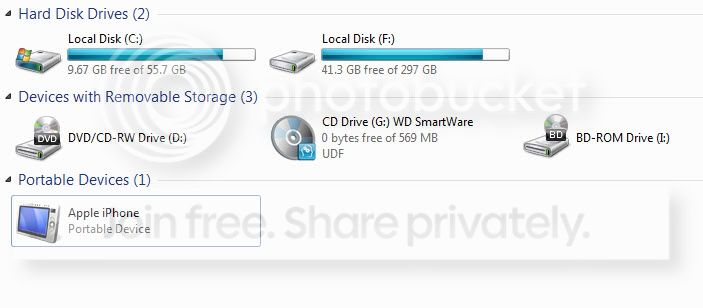
iphone4S.jpg

If I plug in my iPhone 3GS it shows the icon below:
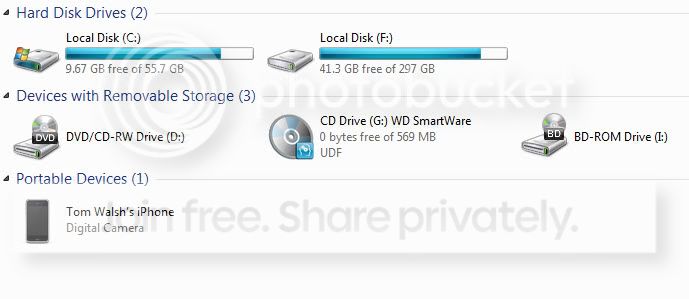
iphone3GS.jpg

Is it possible to change the iPhone 4S icon to a different icon or maybe use the same icon as the iPhone 3GS?

Thanks.
 

My Computer

Computer Manufacturer/Model Number
HP Compaq nc6320
OS
Windows 7 Ultimate 64
CPU
Intel Centrino Duo
Memory
4 GB
Welcome to the Seven Forums
The icon in your first screenshot is icon #2066 in the DDORes.dll and you are using 64-bit so that .dll will be in both C:\Windows\System32 and C:\Windows\SysWOW64 so yes that icon can be changed.
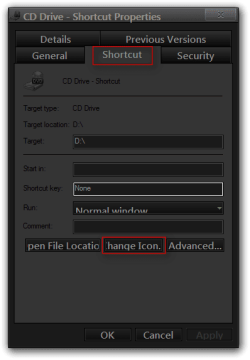
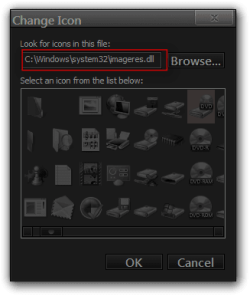
The icon in the second screenshot must have came from the phone to find out where it is located at right click on it and then click on create shortcut which you put a shortcut on the desktop on that shortcut right-click on it go down to properties click on properties choose the shortcut tab and then click on the change icon button in the next open window the address field should show where the icon is. If you get that far I can help you change it if you like.
Here is an example of what I explained to do.
Jerry
CD Drive - Shortcut Properties.pngChange Icon.png
 

My Computer

Computer type
Laptop
Computer Manufacturer/Model Number
Sager NP9170
OS
Win 7 Pro x64 / Win 10 Pro
CPU
Intel(R) Core(TM) i7-3630QM CPU @ 2.40GHz
Motherboard
CLEVO P170EM
Memory
12 GB
Graphics Card(s)
(1) Intel(R) HD Graphics 4000 (2) NVIDIA GeForce GTX 675M
Sound Card
(1) Realtek High Definition Audio (2) Intel(R) Display Aud
Monitor(s) Displays
17.3
Screen Resolution
1920x1080
Hard Drives
(1) Samsung 860 EVO 500GB(OS) (1) Samsung 860 EVO 500GB(Data)
Keyboard
Backlite
Antivirus
MSE, Malwarebytes Pro
Browser
Firefox
Other Info
DESKTOP: Custom-built.
OS: Win 10 Pro x64.
CASE: Rosewill R5.
CPU: Intel I5 4670K CPU @ 3.40GHz.
CPU COOLER: Cool Master Hyper 212 EVO.
MOTHERBOARD: Asus Z87-A.
MEMORY: Kingston HyperX 2x4 GB.
GPU: Nvidia Geforce 650 TI.
PSU: Corsair TX750.
DRIVES: (1) Samsung 840 120 GB SSD (2) Western Digital blue 500 GB 7200 RPM.
  • Like
Reactions: Arc
Thanks Jerry, I'll get on it tomorrow as I have just shut down my pc. If you could help me change it I would really appreciate it. Speak to you later.

Tom.
 

My Computer

Computer Manufacturer/Model Number
HP Compaq nc6320
OS
Windows 7 Ultimate 64
CPU
Intel Centrino Duo
Memory
4 GB
Will be here tomorrow
Jerry
 

My Computer

Computer type
Laptop
Computer Manufacturer/Model Number
Sager NP9170
OS
Win 7 Pro x64 / Win 10 Pro
CPU
Intel(R) Core(TM) i7-3630QM CPU @ 2.40GHz
Motherboard
CLEVO P170EM
Memory
12 GB
Graphics Card(s)
(1) Intel(R) HD Graphics 4000 (2) NVIDIA GeForce GTX 675M
Sound Card
(1) Realtek High Definition Audio (2) Intel(R) Display Aud
Monitor(s) Displays
17.3
Screen Resolution
1920x1080
Hard Drives
(1) Samsung 860 EVO 500GB(OS) (1) Samsung 860 EVO 500GB(Data)
Keyboard
Backlite
Antivirus
MSE, Malwarebytes Pro
Browser
Firefox
Other Info
DESKTOP: Custom-built.
OS: Win 10 Pro x64.
CASE: Rosewill R5.
CPU: Intel I5 4670K CPU @ 3.40GHz.
CPU COOLER: Cool Master Hyper 212 EVO.
MOTHERBOARD: Asus Z87-A.
MEMORY: Kingston HyperX 2x4 GB.
GPU: Nvidia Geforce 650 TI.
PSU: Corsair TX750.
DRIVES: (1) Samsung 840 120 GB SSD (2) Western Digital blue 500 GB 7200 RPM.
Hi, sorry Jerry didn't manage to get online yesterday.

Ok so how do I change the icon #2066 in the DDORes.dll ?
 

My Computer

Computer Manufacturer/Model Number
HP Compaq nc6320
OS
Windows 7 Ultimate 64
CPU
Intel Centrino Duo
Memory
4 GB
I'd like to know this aswell: it does the same for my iPhone 4 or would I have to modify something different than kingnothing?
 

My Computer

Computer Manufacturer/Model Number
iRush Pro
OS
Windows 7 Ultimate x64
CPU
Intel Core i5 2500K Processor
Motherboard
Intel H67 Chipset Motherboard (Micro ATX)
Memory
2x4GB DDR3 1333Mhz Memory
Graphics Card(s)
Novatech Radeon 6770 1GB Graphics Card
Hard Drives
1TB
PSU
Novatech 500W
Case
Novatech ATX Gaming Case
Cooling
-
Keyboard
Novatech Wired Keyboard
Mouse
Novatech Wired Mouse
Internet Speed
VirginMedia 10MB/s

My Computer

Computer type
PC/Desktop
Computer Manufacturer/Model Number
Self built custom
OS
64-bit Windows 11 Pro for Workstations
CPU
Intel i7-8700K OC'd to 5 GHz
Motherboard
ASUS ROG Maximus XI Formula Z390
Memory
64 GB (4x16GB) G.SKILL TridentZ RGB DDR4 3600 MHz
Graphics Card(s)
ASUS ROG-STRIX-GTX1080TI-O11G-GAMING
Sound Card
Integrated
Monitor(s) Displays
2 x Samsung Odyssey G7 27"
Screen Resolution
2560x1440
Hard Drives
1TB Samsung 990 PRO M.2,
4TB Samsung 990 PRO PRO M.2,
TerraMaster F8 SSD Plus NAS
PSU
Seasonic Prime Titanium 850W
Case
Thermaltake Core P3
Cooling
Corsair Hydro H115i
Keyboard
Logitech wireless K800
Mouse
Logitech MX Master 4
Internet Speed
2 Gb/s Download and 100 Mb/s Upload
Antivirus
Malwarebyte Anti-Malware Premium
Browser
Google Chrome
Other Info
Logitech Z625 speaker system,
Logitech BRIO 4K Pro webcam,
HP Color LaserJet Pro MFP M477fdn,
APC SMART-UPS RT 1000 XL - SURT1000XLI,
Galaxy S23 Plus phone
Thanks brink, I'll give that a try! I'll report back how it went. :D
 

My Computer

Computer Manufacturer/Model Number
HP Compaq nc6320
OS
Windows 7 Ultimate 64
CPU
Intel Centrino Duo
Memory
4 GB

My Computer

Computer Manufacturer/Model Number
HP Compaq nc6320
OS
Windows 7 Ultimate 64
CPU
Intel Centrino Duo
Memory
4 GB
You will need to use a Resource Editor like Resource Hacker it's free I use Restorator - Bome Software - Restorator - the resource editor for customization, localization, and translation. it's not free but has a 30 day trial (if you like it and send them an e-mail sometimes they will sell you a student license which is almost half off that is what I did).
You will want to use a copy of the DDORes.dll and put it on your desktop to modify it.
What you wanted to is replace the icon with your icon then save it which should give you a new DDORes.dll with the original named as backup.
After you have modified the .dll you will need to take ownership give yourself permission and rename the DDORes.dll to DDORes.bak.dll in C:\Windows\System32 & C:\Windows\SysWOW64 these are not the same .dll so don't get the one from System32 mixed up from the one in SysWOW64 do them separately
Follow post #6 from this thread will show you how to do it just substitute DDORes.dll where it says shell32.dll http://www.sevenforums.com/customization/179502-basic-networking-information.html#post1525656
I have not had good luck with resource hacker some have that's why I use restorator
Let me know if you need more explanation or help with this. If you have the icon post it here and I will do it for you.
Jerry
 

My Computer

Computer type
Laptop
Computer Manufacturer/Model Number
Sager NP9170
OS
Win 7 Pro x64 / Win 10 Pro
CPU
Intel(R) Core(TM) i7-3630QM CPU @ 2.40GHz
Motherboard
CLEVO P170EM
Memory
12 GB
Graphics Card(s)
(1) Intel(R) HD Graphics 4000 (2) NVIDIA GeForce GTX 675M
Sound Card
(1) Realtek High Definition Audio (2) Intel(R) Display Aud
Monitor(s) Displays
17.3
Screen Resolution
1920x1080
Hard Drives
(1) Samsung 860 EVO 500GB(OS) (1) Samsung 860 EVO 500GB(Data)
Keyboard
Backlite
Antivirus
MSE, Malwarebytes Pro
Browser
Firefox
Other Info
DESKTOP: Custom-built.
OS: Win 10 Pro x64.
CASE: Rosewill R5.
CPU: Intel I5 4670K CPU @ 3.40GHz.
CPU COOLER: Cool Master Hyper 212 EVO.
MOTHERBOARD: Asus Z87-A.
MEMORY: Kingston HyperX 2x4 GB.
GPU: Nvidia Geforce 650 TI.
PSU: Corsair TX750.
DRIVES: (1) Samsung 840 120 GB SSD (2) Western Digital blue 500 GB 7200 RPM.
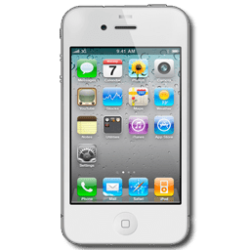
Hi Jerry, ok, I have an image that I want to use as an icon(see attached image). Could you do it with this image or does it need to be an .ico?
 

Attachments

  • iPhone 4S v6.png
    iPhone 4S v6.png
    16.5 KB · Views: 1,429

My Computer

Computer Manufacturer/Model Number
HP Compaq nc6320
OS
Windows 7 Ultimate 64
CPU
Intel Centrino Duo
Memory
4 GB
Here you go I converted your .png to .ico if you need help changing that .dll let me know.
Hint: Make a system restore point http://www.sevenforums.com/tutorials/697-system-restore-point-create.html then
Turned off/move the slider all the way down on UAC http://www.sevenforums.com/tutorials/299-user-account-control-uac-change-notification-settings.html then restart your computer change the .dll and then put your UAC back to the original settings this will make it easier the computer will bark at you so much.
Jerry

Go to Post # 52 for the right .dll http://www.sevenforums.com/customization/202963-change-default-iphone-4s-icon-6.html#post1718792
 
Last edited:

My Computer

Computer type
Laptop
Computer Manufacturer/Model Number
Sager NP9170
OS
Win 7 Pro x64 / Win 10 Pro
CPU
Intel(R) Core(TM) i7-3630QM CPU @ 2.40GHz
Motherboard
CLEVO P170EM
Memory
12 GB
Graphics Card(s)
(1) Intel(R) HD Graphics 4000 (2) NVIDIA GeForce GTX 675M
Sound Card
(1) Realtek High Definition Audio (2) Intel(R) Display Aud
Monitor(s) Displays
17.3
Screen Resolution
1920x1080
Hard Drives
(1) Samsung 860 EVO 500GB(OS) (1) Samsung 860 EVO 500GB(Data)
Keyboard
Backlite
Antivirus
MSE, Malwarebytes Pro
Browser
Firefox
Other Info
DESKTOP: Custom-built.
OS: Win 10 Pro x64.
CASE: Rosewill R5.
CPU: Intel I5 4670K CPU @ 3.40GHz.
CPU COOLER: Cool Master Hyper 212 EVO.
MOTHERBOARD: Asus Z87-A.
MEMORY: Kingston HyperX 2x4 GB.
GPU: Nvidia Geforce 650 TI.
PSU: Corsair TX750.
DRIVES: (1) Samsung 840 120 GB SSD (2) Western Digital blue 500 GB 7200 RPM.
Will that attached System32 file work for 32 Bit and would this work for an original iPhone 4 (not S)?
 

My Computer

Computer Manufacturer/Model Number
iRush Pro
OS
Windows 7 Ultimate x64
CPU
Intel Core i5 2500K Processor
Motherboard
Intel H67 Chipset Motherboard (Micro ATX)
Memory
2x4GB DDR3 1333Mhz Memory
Graphics Card(s)
Novatech Radeon 6770 1GB Graphics Card
Hard Drives
1TB
PSU
Novatech 500W
Case
Novatech ATX Gaming Case
Cooling
-
Keyboard
Novatech Wired Keyboard
Mouse
Novatech Wired Mouse
Internet Speed
VirginMedia 10MB/s
Will that attached System32 file work for 32 Bit and would this work for an original iPhone 4 (not S)?
No that is from a 64-bit system if you would like one for 32-bit I can make one up I have a 32-bit desktop I can get it from.
I am not sure it'll work for the original iPhone4
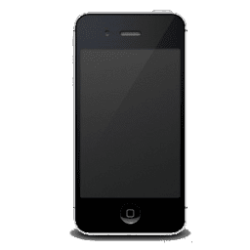
I found a black icon to if anyone is interested.
Jerry
 

Attachments

  • phone.png
    phone.png
    5.4 KB · Views: 1,404

My Computer

Computer type
Laptop
Computer Manufacturer/Model Number
Sager NP9170
OS
Win 7 Pro x64 / Win 10 Pro
CPU
Intel(R) Core(TM) i7-3630QM CPU @ 2.40GHz
Motherboard
CLEVO P170EM
Memory
12 GB
Graphics Card(s)
(1) Intel(R) HD Graphics 4000 (2) NVIDIA GeForce GTX 675M
Sound Card
(1) Realtek High Definition Audio (2) Intel(R) Display Aud
Monitor(s) Displays
17.3
Screen Resolution
1920x1080
Hard Drives
(1) Samsung 860 EVO 500GB(OS) (1) Samsung 860 EVO 500GB(Data)
Keyboard
Backlite
Antivirus
MSE, Malwarebytes Pro
Browser
Firefox
Other Info
DESKTOP: Custom-built.
OS: Win 10 Pro x64.
CASE: Rosewill R5.
CPU: Intel I5 4670K CPU @ 3.40GHz.
CPU COOLER: Cool Master Hyper 212 EVO.
MOTHERBOARD: Asus Z87-A.
MEMORY: Kingston HyperX 2x4 GB.
GPU: Nvidia Geforce 650 TI.
PSU: Corsair TX750.
DRIVES: (1) Samsung 840 120 GB SSD (2) Western Digital blue 500 GB 7200 RPM.
Hi Bongo, please use this image:

iphone%204G.png


If not use the iPhone 4S White Icon, they are exactly the same in visuals except one is a different colour and has a line on the side the iPhone 4 doesn't.

And yes please send me the 32 Bit version.

Thanks.
 

My Computer

Computer Manufacturer/Model Number
iRush Pro
OS
Windows 7 Ultimate x64
CPU
Intel Core i5 2500K Processor
Motherboard
Intel H67 Chipset Motherboard (Micro ATX)
Memory
2x4GB DDR3 1333Mhz Memory
Graphics Card(s)
Novatech Radeon 6770 1GB Graphics Card
Hard Drives
1TB
PSU
Novatech 500W
Case
Novatech ATX Gaming Case
Cooling
-
Keyboard
Novatech Wired Keyboard
Mouse
Novatech Wired Mouse
Internet Speed
VirginMedia 10MB/s
Last edited:

My Computer

Computer type
Laptop
Computer Manufacturer/Model Number
Sager NP9170
OS
Win 7 Pro x64 / Win 10 Pro
CPU
Intel(R) Core(TM) i7-3630QM CPU @ 2.40GHz
Motherboard
CLEVO P170EM
Memory
12 GB
Graphics Card(s)
(1) Intel(R) HD Graphics 4000 (2) NVIDIA GeForce GTX 675M
Sound Card
(1) Realtek High Definition Audio (2) Intel(R) Display Aud
Monitor(s) Displays
17.3
Screen Resolution
1920x1080
Hard Drives
(1) Samsung 860 EVO 500GB(OS) (1) Samsung 860 EVO 500GB(Data)
Keyboard
Backlite
Antivirus
MSE, Malwarebytes Pro
Browser
Firefox
Other Info
DESKTOP: Custom-built.
OS: Win 10 Pro x64.
CASE: Rosewill R5.
CPU: Intel I5 4670K CPU @ 3.40GHz.
CPU COOLER: Cool Master Hyper 212 EVO.
MOTHERBOARD: Asus Z87-A.
MEMORY: Kingston HyperX 2x4 GB.
GPU: Nvidia Geforce 650 TI.
PSU: Corsair TX750.
DRIVES: (1) Samsung 840 120 GB SSD (2) Western Digital blue 500 GB 7200 RPM.
Thanks, turns out that on this PC the iphone already has an iPhone Icon but I remember plugging it into my Netbook it had the same Icon kingnothing had

kingnothing said:

Both are the same OS :S.

I'll keep this in my Ext. Hard Drive just in case though.

Thank You.
 

My Computer

Computer Manufacturer/Model Number
iRush Pro
OS
Windows 7 Ultimate x64
CPU
Intel Core i5 2500K Processor
Motherboard
Intel H67 Chipset Motherboard (Micro ATX)
Memory
2x4GB DDR3 1333Mhz Memory
Graphics Card(s)
Novatech Radeon 6770 1GB Graphics Card
Hard Drives
1TB
PSU
Novatech 500W
Case
Novatech ATX Gaming Case
Cooling
-
Keyboard
Novatech Wired Keyboard
Mouse
Novatech Wired Mouse
Internet Speed
VirginMedia 10MB/s
Here you go I converted your .png to .ico if you need help changing that .dll let me know.
Hint: Make a system restore point http://www.sevenforums.com/tutorials/697-system-restore-point-create.html then
Turned off/move the slider all the way down on UAC http://www.sevenforums.com/tutorials/299-user-account-control-uac-change-notification-settings.html then restart your computer change the .dll and then put your UAC back to the original settings this will make it easier the computer will bark at you so much.
Jerry

Thanks Jerry,

I've changed the .dll files but the icon hasn't changed. Is there a cache that needs clearing or something?
 

My Computer

Computer Manufacturer/Model Number
HP Compaq nc6320
OS
Windows 7 Ultimate 64
CPU
Intel Centrino Duo
Memory
4 GB
Here you go I converted your .png to .ico if you need help changing that .dll let me know.
Hint: Make a system restore point http://www.sevenforums.com/tutorials/697-system-restore-point-create.html then
Turned off/move the slider all the way down on UAC http://www.sevenforums.com/tutorials/299-user-account-control-uac-change-notification-settings.html then restart your computer change the .dll and then put your UAC back to the original settings this will make it easier the computer will bark at you so much.
Jerry

Thanks Jerry,

I've changed the .dll files but the icon hasn't changed. Is there a cache that needs clearing or something?

Yes I am sorry here you go http://www.sevenforums.com/tutorials/49819-icon-cache-rebuild.html
Jerry
 

My Computer

Computer type
Laptop
Computer Manufacturer/Model Number
Sager NP9170
OS
Win 7 Pro x64 / Win 10 Pro
CPU
Intel(R) Core(TM) i7-3630QM CPU @ 2.40GHz
Motherboard
CLEVO P170EM
Memory
12 GB
Graphics Card(s)
(1) Intel(R) HD Graphics 4000 (2) NVIDIA GeForce GTX 675M
Sound Card
(1) Realtek High Definition Audio (2) Intel(R) Display Aud
Monitor(s) Displays
17.3
Screen Resolution
1920x1080
Hard Drives
(1) Samsung 860 EVO 500GB(OS) (1) Samsung 860 EVO 500GB(Data)
Keyboard
Backlite
Antivirus
MSE, Malwarebytes Pro
Browser
Firefox
Other Info
DESKTOP: Custom-built.
OS: Win 10 Pro x64.
CASE: Rosewill R5.
CPU: Intel I5 4670K CPU @ 3.40GHz.
CPU COOLER: Cool Master Hyper 212 EVO.
MOTHERBOARD: Asus Z87-A.
MEMORY: Kingston HyperX 2x4 GB.
GPU: Nvidia Geforce 650 TI.
PSU: Corsair TX750.
DRIVES: (1) Samsung 840 120 GB SSD (2) Western Digital blue 500 GB 7200 RPM.
Here you go I converted your .png to .ico if you need help changing that .dll let me know.
Hint: Make a system restore point http://www.sevenforums.com/tutorials/697-system-restore-point-create.html then
Turned off/move the slider all the way down on UAC http://www.sevenforums.com/tutorials/299-user-account-control-uac-change-notification-settings.html then restart your computer change the .dll and then put your UAC back to the original settings this will make it easier the computer will bark at you so much.
Jerry

Thanks Jerry,

I've changed the .dll files but the icon hasn't changed. Is there a cache that needs clearing or something?

Yes I am sorry here you go http://www.sevenforums.com/tutorials/49819-icon-cache-rebuild.html
Jerry

Unfortunately this hasn't worked. Anything I can do?
 

My Computer

Computer Manufacturer/Model Number
HP Compaq nc6320
OS
Windows 7 Ultimate 64
CPU
Intel Centrino Duo
Memory
4 GB
Back
Top