Change Document To Folder Link?

BigAdam

New member
Local time
11:28 PM
Messages
18
Hey Folks.

This is annoying the hell out of me so I thought I'd ask.

On the start menu you have the "Documents" link under the user name. Mine takes me to library link to My Documents but it won't keep the icons the right size. If I go via the start menu Document link then into My Pictures it keeps the icon sizes as medium. I prefer large icon sizes for My Pictures but if I change it and back up all my icons are then large size.

So, can I change the document link on the start menu from a library to a straight link to a folder where I keep my documents? Or delete it and add my own link instead?

It's just really annoying me now and I'm probably going to format my PC again tonight.

Ta for any help.
 

My Computer

OS
Window 7 ; Home Premium
Hey Folks.

This is annoying the hell out of me so I thought I'd ask.

On the start menu you have the "Documents" link under the user name. Mine takes me to library link to My Documents but it won't keep the icons the right size. If I go via the start menu Document link then into My Pictures it keeps the icon sizes as medium. I prefer large icon sizes for My Pictures but if I change it and back up all my icons are then large size.

So, can I change the document link on the start menu from a library to a straight link to a folder where I keep my documents? Or delete it and add my own link instead?

It's just really annoying me now and I'm probably going to format my PC again tonight.

Ta for any help.


No problem...

Right click on the Windows Orb on the taskbar...
Then select Properties from the menu...
On the dialog's "start menu tab" click "Customize"...
Set it up as you need it.

For the icon size thing... If you set the icon size and/or display properties in a given folder and then close it, it will write a hidden file in that folder and remember your settings. The next time you come to that folder it should show up as you're used to.
 

My Computer

Computer Manufacturer/Model Number
Homebrew
OS
XP Pro SP3 X86 / Win7 Pro X86
CPU
Amd 64 x2 4200 (2.4ghz)
Motherboard
Asus M2N-MX SE Plus
Memory
Kingston DDR2 800 2gb
Graphics Card(s)
Nvidia GF-8400
Sound Card
Realtek on Motherboard
Monitor(s) Displays
Acer x-193bw
Screen Resolution
1440 x 900
Hard Drives
Western Digital 500g
PSU
350watt In-Win
Case
In-Win
Cooling
Air
Keyboard
yes
Mouse
yes
Internet Speed
5mpbs
Other Info
Also ASRock ION 330 as HTPC (on XP).
Acer Aspire as GP netbook (on XP).
No problem...

Right click on the Windows Orb on the taskbar...
Then select Properties from the menu...
On the dialog's "start menu tab" click "Customize"...
Set it up as you need it.

For the icon size thing... If you set the icon size and/or display properties in a given folder and then close it, it will write a hidden file in that folder and remember your settings. The next time you come to that folder it should show up as you're used to.

Yo, yeah thats not swinging it.

Hold on, an example. The top half of the pic shows my documents folder which I got to via My Computer. It's set how I want and if I go into My Pictures from there then the My Pictures folder has large icons but I come back to My Documents its still how I left it with medium icons.


IF I go via Start Menu to Documents (library version) then I'm stuck with the large thumbnails from where I've been into My Pictures before. It ONLY does this on the library version.

Thats my issue.
 

My Computer

OS
Window 7 ; Home Premium
Hello Adam,

Windows 7 remembers folder view settings for each specific location.

In Libraries, all folder view settings are shared in all subfolders in that particular library.


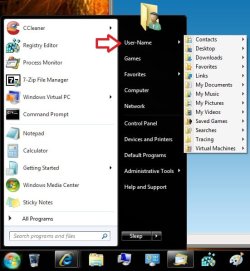
You would want to open your Documents folder directly from the C:\User\(user-name)\My Documents location instead of from within the Library location to be able to have separate folder views. A workaround for this is to open your My Documents folder, and any other user folder, from within your Start Menu Personal folder button set to display as a menu instead of the My Documents button in the Start Menu. Opening it from the Personal folder button will open it directly to the C:\User\(user-name) location instead of from the library location.


Start_Menu.jpg

Hope this helps,
Shawn
 

My Computer

Computer type
PC/Desktop
Computer Manufacturer/Model Number
Self built custom
OS
64-bit Windows 11 Pro for Workstations
CPU
Intel i7-8700K OC'd to 5 GHz
Motherboard
ASUS ROG Maximus XI Formula Z390
Memory
64 GB (4x16GB) G.SKILL TridentZ RGB DDR4 3600 MHz
Graphics Card(s)
ASUS ROG-STRIX-GTX1080TI-O11G-GAMING
Sound Card
Integrated
Monitor(s) Displays
2 x Samsung Odyssey G7 27"
Screen Resolution
2560x1440
Hard Drives
1TB Samsung 990 PRO M.2,
4TB Samsung 990 PRO PRO M.2,
TerraMaster F8 SSD Plus NAS
PSU
Seasonic Prime Titanium 850W
Case
Thermaltake Core P3
Cooling
Corsair Hydro H115i
Keyboard
Logitech wireless K800
Mouse
Logitech MX Master 4
Internet Speed
2 Gb/s Download and 100 Mb/s Upload
Antivirus
Malwarebyte Anti-Malware Premium
Browser
Google Chrome
Other Info
Logitech Z625 speaker system,
Logitech BRIO 4K Pro webcam,
HP Color LaserJet Pro MFP M477fdn,
APC SMART-UPS RT 1000 XL - SURT1000XLI,
Galaxy S23 Plus phone
Hey Shawn,

So there's pretty much no way to change the way that link works?

Rats.

Do have great hatred for link menus too.

Ta for the info though
 

My Computer

OS
Window 7 ; Home Premium
Well, another workaround is to pin the C:\User\(user-name)\My Documents folder to either the Start Menu or taskbar to use instead.
 

My Computer

Computer type
PC/Desktop
Computer Manufacturer/Model Number
Self built custom
OS
64-bit Windows 11 Pro for Workstations
CPU
Intel i7-8700K OC'd to 5 GHz
Motherboard
ASUS ROG Maximus XI Formula Z390
Memory
64 GB (4x16GB) G.SKILL TridentZ RGB DDR4 3600 MHz
Graphics Card(s)
ASUS ROG-STRIX-GTX1080TI-O11G-GAMING
Sound Card
Integrated
Monitor(s) Displays
2 x Samsung Odyssey G7 27"
Screen Resolution
2560x1440
Hard Drives
1TB Samsung 990 PRO M.2,
4TB Samsung 990 PRO PRO M.2,
TerraMaster F8 SSD Plus NAS
PSU
Seasonic Prime Titanium 850W
Case
Thermaltake Core P3
Cooling
Corsair Hydro H115i
Keyboard
Logitech wireless K800
Mouse
Logitech MX Master 4
Internet Speed
2 Gb/s Download and 100 Mb/s Upload
Antivirus
Malwarebyte Anti-Malware Premium
Browser
Google Chrome
Other Info
Logitech Z625 speaker system,
Logitech BRIO 4K Pro webcam,
HP Color LaserJet Pro MFP M477fdn,
APC SMART-UPS RT 1000 XL - SURT1000XLI,
Galaxy S23 Plus phone
Hey Shawn,

So there's pretty much no way to change the way that link works?

Rats.

Do have great hatred for link menus too.

Ta for the info though

Have you tried dragging your username out of the start bar and onto the desktop. This will create a link to your c:\users\<you> folder. I use it and the display is pretty consistently the way I set it for each folder....

Also have you tried right clicking in the open area of a folder... you should see "customize this folder" which lets you set various options in each folder?
 

My Computer

Computer Manufacturer/Model Number
Homebrew
OS
XP Pro SP3 X86 / Win7 Pro X86
CPU
Amd 64 x2 4200 (2.4ghz)
Motherboard
Asus M2N-MX SE Plus
Memory
Kingston DDR2 800 2gb
Graphics Card(s)
Nvidia GF-8400
Sound Card
Realtek on Motherboard
Monitor(s) Displays
Acer x-193bw
Screen Resolution
1440 x 900
Hard Drives
Western Digital 500g
PSU
350watt In-Win
Case
In-Win
Cooling
Air
Keyboard
yes
Mouse
yes
Internet Speed
5mpbs
Other Info
Also ASRock ION 330 as HTPC (on XP).
Acer Aspire as GP netbook (on XP).
Back
Top