Change file association for viewing on-screen webcam

clemenzina

New member
Member
Local time
10:09 PM
Messages
43
Precision M4400 - Windows 7 Professional 64-bit

This webcam requires Windows Media Player (and Silverlight) in order to display on my screen, however it is happily displaying via VLC.

The RSPB: Loch Garten: Live video webcam

Please advise how I can make the cam display with WMP instead of VLC. WMP has all its defaults, so why is the cam using VLC? I don't know the file-type that would have to be changed.

(The reason I want to do this is that the browser, Opera 12.16, auto-refreshes periodically to counter stream-freezes, and currently it takes at least 7 seconds for the picture to recover. I'm hoping it might be faster with WMP, at least I need to find out one way or the other.)
 

Attachments

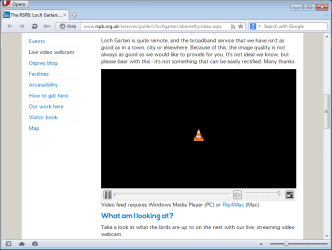
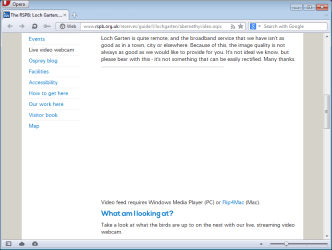
  • 2013-08-04 03_28_58-The RSPB_ Loch Garten_ Live video webcam - Opera.jpg
    2013-08-04 03_28_58-The RSPB_ Loch Garten_ Live video webcam - Opera.jpg
    4.9 KB · Views: 1

My Computer My Computer

At a glance

W7 Pro 64-bit | W10 Pro 64-biti7-4700MQ16GBNVIDIA GTX 765M
Computer type
Laptop
Computer Manufacturer/Model Number
Clevo W230ST | Precision M3800 | Precision M4500 | Alienware M11x-R3
OS
W7 Pro 64-bit | W10 Pro 64-bit
CPU
i7-4700MQ
Memory
16GB
Graphics Card(s)
NVIDIA GTX 765M
Screen Resolution
1920x1080
Hard Drives
256GB SSD | 1TB HD
Antivirus
Microsoft Security Essentials, Malwarebytes Pro
Browser
Firefox, Chrome, Pale Moon
Precision M4400 - Windows 7 Professional 64-bit

This webcam requires Windows Media Player (and Silverlight) in order to display on my screen, however it is happily displaying via VLC.

The RSPB: Loch Garten: Live video webcam

Please advise how I can make the cam display with WMP instead of VLC. WMP has all its defaults, so why is the cam using VLC? I don't know the file-type that would have to be changed.

(The reason I want to do this is that the browser, Opera 12.16, auto-refreshes periodically to counter stream-freezes, and currently it takes at least 7 seconds for the picture to recover. I'm hoping it might be faster with WMP, at least I need to find out one way or the other.)
Let me start by saying that I'm not picking at your choice of words - but I am going to change them for my sake:

You are not talking about a webcam (a device connected to your computer or network), you are talking about a video stream (that happens to be embedded in a webpage). You are not needing to change a Windows Operating System file association, you are wanting to change which browser plug-in handles this video stream.

I installed Opera 12.16 and VLC 2.08 into a Virtual Machine that is running W7 pro 64bit. I was able to see the ~7 second blackout that happens when the stream reconnects after about 7 minutes. (BTW, I did not install the Windows Media Player (WMP) plug-in. Silverlight was not installed - yet.)

I then ended the Virtual Machine (which resets everything back to a W7 clean install). I installed Opera 12.16 - but did not install VLC. When using Opera to visit the webpage that you linked to, the area that would normally show the video stream informed me of missing plug-ins and offered a link. I installed the WMP plug-in and retested the website after restarting Opera. Now, instead of a grey box where the video should be showing, there was an ill-defined white area - with no video and no help on solving the issue.

So - I installed Silverlight 5.something, restarted Opera - but no luck - same ill-defined white area.

I then ended the Virtual Machine again (which resets everything back to a W7 clean install). I installed Opera 15.0.1147.153 and VLC 2.08. When I visited the website for the video stream of interest, the area that would normally show the video stream informed me that "This plug-in is not supported".

Rather than continue to mess with web browsers and plug-ins, I did what I normally do, I looked at the source code of the webpage and found the direct link to the video stream. Then I opened WMP and viewed the stream from there. The video stream still resets about every 7 minutes and I only checked the reconnect time for 2 of those resets: ~7 seconds and ~11 seconds.

I had the same results when I played the video stream directly from the VLC app.

I would suggest that you manually create a shortcut on your desktop to this stream link:
Code:
mms://wms.carnyxlive.co.uk/abernethy
Then double click on that shortcut to watch this stream.


I'm not sure if there is going to be a way to avoid missing the video during a reconnect. The video stream itself resets from the source at fixed intervals. This means that even if you start one video stream using VLC - then wait a minute or two and start another video stream using WMP (or even a second instance of VLC); they all reset within seconds of each other whenever the video stream itself resets.

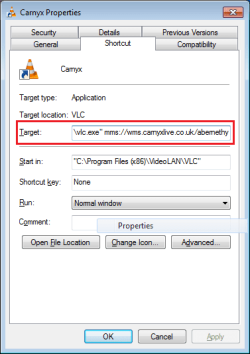
I would suggest that you use VLC to watch this stream. To do so, you can create a shortcut on your desktop (or in some folder) that has this as the target:
Code:
"C:\Program Files (x86)\VideoLAN\VLC\vlc.exe" mms://wms.carnyxlive.co.uk/abernethy
birds1.png


Once the VLC window opens (even before the stream finishes connecting), you can select View > Minimal Interface.

birds2.png


After the stream connects, it may change the size of the VLC window. You can change the window(s) shape/position as desired.

birds3.png

Yes - I did see the ospreys in the nest and had they been there when I opted to take the screenshot showing the multiple streams, you might have been able to see that each stream shows a slightly different point in time. Such is the nature of video stream and buffering.

From the "For What It Is Worth" department: visiting the webpage that you linked to using Opera 15.0.1147.153 and the VLC 2.08 plug-in at just the wrong time (when the stream is resetting) caused Opera to lock up. The odds are that you will not visit the page precisely at that time and thus the embedded video stream should still play using the VLC plug-in even if you are also viewing the video streaming directly in VLC and/or WMP.

Let us know if you need any help making the shortcuts mentioned above. There might be command line switches that will set the view to the Minimal Interface... but my brief search for same yielded nothing.


Edit: Obviously, the shortcut target mentioned above would be different if someone is using a 32bit Operating System or the experimental 64bit version of VLC - which can be downloaded from here:
http://download.videolan.org/pub/videolan/vlc/last/win64/

Code:
"C:\Program Files\VideoLAN\VLC\vlc.exe" mms://wms.carnyxlive.co.uk/abernethy
 
Last edited:

My Computer My Computer

At a glance

W7 Pro SP1 64biti78GBIntel HD Graphics
Computer type
Laptop
Computer Manufacturer/Model Number
Employer provided Dell Latitude
OS
W7 Pro SP1 64bit
CPU
i7
Memory
8GB
Graphics Card(s)
Intel HD Graphics
Hard Drives
crappy SSD
Antivirus
Employer mandated Symantec Endpoint Protection
Browser
Pale Moon 64bit, IE11 64bit & Chrome 64bit
I cannot believe the trouble you've gone to on my behalf, UI, and I truly appreciate it.

Let me start by saying that I'm not picking at your choice of words - but I am going to change them for my sake:

Rarely have I seen such tact - I never take offence at being corrected, but if I did I wouldn't in your case - if you see what I mean :confused: I never know what to call it: "a video stream embedded in a web page" is a bit of a mouthful, but I suppose it's the best that can be done.

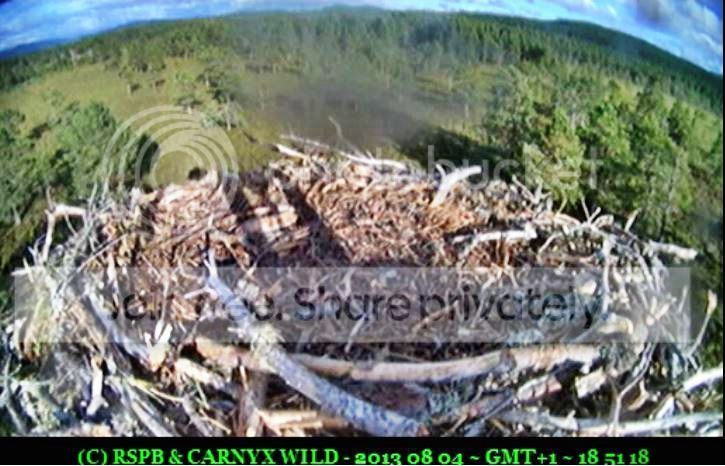
My post was very abbreviated because I didn't want to frighten off potential advisers with all my nitty-gritties. The fact is, I monitor/record that nest 24/7 during the breeding season (nearly over now) and extract "activity" in clips, cutting and joining as appropriate; then I upload to YouTube and post on the relevant forum.

This is what I must end up with:

2013-07-2406_23_56-Precision3083_zpsd10d3498.jpg


(The cloud on the lens is chick-poo.)

Copyright acknowledgements and date/time must be "embedded" because I like to do things right. If I present a video depicting certain activity, it is gospel that it happened at the time stated on the video. I screen-capture with Debut Video Capture because that program allows me to add the text and date/time down to the second. Also, I used to have to deal with recordings up to 10 hours long, you can imagine how valuable the time-stamp is when doing that. (I recently realised that Debut will stop/restart at chosen intervals, so now my max is 2 hours, but even then I resent the 4 seconds lost during the stop/restart process.)

VLC cannot record date/time, I have investigated it with the developers, and on their and their wiki's advice wrote some code (can't believe I did that!) but it turned out that when the recording was played it displayed the current date/time, not the date/time that the recording was made. A kind forum member with more experience than I tried to help but had to give up.

On the 2nd I asked on the VideoLan forum if VLC could refresh a stream periodically but have had no answer. That is one complex program and I am not software-literate.

The stream displayed on the RSPB's site does not, as yet, have to be manually restarted every so-many minutes but the flaky stream does go down, that's why I use Opera's auto-refresh (say) every 20 minutes. Did you know that Opera's auto-refresh, unlike any other add-on for FF or Chrome that I've tried, after the refresh has completed, replays the video from before the refresh took place - so I can cut out the blank and any duplicated action and join it seamlessly (if I'm on form ;) but with a tiny glitch if I'm not)? But now that I'm using the RSPB site instead of the Carnyx one, I'm stuck with the VLC cone for too long before the stream reappears - that's what led to my original question "how can I associate it with WMP?".

My VLC 2.0.8 has just crashed and I cannot reopen it, all I get is the "let's send crash report" box, which I OK'd the first time but it hasn't listened. What I was going to do was show you how I could play the stream in VLC, superimpose DS Clock on it, and screen-capture that. But VLC doesn't refresh the stream :rolleyes: Also, DS Clock won't allow me to type D or M, it shows them as numbers of course. So I can't show CARNYX WILD or GMT (I use UTC, yuk, when taking screenshots of various other subjects).
I'm terribly sorry for taking up your time with this confusion, you can see I did try to be sparing initially :(

Would it be possible to PM you video? I'm asking in advance of actually needing to, just to know where I stand.

Thank you again, very much. Got birds on the nest, must fly.
 

My Computer My Computer

At a glance

W7 Pro 64-bit | W10 Pro 64-biti7-4700MQ16GBNVIDIA GTX 765M
Computer type
Laptop
Computer Manufacturer/Model Number
Clevo W230ST | Precision M3800 | Precision M4500 | Alienware M11x-R3
OS
W7 Pro 64-bit | W10 Pro 64-bit
CPU
i7-4700MQ
Memory
16GB
Graphics Card(s)
NVIDIA GTX 765M
Screen Resolution
1920x1080
Hard Drives
256GB SSD | 1TB HD
Antivirus
Microsoft Security Essentials, Malwarebytes Pro
Browser
Firefox, Chrome, Pale Moon
I normally try and stick with the terms used by those asking for help - I try to reply using their own words/terms. But I have been up all night with a cold and my concentration is not what it could be. I did not trust myself to stick with your terminology. I'm not even going to claim that the terms I used are correct... they just work for me at the moment.

I also cannot summarize very well with a foggy brain, so it was easier to just right stuff out as I did it... that resulted in a post the size of a novel - which could put others to sleep - but not me :-(


I watch live streams (like these birds) or shows/movies/music streamed from JTV (and others websites). I don't know much about attempting to capture a stream, much less adding an overlay to it. I'm not sure how much help I'll be.

Video feeds sent to JTV can be stored like a Digital Video Recorder. I've seen 3 days worth of video in one file. You would have to convince those that control the webcam by that nest that they should be sending the video to JTV instead of (or in addition to) where they currently send it.

If you don't want to try to talk them into using JTV, then you might show them the bird live stream that I linked to and see if they can/will add credits and time stamps on their end.


You were correct not to make the first post too long. You understand forums well. After your last post, I better understand this:
(The reason I want to do this is that the browser, Opera 12.16, auto-refreshes periodically to counter stream-freezes, and currently it takes at least 7 seconds for the picture to recover. I'm hoping it might be faster with WMP, at least I need to find out one way or the other.)

I did not understand that you were causing the refresh via an add-on/plug-in. Websites can force refreshes, but I did not see that happen, so I ignored that part of your post. I also knew that the suggested solution in my reply was going to be to get away from using a browser. So I did not even mention that I did not understand the auto-refresh part of the OP.


You said:
On the 2nd I asked on the VideoLan forum if VLC could refresh a stream periodically but have had no answer. That is one complex program and I am not software-literate.
I do not understand why you need VLC to refresh. I've had the stream going for over 6 hours now and it has not needed my attention. (It is funny to hear the birds mixed into the instrumental music that I'm also streaming via another player.) Maybe I've just caught the video stream on a good day. Maybe it normally stops for you.

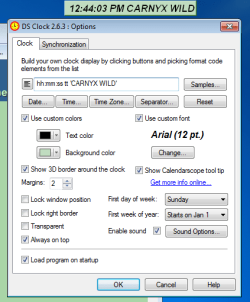
DS Clock:
Enclose the text in single quotes:
Code:
hh:mm:ss tt 'CARNYX WILD'
DS.png

I've never used DS Clock - so let me look into the GMT thing for you.


Edit:
I missed commenting on this:
I'm terribly sorry for taking up your time with this confusion...
You did not take up much of my time and none of it was a waste of time on my part. I learned stuff and this is just a hobby/entertainment for me. I'm in bed with a laptop on my chest.

I missed answering this too:
Would it be possible to PM you video?
I'll look at anything that you wish to get to me, but I'm not sure how best to do that. If the file is small enough to e-mail, I can give you an e-mail address via this forum's PM system. Other than that, I don't have/use cloud based space like SkyDrive, DropBox or the like - where the public can put stuff for me to get.

I may have missed other things that you asked about - just repeat your question(s).


Edit2:
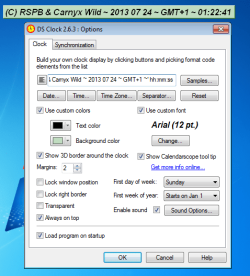
Doh! Now I understand what you meant my GMT:
Code:
'(C) RSPB & Carnyx Wild ~ 2013 07 24 ~ GMT+1 ~' hh:mm:ss
DS2.png

I read what you said about DS Clock not letting you type D or M... so you "can't show CARNYX WILD or GMT". By the time I got around to testing DS Clock, I totally remembered it wrong. I thought it was: Can't type type X or M... so you can't show CARNYX (as text) and you can't show the time in GMT (because the DS app does not have an offset setting to add one hour to your computers time so that the time being shown was just GMT and not GMT+1). I was pretty confused about how typing M was going to add an hour to the displayed time; but hey, I had never used DS Clock.

I don't know how I morphed the D into an X - maybe I thought that you typo'd. That you meant CARNYX WILD were the problems. My warped mind already thought it knew that you wanted to "show" the time in GMT. Not show GMT as text.

I probably did not even convey my confused thought process well - just ignore it and try the code in the code box.
 
Last edited:

My Computer My Computer

At a glance

W7 Pro SP1 64biti78GBIntel HD Graphics
Computer type
Laptop
Computer Manufacturer/Model Number
Employer provided Dell Latitude
OS
W7 Pro SP1 64bit
CPU
i7
Memory
8GB
Graphics Card(s)
Intel HD Graphics
Hard Drives
crappy SSD
Antivirus
Employer mandated Symantec Endpoint Protection
Browser
Pale Moon 64bit, IE11 64bit & Chrome 64bit
I used to watch football matches on Justin TV before they got blocked, naughty! I watch storks, bald eagles, great horned owls, all sorts on Ustream.tv. Very similar. There is absolutely no chance of getting Carnyx to change their streaming channel (for want of a better expression). They are very nice people but! When they finish the new website I shall contact them about the reset problem though. They know me and what I do with their "material".

I did not understand that you were causing the refresh via an add-on/plug-in.

I would be using an auto-refresh add-on with FF or Chrome, but I only recently discovered that Opera has one built-in and it has that wonderful feature where you don't miss anything due to the refresh process.

I do not understand why you need VLC to refresh. I've had the stream going for over 6 hours now and it has not needed my attention... Maybe I've just caught the video stream on a good day. Maybe it normally stops for you.

It has been a good day, you have been lucky. I have to be set up for bad days all the time, it happens without warning.

DS Clock:

Please don't spend too much of your precious time investigating DS Clock (though it would be nice to be able to use GMT when I use DS Clock for other things) - I must have had one of my fugues ;) because if I'm going to screen-capture then I can use Debut's feature. Just tried it out, you wouldn't know this was screen-captured from VLC because if it's sized correctly you can get black bars as a background for Debut's text/timeline:

2013-08-0419_09_50-_0000_zps3f627f38.jpg


So... I'm left with my original poser - how can I get the stream from the RSPB site to refresh more quickly?

Very nice talking to you, UI, and I hope you feel a lot better soon :)
 

My Computer My Computer

At a glance

W7 Pro 64-bit | W10 Pro 64-biti7-4700MQ16GBNVIDIA GTX 765M
Computer type
Laptop
Computer Manufacturer/Model Number
Clevo W230ST | Precision M3800 | Precision M4500 | Alienware M11x-R3
OS
W7 Pro 64-bit | W10 Pro 64-bit
CPU
i7-4700MQ
Memory
16GB
Graphics Card(s)
NVIDIA GTX 765M
Screen Resolution
1920x1080
Hard Drives
256GB SSD | 1TB HD
Antivirus
Microsoft Security Essentials, Malwarebytes Pro
Browser
Firefox, Chrome, Pale Moon
PS!!!

What you should be spending your precious time on is finding out how to enable stereo mix on my Precision M4400 with IDT sound card - the question is buried somewhere in this forum.

On the other hand, it's been asked on a lot of forums and I think it's been pronounced impossible ;)
 

My Computer My Computer

At a glance

W7 Pro 64-bit | W10 Pro 64-biti7-4700MQ16GBNVIDIA GTX 765M
Computer type
Laptop
Computer Manufacturer/Model Number
Clevo W230ST | Precision M3800 | Precision M4500 | Alienware M11x-R3
OS
W7 Pro 64-bit | W10 Pro 64-bit
CPU
i7-4700MQ
Memory
16GB
Graphics Card(s)
NVIDIA GTX 765M
Screen Resolution
1920x1080
Hard Drives
256GB SSD | 1TB HD
Antivirus
Microsoft Security Essentials, Malwarebytes Pro
Browser
Firefox, Chrome, Pale Moon
Re sending you videos, I would send you the links to view in my YouTube a/c. It's not something I want to make public in non-specialist forums because I've had a lot of trouble with spam/troll messages. Not quite the nasty stuff in the news re Twitter, but not nice.
 

My Computer My Computer

At a glance

W7 Pro 64-bit | W10 Pro 64-biti7-4700MQ16GBNVIDIA GTX 765M
Computer type
Laptop
Computer Manufacturer/Model Number
Clevo W230ST | Precision M3800 | Precision M4500 | Alienware M11x-R3
OS
W7 Pro 64-bit | W10 Pro 64-bit
CPU
i7-4700MQ
Memory
16GB
Graphics Card(s)
NVIDIA GTX 765M
Screen Resolution
1920x1080
Hard Drives
256GB SSD | 1TB HD
Antivirus
Microsoft Security Essentials, Malwarebytes Pro
Browser
Firefox, Chrome, Pale Moon
Sure - PM some links :-)
 

My Computer My Computer

At a glance

W7 Pro SP1 64biti78GBIntel HD Graphics
Computer type
Laptop
Computer Manufacturer/Model Number
Employer provided Dell Latitude
OS
W7 Pro SP1 64bit
CPU
i7
Memory
8GB
Graphics Card(s)
Intel HD Graphics
Hard Drives
crappy SSD
Antivirus
Employer mandated Symantec Endpoint Protection
Browser
Pale Moon 64bit, IE11 64bit & Chrome 64bit
Re sending you videos, I would send you the links to view in my YouTube a/c. It's not something I want to make public in non-specialist forums because I've had a lot of trouble with spam/troll messages. Not quite the nasty stuff in the news re Twitter, but not nice.
You can set the videos to be unlisted and not allow comments. Keep all comments in the forums where better moderation exists. But - that might not work for you if you want the videos for all the world to find.

Let's revisit some points in this thread:

If you watch the osprey using VLC as a stand alone app (not via a plug-in to Opera), you have to manually stop the stream every once in a while and restart it to prevent it from stopping on its own.

If you watch the osprey via Opera/VLC plug-in - the auto-refresh within Opera stops/restarts the stream for you - without losing any video? That really does not make sense and I've not been able to repeat it. I lose part of the video when Opera refreshes the page.

Before I forget, did you see the edit of my earlier post where I showed how to get DS Clock to do what you wanted?
 
Last edited:

My Computer My Computer

At a glance

W7 Pro SP1 64biti78GBIntel HD Graphics
Computer type
Laptop
Computer Manufacturer/Model Number
Employer provided Dell Latitude
OS
W7 Pro SP1 64bit
CPU
i7
Memory
8GB
Graphics Card(s)
Intel HD Graphics
Hard Drives
crappy SSD
Antivirus
Employer mandated Symantec Endpoint Protection
Browser
Pale Moon 64bit, IE11 64bit & Chrome 64bit
If you watch the osprey using VLC as a stand alone app (not via a plug-in to Opera), you have to manually stop the stream every once in a while and restart it to prevent it from stopping on its own.

One of the developers has replied to my question with "Did you try the http-reconnect option?" (they are men of few words!). I found a box and ticked it but it hasn't had any effect that I can see. Regarding the need to manually restart VLC, if the stream is healthy it will record for many hours, but if the stream cuts out for more than a few seconds or a minute (not sure how long) it will finalise the recording and stay dead.

If you watch the osprey via Opera/VLC plug-in - the auto-refresh within Opera stops/restarts the stream for you [without losing any video?] That really does not make sense

It doesn't make sense cos that's not what happens. Stream drop-outs cause the picture to freeze, and if significant any browser will continue to display the frozen picture even though the stream has recovered. It requires the browser to be refreshed for it to display the active stream. Hence, when recording unattended (which is most of the time because I'm doing other things), I set the browser to auto-refresh periodically just in case. If the stream is displaying normally without freezes and I want to publish a section that includes a refresh, I can cut and join as described below and produce a clip with nothing missing and nothing extra included.

... without losing any video? ... I've not been able to repeat it. I lose part of the video when Opera refreshes the page.

You lose part of the video because Opera is now taking too long to refresh the RSPB page, and I am assuming it's because VLC is handling it (but I need to test the assumption by ditching VLC for WMP). When I was recording from the Carnyx site before they changed it, it took only a few seconds for the page to refresh, and after the gap it resumed, presumably from cache, from a few seconds before the refresh took place (AFAIK Opera's built-in auto-refresh is the only auto-refresh that does this, I have tried 2 different add-ons for FF and Chrome) - therefore cutting the duplicated footage and joining was possible and absolutely nothing was lost.

... did you see the edit of my earlier post where I showed how to get DS Clock to do what you wanted?

Inspired by you ;) have now spent some time on it and got a result!

2013-08-0704_40_48-279736-change-file-association-viewing-screen-webcam-dspng423times510_zps835c8ea5.jpg


I need to know how to get this VLC plug-in out of Opera and replace it with WMP, I shall try the Opera forums.

Thank you for paying such close attention to my 'issues'.
 

My Computer My Computer

At a glance

W7 Pro 64-bit | W10 Pro 64-biti7-4700MQ16GBNVIDIA GTX 765M
Computer type
Laptop
Computer Manufacturer/Model Number
Clevo W230ST | Precision M3800 | Precision M4500 | Alienware M11x-R3
OS
W7 Pro 64-bit | W10 Pro 64-bit
CPU
i7-4700MQ
Memory
16GB
Graphics Card(s)
NVIDIA GTX 765M
Screen Resolution
1920x1080
Hard Drives
256GB SSD | 1TB HD
Antivirus
Microsoft Security Essentials, Malwarebytes Pro
Browser
Firefox, Chrome, Pale Moon
~~~
I need to know how to get this VLC plug-in out of Opera and replace it with WMP, I shall try the Opera forums.
~~~
For Opera 12.16, you can install the WMP plug-in from here:
http://www.opera.com/docs/plugins/installation/#wmp
That link just sends you to here:
http://www.interoperabilitybridges.com/windows-media-player-firefox-plugin-download
And that link leads you to this file to download:
https://msopentechsitestorage.blob.core.windows.net/downloads/wmpfirefoxplugin.exe

You should close all web browsers before installing that WMP plug-in.

Here is what you have now:
1-VLC.png

Installing the WMP plug-in will break the RSBP website:
2-WMP.png
Nothing will stream from that website and maybe other websites that try to use the WMP plug-in via Opera. That is probably why Opera 15 has dropped support for that very old (2007) WMP plug-in.

However, if you want to use the file that I've attached to this post...
(carnyxlive.html inside carnyxlive.zip)
...you can get Opera 12.16 and the WMP plug-in to display the stream of interest:
3-WMP-local.png
Just place the carnyxlive.html file on your desktop.
Open Opera.
Drag/drop the carnyxlive.html file into the Opera window.
If Opera is your default browser, then you can just double click on the carnyxlive.html file.

Using the carnyxlive.html file should help you avoid the issue that you mentioned in a PM about the RSBP website somehow shifting positions. WMP reconnects pretty fast for me via the carnyxlive.html file. I'm just not sure how many websites will not display embedded video streams once you install that old plug-in.

You might also want to consider uninstalling VLC and install the 64bit version... since you no longer need the 32bit plug-in for your Opera 32 bit browser.
 

Attachments

Last edited:

My Computer My Computer

At a glance

W7 Pro SP1 64biti78GBIntel HD Graphics
Computer type
Laptop
Computer Manufacturer/Model Number
Employer provided Dell Latitude
OS
W7 Pro SP1 64bit
CPU
i7
Memory
8GB
Graphics Card(s)
Intel HD Graphics
Hard Drives
crappy SSD
Antivirus
Employer mandated Symantec Endpoint Protection
Browser
Pale Moon 64bit, IE11 64bit & Chrome 64bit
Here is a version of that HTML file that refreshes itself. You can keep both versions on your desktop and load the auto-refreshing version when you are going to be away from the computer.

Notice in the video below that different browsers do different things with the info in that HTML file. Opera seems to respect some size limit set by the stream itself. IE10 seems to let you make the video as big (and thus blurry) as you want.


The refresh time is in seconds. I set it to 1200 seconds (the 20 minutes that you were using). Near the end of the video, I change that to 12 seconds so that you can see the reconnect rate that I'm seeing.

IE10 honors these showcontrols="0" showstatusbar="0" settings; Opera (and that WMP plug-in) does not. Those settings are set to 1 in the attached file, but you can set them to 0 to turn off those two parts of WMP if you want.


To those that know HTML better than I do. Feel free to create a better version of the file. I probably removed more HTML code than is normal, but it works - so.... :-)
 

Attachments

My Computer My Computer

At a glance

W7 Pro SP1 64biti78GBIntel HD Graphics
Computer type
Laptop
Computer Manufacturer/Model Number
Employer provided Dell Latitude
OS
W7 Pro SP1 64bit
CPU
i7
Memory
8GB
Graphics Card(s)
Intel HD Graphics
Hard Drives
crappy SSD
Antivirus
Employer mandated Symantec Endpoint Protection
Browser
Pale Moon 64bit, IE11 64bit & Chrome 64bit
QUOTE UI = "Opera (and that WMP plug-in)"


"What WMP plug-in?" thinks I, "I don't have one."

So I've been puzzling over the HTML file all day (on and off), testing it out and I can't handle it... and I've only just seen that there was another message prior to the last one.

I'm going to have to start all over again. Please don't think your messages are ignored. I noted how carefully and precisely you prepared the video but I can't see it well enough, so I'm going to have to take my recording laptop (15" full HD screen) out of service and watch the video on that. That will have to wait until the night-time when there is likely to be no activity. It's the end of the season so there isn't much activity, but earlier today I missed 2 landings while I was trying to adjust stuff with the recording going on.

Thank you for everything you are doing for me. I'll be back ;)
 

My Computer My Computer

At a glance

W7 Pro 64-bit | W10 Pro 64-biti7-4700MQ16GBNVIDIA GTX 765M
Computer type
Laptop
Computer Manufacturer/Model Number
Clevo W230ST | Precision M3800 | Precision M4500 | Alienware M11x-R3
OS
W7 Pro 64-bit | W10 Pro 64-bit
CPU
i7-4700MQ
Memory
16GB
Graphics Card(s)
NVIDIA GTX 765M
Screen Resolution
1920x1080
Hard Drives
256GB SSD | 1TB HD
Antivirus
Microsoft Security Essentials, Malwarebytes Pro
Browser
Firefox, Chrome, Pale Moon
For Opera 12.16, you can install the WMP plug-in from here:
...
...
...
You should close all web browsers before installing that WMP plug-in.
...
...
...

Nothing will stream from that website and maybe other websites that try to use the WMP plug-in via Opera. That is probably why Opera 15 has dropped support for that very old (2007) WMP plug-in.

Just a quickie to let you know that I need a good smack, I'm not reading instructions! Suffice to say that I've uninstalled the WMP plug-in (BTW, I found a guide to show Opera the plug-in path but it turned out to be out-of-date) which got me exactly the result you predicted, but took the opportunity to reinstall VLC 2.0.8 which had kept crashing, however I've got to do it again now cos I didn't download the 64-bit version. Neither VLC nor Opera offer their 64-bit versions up-front, inexcusable! See you later.
 

My Computer My Computer

At a glance

W7 Pro 64-bit | W10 Pro 64-biti7-4700MQ16GBNVIDIA GTX 765M
Computer type
Laptop
Computer Manufacturer/Model Number
Clevo W230ST | Precision M3800 | Precision M4500 | Alienware M11x-R3
OS
W7 Pro 64-bit | W10 Pro 64-bit
CPU
i7-4700MQ
Memory
16GB
Graphics Card(s)
NVIDIA GTX 765M
Screen Resolution
1920x1080
Hard Drives
256GB SSD | 1TB HD
Antivirus
Microsoft Security Essentials, Malwarebytes Pro
Browser
Firefox, Chrome, Pale Moon
Notice in the video below that different browsers do different things with the info in that HTML file. Opera seems to respect some size limit set by the stream itself. IE10 seems to let you make the video as big (and thus blurry) as you want.

I do need to be able to adjust the video size because the smaller the better (but still viewable from about 4 feet), for the sake of video editing - the bigger the "frame" the more sluggish it is to skip or scroll thru recordings. I notice that Firefox will let me adjust the size, so I'm just going to compare refresh times, Opera taking about 8 seconds, which I think is too long.
 

My Computer My Computer

At a glance

W7 Pro 64-bit | W10 Pro 64-biti7-4700MQ16GBNVIDIA GTX 765M
Computer type
Laptop
Computer Manufacturer/Model Number
Clevo W230ST | Precision M3800 | Precision M4500 | Alienware M11x-R3
OS
W7 Pro 64-bit | W10 Pro 64-bit
CPU
i7-4700MQ
Memory
16GB
Graphics Card(s)
NVIDIA GTX 765M
Screen Resolution
1920x1080
Hard Drives
256GB SSD | 1TB HD
Antivirus
Microsoft Security Essentials, Malwarebytes Pro
Browser
Firefox, Chrome, Pale Moon
Back
Top