Solved Change Icon size in Quicklaunch

DaveTief

New member
Local time
3:19 PM
Messages
3
I'm trying to get my first win 7 system set up. And quite frustrated. I've found the usual "large Icon / Small Icon" setting. It's already on small for the task bar. Those are the size I want, just like I had them in XP. After a lot of confusion & searching I finally found I had to enable quicklaunch, and did so. But the smegging icons are 2-3 times the size of the task bar ones. Secondary annoyance I have: I prefer the task bar vertically on the left of the screen. It won't get nice and narrow like it did in win XP. Is there any fix for this? Thank you, Dave
 

My Computer

Computer type
PC/Desktop
Computer Manufacturer/Model Number
White Box
OS
win 7
CPU
i5-4430 @ 3GHz
Motherboard
Asus
Memory
8 GB
Graphics Card(s)
Nvidia Quadro K2000D
Monitor(s) Displays
2) NEC FE2111SB
Screen Resolution
1600x1200
Hard Drives
460GB
Hello Dave, and welcome to Seven Forums.

Please go ahead and post a screenshot showing this to help ID any possible unknown issues.

You should be able to use step 7 in Option One of the tutorial below to use small icons in Quick Launch.
The taskbar will not be as thin when moved to a side than it was on the bottom of your desktop. About all you can do is resize the taskbar as thin as will allow.
Hope this may help some for now, :)
Shawn
 

My Computer

Computer type
PC/Desktop
Computer Manufacturer/Model Number
Self built custom
OS
64-bit Windows 11 Pro for Workstations
CPU
Intel i7-8700K OC'd to 5 GHz
Motherboard
ASUS ROG Maximus XI Formula Z390
Memory
64 GB (4x16GB) G.SKILL TridentZ RGB DDR4 3600 MHz
Graphics Card(s)
ASUS ROG-STRIX-GTX1080TI-O11G-GAMING
Sound Card
Integrated
Monitor(s) Displays
2 x Samsung Odyssey G7 27"
Screen Resolution
2560x1440
Hard Drives
1TB Samsung 990 PRO M.2,
4TB Samsung 990 PRO PRO M.2,
TerraMaster F8 SSD Plus NAS
PSU
Seasonic Prime Titanium 850W
Case
Thermaltake Core P3
Cooling
Corsair Hydro H115i
Keyboard
Logitech wireless K800
Mouse
Logitech MX Master 4
Internet Speed
2 Gb/s Download and 100 Mb/s Upload
Antivirus
Malwarebyte Anti-Malware Premium
Browser
Google Chrome
Other Info
Logitech Z625 speaker system,
Logitech BRIO 4K Pro webcam,
HP Color LaserJet Pro MFP M477fdn,
APC SMART-UPS RT 1000 XL - SURT1000XLI,
Galaxy S23 Plus phone
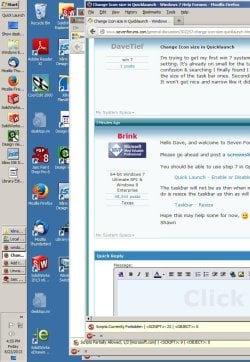
Here is a screen shot.

Tried step 7. The choice for small icon is already checked...
 

Attachments

  • Screen1.jpg
    Screen1.jpg
    115.6 KB · Views: 5

My Computer

Computer type
PC/Desktop
Computer Manufacturer/Model Number
White Box
OS
win 7
CPU
i5-4430 @ 3GHz
Motherboard
Asus
Memory
8 GB
Graphics Card(s)
Nvidia Quadro K2000D
Monitor(s) Displays
2) NEC FE2111SB
Screen Resolution
1600x1200
Hard Drives
460GB
Dave,

It looks like you still have "Large Icons" checked for Quick Launch. Be sure that you right click on the line just above "Quick Launch" at the top of your screenshot.

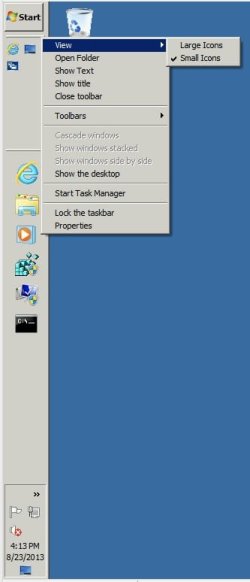
Here's what mine looks like for this to help.

QL.jpg
 

My Computer

Computer type
PC/Desktop
Computer Manufacturer/Model Number
Self built custom
OS
64-bit Windows 11 Pro for Workstations
CPU
Intel i7-8700K OC'd to 5 GHz
Motherboard
ASUS ROG Maximus XI Formula Z390
Memory
64 GB (4x16GB) G.SKILL TridentZ RGB DDR4 3600 MHz
Graphics Card(s)
ASUS ROG-STRIX-GTX1080TI-O11G-GAMING
Sound Card
Integrated
Monitor(s) Displays
2 x Samsung Odyssey G7 27"
Screen Resolution
2560x1440
Hard Drives
1TB Samsung 990 PRO M.2,
4TB Samsung 990 PRO PRO M.2,
TerraMaster F8 SSD Plus NAS
PSU
Seasonic Prime Titanium 850W
Case
Thermaltake Core P3
Cooling
Corsair Hydro H115i
Keyboard
Logitech wireless K800
Mouse
Logitech MX Master 4
Internet Speed
2 Gb/s Download and 100 Mb/s Upload
Antivirus
Malwarebyte Anti-Malware Premium
Browser
Google Chrome
Other Info
Logitech Z625 speaker system,
Logitech BRIO 4K Pro webcam,
HP Color LaserJet Pro MFP M477fdn,
APC SMART-UPS RT 1000 XL - SURT1000XLI,
Galaxy S23 Plus phone
Yep, that was it. The view thing at the top of the menu. Silly me, I was going down to properties... Now to get it narrow.. Somewhere I came across something about it being stopped from going narrower for touch screens. Stupid, since not everyone is going to use touch screens...
 

My Computer

Computer type
PC/Desktop
Computer Manufacturer/Model Number
White Box
OS
win 7
CPU
i5-4430 @ 3GHz
Motherboard
Asus
Memory
8 GB
Graphics Card(s)
Nvidia Quadro K2000D
Monitor(s) Displays
2) NEC FE2111SB
Screen Resolution
1600x1200
Hard Drives
460GB
Hi Dave Tief, welcome to the Seven Forums.

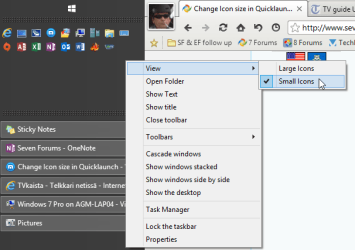
Your screenshot shows very clearly the Quick Launch icons are large, and that Quick Launch is set to show title (Quick Launch) as well as application titles (Text). To change icons small, you need to first unlock the Taskbar, as the Quick Launch options are only visible when you right click an empty spot inside Quick Launch area on an unlocked Taskbar:

2013-08-23_232025.png

When you have the correct settings, lock the Taskbar again.

Please notice the icon size set in Taskbar properties has nothing to do with Quick Launch icon size.

Here the same Quick Launch as in above screenshot, this time with small icons:

2013-08-23_232432.png

Kari


EDIT: Too late, I noticed Brink already told the same :).
 

My Computer

Computer type
Laptop
Computer Manufacturer/Model Number
HP ENVY 17-1150eg
OS
Windows 10 Pro x64 EN-GB
CPU
1.6 GHz Intel Core i7-720QM Processor
Memory
6 GB
Graphics Card(s)
ATI Mobility Radeon HD 5850 Graphics
Sound Card
Beats sound system with integrated subwoofer
Monitor(s) Displays
17" laptop display, 22" LED and 32" Full HD TV through HDMI
Screen Resolution
1600*900 (1), 1920*1080 (2&3)
Hard Drives
Internal: 2 x 500 GB SATA Hard Disk Drive 7200 rpm
External: 2TB for backups, 3TB USB3 network drive for media
Cooling
As Envy runs a bit warm, I have it on a Cooler Master pad
Keyboard
Logitech diNovo Media Desktop Laser (bluetooth)
Mouse
Logitech Performance Mouse MX
Internet Speed
50/10 Mbps VDSL
Antivirus
Windows Defender 4.3.9431.0
Browser
Maxthon 3.5.2., IE11
Back
Top