Change MMS protocol association

nabilalk

New member
Power User
Local time
4:27 PM
Messages
299
Hey all,

I want to change the MMS Protocol association from Windows Media Player to GOM. Unfortunately, when I go to Control Panel > Default Programs > Set Associations and click change program under MMS Protocol, only Windows Media Player is listed. Can I edit something in the registry to accomplish this?

This thread didn't solve the issue: http://www.sevenforums.com/software/80560-how-change-default-player-mms-2.html
 
Last edited:

My Computer

Computer Manufacturer/Model Number
Gateway M6827
OS
Win 7 Professional 32-bit
CPU
Intel Core 2 Duo CPU T5750 @ 2.00 GHz
Memory
3GB
Monitor(s) Displays
ViewSonic Vx900
Screen Resolution
1280x1024
Hard Drives
150GB Hard Drive
Last edited by a moderator:

My Computer

Computer Manufacturer/Model Number
Dell and Custom
OS
Systems 1 and 2: Windows 7 Enterprise x64, Win 8 Developer
CPU
System 1: i7 [email protected], System 2: AMD FX-4100 Zambezi 3.6G
Motherboard
System 1:Dell 06NWYK System 2: ASUS M5A97 AM3+
Memory
System 1: 8GB System 2: 8GB
Graphics Card(s)
System 1: ATI FirePro V4800 System 2: Radeon HD 6850
Sound Card
System 1: onboard System 2: onboard
Monitor(s) Displays
System1: Viewsonic HDMI 24"
Screen Resolution
System 1: 1920x1080 System 2: 1920x1080
Hard Drives
System 1: Mirrored .5B drives System 2: Seagate Barracuda ST1000DM003 1TB 7200 RPM 64MB Cache SATA 6.0Gb/s
Case
System 1: Dell System 2: Cooler Master
Internet Speed
10 MBPS

My Computer

Computer Manufacturer/Model Number
Gateway M6827
OS
Win 7 Professional 32-bit
CPU
Intel Core 2 Duo CPU T5750 @ 2.00 GHz
Memory
3GB
Monitor(s) Displays
ViewSonic Vx900
Screen Resolution
1280x1024
Hard Drives
150GB Hard Drive
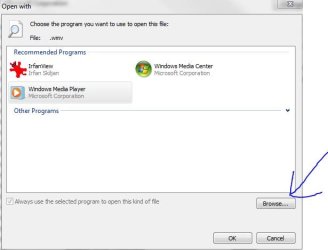
See the capture below. You can browse to select another program.
 

Attachments

  • Capture.JPG
    Capture.JPG
    27.3 KB · Views: 54

My Computer

Computer Manufacturer/Model Number
Dell and Custom
OS
Systems 1 and 2: Windows 7 Enterprise x64, Win 8 Developer
CPU
System 1: i7 [email protected], System 2: AMD FX-4100 Zambezi 3.6G
Motherboard
System 1:Dell 06NWYK System 2: ASUS M5A97 AM3+
Memory
System 1: 8GB System 2: 8GB
Graphics Card(s)
System 1: ATI FirePro V4800 System 2: Radeon HD 6850
Sound Card
System 1: onboard System 2: onboard
Monitor(s) Displays
System1: Viewsonic HDMI 24"
Screen Resolution
System 1: 1920x1080 System 2: 1920x1080
Hard Drives
System 1: Mirrored .5B drives System 2: Seagate Barracuda ST1000DM003 1TB 7200 RPM 64MB Cache SATA 6.0Gb/s
Case
System 1: Dell System 2: Cooler Master
Internet Speed
10 MBPS
See the capture below. You can browse to select another program.

Did you select change on the MMS protocol or something else? Because, I cannot see Browse when clicking change for the MMS.
 
Last edited:

My Computer

Computer Manufacturer/Model Number
Gateway M6827
OS
Win 7 Professional 32-bit
CPU
Intel Core 2 Duo CPU T5750 @ 2.00 GHz
Memory
3GB
Monitor(s) Displays
ViewSonic Vx900
Screen Resolution
1280x1024
Hard Drives
150GB Hard Drive
Having the same issue. "Select another program" option shows up for every file extension, but not when clicking on MMS protocol at the bottom of the list. Only WMP shows up as an option. Grrr. Will probably have to go into regedit to do this manually. MS has obviously done this on purpose, so it would be very hard to change.

EDIT: Figured it out! Follow these instructions. Worked for me. Now MMS links open in VLC. Suck it, MS!

1. Go into REGEDIT (be careful in there to do everything exactly as specified or you might screw up your OS) by searching for "regedit" & clicking on the result.

2. Change values to the ones you see in the attached screenshots.

In HKEY_CLASSES_ROOT change to this:
mmsvlc2.png


In HKEY_LOCAL_MACHINE change to this:
mmsvlc1.png
 
Last edited:

My Computer

OS
Windows 7 Pro 32bit
Having the same issue. "Select another program" option shows up for every file extension, but not when clicking on MMS protocol at the bottom of the list. Only WMP shows up as an option. Grrr. Will probably have to go into regedit to do this manually. MS has obviously done this on purpose, so it would be very hard to change.

EDIT: Figured it out! Follow these instructions. Worked for me. Now MMS links open in VLC. Suck it, MS!

1. Go into REGEDIT (be careful in there to do everything exactly as specified or you might screw up your OS) by searching for "regedit" & clicking on the result.

2. Change values to the ones you see in the attached screenshots.

In HKEY_CLASSES_ROOT change to this:
mmsvlc2.png


In HKEY_LOCAL_MACHINE change to this:
mmsvlc1.png

Thanks for the fix idea.

Unfortunately, I'm still getting the same error when trying to open up a .asx file in GOM Player.
Cannot connect to the streaming server.
Make sure you are connected to the internet and you're not block by a firewall, then try again.

Error code: 0x00000071

I tested this on Win XP, and I can open the links up without an issue with XP. So this must be a Win 7 issue. I thought changing the MMS in the registry would solve things, but not luck. Thanks, and I'm glad you were able to find a solution for yourself. I want to use GOM as VLC doesn't seem to interact well with the MMS files that my school releases.
 

My Computer

Computer Manufacturer/Model Number
Gateway M6827
OS
Win 7 Professional 32-bit
CPU
Intel Core 2 Duo CPU T5750 @ 2.00 GHz
Memory
3GB
Monitor(s) Displays
ViewSonic Vx900
Screen Resolution
1280x1024
Hard Drives
150GB Hard Drive
Back
Top