
warrenpeace
New member
- Local time
- 9:47 PM
- Messages
- 1
Hi,
I currently have my Xbox 360 connected up to my Laptop via Ethernet and I am having a problem with streaming videos and music. Everything else works fine, it connects to Xbox Live etc, and connects to the Laptop and finds the video files, it just won't play them. It gives the error:
'The connection to your computer was lost. Make sure your computer is turned on, connected to the network, and running media sharing software.
Status Code: 53-C00DF238'
I can't find much information about this error apart from one person stating that the ethernet connection to their Xbox had made itself public rather than private and could fix it by changing it to private again.
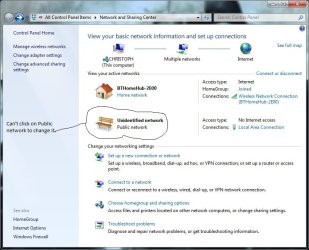
This is where I'm having a problem. The connection is showing up as an unidentified network with no internet access and as a public network. I can't figure out how to change it to a private network, there just doesn't seem to be an option.
Everything else on the laptop is working fine, my firewall is configured correctly, media player 12 is sharing correctly, the homegroup is set up etc. It just won't stream the video and the only thing I can think of now is that it needs to be a private network in order to allow streaming. I just can't change it.
I have attached a screenshot of my network & sharing centre to show you how it won't let me change the network location type.
Any help would be much appreciated!
Thanks
Chris
I currently have my Xbox 360 connected up to my Laptop via Ethernet and I am having a problem with streaming videos and music. Everything else works fine, it connects to Xbox Live etc, and connects to the Laptop and finds the video files, it just won't play them. It gives the error:
'The connection to your computer was lost. Make sure your computer is turned on, connected to the network, and running media sharing software.
Status Code: 53-C00DF238'
I can't find much information about this error apart from one person stating that the ethernet connection to their Xbox had made itself public rather than private and could fix it by changing it to private again.
This is where I'm having a problem. The connection is showing up as an unidentified network with no internet access and as a public network. I can't figure out how to change it to a private network, there just doesn't seem to be an option.
Everything else on the laptop is working fine, my firewall is configured correctly, media player 12 is sharing correctly, the homegroup is set up etc. It just won't stream the video and the only thing I can think of now is that it needs to be a private network in order to allow streaming. I just can't change it.
I have attached a screenshot of my network & sharing centre to show you how it won't let me change the network location type.
Any help would be much appreciated!
Thanks
Chris
Attachments
My Computer
- OS
- Windows 7
