Change of user drops network connection

teqniqal

New member
Local time
9:47 AM
Messages
5
When I change users my network connection no longer works. I tried all of the network diagnostic troubleshooting things, and the system doesn't seem to be aware that there is a problem. I have to log-out, then restart the system, then login to the new user for everything to be OK. Any suggestions?
 
Last edited:

My Computer My Computer

Computer Manufacturer/Model Number
Homebuilt
OS
Win 7 Pro
CPU
Intel Core2 Quad 2.4MHz
Motherboard
Abit 35 Pro
Memory
4 GB
Graphics Card(s)
nVidia 8500 GT
Monitor(s) Displays
Viewsonic VA1912wb
Hard Drives
85GB
PSU
big
Case
Tower
Cooling
fans
Welcome to Seven Forums!

When you login the new user can you open a command prompt an run an ipconfig /all command then post the output?

Another item to look at is in the Network and Sharing Center. At the right click on Change Adapter settings. Then find your network adapter and right click on it. Select Properties. Click the Configure button next to the name of the adapter. Select the Power Management tab and clear the checkbox that allows the computer to turn off the device to save power. Click OK. You can close all the remaining windows.
 

My Computer My Computer

Computer Manufacturer/Model Number
Dell C521
OS
W7 Ultimate 64bit W7 Premium 64bit W7 Premium 32bit WXP Home 32bit
CPU
Athlon 64X2 5000+
Motherboard
Dell
Memory
4GB
Graphics Card(s)
ATI X1300
Sound Card
On Board
Monitor(s) Displays
Dell 19" Flat
Screen Resolution
1280x1024
Hard Drives
500GB Western Digital Caviar Green
Mouse
Microsoft Wireless Intellimouse Explorer 2.0
Internet Speed
SBC DSL - 6Mbps
I tried setting the network adapter power management like you suggested. It made no difference, even after several reboots.

Below is the ipconfig/all dump. I ran it before and after I logged out / logged in, and compared the two - they were EXACTLY the same. One more piece of info: It doesn't matter if I try to log into another user, or back into the original user, the results are the same.

Thanks in advance for any additional help or ideas.

Teqniqal
-----------------to the dump....
Windows IP Configuration
Host Name . . . . . . . . . . . . : Home-PC
Primary Dns Suffix . . . . . . . :
Node Type . . . . . . . . . . . . : Broadcast
IP Routing Enabled. . . . . . . . : No
WINS Proxy Enabled. . . . . . . . : No
DNS Suffix Search List. . . . . . : gateway.2wire.net

Ethernet adapter Local Area Connection 2:
Media State . . . . . . . . . . . : Media disconnected
Connection-specific DNS Suffix . :
Description . . . . . . . . . . . : Realtek PCI GBE Family Controller #2
Physical Address. . . . . . . . . : 00-50-8D-B3-CF-29
DHCP Enabled. . . . . . . . . . . : Yes
Autoconfiguration Enabled . . . . : Yes

Ethernet adapter Local Area Connection:
Connection-specific DNS Suffix . : gateway.2wire.net
Description . . . . . . . . . . . : Realtek PCI GBE Family Controller
Physical Address. . . . . . . . . : 00-50-8D-B3-CF-28
DHCP Enabled. . . . . . . . . . . : Yes
Autoconfiguration Enabled . . . . : Yes
Link-local IPv6 Address . . . . . : fe80::d5bc:cda1:a987:a40c%11(Preferred)
IPv4 Address. . . . . . . . . . . : 192.168.1.65(Preferred)
Subnet Mask . . . . . . . . . . . : 255.255.255.0
Lease Obtained. . . . . . . . . . : Wednesday, February 10, 2010 3:03:07 PM
Lease Expires . . . . . . . . . . : Thursday, February 11, 2010 3:03:07 PM
Default Gateway . . . . . . . . . : 192.168.1.254
DHCP Server . . . . . . . . . . . : 192.168.1.254
DHCPv6 IAID . . . . . . . . . . . : 234901645
DHCPv6 Client DUID. . . . . . . . : 00-01-00-01-12-D2-FA-C5-00-50-8D-B3-CF-28
DNS Servers . . . . . . . . . . . : 192.168.1.254
NetBIOS over Tcpip. . . . . . . . : Enabled

Tunnel adapter isatap.{20B71DBC-5906-4BCF-9093-808788474722}:
Media State . . . . . . . . . . . : Media disconnected
Connection-specific DNS Suffix . :
Description . . . . . . . . . . . : Microsoft ISATAP Adapter
Physical Address. . . . . . . . . : 00-00-00-00-00-00-00-E0
DHCP Enabled. . . . . . . . . . . : No
Autoconfiguration Enabled . . . . : Yes

Tunnel adapter isatap.gateway.2wire.net:
Media State . . . . . . . . . . . : Media disconnected
Connection-specific DNS Suffix . : gateway.2wire.net
Description . . . . . . . . . . . : Microsoft ISATAP Adapter #2
Physical Address. . . . . . . . . : 00-00-00-00-00-00-00-E0
DHCP Enabled. . . . . . . . . . . : No
Autoconfiguration Enabled . . . . : Yes

Tunnel adapter Local Area Connection* 12:
Connection-specific DNS Suffix . :
Description . . . . . . . . . . . : Teredo Tunneling Pseudo-Interface
Physical Address. . . . . . . . . : 00-00-00-00-00-00-00-E0
DHCP Enabled. . . . . . . . . . . : No
Autoconfiguration Enabled . . . . : Yes
IPv6 Address. . . . . . . . . . . : 2001:0:4137:9e74:2cdb:2ee6:3f57:febe(Preferred)
Link-local IPv6 Address . . . . . : fe80::2cdb:2ee6:3f57:febe%14(Preferred)
Default Gateway . . . . . . . . . : ::
NetBIOS over Tcpip. . . . . . . . : Disabled

 

My Computer My Computer

Computer Manufacturer/Model Number
Homebuilt
OS
Win 7 Pro
CPU
Intel Core2 Quad 2.4MHz
Motherboard
Abit 35 Pro
Memory
4 GB
Graphics Card(s)
nVidia 8500 GT
Monitor(s) Displays
Viewsonic VA1912wb
Hard Drives
85GB
PSU
big
Case
Tower
Cooling
fans
Are you connected to a router which is connected to the modem or you don't have a router?

So basically it connects fine till you restart the machine and log back on??
 

My Computer My Computer

Computer Manufacturer/Model Number
Lenovo ThinkPad T60
OS
Windows 7 Ultimate 64Bit
CPU
GenuineIntel Intel(R) Core(TM) DuoCore T2400 @ 1.83GHz
Motherboard
Intel(R) 82801G (ICH7 Family)
Memory
2.00 GB
Graphics Card(s)
Mobile Intel(R) 945 Express Chipset
Sound Card
SoundMAX Integrated Digital HD Audio
Monitor(s) Displays
ThinkPad Display
Screen Resolution
1400x1050
Hard Drives
100Gb SATA
Keyboard
Standard Keyboard
Mouse
HID-compliant Mouse
Internet Speed
Cable Broadband - 54Mbps
Other Info
Intel(R) PRO/1000 PL Network Connection
11a/b/g Wireless LAN Mini PCI Express Adapter
The NIC card in the computer is connected to a DSL modem (2wire brand). No router.

"So basically it connects fine till you restart the machine and log back on??"

No, it connects fine for the first user, but when I log off the first user, and then try to log back into any user (including the original), it fails to connect (even though it thinks it's still connected - it's stupid and doesn't know it has a problem.
When I reboot/restart the system it will again log into the first user fine, then will not log into any other users with internet functionality (repeat of first scenario). It makes no difference who is the first user or the second user.

I never had this problem with XP Pro, so this is new. I don't think it's a problem with the DSL modem.

Again, thanks for following this.
 

My Computer My Computer

Computer Manufacturer/Model Number
Homebuilt
OS
Win 7 Pro
CPU
Intel Core2 Quad 2.4MHz
Motherboard
Abit 35 Pro
Memory
4 GB
Graphics Card(s)
nVidia 8500 GT
Monitor(s) Displays
Viewsonic VA1912wb
Hard Drives
85GB
PSU
big
Case
Tower
Cooling
fans
I've been away a few days, sorry for not being around.

It doesn't appear to be an IP problem. The NIC is retaining it's IP Address.

It's possible the 2Wire is causing the DSL to disconnect and not log back in but I'm not sure how W7 would cause that.

I don't see PPPoE on the NIC so that means it's being done in the DSL modem which is pretty normal. Is there a way you can look at the logs in the 2Wire? It may provide a clue.
 

My Computer My Computer

Computer Manufacturer/Model Number
Dell C521
OS
W7 Ultimate 64bit W7 Premium 64bit W7 Premium 32bit WXP Home 32bit
CPU
Athlon 64X2 5000+
Motherboard
Dell
Memory
4GB
Graphics Card(s)
ATI X1300
Sound Card
On Board
Monitor(s) Displays
Dell 19" Flat
Screen Resolution
1280x1024
Hard Drives
500GB Western Digital Caviar Green
Mouse
Microsoft Wireless Intellimouse Explorer 2.0
Internet Speed
SBC DSL - 6Mbps
It sounds like the modem is set to allow access to only one logon after reboot. The fact that you have full ip showing, it cannot be due to an adapter. Have you tried disabling IPv6? I would check the settings on the modem.
 

My Computer My Computer

Computer Manufacturer/Model Number
Lenovo ThinkPad T60
OS
Windows 7 Ultimate 64Bit
CPU
GenuineIntel Intel(R) Core(TM) DuoCore T2400 @ 1.83GHz
Motherboard
Intel(R) 82801G (ICH7 Family)
Memory
2.00 GB
Graphics Card(s)
Mobile Intel(R) 945 Express Chipset
Sound Card
SoundMAX Integrated Digital HD Audio
Monitor(s) Displays
ThinkPad Display
Screen Resolution
1400x1050
Hard Drives
100Gb SATA
Keyboard
Standard Keyboard
Mouse
HID-compliant Mouse
Internet Speed
Cable Broadband - 54Mbps
Other Info
Intel(R) PRO/1000 PL Network Connection
11a/b/g Wireless LAN Mini PCI Express Adapter
I was thinking the same thing. Something in the router causing the PPPoE session to drop.

BTW: What happened to you sig?
 

My Computer My Computer

Computer Manufacturer/Model Number
Dell C521
OS
W7 Ultimate 64bit W7 Premium 64bit W7 Premium 32bit WXP Home 32bit
CPU
Athlon 64X2 5000+
Motherboard
Dell
Memory
4GB
Graphics Card(s)
ATI X1300
Sound Card
On Board
Monitor(s) Displays
Dell 19" Flat
Screen Resolution
1280x1024
Hard Drives
500GB Western Digital Caviar Green
Mouse
Microsoft Wireless Intellimouse Explorer 2.0
Internet Speed
SBC DSL - 6Mbps
It sounds like the modem is set to allow access to only one logon after reboot. The fact that you have full ip showing, it cannot be due to an adapter. Have you tried disabling IPv6? I would check the settings on the modem.
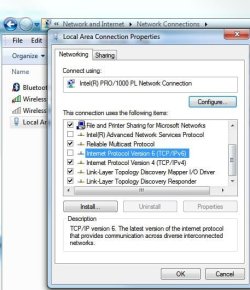
Sorry, I'm not that good with network stuff, can you tell me where to go to disable the IPv6?

Also, another tidbit of info: I found that if I "Switch Users" rather than log off and then re-enter a user, the network stays connected. Curiouser and curiouser....

Thansk for all the help so far!
 

My Computer My Computer

Computer Manufacturer/Model Number
Homebuilt
OS
Win 7 Pro
CPU
Intel Core2 Quad 2.4MHz
Motherboard
Abit 35 Pro
Memory
4 GB
Graphics Card(s)
nVidia 8500 GT
Monitor(s) Displays
Viewsonic VA1912wb
Hard Drives
85GB
PSU
big
Case
Tower
Cooling
fans
I was thinking the same thing. Something in the router causing the PPPoE session to drop.

BTW: What happened to you sig?

My sig server is dead. :p hence no output.

@teqniqal, you could do it via the registry or just untick the box show in the Properties.
Noname.jpg
 

My Computer My Computer

Computer Manufacturer/Model Number
Lenovo ThinkPad T60
OS
Windows 7 Ultimate 64Bit
CPU
GenuineIntel Intel(R) Core(TM) DuoCore T2400 @ 1.83GHz
Motherboard
Intel(R) 82801G (ICH7 Family)
Memory
2.00 GB
Graphics Card(s)
Mobile Intel(R) 945 Express Chipset
Sound Card
SoundMAX Integrated Digital HD Audio
Monitor(s) Displays
ThinkPad Display
Screen Resolution
1400x1050
Hard Drives
100Gb SATA
Keyboard
Standard Keyboard
Mouse
HID-compliant Mouse
Internet Speed
Cable Broadband - 54Mbps
Other Info
Intel(R) PRO/1000 PL Network Connection
11a/b/g Wireless LAN Mini PCI Express Adapter
Closing a session drops network connection

Hello,
sorry for reviving the thread, but I have this exact same problem, and it's the only thread I found through google.

Disabling IPV6 did not solve the issue.
 

My Computer My Computer

OS
Windows 7 Professional x64
CPU
Intel Core i7 3770
Motherboard
ASUS P8Z77-V PRO
Memory
4x4 GB Cosair Dominator
Graphics Card(s)
GTX 680 Phantom
Case
Fractal Design R3
Back
Top