Change Processor Speed

pragnesh89

New member
Power User
Local time
2:17 AM
Messages
173
Not sure if this is the right forum to post this, but here I go.

The Story: I have a Dell Dimension E510 with 1gb of RAM Intel (R) Pentium (R) 4 CPU 3.00GHz with a processor speed of 533 MHz. I recently bought a 4 GB (Newegg.com - G.SKILL 4GB (2 x 2GB) 240-Pin DDR2 SDRAM DDR2 800 (PC2 6400) Dual Channel Kit Desktop Memory Model F2-6400CL5D-4GBPQ), with a processor speed of ddr2 800 and installed it. After going into bios, it says


Installed Memory = 4.0GB
Memory Speed = 533MHz
Memory Channel Mode = Dual Interleaved
Memory Technology = DDR2 SDRAM


Why is my memory speed still 533 MHz and not 800 MHz? Can I change this?
 

My Computer

Computer Manufacturer/Model Number
Dell Inspiron E 1505
OS
Windows 7 Professional 32 Bit
CPU
Genuine Intel(R) CPU T2080 @ 1.73GHz 1.73 GHz
Motherboard
DELL
Memory
2GB
Graphics Card(s)
ATI Mobility Radeon X1400
Sound Card
High Definition Audio Device
Screen Resolution
1280 by 800
Hard Drives
136 GB
Recovery 10 GB
A pentium 4 3.0Ghz CPU has a front side bus speed 133Mhz. And quad pumped 133x4 is 533Mhz.

Now, your RAM is DDR2 ram, so you take the FSB speed of 133Mhz and double it to 266Mhz (DDR part). Then you take the x2 part and take 266 x 2 = 533Mhz.

Thus, your RAM is going to run at 533Mhz. The way to increase the RAM speed is to overclock the CPU and increase it's FSB speed. You could then take the FSB to 200 and then that would run your ram at 800Mhz. However, the Dell is not likely going to let you make these changes.
 

My Computer

Computer Manufacturer/Model Number
Self-Built in July 2009
OS
Windows 7 Ultimate x64
CPU
Intel Q9550 2.83Ghz OC'd to 3.40Ghz
Motherboard
Gigabyte GA-EP45-UD3R rev. 1.1, F12 BIOS
Memory
8GB G.Skill PI DDR2-800, 4-4-4-12 timings
Graphics Card(s)
EVGA 1280MB Nvidia GeForce GTX570
Sound Card
Realtek ALC899A 8 channel onboard audio
Monitor(s) Displays
23" Acer x233H
Screen Resolution
1920x1080
Hard Drives
Intel X25-M 80GB Gen 2 SSD
Western Digital 1TB Caviar Black, 32MB cache. WD1001FALS
PSU
Corsair 620HX modular
Case
Antec P182
Cooling
stock
Keyboard
ABS M1 Mechanical
Mouse
Logitech G9 Laser Mouse
Internet Speed
15/2 cable modem
Other Info
Windows and Linux enthusiast. Logitech G35 Headset.
Yeah, when I went into BIOS, I wasn't allowed to make changes regarding memory and processor info.
 

My Computer

Computer Manufacturer/Model Number
Dell Inspiron E 1505
OS
Windows 7 Professional 32 Bit
CPU
Genuine Intel(R) CPU T2080 @ 1.73GHz 1.73 GHz
Motherboard
DELL
Memory
2GB
Graphics Card(s)
ATI Mobility Radeon X1400
Sound Card
High Definition Audio Device
Screen Resolution
1280 by 800
Hard Drives
136 GB
Recovery 10 GB
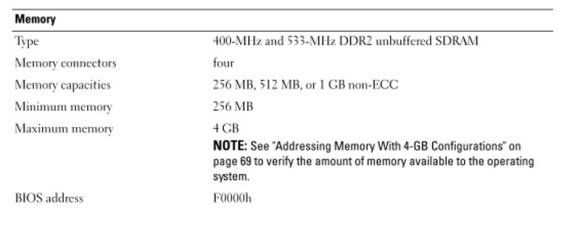
Here is the relevant portion of the Dell user manual for your PC.

That model does not support any memory above 533 mhz.

No harm done, but you didn't need to buy that higher speed RAM.
 

Attachments

  • dell memory.jpg
    dell memory.jpg
    31.3 KB · Views: 41

My Computer

Computer type
PC/Desktop
Computer Manufacturer/Model Number
Ignatz Special; 4 speed manual gearbox; factory air conditioning; one of one
OS
Windows 7 Home Premium SP1, 64-bit
CPU
Intel Skylake i5-6600K, not overclocked
Motherboard
AsRock Z170M Extreme 4, micro ATX
Memory
8 GB HyperX DDR4-2666 (2 x 4 GB)
Graphics Card(s)
none; graphics are integrated on CPU
Sound Card
onboard: Realtek ALC1150; external: USB Behringer UF0-202
Monitor(s) Displays
Dell S2340M 23 inch IPS
Screen Resolution
1600 x 900
Hard Drives
System: Crucial MX100 series SSD, 128 GB;
Data: Samsung Spinpoint 103SJ, 1 TB;
Backup: WD Caviar Green WD30EZRX-00D8PB0, 3 TB
PSU
Rosewill SilentNight 500 watt fanless, semi-modular
Case
Antec Solo II
Cooling
Noctua NH-U12S; Noctua F12 intake, Noctua S12A exhaust
Keyboard
Microsoft 200 6JH-00001 USB
Mouse
Dell or Microsoft optical wired; USB
Antivirus
Microsoft Security Essentials and Malwarebytes Premium
Browser
Pale Moon
Other Info
All fans PWM; speeds at idle: CPU circa 500 rpm; intake circa 600 rpm; exhaust circa 600 rpm; CPU temps 27 idle and 47 C load in a warm room (27 C/81 F) when running Intel Extreme Tuning Utility stress test.
Well I talked to the idiots at dell upgrade parts and advisor, and they said that I would be able to upgrade memory and I wouldn't be able to go beyond 800 Mhz. I should have known that they didnt know what they were talking about because she was just telling me what was on this page: Memory : Computer Components | Dell


P.S By the way in Bios, it shows Processor Bus Speed = 800 MHz and Memory Speed = 533MHz
 

My Computer

Computer Manufacturer/Model Number
Dell Inspiron E 1505
OS
Windows 7 Professional 32 Bit
CPU
Genuine Intel(R) CPU T2080 @ 1.73GHz 1.73 GHz
Motherboard
DELL
Memory
2GB
Graphics Card(s)
ATI Mobility Radeon X1400
Sound Card
High Definition Audio Device
Screen Resolution
1280 by 800
Hard Drives
136 GB
Recovery 10 GB
Back
Top