Change resolution of scroll wheel in MS Intellimouse?

mendopaul

New member
Member
VIP
Local time
3:25 PM
Messages
122
Location
Northern California Coast
My MS Intellimouse Explorer 3.0 has detents in the scroll wheel operation which cause the scroll to jump two or three lines with every use. However, my MS Comfort Optical Mouse 3000 has a smooth continuous scroll wheel operation which is much preferred. Both mice are wired USB devices.

Is it possible to change the Explorer Mouse to scroll continuously without detents or do I have to just give up and buy the other mouse? I recall reading somewhere that this detent could be changed or removed or maybe I read wrongly.
 

My Computer My Computer

At a glance

Windows 7 64 bit Home PremiumIntel Core i5-2500K @ 3.30 ghz8 GB of CorsairIntel integrated
Computer Manufacturer/Model Number
Homebuilt
OS
Windows 7 64 bit Home Premium
CPU
Intel Core i5-2500K @ 3.30 ghz
Motherboard
ASUS P8Z68-V PRO GEN 3
Memory
8 GB of Corsair
Graphics Card(s)
Intel integrated
Sound Card
none, Realtek HD integrated
Monitor(s) Displays
ACER X223W LCD Monitor
Screen Resolution
VGA for the moment: to change
Hard Drives
Samsung 128gb 830 series SSD;
WDC WD15EARS 1.5 TB
PSU
HX 750 watt Corsair
Case
NZXT
Cooling
Cooler Master Hyper 212 Plus
Keyboard
MS Digital Multimedia Pro
Mouse
MS Wired Comfort Optical Mouse
Internet Speed
Cable ?
My MS Intellimouse Explorer 3.0 has detents in the scroll wheel operation which cause the scroll to jump two or three lines with every use. However, my MS Comfort Optical Mouse 3000 has a smooth continuous scroll wheel operation which is much preferred. Both mice are wired USB devices.

Is it possible to change the Explorer Mouse to scroll continuously without detents or do I have to just give up and buy the other mouse? I recall reading somewhere that this detent could be changed or removed or maybe I read wrongly.

Control Panel -> Mouse -> Wheel

Set it as you want it.
 

My Computer My Computer

At a glance

XP Pro SP3 X86 / Win7 Pro X86Amd 64 x2 4200 (2.4ghz)Kingston DDR2 800 2gbNvidia GF-8400
Computer Manufacturer/Model Number
Homebrew
OS
XP Pro SP3 X86 / Win7 Pro X86
CPU
Amd 64 x2 4200 (2.4ghz)
Motherboard
Asus M2N-MX SE Plus
Memory
Kingston DDR2 800 2gb
Graphics Card(s)
Nvidia GF-8400
Sound Card
Realtek on Motherboard
Monitor(s) Displays
Acer x-193bw
Screen Resolution
1440 x 900
Hard Drives
Western Digital 500g
PSU
350watt In-Win
Case
In-Win
Cooling
Air
Keyboard
yes
Mouse
yes
Internet Speed
5mpbs
Other Info
Also ASRock ION 330 as HTPC (on XP).
Acer Aspire as GP netbook (on XP).
Thanks for reply! But seems to me those are only software settings. The detents in my mouse are mechanical.
 

My Computer My Computer

At a glance

Windows 7 64 bit Home PremiumIntel Core i5-2500K @ 3.30 ghz8 GB of CorsairIntel integrated
Computer Manufacturer/Model Number
Homebuilt
OS
Windows 7 64 bit Home Premium
CPU
Intel Core i5-2500K @ 3.30 ghz
Motherboard
ASUS P8Z68-V PRO GEN 3
Memory
8 GB of Corsair
Graphics Card(s)
Intel integrated
Sound Card
none, Realtek HD integrated
Monitor(s) Displays
ACER X223W LCD Monitor
Screen Resolution
VGA for the moment: to change
Hard Drives
Samsung 128gb 830 series SSD;
WDC WD15EARS 1.5 TB
PSU
HX 750 watt Corsair
Case
NZXT
Cooling
Cooler Master Hyper 212 Plus
Keyboard
MS Digital Multimedia Pro
Mouse
MS Wired Comfort Optical Mouse
Internet Speed
Cable ?
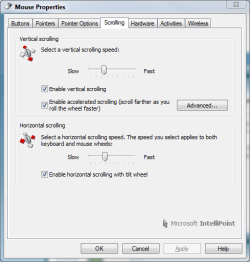
I have a Wireless 5000 mouse. It has the same type of wheel. It can be set to any amount of sensitivity. You MAY need the latest driver. HERE
scrolling.PNG
 

My Computer My Computer

At a glance

Windows 7 Professional x64Intel Core i7 8604GB DDR3 Mushkin 1600Mhz @ 7-8-7-20MSI GTS250 1GB DDR3 Twin Frozr
Computer Manufacturer/Model Number
Keeps changing - (Custom)
OS
Windows 7 Professional x64
CPU
Intel Core i7 860
Motherboard
Gigabyte GA-P55-UD4P
Memory
4GB DDR3 Mushkin 1600Mhz @ 7-8-7-20
Graphics Card(s)
MSI GTS250 1GB DDR3 Twin Frozr
Sound Card
Onboard realtek
Monitor(s) Displays
Samsung SyncMaster 24" P2450 + Samsung 20" 2033
Screen Resolution
1920 X 1080 and 1600 X 900 (#2 system 1440 X 900)
Hard Drives
Patriot Inferno 120GB SSD + 3 WD Blue 640GB drives
PSU
Corsair 750 HX Modular
Case
Lancool PC-K62
Cooling
Cooler Master TX3 CPU cooler and 4-140mm and 1-120mm case
Keyboard
Gigabyte USB keyboard
Mouse
Microsoft wireless laser mouse 5000
Internet Speed
7 Mb down 1.5 up
Other Info
System #2: AMD Phenom II X6 1055T (Freezer 7 Pro cooler) - Gigabyte 880GMA-UD2H - WD 500GB Black - 9500GT (1GB) 500W OCZ modular PSU - Antec 200 case. System #3 (LapTop) Core 2 Duo T6670 - 320GB 7200RPM HD - 4GB DDR3 RAM.
Thanks for reply! But seems to me those are only software settings. The detents in my mouse are mechanical.

Thats right... if you set the wheel setting to 1 it will scroll 1 line per click. Set it to 3 and you get 3 lines per click.

Is that a problem?
 

My Computer My Computer

At a glance

XP Pro SP3 X86 / Win7 Pro X86Amd 64 x2 4200 (2.4ghz)Kingston DDR2 800 2gbNvidia GF-8400
Computer Manufacturer/Model Number
Homebrew
OS
XP Pro SP3 X86 / Win7 Pro X86
CPU
Amd 64 x2 4200 (2.4ghz)
Motherboard
Asus M2N-MX SE Plus
Memory
Kingston DDR2 800 2gb
Graphics Card(s)
Nvidia GF-8400
Sound Card
Realtek on Motherboard
Monitor(s) Displays
Acer x-193bw
Screen Resolution
1440 x 900
Hard Drives
Western Digital 500g
PSU
350watt In-Win
Case
In-Win
Cooling
Air
Keyboard
yes
Mouse
yes
Internet Speed
5mpbs
Other Info
Also ASRock ION 330 as HTPC (on XP).
Acer Aspire as GP netbook (on XP).
Well, I wouldn't call it exactly a problem but my MS Comfort Mouse has no clicks at all and just smoothly scrolls up and down. I much prefer the Comfort Mouse over the Explorer 3000. I'm after "no clicks" like the other mouse and was just wondering if that was possible with this mouse. Maybe it's the mechanical construction and not electronic at all. Thanks for the replies!
 

My Computer My Computer

At a glance

Windows 7 64 bit Home PremiumIntel Core i5-2500K @ 3.30 ghz8 GB of CorsairIntel integrated
Computer Manufacturer/Model Number
Homebuilt
OS
Windows 7 64 bit Home Premium
CPU
Intel Core i5-2500K @ 3.30 ghz
Motherboard
ASUS P8Z68-V PRO GEN 3
Memory
8 GB of Corsair
Graphics Card(s)
Intel integrated
Sound Card
none, Realtek HD integrated
Monitor(s) Displays
ACER X223W LCD Monitor
Screen Resolution
VGA for the moment: to change
Hard Drives
Samsung 128gb 830 series SSD;
WDC WD15EARS 1.5 TB
PSU
HX 750 watt Corsair
Case
NZXT
Cooling
Cooler Master Hyper 212 Plus
Keyboard
MS Digital Multimedia Pro
Mouse
MS Wired Comfort Optical Mouse
Internet Speed
Cable ?
Well, I wouldn't call it exactly a problem but my MS Comfort Mouse has no clicks at all and just smoothly scrolls up and down. I much prefer the Comfort Mouse over the Explorer 3000. I'm after "no clicks" like the other mouse and was just wondering if that was possible with this mouse. Maybe it's the mechanical construction and not electronic at all. Thanks for the replies!

Of course it's the mechanical construction of the mouse...

You can't turn a spring off with software.
 

My Computer My Computer

At a glance

XP Pro SP3 X86 / Win7 Pro X86Amd 64 x2 4200 (2.4ghz)Kingston DDR2 800 2gbNvidia GF-8400
Computer Manufacturer/Model Number
Homebrew
OS
XP Pro SP3 X86 / Win7 Pro X86
CPU
Amd 64 x2 4200 (2.4ghz)
Motherboard
Asus M2N-MX SE Plus
Memory
Kingston DDR2 800 2gb
Graphics Card(s)
Nvidia GF-8400
Sound Card
Realtek on Motherboard
Monitor(s) Displays
Acer x-193bw
Screen Resolution
1440 x 900
Hard Drives
Western Digital 500g
PSU
350watt In-Win
Case
In-Win
Cooling
Air
Keyboard
yes
Mouse
yes
Internet Speed
5mpbs
Other Info
Also ASRock ION 330 as HTPC (on XP).
Acer Aspire as GP netbook (on XP).
workaround

I've got the same problem with Intellipoint and scrolling. And as you search the internet, almost everybody complains about the scrolling feature. After an hour of reading through many discussions I've stumbled upon a little tool called X-Mouse Button Control: http://www.highrez.co.uk/downloads/XMouseButtonControl.htm

It has almost the same mouse settings like Intellipoint but a few advantages:

- the scroll function works much better!

- if you don't like the way the mouse scrolls in one of your applications you can set special scroll settings for as many applications as you want.

- it works with every mouse connected to your computer and not just microsoft mice.

- there is a special setting called "make scroll wheel scroll window under cursor" - very useful!

- it is free (as Intellipoint is)


Microsoft's Intellipoint developers should follow the example! There is a guy out there called Phil which does a much better job then you guys at microsoft.
 

My Computer My Computer

At a glance

Win7 pro
OS
Win7 pro
Back
Top