Change Spacing in Start Menu!

Digital7

New member
Member
VIP
Local time
4:48 AM
Messages
86
Location
USA
Hello Folks,

New day new questions...

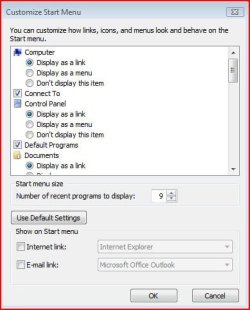
Change space between my computer....Control panel so it fans out all the way then all jammed just on top....


205701s.png


Is there way to add empty deciders...or just extra space...
 
Last edited by a moderator:

My Computer

Computer Manufacturer/Model Number
AlienWare GodFatheriZed!
OS
WIN 7 x64
CPU
I7 550
Memory
8 GB DDR3
Graphics Card(s)
9800 GTX Turbo Dual
Monitor(s) Displays
21" Samsung True Colors HD + 25 SYNC Master
Screen Resolution
1680*1050
Hard Drives
Total 1.5 TB

Attachments

  • Capture.JPG
    Capture.JPG
    35.5 KB · Views: 11

My Computer

Computer Manufacturer/Model Number
Dell and Custom
OS
Systems 1 and 2: Windows 7 Enterprise x64, Win 8 Developer
CPU
System 1: i7 [email protected], System 2: AMD FX-4100 Zambezi 3.6G
Motherboard
System 1:Dell 06NWYK System 2: ASUS M5A97 AM3+
Memory
System 1: 8GB System 2: 8GB
Graphics Card(s)
System 1: ATI FirePro V4800 System 2: Radeon HD 6850
Sound Card
System 1: onboard System 2: onboard
Monitor(s) Displays
System1: Viewsonic HDMI 24"
Screen Resolution
System 1: 1920x1080 System 2: 1920x1080
Hard Drives
System 1: Mirrored .5B drives System 2: Seagate Barracuda ST1000DM003 1TB 7200 RPM 64MB Cache SATA 6.0Gb/s
Case
System 1: Dell System 2: Cooler Master
Internet Speed
10 MBPS
Um not that....i want space between The Godfather.......Documents......Pictures

and so on...i want more spacing then there is not number of programs...!
 

My Computer

Computer Manufacturer/Model Number
AlienWare GodFatheriZed!
OS
WIN 7 x64
CPU
I7 550
Memory
8 GB DDR3
Graphics Card(s)
9800 GTX Turbo Dual
Monitor(s) Displays
21" Samsung True Colors HD + 25 SYNC Master
Screen Resolution
1680*1050
Hard Drives
Total 1.5 TB
so no one can help? or is this not possible?
 

My Computer

Computer Manufacturer/Model Number
AlienWare GodFatheriZed!
OS
WIN 7 x64
CPU
I7 550
Memory
8 GB DDR3
Graphics Card(s)
9800 GTX Turbo Dual
Monitor(s) Displays
21" Samsung True Colors HD + 25 SYNC Master
Screen Resolution
1680*1050
Hard Drives
Total 1.5 TB
Disable either Default programs or Devises and Printers in the left side pane .
 

Attachments

  • sshot-1.jpg
    sshot-1.jpg
    29.9 KB · Views: 5

My Computer

Computer type
PC/Desktop
Computer Manufacturer/Model Number
Self Assembled
OS
Microsoft Windows 10 Pro Insider Preview 64-bit
CPU
Intel(R) Core(TM) i3-4130 CPU @ 3.40GHz
Motherboard
Gigabyte Technology Co., Ltd. B85M-D3H
Memory
Corsair Vengence 4GB x2 (8.00GB Dual-Channel DDR3 @ 798MHz)
Graphics Card(s)
2047MB GeForce GTS 450 (ZOTAC International)
Sound Card
Onboard (Realtek High Definition Audio)
Monitor(s) Displays
LG Flatron E2040T
Screen Resolution
1600x900
Hard Drives
Western Digital 1 TB
Seagate 500 GB
PSU
Corsair VS550
Case
Cooler Master K380
Cooling
Cooler Master Seidon 120V Plus
Keyboard
Logitech MK260r
Mouse
Logitech MK260r
Internet Speed
PMPL Broadband
Antivirus
Windows Defender + MBAM
Browser
Firefox
Other Info
Dell Studio 15" Laptop
yeah Arc tried that only shifts the icons up in Bunch like i have posted in SS...
 

My Computer

Computer Manufacturer/Model Number
AlienWare GodFatheriZed!
OS
WIN 7 x64
CPU
I7 550
Memory
8 GB DDR3
Graphics Card(s)
9800 GTX Turbo Dual
Monitor(s) Displays
21" Samsung True Colors HD + 25 SYNC Master
Screen Resolution
1680*1050
Hard Drives
Total 1.5 TB
any one with knowledge of this i would truly appreciate the help guys!
 

My Computer

Computer Manufacturer/Model Number
AlienWare GodFatheriZed!
OS
WIN 7 x64
CPU
I7 550
Memory
8 GB DDR3
Graphics Card(s)
9800 GTX Turbo Dual
Monitor(s) Displays
21" Samsung True Colors HD + 25 SYNC Master
Screen Resolution
1680*1050
Hard Drives
Total 1.5 TB
Back
Top