Change the default Office 2007 layout?

bp96

New member
Local time
4:20 AM
Messages
85
Solved Change the default Office 2007 layout?

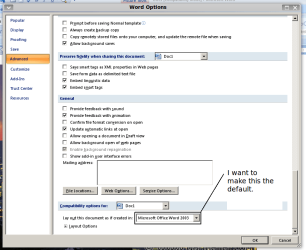
How do I change the default layout option of 'Layout this document as if it was created in Office 2007' to 'Layout this document as if it was created in Office 2003'
At the moment, this only applies to the current document but I want it to happen by default everytime I open up Word and without saving the document.

I want to do this because I want to revert back to the classic moving an image where only the outline is shown when moving the image. Look at this video: Video - TinyPic - Free Image Hosting, Photo Sharing & Video Hosting

Any ideas on how to do either of these things?
 

Attachments
  • Screenshot.png
    Screenshot.png
    25.7 KB · Views: 256
Last edited:

My Computer

Computer Manufacturer/Model Number
Sony VAIO VGN-NR11S
OS
Linux Mint with Windows 7 in Virtualbox
CPU
Intel® Core™ 1.5 GHz 2 Duo Processor T5250
Memory
2048 MB (2GB) RAM
Graphics Card(s)
Mobile Intel® Graphics Media Accelerator X3100
Sound Card
Realtek HD Audio
Screen Resolution
1280x800
Internet Speed
10 Mbps
I understand what you are trying to do. But unfortunately it applies only to this document. I know of no other setting where you can do that permanently.
 

My Computer

Computer Manufacturer/Model Number
HP, Dell, Gateway, Toshiba - 4 laptops and 2 desktops
OS
Vista, Windows7, Mint Mate, Zorin, Windows 8
CPU
from 1.6GHz Duo to i7
Monitor(s) Displays
2x HP w2207
Hard Drives
5x HDD, 7x SSD, 12x Externals
Keyboard
with trackball - no mices
Mouse
Trackball mice
Internet Speed
DSL 6000
Click the office button in the upper left corner and select word options. In the menu select Save. The options displayed can be changed to save documents as Word 97-2003 Format. Choose this and it will save as Doc for Office 2003.
 

My Computer

Computer Manufacturer/Model Number
Home Built
OS
Windows 7 SP1 x64
CPU
AMD 9850 X4
Motherboard
ASUS
Memory
Corsair
Graphics Card(s)
ATI Radeon
Sound Card
Sigmatel
Monitor(s) Displays
Dell
Screen Resolution
1600X900
Hard Drives
(1) WD 1TB
Cooling
Corsair H60
Internet Speed
UVerse 12MB
Click the office button in the upper left corner and select word options. In the menu select Save. The options displayed can be changed to save documents as Word 97-2003 Format. Choose this and it will save as Doc for Office 2003.

I am not sure whether that is the same thing, but you can try that. I would make a .doc in lieu of a .docx all the time. But you can also select that with "save as" when you go to "save as type".
 

My Computer

Computer Manufacturer/Model Number
HP, Dell, Gateway, Toshiba - 4 laptops and 2 desktops
OS
Vista, Windows7, Mint Mate, Zorin, Windows 8
CPU
from 1.6GHz Duo to i7
Monitor(s) Displays
2x HP w2207
Hard Drives
5x HDD, 7x SSD, 12x Externals
Keyboard
with trackball - no mices
Mouse
Trackball mice
Internet Speed
DSL 6000
Yes, I know the layout option will change to the 2003 layout but I have to save it. For this to happen. When I save it in a 2003 doc, it changes to compatability mode, which makes it so the pictures move only showing the outline. Can't I make Word startup in 2003 compatability mode, or get the layout to change to 2003 compatability mode- WITHOUT saving the document? Isn't there a registry tweak or something?
 

My Computer

Computer Manufacturer/Model Number
Sony VAIO VGN-NR11S
OS
Linux Mint with Windows 7 in Virtualbox
CPU
Intel® Core™ 1.5 GHz 2 Duo Processor T5250
Memory
2048 MB (2GB) RAM
Graphics Card(s)
Mobile Intel® Graphics Media Accelerator X3100
Sound Card
Realtek HD Audio
Screen Resolution
1280x800
Internet Speed
10 Mbps
Last edited:

My Computer

Computer Manufacturer/Model Number
Sony VAIO VGN-NR11S
OS
Linux Mint with Windows 7 in Virtualbox
CPU
Intel® Core™ 1.5 GHz 2 Duo Processor T5250
Memory
2048 MB (2GB) RAM
Graphics Card(s)
Mobile Intel® Graphics Media Accelerator X3100
Sound Card
Realtek HD Audio
Screen Resolution
1280x800
Internet Speed
10 Mbps
Any ideas?
 

My Computer

Computer Manufacturer/Model Number
Sony VAIO VGN-NR11S
OS
Linux Mint with Windows 7 in Virtualbox
CPU
Intel® Core™ 1.5 GHz 2 Duo Processor T5250
Memory
2048 MB (2GB) RAM
Graphics Card(s)
Mobile Intel® Graphics Media Accelerator X3100
Sound Card
Realtek HD Audio
Screen Resolution
1280x800
Internet Speed
10 Mbps
Bump.

Q: Can I move pictures in outline view in PowerPoint 2007 somehow- I don't think you can, but does someone know?
 

My Computer

Computer Manufacturer/Model Number
Sony VAIO VGN-NR11S
OS
Linux Mint with Windows 7 in Virtualbox
CPU
Intel® Core™ 1.5 GHz 2 Duo Processor T5250
Memory
2048 MB (2GB) RAM
Graphics Card(s)
Mobile Intel® Graphics Media Accelerator X3100
Sound Card
Realtek HD Audio
Screen Resolution
1280x800
Internet Speed
10 Mbps
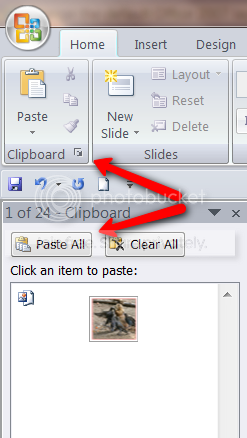
Yes you can. Once you have the picture in Word, right click on it and Copy. That will put it on the clipboard. Then open PowerPoint (leave Word open), open the clipboard in the Home tab (see picture) and paste it to a PP page. If you have more than 1 item, you can also paste them individually.

2010-03-14_1535.png
 

My Computer

Computer Manufacturer/Model Number
HP, Dell, Gateway, Toshiba - 4 laptops and 2 desktops
OS
Vista, Windows7, Mint Mate, Zorin, Windows 8
CPU
from 1.6GHz Duo to i7
Monitor(s) Displays
2x HP w2207
Hard Drives
5x HDD, 7x SSD, 12x Externals
Keyboard
with trackball - no mices
Mouse
Trackball mice
Internet Speed
DSL 6000
Thanks ;)
 

My Computer

Computer Manufacturer/Model Number
Sony VAIO VGN-NR11S
OS
Linux Mint with Windows 7 in Virtualbox
CPU
Intel® Core™ 1.5 GHz 2 Duo Processor T5250
Memory
2048 MB (2GB) RAM
Graphics Card(s)
Mobile Intel® Graphics Media Accelerator X3100
Sound Card
Realtek HD Audio
Screen Resolution
1280x800
Internet Speed
10 Mbps
I was not sure whether that's what you wanted to do. But I hoped it did the trick.
 

My Computer

Computer Manufacturer/Model Number
HP, Dell, Gateway, Toshiba - 4 laptops and 2 desktops
OS
Vista, Windows7, Mint Mate, Zorin, Windows 8
CPU
from 1.6GHz Duo to i7
Monitor(s) Displays
2x HP w2207
Hard Drives
5x HDD, 7x SSD, 12x Externals
Keyboard
with trackball - no mices
Mouse
Trackball mice
Internet Speed
DSL 6000

My Computer

Computer Manufacturer/Model Number
Sony VAIO VGN-NR11S
OS
Linux Mint with Windows 7 in Virtualbox
CPU
Intel® Core™ 1.5 GHz 2 Duo Processor T5250
Memory
2048 MB (2GB) RAM
Graphics Card(s)
Mobile Intel® Graphics Media Accelerator X3100
Sound Card
Realtek HD Audio
Screen Resolution
1280x800
Internet Speed
10 Mbps

My Computer

Computer Manufacturer/Model Number
HP, Dell, Gateway, Toshiba - 4 laptops and 2 desktops
OS
Vista, Windows7, Mint Mate, Zorin, Windows 8
CPU
from 1.6GHz Duo to i7
Monitor(s) Displays
2x HP w2207
Hard Drives
5x HDD, 7x SSD, 12x Externals
Keyboard
with trackball - no mices
Mouse
Trackball mice
Internet Speed
DSL 6000

Sorry, I have not the faintest idea. I never saw that before. Do you know which filetype it was (e.g. .docx).

It was with .docx, but after I converted it to .doc in Word, I still got the error. Never mind if you can't fix it because I've installed Office 2007 on Windows 7 in a VirtualBox in which Office works properly... This problem is in Linux ;)
 

My Computer

Computer Manufacturer/Model Number
Sony VAIO VGN-NR11S
OS
Linux Mint with Windows 7 in Virtualbox
CPU
Intel® Core™ 1.5 GHz 2 Duo Processor T5250
Memory
2048 MB (2GB) RAM
Graphics Card(s)
Mobile Intel® Graphics Media Accelerator X3100
Sound Card
Realtek HD Audio
Screen Resolution
1280x800
Internet Speed
10 Mbps
Now you're talking. Linux can have it's own flaws. Maybe you should try with Open Office.
 

My Computer

Computer Manufacturer/Model Number
HP, Dell, Gateway, Toshiba - 4 laptops and 2 desktops
OS
Vista, Windows7, Mint Mate, Zorin, Windows 8
CPU
from 1.6GHz Duo to i7
Monitor(s) Displays
2x HP w2207
Hard Drives
5x HDD, 7x SSD, 12x Externals
Keyboard
with trackball - no mices
Mouse
Trackball mice
Internet Speed
DSL 6000
Thanks for the explanation. I am not having any problems with Word 2007.
 

My Computer

Computer Manufacturer/Model Number
Home built
OS
Windows 7 Ultimate 32 bit
CPU
Intel(R) Pentium(R) 4 CPU 3.00GHz
Motherboard
ASUS P4P800-VM Motherboard Chipset: Intel 865G + ICH5
Memory
2.50 GB RAM
Graphics Card(s)
NVIDIA GeForce 7600 GS
Sound Card
SoundMax Integrated Digital Audio (Chip)
Monitor(s) Displays
ViewSonic VX 1962 wm
Screen Resolution
1680 X 1050
Hard Drives
Seagate Barracuda 7200.10 80 GB
ST380215A ATA Device 18.6 GB
Western Digital "My Book" external hard drive 750 GB
Cooling
Fan based
Keyboard
Microsoft Comfort Curve Keyboard 2000 v10 USB
Mouse
Logitec optic USB
Internet Speed
3.01 Mb/s download 0.64 Mb/s upload
ok thanks
 

My Computer

Computer Manufacturer/Model Number
Sony VAIO VGN-NR11S
OS
Linux Mint with Windows 7 in Virtualbox
CPU
Intel® Core™ 1.5 GHz 2 Duo Processor T5250
Memory
2048 MB (2GB) RAM
Graphics Card(s)
Mobile Intel® Graphics Media Accelerator X3100
Sound Card
Realtek HD Audio
Screen Resolution
1280x800
Internet Speed
10 Mbps
Back
Top