
Change the Library icon

zerodegreec

New member
Local time
4:00 PM
Messages
73
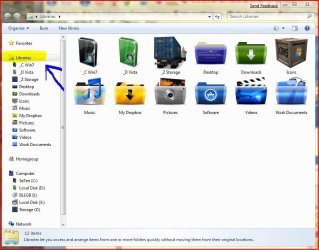
I have changed the Library folders icons and appreciate the tutorial on this site (they are all awesome)

What I would like to do now is to change the library icon itself. Its ugly (like most of Win7 icons to be honest)
 

Attachments
  • Capture.JPG
    Capture.JPG
    80.5 KB · Views: 3,196

My Computer

Computer Manufacturer/Model Number
HP Pavilion dv7
OS
w7 dual boot vista32
CPU
Core2Duo T5800 2GHz
Motherboard
HP
Memory
4gig
Graphics Card(s)
NVIDIA GeForce 9600M GT
I am trying to do this as well. Changing the Library icons is quite easy, it's just that pesky Library icon itself (uses the Windows Explorer icon.) Anyone know how to do this?
 

My Computer

OS
Windows 7 (7022)
You can Use Restorator or similar programs to achieve what you ask but you will need to take ownership of explorer.exe first and then replace the icon but before you save you will need to kill explorer first and then save, that however will not change the desktop icon until you have deleted the icon cache or after a few restarts.
 

My Computer

Computer Manufacturer/Model Number
Home Brew
OS
Windows 7 Ultimate Vista Ultimate x64
CPU
Core 2 Duo E8500 3.16Ghz @ 3.8Ghz
Motherboard
eVGA 750i FTW
Memory
2x2Gigs Patriot PC2-6400 LL
Graphics Card(s)
Inno3D GeForce GTX260 216 SP
Monitor(s) Displays
ASUS VW222U 22" 2ms Response time
Screen Resolution
1680x1050
Hard Drives
SATA 150GB
SATA II 250GB
USB IDE 750GB Ext.
PSU
HYTEC 600W & Thermaltake 650W Toughpower Power Exp
Case
Thermaltake Armor LCS (Liquid Cooling System)
Cooling
Liquid Cooling System
Keyboard
Logitech G15 Gaming Keyboard
Mouse
Logitech G9 Gaming Mouse
Nope, that doesn't do it. Same with the icon from imageres.dll. I still have a hard time tracking this bugger down. Any ideas?
 

My Computer

Computer Manufacturer/Model Number
PackardBell EasyNote
OS
Windows 7
CPU
Intel Celeron M 1.46 GHz
Memory
1024 MB
Graphics Card(s)
ATI X200M
Hard Drives
250 GB SATA
i want those icon packs PLEASE. Thanks
 
Last edited:

My Computer

Computer Manufacturer/Model Number
ME
OS
Windows 7 Ultimate 32-bit
CPU
P4 Northwood 3.0 Ghz @ 3.4 Ghz (512kb Cache :( )
Motherboard
Abit IC7-G
Memory
PC-3200 (3.0) 2x512 Kingston 2x1024 Corsair
Graphics Card(s)
Sapphire HD 3850 512mb DDR3 !AGP! Catalyst 9.9 HOTFIX
Sound Card
Onbored
Monitor(s) Displays
Viewsonic G220fb
Screen Resolution
1600x1200
Hard Drives
(2) 3.5 Seagate 74 GB Raid-0 , 1 WD Raptor 10k 150 GB, (2) Seagate 300 GB
PSU
650w Antec
Case
Mid tower
Cooling
Air.
Keyboard
PS2 Generic
Mouse
MX 518
Internet Speed
ComCrap
Other Info
This computer will become a good second computer until the time comes to buy a new computer.
I have changed the Library folders icons and appreciate the tutorial on this site (they are all awesome)

What I would like to do now is to change the library icon itself. Its ugly (like most of Win7 icons to be honest)

Hi

You have to change path to the desired icon in registry here

http://www.sevenforums.com/tutorials/34032-libraries-icon-change-default-icon.html

HKEY_CLASSES_ROOT\CLSID\{031E4825-7B94-4dc3-B131-E946B44C8DD5}\DefaultIcon

but sometimes it doesn't refresh correctly ( I have pbs under win 7 x64 particularly , x86 works fine )
 
Last edited by a moderator:

My Computer

OS
Win 7 x64
I don't know for sure but I suppose you can change the defaul library icon using resource hacker on explorer.exe or imageres.dll, probably one of the two. That would require taking ownership of explorer.exe at the least, and there's the possibility that windows senses the change in the file and silently changes it back to default.

Also I suggest using converticon to generate a "standard" icon with all dimensions, otherwise your new icon may not display correctly on all sizes.

If you just want to change single library icons, this program will save you the need to manually open library files.
 

My Computer

OS
Windows 7 Professional x64
CPU
Intel Core 2 Duo E8400 @ 3000 MHz
Motherboard
Asus P5Q PRO
Memory
G-Skill 1066 4 GB Kit
Graphics Card(s)
Powercolor AMD/Ati Radeon 4870 1 GB
Sound Card
Realtek HD Audio
Monitor(s) Displays
Samsung XL2370 23'' LED
Screen Resolution
1920x1080
Hard Drives
Maxtor 200 GB SATA II
LaCie 1TB USB
PSU
LC-Power Metatron Hyperion 700W
Cooling
Arctic Cooling Freezer 7 Pro
Keyboard
Logitech Wave Pro
Mouse
Logitech MX1100
Back
Top