Change the size of the All Programs Folders

Aperture

New member
Member
Local time
4:02 AM
Messages
94
When I click Start Menu>All Programs I have these very tiny folders in front of me.
Is it possible to make them larger?

One of the things I like about Win7 is that this seems to be possible anywhere in Win Explorer but not in the Start Menu.

Thanks

A
 

My Computer My Computer

At a glance

Windows 7 Home Premium
OS
Windows 7 Home Premium
I haven't found a way to do this myself, but I have found a workaround.

I pin the programs I use most often to the start menu list. Not only are the icons a bit larger there, but the programs that keep a list of recently opened items and/or have menus which would normally show up through a right click on the taskbar have their own menus while in this list. Theoretically, you could pin all of the items in the All Programs list to the start menu itself. The only problem is that you cannot pin folders.

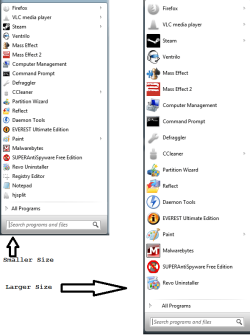
Once they're pinned to the Start Menu, you can use two sizes. One is a tiny bit bigger than the standard All Programs list, the other is much larger than the list.

To change the size of icons in the Start Menu List:

http://www.sevenforums.com/tutorials/743-start-menu-use-small-large-icons.html

Right Click Taskbar > Properties > Start Menu > Customize > Scroll Down > Check "Use Large Icons"

allprog.png
 
Last edited by a moderator:

My Computer My Computer

At a glance

W7 Ult. x64 | OS XIntel Mobile Core 2 Duo 2.93Ghz [T9800 Penryn]4096MB Samsung DDR3 Dual Channel [PC3-8500F 1...NVIDIA GeForce 9600M GT 512MB [G96M Rev. C1]
Computer Manufacturer/Model Number
Apple Macbook Pro (April 2009)
OS
W7 Ult. x64 | OS X
CPU
Intel Mobile Core 2 Duo 2.93Ghz [T9800 Penryn]
Motherboard
NVIDIA nForce 730i Rev. B1 [Mac-F2268EC8 (U2E1)]
Memory
4096MB Samsung DDR3 Dual Channel [PC3-8500F 1066Mhz]
Graphics Card(s)
NVIDIA GeForce 9600M GT 512MB [G96M Rev. C1]
Sound Card
SB X-Fi Surround 5.1 USB | Onboard Realtek (Disabled)
Monitor(s) Displays
Acer x223wbd 22" | Apple Anti-Glare 17" (Disabled)
Screen Resolution
{Current} 1440x900 {Acer} 1680x1050 {Apple} 1920x1200
Hard Drives
{Internal}
Seagate Momentus 320GB 2.5" 7200RPM [ST9320421AS]

{Externals}
LaCie 320GB USB 2.0 HDD [301284UR]
LaCie 750GB USB 2.0 FW400 eSATA HDD [301314U]
LaCie 1TB USB 2.0 HDD [301304UR]
PSU
Magsafe
Case
Aluminum/Unibody (MBP52)
Cooling
2 x 6000 RPM Fans
Keyboard
Logitech G-15v2 [PN 920-000379]
Mouse
Logitech G-9 [PN 910-000338]
Internet Speed
12Mbps/2.5Mbps w/ 24Mbps Speed Boost [Comcast]
Other Info
Logitech X-540 Speakers [PN 970223-0122]
Sennheiser PC-151 Headset

My Computer My Computer

At a glance

Windows 7 64-bitIntel i712 gigsAMD Radeon HD 6900 series
Computer Manufacturer/Model Number
Power Spec- Micro Electronics,Inc.
OS
Windows 7 64-bit
CPU
Intel i7
Motherboard
Intel
Memory
12 gigs
Graphics Card(s)
AMD Radeon HD 6900 series
Sound Card
AMD High Definition Audio Device
Monitor(s) Displays
Gateway FHX2300
Screen Resolution
1920x1080
Hard Drives
Samsung HD204UI 2 terabytes used for storage
SSD G2 Series 64 GB System drive
Thanks for your suggestions.
Amazing that Microsoft wouldn't include a way to do this more simply.

I will try both suggestions.

The xp hack sounds good as I don't like the 7 start menu but thought I'd give it a few months to get used to it. I got 7 the weekend it came out and I'm still hating its start menu.
Time to do something about it.

Thanks

A
 

My Computer My Computer

At a glance

Windows 7 Home Premium
OS
Windows 7 Home Premium

My Computer My Computer

At a glance

Windows 7 64-bitIntel i712 gigsAMD Radeon HD 6900 series
Computer Manufacturer/Model Number
Power Spec- Micro Electronics,Inc.
OS
Windows 7 64-bit
CPU
Intel i7
Motherboard
Intel
Memory
12 gigs
Graphics Card(s)
AMD Radeon HD 6900 series
Sound Card
AMD High Definition Audio Device
Monitor(s) Displays
Gateway FHX2300
Screen Resolution
1920x1080
Hard Drives
Samsung HD204UI 2 terabytes used for storage
SSD G2 Series 64 GB System drive
When I click Start Menu>All Programs I have these very tiny folders in front of me.
Is it possible to make them larger?

One of the things I like about Win7 is that this seems to be possible anywhere in Win Explorer but not in the Start Menu.

Thanks

A

Just click the Start button, then type the name of the program in the Search bar. Once found, hit enter. Easy as that.
 

My Computer My Computer

At a glance

Windows 7 Home Premium x64Intel Core 2 Quad Q9450 @ 3.2GHz4GB DDR2-800MSI Radeon HD 5850
OS
Windows 7 Home Premium x64
CPU
Intel Core 2 Quad Q9450 @ 3.2GHz
Motherboard
Asus P5Q PRO Turbo
Memory
4GB DDR2-800
Graphics Card(s)
MSI Radeon HD 5850
Sound Card
Creative Labs Audigy2 ZS
Monitor(s) Displays
Samsung 225BW
Hard Drives
(2) 1TB Samsung F1, (2) 1.5TB Samsung F2, 1TB Samsung F2, 2TB Samsung F3
PSU
Corsair HX650
Case
Antec Nine Hundred
Just click the Start button, then type the name of the program in the Search bar. Once found, hit enter. Easy as that.


I really don't know what you're talking about here.
Doesn't seem to have anything to do with my question. "Easy as that".

A
 

My Computer My Computer

At a glance

Windows 7 Home Premium
OS
Windows 7 Home Premium
Back
Top