Change the Taskbar Color

theneves

New member
Local time
1:27 AM
Messages
52
Good day. I installed a theme, and I used UxStyle Core to patch the needed files for the theme to appear. I like this theme, but the problem is the taskbar is black. I want to make it color blue, like the color of the top of the explorer. See attached image.How can I make it like the color of the explorer? I tried to change the Windows color but to no avail.
 

Attachments

  • Untitled.png
    Untitled.png
    103.2 KB · Views: 1

My Computer

Computer type
Laptop
Computer Manufacturer/Model Number
Neo
OS
Windows 7 Home Premium 32-bit
CPU
Intel(R) Atom(TM) CPU N2600 @ 1.60GHz
Motherboard
CLEVO CO. W210CUQ
Memory
2.00 GB
Graphics Card(s)
Intel(R) Graphics Media Accelerator 3600 Series
Sound Card
(1) VIA High Definition Audio (2) Intel(R) Display Audio
Hard Drives
Hitachi HTS543232A7A384 ATA Device
Antivirus
Avast!/Malwarebytes (Free)
Browser
Firefox/Pale Moon
Neves I personally don't like those sorts of third party programs like the UxStyle and did you try using the Custom colour > Control Panel Personalisation first??
 

My Computer

Computer type
PC/Desktop
Computer Manufacturer/Model Number
Own build (new) Desk1 / Asus ROG Win 7 / Desk2 1st build
OS
Desk1 7 Home Prem / Desk2 10 Pro / Main lap Asus ROG 10 Pro 2 laptop Toshiba 7 Pro Asus P2520 7 & 10
CPU
Desk1 i5 3750K / Laptop i7 GTX 860M / Desk2 i5 2500
Motherboard
Desk1 Asus P877-V / Desk2 Gigabyte H67 UD3H / Laptop ?
Memory
Desk1 8GB (1866) / Desk2 16GB (1333) / Laptop 8Gb DDR3
Graphics Card(s)
Desk 1& 2NVidia GTX 650 & Laptops on board Intel
Sound Card
Desk 1 & 2 -XONAR DG Realtek High Def audio Laptop
Monitor(s) Displays
Desk 1 Benq HD 2450 / Desk2 Philips 24" / Laptop 17.5"
Screen Resolution
1920x1080 D1 & D2 & Laptop 1
Hard Drives
Desk1 Samsung 120GB 830 SSD
Asus ROG 256GB 850 Pro SSD
Desk2 Samsung 840 256 SSD
Toshiba 120GB EVO
PSU
Desk 1 Corsair HX 1050/ Laptop ? / Desk 2 Corsair HX 650
Case
Desk 1 Cooler HAF XM ? Toshiba laptop / Desk2 Coolermaster
Cooling
Fans on all Desk1 -2 Desk2 - all Coolermasters 5 Laptop ?
Keyboard
Desk 1 MS Sidewinder X6 Desk 2 MS Sidewinder X 4
Mouse
Desk 1&2 - Gigabyte MS 900 gamer - laptop - Logitec wireless
Internet Speed
ADSL2+
Other Info
One other Desktop (tester) and spare Toshba laptop both with SSD's
Running Kaspersky 2016 ISS on all machines config'd identically
Logitec audio stereo systems on each machine (x3)
Canon MG5250MFC
Router/modem TP-Link running WPA2SK
Neves I personally don't like those sorts of third party programs like the UxStyle and did you try using the Custom colour > Control Panel Personalisation first??

Good day! In what does you didn't like UxStyle? What you used for customizing Windows 7?

Anyway, you mean in the Personalization>Windows color? I tried that. Maybe the color is embedded in the style/theme itself. Therefore, is there any program that can edit themes?
 

My Computer

Computer type
Laptop
Computer Manufacturer/Model Number
Neo
OS
Windows 7 Home Premium 32-bit
CPU
Intel(R) Atom(TM) CPU N2600 @ 1.60GHz
Motherboard
CLEVO CO. W210CUQ
Memory
2.00 GB
Graphics Card(s)
Intel(R) Graphics Media Accelerator 3600 Series
Sound Card
(1) VIA High Definition Audio (2) Intel(R) Display Audio
Hard Drives
Hitachi HTS543232A7A384 ATA Device
Antivirus
Avast!/Malwarebytes (Free)
Browser
Firefox/Pale Moon
No mate I just don't mess with add on stuff as Windows running as is fine by me.

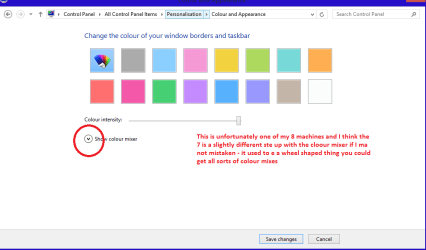
The Windows colour can be changed through Personalisation using that feature which acts alike a colour palette - see pic
 

Attachments

  • COLOUR.PNG
    COLOUR.PNG
    28 KB · Views: 1

My Computer

Computer type
PC/Desktop
Computer Manufacturer/Model Number
Own build (new) Desk1 / Asus ROG Win 7 / Desk2 1st build
OS
Desk1 7 Home Prem / Desk2 10 Pro / Main lap Asus ROG 10 Pro 2 laptop Toshiba 7 Pro Asus P2520 7 & 10
CPU
Desk1 i5 3750K / Laptop i7 GTX 860M / Desk2 i5 2500
Motherboard
Desk1 Asus P877-V / Desk2 Gigabyte H67 UD3H / Laptop ?
Memory
Desk1 8GB (1866) / Desk2 16GB (1333) / Laptop 8Gb DDR3
Graphics Card(s)
Desk 1& 2NVidia GTX 650 & Laptops on board Intel
Sound Card
Desk 1 & 2 -XONAR DG Realtek High Def audio Laptop
Monitor(s) Displays
Desk 1 Benq HD 2450 / Desk2 Philips 24" / Laptop 17.5"
Screen Resolution
1920x1080 D1 & D2 & Laptop 1
Hard Drives
Desk1 Samsung 120GB 830 SSD
Asus ROG 256GB 850 Pro SSD
Desk2 Samsung 840 256 SSD
Toshiba 120GB EVO
PSU
Desk 1 Corsair HX 1050/ Laptop ? / Desk 2 Corsair HX 650
Case
Desk 1 Cooler HAF XM ? Toshiba laptop / Desk2 Coolermaster
Cooling
Fans on all Desk1 -2 Desk2 - all Coolermasters 5 Laptop ?
Keyboard
Desk 1 MS Sidewinder X6 Desk 2 MS Sidewinder X 4
Mouse
Desk 1&2 - Gigabyte MS 900 gamer - laptop - Logitec wireless
Internet Speed
ADSL2+
Other Info
One other Desktop (tester) and spare Toshba laptop both with SSD's
Running Kaspersky 2016 ISS on all machines config'd identically
Logitec audio stereo systems on each machine (x3)
Canon MG5250MFC
Router/modem TP-Link running WPA2SK
No mate I just don't mess with add on stuff as Windows running as is fine by me.

The Windows colour can be changed through Personalisation using that feature which acts alike a colour palette - see pic

I see. Anyway, that is what I did. But it didn't change the color of the taskbar. And to get rid of it, I change the theme. Hehe. And uninstalled UxStyle. :D

Thank you very much. :)
 

My Computer

Computer type
Laptop
Computer Manufacturer/Model Number
Neo
OS
Windows 7 Home Premium 32-bit
CPU
Intel(R) Atom(TM) CPU N2600 @ 1.60GHz
Motherboard
CLEVO CO. W210CUQ
Memory
2.00 GB
Graphics Card(s)
Intel(R) Graphics Media Accelerator 3600 Series
Sound Card
(1) VIA High Definition Audio (2) Intel(R) Display Audio
Hard Drives
Hitachi HTS543232A7A384 ATA Device
Antivirus
Avast!/Malwarebytes (Free)
Browser
Firefox/Pale Moon
Back
Top