Change Thumbnail Size?

kuka00

New member
Local time
9:27 PM
Messages
5
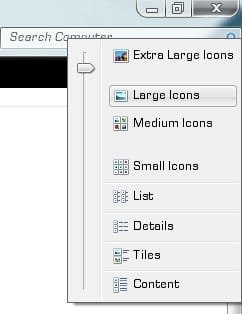
Is there an easy way to change the size of the thumbnails Windows shows on "big"?

The huge ones are too big, the big ones are too small (and I'm not even at a full HD resolution).

Tweak UI had a feature like that, but I think it's not compatible with 7.
 

My Computer

OS
Windows 7
Try this, it might work for you ;)
First open the folder you want to have the custom sized preview in. (Click the button show in pic 1)
Select the size you want (see pic 2)
Now you should have them custom sized :)

Hope this helps
 

Attachments

  • 1.jpg
    1.jpg
    777 bytes · Views: 2,706
  • 2.jpg
    2.jpg
    9.7 KB · Views: 2,722
This i know how to do. My Windows is in Portuguese so I was not sure if it was "big" or "large". What I mean is that even the "large" option is too small on my screen, while the "extra large" are ridiculously huge.

Any way to tweak so the "large" option is a little bigger?
 

My Computer

OS
Windows 7
in the screenie sergio showed you you can see a slider, use it to tweak to whatever size suits
 

My Computer

Computer Manufacturer/Model Number
Hewlett packard/p6512uk
OS
Microsoft Windows 7 Home Premium 64-bit 7600
CPU
IIx4 amd athelon 635 processor
Motherboard
FOXCONN 2AA9
Memory
2x2gb
Graphics Card(s)
ati radeon HD 5450
Sound Card
(1) Realtek High Definition Audio (2) AMD High Definition
Monitor(s) Displays
samsung lcd tv 32"
Screen Resolution
1360x 768
Hard Drives
(1) WDC WD10 01FAES-60Z2A0 SATA Disk Device (2) Maxtor OneTouch USB Device (3) ST310003 33AS USB Device (4) WD My Book 1111 USB Device
PSU
?
Cooling
air!
Keyboard
wireless hp
Mouse
wireless Hp,optical
Internet Speed
1.10mb/s
Antivirus
MSE
Browser
Firefox
Holy crap, I must be legally retarded. Never notice you could actually slide the slide.

Thanks.
=)
 

My Computer

OS
Windows 7
Holy crap, I must be legally retarded. Never notice you could actually slide the slide.

Thanks.
=)

If you have a scroll wheel on your mouse, you can also hold CONTROL on the keyboard and use the scroll wheel. It does the same as the slider.

Edit: This works everywhere.
 
Last edited:

My Computers

System One System Two

  • Computer type
    Laptop
    Computer Manufacturer/Model Number
    Dell Precision 7510
    OS
    W7PRO
    CPU
    Intel i7-6820HQ @ 2.7GHz
    Memory
    16GB
  • Computer type
    Laptop
    OS
    W7Pro
Holy crap, I must be legally retarded. Never notice you could actually slide the slide.

Thanks.
=)

If you have a scroll wheel on your mouse, you can also hold CONTROL on the keyboard and use the scroll wheel. It does the same as the slider.
this also applies to desktop shortcuts
 

My Computer

Computer Manufacturer/Model Number
Hewlett packard/p6512uk
OS
Microsoft Windows 7 Home Premium 64-bit 7600
CPU
IIx4 amd athelon 635 processor
Motherboard
FOXCONN 2AA9
Memory
2x2gb
Graphics Card(s)
ati radeon HD 5450
Sound Card
(1) Realtek High Definition Audio (2) AMD High Definition
Monitor(s) Displays
samsung lcd tv 32"
Screen Resolution
1360x 768
Hard Drives
(1) WDC WD10 01FAES-60Z2A0 SATA Disk Device (2) Maxtor OneTouch USB Device (3) ST310003 33AS USB Device (4) WD My Book 1111 USB Device
PSU
?
Cooling
air!
Keyboard
wireless hp
Mouse
wireless Hp,optical
Internet Speed
1.10mb/s
Antivirus
MSE
Browser
Firefox
Back
Top