Solved Change Title name?

iwgohan

New member
Local time
10:02 PM
Messages
2
is there a way to change the title of a video? my friend gave me a few of his dvds and he likes to add @! to his file names... for god knows why.... and i want to remove it and it is the actual 'Title name' that he changed but i don't know how to remove it...

Even in windows media player it shows @! ______ @! _____ etc

By the way i want to change the file permanently not just in wmp!
 

My Computer

OS
Windows 7, Xp
Are you talking about the filename? That you can just right click the file and click rename.

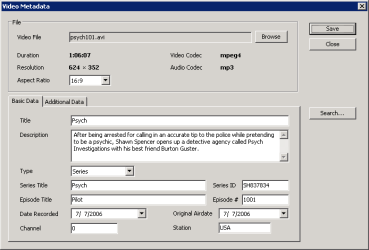
Otherwise, if you're talking about the title/tags of AVI files, this might help, but you m,ay have to run it in XP Compatibility mode. It works perfectly for me w/out Xp compatibility mode but then again who knows.

abcAVI Tag Editor
 

My Computer

Computer Manufacturer/Model Number
Apple Macbook Pro (April 2009)
OS
W7 Ult. x64 | OS X
CPU
Intel Mobile Core 2 Duo 2.93Ghz [T9800 Penryn]
Motherboard
NVIDIA nForce 730i Rev. B1 [Mac-F2268EC8 (U2E1)]
Memory
4096MB Samsung DDR3 Dual Channel [PC3-8500F 1066Mhz]
Graphics Card(s)
NVIDIA GeForce 9600M GT 512MB [G96M Rev. C1]
Sound Card
SB X-Fi Surround 5.1 USB | Onboard Realtek (Disabled)
Monitor(s) Displays
Acer x223wbd 22" | Apple Anti-Glare 17" (Disabled)
Screen Resolution
{Current} 1440x900 {Acer} 1680x1050 {Apple} 1920x1200
Hard Drives
{Internal}
Seagate Momentus 320GB 2.5" 7200RPM [ST9320421AS]

{Externals}
LaCie 320GB USB 2.0 HDD [301284UR]
LaCie 750GB USB 2.0 FW400 eSATA HDD [301314U]
LaCie 1TB USB 2.0 HDD [301304UR]
PSU
Magsafe
Case
Aluminum/Unibody (MBP52)
Cooling
2 x 6000 RPM Fans
Keyboard
Logitech G-15v2 [PN 920-000379]
Mouse
Logitech G-9 [PN 910-000338]
Internet Speed
12Mbps/2.5Mbps w/ 24Mbps Speed Boost [Comcast]
Other Info
Logitech X-540 Speakers [PN 970223-0122]
Sennheiser PC-151 Headset
what do you mean title ?
the file name or dvd title which shown is DVDROM drive ?
give screenshoot to make it clearly ..
 

My Computer

OS
win7
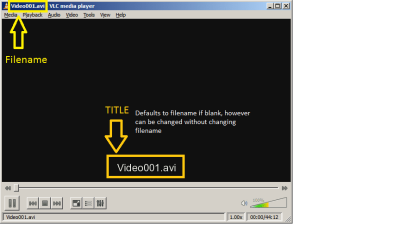
I believe he's talking about the internal title which is considered a tag of the video. It's not the title of the file itself, but the title that shows up when you start watching a video.

For example:
 

Attachments

  • titlefilename.png
    titlefilename.png
    9.4 KB · Views: 465
  • MetadataBasic13.png
    MetadataBasic13.png
    5.4 KB · Views: 692

My Computer

Computer Manufacturer/Model Number
Apple Macbook Pro (April 2009)
OS
W7 Ult. x64 | OS X
CPU
Intel Mobile Core 2 Duo 2.93Ghz [T9800 Penryn]
Motherboard
NVIDIA nForce 730i Rev. B1 [Mac-F2268EC8 (U2E1)]
Memory
4096MB Samsung DDR3 Dual Channel [PC3-8500F 1066Mhz]
Graphics Card(s)
NVIDIA GeForce 9600M GT 512MB [G96M Rev. C1]
Sound Card
SB X-Fi Surround 5.1 USB | Onboard Realtek (Disabled)
Monitor(s) Displays
Acer x223wbd 22" | Apple Anti-Glare 17" (Disabled)
Screen Resolution
{Current} 1440x900 {Acer} 1680x1050 {Apple} 1920x1200
Hard Drives
{Internal}
Seagate Momentus 320GB 2.5" 7200RPM [ST9320421AS]

{Externals}
LaCie 320GB USB 2.0 HDD [301284UR]
LaCie 750GB USB 2.0 FW400 eSATA HDD [301314U]
LaCie 1TB USB 2.0 HDD [301304UR]
PSU
Magsafe
Case
Aluminum/Unibody (MBP52)
Cooling
2 x 6000 RPM Fans
Keyboard
Logitech G-15v2 [PN 920-000379]
Mouse
Logitech G-9 [PN 910-000338]
Internet Speed
12Mbps/2.5Mbps w/ 24Mbps Speed Boost [Comcast]
Other Info
Logitech X-540 Speakers [PN 970223-0122]
Sennheiser PC-151 Headset
Are you talking about the filename? That you can just right click the file and click rename.

Otherwise, if you're talking about the title/tags of AVI files, this might help, but you m,ay have to run it in XP Compatibility mode. It works perfectly for me w/out Xp compatibility mode but then again who knows.

abcAVI Tag Editor

I believe he's talking about the internal title which is considered a tag of the video. It's not the title of the file itself, but the title that shows up when you start watching a video.

For example:

you both hit it on the nail... does w7 have a way to do it? also is there a way to do multiple ones easily?
 

My Computer

OS
Windows 7, Xp
@notsograymatter

I know this thread is old but your post really helped me out. I've been searching all over trying to figure out how to edit metadata for videos in windows explorer, but to no avail. I don't know why windows won't allow me to simply edit a title for a video. I downloaded abcAVI Tag Editor and it did the trick. Thanks a bunch. :geek:
 

My Computer

Computer Manufacturer/Model Number
Acer Aspire 5551G
OS
Windows 7 Ultimate x64 (Service Pack 1)
CPU
AMD Turion II P520 Dual-Core, 2.3 GHz (11.5 x 200)
Motherboard
Acer Aspire 5551G
Memory
4GB DDR3-1333
Graphics Card(s)
ATI Mobility Radeon HD 5650 (1024 MB)
Sound Card
ATI Radeon HDMI
Monitor(s) Displays
AU Optronics B156XW02 V2 [15.6" LCD]
Screen Resolution
1366 x 768
Hard Drives
Seagate ST9500325AS ATA Device (500 GB, 5400 RPM, SATA-II)
Back
Top