
artmaker43
New member
- Local time
- 8:39 PM
- Messages
- 6
Here are Microsoft's Instructions to Change Settings for Updates
"...In the left pane, click Change settings.
Under Microsoft Update, select the Give me updates for Microsoft products and check for new optional Microsoft software when I update Windows check box.
To get notifications of new Microsoft software, select the Show me detailed notifications when new Microsoft software is available check box..."
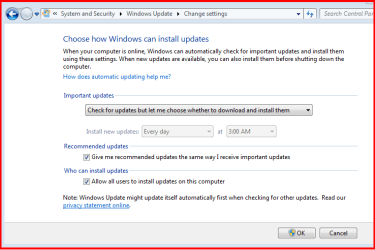
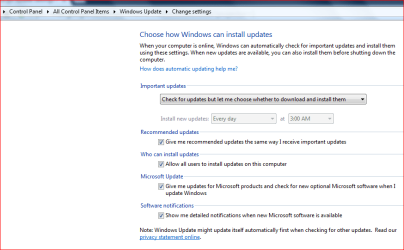
See the attached two (2) .png images. On my 32 Bit Windows 7 Starter, notice how the required boxes needed to check are not shown. I would like to have this ability - just like on my 64 Bit Windows 7 Home Premium 64 Bit Notebook. Seems like Microsoft goofed up something in their system software for Windows 7 Starter 32 bit.
Any ideas how to get the missing check boxes? Maybe with REGEDIT? Or something else?
"...In the left pane, click Change settings.
Under Microsoft Update, select the Give me updates for Microsoft products and check for new optional Microsoft software when I update Windows check box.
To get notifications of new Microsoft software, select the Show me detailed notifications when new Microsoft software is available check box..."
See the attached two (2) .png images. On my 32 Bit Windows 7 Starter, notice how the required boxes needed to check are not shown. I would like to have this ability - just like on my 64 Bit Windows 7 Home Premium 64 Bit Notebook. Seems like Microsoft goofed up something in their system software for Windows 7 Starter 32 bit.
Any ideas how to get the missing check boxes? Maybe with REGEDIT? Or something else?
Attachments
My Computer
At a glance
Windows 7 Home Premium 64 bitIntel Core 2 Duo T6600 2.20 GHz4 GB
- Computer type
- Laptop
- Computer Manufacturer/Model Number
- HP
- OS
- Windows 7 Home Premium 64 bit
- CPU
- Intel Core 2 Duo T6600 2.20 GHz
- Memory
- 4 GB
- Browser
- Chrome
