Change user account type from System Recovery

Bung

New member
Local time
9:04 PM
Messages
3
Hello, thanks for looking,

I have a Windows 7 Home Premium 64 laptop with a single user on it. This user recently got changed to a guest account type from admin account type and I can't fix it.

I have read all the guides to "enable hidden administrator account" using "net user administrator /active:yes" but it doesn't work from regular command prompt (ie not run as administrator, can't get past UAC), safe mode command prompt, or system recovery command prompt.

I have also tried to disable UAC via system recovery command prompt by running regedit and doing the equivalent of this: "C:\Windows\System32\cmd.exe /k %windir%\System32\reg.exe ADD HKLM\SOFTWARE\Microsoft\Windows\CurrentVersion\Policies\System /v EnableLUA /t REG_DWORD /d 0 /f" Obviously I can't change this from a safe mode command prompt because my user doesn't have the privileges. When I boot into safe mode, it automatically logs me into the user, there is no option for anything else.

I should also mention that Ive tried this as well: http://www.sevenforums.com/tutorials/102552-built-administrator-enable-winre.html

Method 1, after typing enableadmin <enter> I got the error "The subsystem needed to support the image type is not present".

Method 2, the load hive option was greyed out.

I am certain that tutorial is ALMOST what I need but they didn't work. Any thoughts?

Unfortunately nothing will work that requires an administrator account or adminstrator console. I believe my user problem can only be fixed from system recover command prompt. Does anyone know how to add a new administrator user, or change the account type on my existing user?

Please please please please help.
CB
 

My Computer My Computer

At a glance

Win 7 Home Premium 64
OS
Win 7 Home Premium 64
What happens when you try to enable the original account or set up a new one with Admin rights in Control Panel>User Accounts?

Have you tried enabling the hidden administrative account using an Elevated Command Prompt? http://www.sevenforums.com/tutorials/783-elevated-command-prompt.html

If these won't work then try System Restore to before the problem began: http://www.sevenforums.com/tutorials/700-system-restore.html Try it first from Windows and then from the DVD Repair console or Repair CD, or try tapping F8 at bootup to see if Repair console is on Advanced Boot Tools menu. http://www.sevenforums.com/tutorials/2083-system-repair-disc-create.html

I would also try http://www.sevenforums.com/tutorials/1538-sfc-scannow-command-system-file-checker.html and if necessary a http://www.sevenforums.com/tutorials/3413-repair-install.html?ltr=R if you have access to a Win7 install DVD.

If all of these fail, then you may have messed up your system beyond repair. See if you can make your Recovery Disks if you haven't already, then back up your files and run full Factory Recovery from Windows, or by tapping the F-key given on the first boot screen or in the Manual on the Support Downloads webpage for your laptop model.

If you have access to a Win7 DVD, you can clean reinstall using these tips: http://www.sevenforums.com/installation-setup/125874-re-install-windows-7-a.html#post1086729
 
What happens when you try to enable the original account or set up a new one with Admin rights in Control Panel>User Accounts?
As stated, this requires adminstrator access, can't click yes on the UAC prompt.

Have you tried enabling the hidden administrative account using an Elevated Command Prompt? http://www.sevenforums.com/tutorials/783-elevated-command-prompt.html
As stated, this requires adminstrator access, can't click yes on the UAC prompt.

If these won't work then try System Restore to before the problem began: http://www.sevenforums.com/tutorials/700-system-restore.html Try it first from Windows and then from the DVD Repair console or Repair CD, or try tapping F8 at bootup to see if Repair console is on Advanced Boot Tools menu. http://www.sevenforums.com/tutorials/2083-system-repair-disc-create.html
Unfortunately it's a brand new computer and there has been no restore images made yet.

I have tried the repair install methods of my Win 7 install CD, but it didn't effect anything unfortunately. What would a system file checker do?
 

My Computer My Computer

At a glance

Win 7 Home Premium 64
OS
Win 7 Home Premium 64
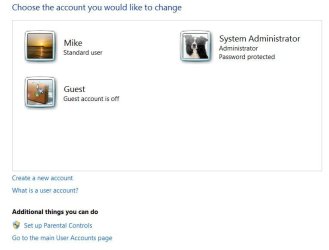
Go to start and type "accounts" then click on "User Accounts" from the list. Click on "Manage Another Account". Grab a snip of this window and post the pic, here. Mine looks like this:

Capture.JPG

I'm failing to find it even remotely possible that an administrator account can be changed to a guest account. The guest account, to my knowledge, is a built in account that can't be changed or deleted, only turned on or off. Windows 7 requires at least 1 administrator account to operate.
 

My Computer My Computer

At a glance

Windows 7 Pro/32 Academic. Build 7600Intel 2.3 Duo core4 GB DDRNvidia GeForce 9500 GT
Computer Manufacturer/Model Number
Custom Build
OS
Windows 7 Pro/32 Academic. Build 7600
CPU
Intel 2.3 Duo core
Motherboard
EliteGroup G31T-M
Memory
4 GB DDR
Graphics Card(s)
Nvidia GeForce 9500 GT
Sound Card
Built in
Monitor(s) Displays
Viewsonic 15" 4:3
Screen Resolution
1280 x 1024
Hard Drives
WD Caviar Black 750 GB
WD 250 GB External
PSU
Antec 450w
Keyboard
Standard windows
Mouse
Logitech USB
Internet Speed
Bellsouth DSL 6.0
Let me tell you how all this happened..

Bung,

You had only one account on your computer and it was the 'Administrator' some one activactivated 'Guest' account on your computer and the default 'Administrator' account got disabled. (This bullshit was happening becoz Windows default administrator account in Win7 will not show of by default if there is any other user account is active).

I don't know if it would work, but please try to log-in to Safe mode, then Alt-Ctrl-Del at log-in screen and try to log-in with Username: Administrator and the password you have been using (I don't think you have any password set for administrator account in this case, you bet) and if you are successful, please create a new Admin User account from control panel.

Wish you good luck with your PC.
 

My Computer My Computer

At a glance

Windows 8 64bit RP
OS
Windows 8 64bit RP
System Recovery, cmd prompt may be inadequate

If it was the only active account, one may be reduced to booting from System Repair CD, and working from cmd prompt. However, commands will act on the volatile state, by default. For example, to repair a munged ProfileList in the registry, one must load the Software hive from the harddrive, correct damage (if a valid S-*.bak Key is there), unload the registry hive and reboot.

Just did that on a laptop, and was still not able to login. That HP ProBook 4530s has 3 means to login (password, finterprint reader, or facial recog). Maybe those means interact in some way...

As a workaround, it would be nice to activate the hidden Admin acct. However, net user Administrator /active:yes seems to active on the volatile state, and not what is on the harddrive. :eek:
 

My Computer My Computer

At a glance

Windows 8Pentium G6454 GBIntel HD
Computer type
PC/Desktop
Computer Manufacturer/Model Number
HP
OS
Windows 8
CPU
Pentium G645
Motherboard
Joshua-H61-uATX
Memory
4 GB
Graphics Card(s)
Intel HD
Hard Drives
Seagate 1 TB, SATA
Back
Top