Change User Password

regist

New member
Local time
11:22 PM
Messages
8
Hi all'

First post.
I have a Lenovo T460s that has fingerprint entry into my account. I am the Administrator and am logged into Admin acct. I have been using the fingerprint scan for so long now that I have forgotten my password.

Windows is asking for current password to change the password even though I'm logged in. Is there a way - as administrator - to change the password?
 

My Computer

Computer type
PC/Desktop
Computer Manufacturer/Model Number
Lenovo T460s
OS
Windows7 64
CPU
intel 6600u
Hi,

welcome to SF.

See if this helps, Password reset

Be careful with the steps. Follow them.
 

My Computer

Computer type
PC/Desktop
Computer Manufacturer/Model Number
Custom Bulid/Self made
OS
Windows 11 x64
CPU
i5 2500K @ 3.3 GHz
Motherboard
ASUS P8 Z77 V pro
Memory
16 GB DDR 3 @ 1600Mhz
Graphics Card(s)
MSI 1050TI 4GB OC version
Sound Card
On Board (Realtek HD audio)
Monitor(s) Displays
Samsung 22" LCD
Screen Resolution
1920*1080
Hard Drives
Seagate 1 TB, WD 1TB, Seagate 2 TB ( I use a lot of space)
PSU
coolermaster 750 W
Case
Coolermaster HAF912
Cooling
Coolermaster hyper 212 EVO
Keyboard
Samsung
Mouse
Dell Wireless
Internet Speed
Wireless 50 Mbps
Antivirus
AVG 2016 Internet Security
Browser
Google Chrome
We’ve solved this problem already. See my post here.
 

My Computer

Computer type
PC/Desktop
OS
Windows 10, Windows 8.1 Pro, Windows 7 Professional, OS X El Capitan
I'm pretty sure you haven't. Lenovo must lay their fingerprint software on top without actually integrating it into Windows Seven. Somehow I can actually get into my Admin acct without Windows permission. If I were in Windows I would be logged in and would not need to have the present password to delete the password.
 

My Computer

Computer type
PC/Desktop
Computer Manufacturer/Model Number
Lenovo T460s
OS
Windows7 64
CPU
intel 6600u
I elevated the command prompt and typed into it:
net user "xxx" ""
and hit return and nothing happened.
 

My Computer

Computer type
PC/Desktop
Computer Manufacturer/Model Number
Lenovo T460s
OS
Windows7 64
CPU
intel 6600u
I elevated the command prompt and typed into it:
net user "xxx" ""
and hit return and nothing happened.
Something would have happened, and you did get something out of performing that action. Even if it is an error, this is valued problem-solving material and you should share this result if you wish to see your issue solved quickly.


Please don’t abandon your thread as to avoid thread obsolescence on the forum.
 

My Computer

Computer type
PC/Desktop
OS
Windows 10, Windows 8.1 Pro, Windows 7 Professional, OS X El Capitan
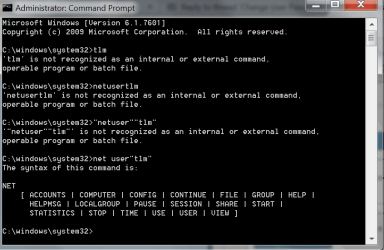
I am not sure if I structured the command right. I brought up an admin grade command prompt and entered
 

Attachments

  • ScreenShot00148.png
    ScreenShot00148.png
    18.7 KB · Views: 1

My Computer

Computer type
PC/Desktop
Computer Manufacturer/Model Number
Lenovo T460s
OS
Windows7 64
CPU
intel 6600u
Your doubt is understandable. I can’t fathom how you came up with those commands. The one in post 5 seemed promising enough but you don’t demonstrate it in the image?


Try again.

  1. Open an elevated command prompt.
  2. Execute the following command line exactly as shown (i.e., make no substitutions). This will remove the user’s password.
Code:
net user "%username%" ""
 

My Computer

Computer type
PC/Desktop
OS
Windows 10, Windows 8.1 Pro, Windows 7 Professional, OS X El Capitan
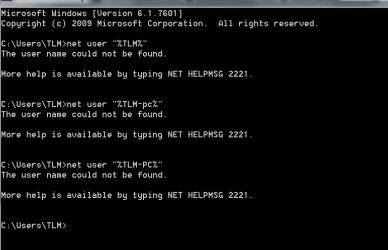
Here it is as you instruct:
 

Attachments

  • ScreenShot00149.png
    ScreenShot00149.png
    7.2 KB · Views: 1

My Computer

Computer type
PC/Desktop
Computer Manufacturer/Model Number
Lenovo T460s
OS
Windows7 64
CPU
intel 6600u
  1. Click on the Start button.
  2. Right-click on Computer.
  3. Select Properties.
 

My Computer

Computer type
PC/Desktop
Computer Manufacturer/Model Number
Lenovo T460s
OS
Windows7 64
CPU
intel 6600u
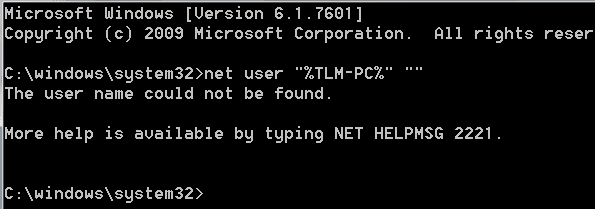
Just checked, password has not been deleted.
 

My Computer

Computer type
PC/Desktop
Computer Manufacturer/Model Number
Lenovo T460s
OS
Windows7 64
CPU
intel 6600u
?..
 

Attachments

  • ScreenShot00150.png
    ScreenShot00150.png
    3 KB · Views: 22

My Computer

Computer type
PC/Desktop
Computer Manufacturer/Model Number
Lenovo T460s
OS
Windows7 64
CPU
intel 6600u
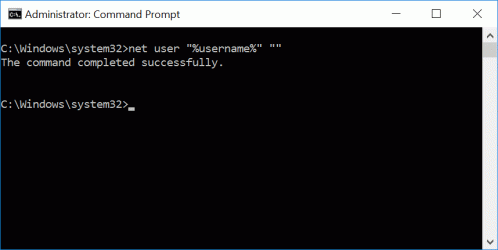
When I say “exactly” I mean none other than *exactly*, that is, don’t make modifications, don’t make substitutions. Just copy-paste the line as is and restrain yourself from performing alterations, like inserting your name, and you should be golden.

Here is an image as reference this time.
screenshot665077.gif
 

My Computer

Computer type
PC/Desktop
OS
Windows 10, Windows 8.1 Pro, Windows 7 Professional, OS X El Capitan
if you could try this one !

Hi to All,
First i would like to add that cracking/revealing the password is more difficult than just changing it without knowing and if you are able to run apps,etc as admin, it is further easy. if you could try out this link/thread

Change Windows User Password Without Knowing Current Password • Raymond.CC

(my opinion: don't entangle with KON Boot , i don't know much about that in the given situation)

Thanks & Regards,
Vineet Garg...
 

My Computer

Computer type
Laptop
Computer Manufacturer/Model Number
hp compaq presario c795VU notebook pc
OS
Windows 7 Ultimate x32 With Sp1 + Vista Ultimate x32 with Sp1 & Sp2 !!
CPU
Intel Mobile Core 2 Duo T5750 @ 2.00GHz Merom 65nm Technolog
Motherboard
Hewlett-Packard 30D9 (CPU)
Memory
2.00GB Dual-Channel DDR2 @ 332MHz (5-5-5-15)
Graphics Card(s)
Mobile Intel(R) 965 Express Chipset Family
Sound Card
High Definition Audio Device
Monitor(s) Displays
LP154WX4-TLCB on Mobile Intel 965 Express Chipset Family
Screen Resolution
1280x800 @ 60Hz
Hard Drives
149GB Western Digital WDC WD1600BEVS-60VAT0 ATA Device (SATA)
Keyboard
Standard 101/102-Key or Microsoft Natural PS/2 Key + HP QLB
Mouse
ALPS pointing device
Antivirus
Kaspersky AV 2017(Win 7) & AVG AntiVirus Free 2016 (VISTA)
Browser
google chrome
Back
Top