change volume up/down ratio, when button pressed

stuartrozier

New member
Member
VIP
Local time
3:32 AM
Messages
113
Hello,

I was wondering if their was a way of changing the ratio on which, when your pressing the volume up/down buttons on the keyboard - it changes jumps up more or down when pressed,

im probably not describing this very well,

but when I press volume up, it moves up so gradually its very slow,

is their a way of making it move up the bar faster when pressed ? and also when volume down is pressed ?

Many thanks

Stuart
 

My Computer

Computer Manufacturer/Model Number
HP
OS
Windows 7 Home Pre 64bit
CPU
i7 intel core 2.93GHZ
Motherboard
MSI
Memory
16.00GB
Graphics Card(s)
nVidia GT 220
Hello Stuart mate I may be wrong but I am guessing it is a idiosyncrasy of any machine soem fats soem slow.
I suppose a run of these would not do any harm.
http://www.sevenforums.com/tutorials/1538-sfc-scannow-command-system-file-checker.html
http://www.sevenforums.com/tutorials/433-disk-check.html < if necessary include the /f and /r in the command line as per Option2
Run these in safe mode and the sfc often best run for two to three runs and you could drop the /r switch in chkdsk unless you feel it necessary. I am assuming the machine is not brand new of course.
 

My Computer

Computer type
PC/Desktop
Computer Manufacturer/Model Number
Own build (new) Desk1 / Asus ROG Win 7 / Desk2 1st build
OS
Desk1 7 Home Prem / Desk2 10 Pro / Main lap Asus ROG 10 Pro 2 laptop Toshiba 7 Pro Asus P2520 7 & 10
CPU
Desk1 i5 3750K / Laptop i7 GTX 860M / Desk2 i5 2500
Motherboard
Desk1 Asus P877-V / Desk2 Gigabyte H67 UD3H / Laptop ?
Memory
Desk1 8GB (1866) / Desk2 16GB (1333) / Laptop 8Gb DDR3
Graphics Card(s)
Desk 1& 2NVidia GTX 650 & Laptops on board Intel
Sound Card
Desk 1 & 2 -XONAR DG Realtek High Def audio Laptop
Monitor(s) Displays
Desk 1 Benq HD 2450 / Desk2 Philips 24" / Laptop 17.5"
Screen Resolution
1920x1080 D1 & D2 & Laptop 1
Hard Drives
Desk1 Samsung 120GB 830 SSD
Asus ROG 256GB 850 Pro SSD
Desk2 Samsung 840 256 SSD
Toshiba 120GB EVO
PSU
Desk 1 Corsair HX 1050/ Laptop ? / Desk 2 Corsair HX 650
Case
Desk 1 Cooler HAF XM ? Toshiba laptop / Desk2 Coolermaster
Cooling
Fans on all Desk1 -2 Desk2 - all Coolermasters 5 Laptop ?
Keyboard
Desk 1 MS Sidewinder X6 Desk 2 MS Sidewinder X 4
Mouse
Desk 1&2 - Gigabyte MS 900 gamer - laptop - Logitec wireless
Internet Speed
ADSL2+
Other Info
One other Desktop (tester) and spare Toshba laptop both with SSD's
Running Kaspersky 2016 ISS on all machines config'd identically
Logitec audio stereo systems on each machine (x3)
Canon MG5250MFC
Router/modem TP-Link running WPA2SK
Hello Stuart mate I may be wrong but I am guessing it is a idiosyncrasy of any machine soem fats soem slow.
I suppose a run of these would not do any harm.
http://www.sevenforums.com/tutorials/1538-sfc-scannow-command-system-file-checker.html
http://www.sevenforums.com/tutorials/433-disk-check.html < if necessary include the /f and /r in the command line as per Option2
Run these in safe mode and the sfc often best run for two to three runs and you could drop the /r switch in chkdsk unless you feel it necessary. I am assuming the machine is not brand new of course.


Hello ! thankyou for your reply,

I think ive written it wrongly,

it does respond it real-time,

I was just wondering if their was a way of making it move up the bar quicker,
ie
if we break the volume bar down into 4 parts,

one click up - section 1
two clicks up - section 2
3 clicks up - section 4
4 click up - full volume,

whereas at the moment, im pressing the volume button about 15-20 clicks, just to reach full volume ,

have I made that sound even more complicated now haha
 

My Computer

Computer Manufacturer/Model Number
HP
OS
Windows 7 Home Pre 64bit
CPU
i7 intel core 2.93GHZ
Motherboard
MSI
Memory
16.00GB
Graphics Card(s)
nVidia GT 220
Hmm got me there Stuart would be something again to do with the machine setup I guess. I actually use a Microsoft Sidewinder x6 KB which has a round knob that I use to work the volume so I can go from whoa to go in a nano second.

Have you tried using the mouse to move the audio slider??
 

Attachments

  • VOLUME.PNG
    VOLUME.PNG
    1.9 KB · Views: 14

My Computer

Computer type
PC/Desktop
Computer Manufacturer/Model Number
Own build (new) Desk1 / Asus ROG Win 7 / Desk2 1st build
OS
Desk1 7 Home Prem / Desk2 10 Pro / Main lap Asus ROG 10 Pro 2 laptop Toshiba 7 Pro Asus P2520 7 & 10
CPU
Desk1 i5 3750K / Laptop i7 GTX 860M / Desk2 i5 2500
Motherboard
Desk1 Asus P877-V / Desk2 Gigabyte H67 UD3H / Laptop ?
Memory
Desk1 8GB (1866) / Desk2 16GB (1333) / Laptop 8Gb DDR3
Graphics Card(s)
Desk 1& 2NVidia GTX 650 & Laptops on board Intel
Sound Card
Desk 1 & 2 -XONAR DG Realtek High Def audio Laptop
Monitor(s) Displays
Desk 1 Benq HD 2450 / Desk2 Philips 24" / Laptop 17.5"
Screen Resolution
1920x1080 D1 & D2 & Laptop 1
Hard Drives
Desk1 Samsung 120GB 830 SSD
Asus ROG 256GB 850 Pro SSD
Desk2 Samsung 840 256 SSD
Toshiba 120GB EVO
PSU
Desk 1 Corsair HX 1050/ Laptop ? / Desk 2 Corsair HX 650
Case
Desk 1 Cooler HAF XM ? Toshiba laptop / Desk2 Coolermaster
Cooling
Fans on all Desk1 -2 Desk2 - all Coolermasters 5 Laptop ?
Keyboard
Desk 1 MS Sidewinder X6 Desk 2 MS Sidewinder X 4
Mouse
Desk 1&2 - Gigabyte MS 900 gamer - laptop - Logitec wireless
Internet Speed
ADSL2+
Other Info
One other Desktop (tester) and spare Toshba laptop both with SSD's
Running Kaspersky 2016 ISS on all machines config'd identically
Logitec audio stereo systems on each machine (x3)
Canon MG5250MFC
Router/modem TP-Link running WPA2SK
I solved the problem by getting a media keyboard with a dial on it, but that doesn't help you much unless you're prepared to buy a new keyboard. In that case, I recommend the Logitech G710+.

More to the point, there isn't a lot to be done about your problem. I take it that your keyboard has a sound up/down button that you press to increase/decrease the volume. In that case, you're a victim of the keyboard's driver as for how fast it increases or decreases the volume. There's really nothing you can do about it. Most keyboards with these buttons increase the volume by 3 dB each press, which is effectively double the previous volume, and the minimum level for you to detect a change in volume. It sounds like your keyboard is less than that, unfortunately.

The easiest solution for you would be to follow ICIT2LOL's advice about using the mouse to increase/decrease the sound level.
 

My Computer

Computer type
PC/Desktop
Computer Manufacturer/Model Number
Mellon Labs (custom build)
OS
Win 7 Pro x64/Win 10 Pro x64 dual boot
CPU
AMD FX 8350 Vishera @ 4200
Motherboard
ASUS M5A97 R2.0
Memory
16 GB Mushkin Blackline DDR3-2400 @ 1866 (9-10-10-10-31)
Graphics Card(s)
XFX Radeon R9 280 Double D Black Edition
Sound Card
Realtek HD Audio on MB. Sounds great.
Monitor(s) Displays
Acer 24", Acer 22"
Screen Resolution
3840 x 1080
Hard Drives
1 x Mushkin Chronos 120 GB SSD (Win 10)
1 x Samsung 850 EVO 250 GB SSD (Win 7)
1 x WD 1TB SATA Blue
1 x WD 1TB SATA Green
PSU
Corsair TX-750
Case
CoolerMaster HAF 912+
Cooling
Coolermaster Seidon 240M Liquid AIO. 6 case fans
Keyboard
Logitech G710+
Mouse
Logitech G500s
Internet Speed
Much better since I got fiber, but still way overpriced.
Antivirus
MSE, Malware Bytes for scanning
Browser
Firefox
Other Info
Corsair VOID USB headphones.

A Mellon Labs X-1 - LCD Smartie driven system status display.

Brought to you by the letter E
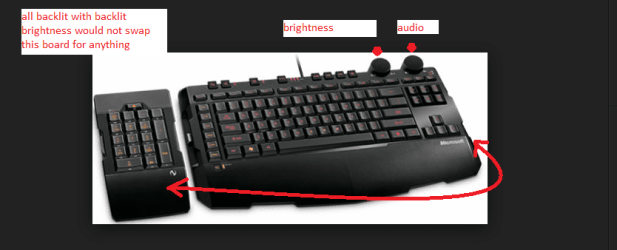
As Mellon Head has said mate good to get a KB like we have - that one that I have has a knob for audio and screen brightness, but unfortunately they seem to have stopped supplying them out where I live - real beauty because you can also change the NUM pad from right to left - wherever you like it. seepic
 

Attachments

  • SIDEWINDER.PNG
    SIDEWINDER.PNG
    40.2 KB · Views: 0

My Computer

Computer type
PC/Desktop
Computer Manufacturer/Model Number
Own build (new) Desk1 / Asus ROG Win 7 / Desk2 1st build
OS
Desk1 7 Home Prem / Desk2 10 Pro / Main lap Asus ROG 10 Pro 2 laptop Toshiba 7 Pro Asus P2520 7 & 10
CPU
Desk1 i5 3750K / Laptop i7 GTX 860M / Desk2 i5 2500
Motherboard
Desk1 Asus P877-V / Desk2 Gigabyte H67 UD3H / Laptop ?
Memory
Desk1 8GB (1866) / Desk2 16GB (1333) / Laptop 8Gb DDR3
Graphics Card(s)
Desk 1& 2NVidia GTX 650 & Laptops on board Intel
Sound Card
Desk 1 & 2 -XONAR DG Realtek High Def audio Laptop
Monitor(s) Displays
Desk 1 Benq HD 2450 / Desk2 Philips 24" / Laptop 17.5"
Screen Resolution
1920x1080 D1 & D2 & Laptop 1
Hard Drives
Desk1 Samsung 120GB 830 SSD
Asus ROG 256GB 850 Pro SSD
Desk2 Samsung 840 256 SSD
Toshiba 120GB EVO
PSU
Desk 1 Corsair HX 1050/ Laptop ? / Desk 2 Corsair HX 650
Case
Desk 1 Cooler HAF XM ? Toshiba laptop / Desk2 Coolermaster
Cooling
Fans on all Desk1 -2 Desk2 - all Coolermasters 5 Laptop ?
Keyboard
Desk 1 MS Sidewinder X6 Desk 2 MS Sidewinder X 4
Mouse
Desk 1&2 - Gigabyte MS 900 gamer - laptop - Logitec wireless
Internet Speed
ADSL2+
Other Info
One other Desktop (tester) and spare Toshba laptop both with SSD's
Running Kaspersky 2016 ISS on all machines config'd identically
Logitec audio stereo systems on each machine (x3)
Canon MG5250MFC
Router/modem TP-Link running WPA2SK
As Mellon Head has said mate good to get a KB like we have - that one that I have has a knob for audio and screen brightness, but unfortunately they seem to have stopped supplying them out where I live - real beauty because you can also change the NUM pad from right to left - wherever you like it. seepic

I solved the problem by getting a media keyboard with a dial on it, but that doesn't help you much unless you're prepared to buy a new keyboard. In that case, I recommend the Logitech G710+.

More to the point, there isn't a lot to be done about your problem. I take it that your keyboard has a sound up/down button that you press to increase/decrease the volume. In that case, you're a victim of the keyboard's driver as for how fast it increases or decreases the volume. There's really nothing you can do about it. Most keyboards with these buttons increase the volume by 3 dB each press, which is effectively double the previous volume, and the minimum level for you to detect a change in volume. It sounds like your keyboard is less than that, unfortunately.

The easiest solution for you would be to follow ICIT2LOL's advice about using the mouse to increase/decrease the sound level.

Hmm got me there Stuart would be something again to do with the machine setup I guess. I actually use a Microsoft Sidewinder x6 KB which has a round knob that I use to work the volume so I can go from whoa to go in a nano second.

Have you tried using the mouse to move the audio slider??

Hello Stuart mate I may be wrong but I am guessing it is a idiosyncrasy of any machine soem fats soem slow.
I suppose a run of these would not do any harm.
http://www.sevenforums.com/tutorials/1538-sfc-scannow-command-system-file-checker.html
http://www.sevenforums.com/tutorials/433-disk-check.html < if necessary include the /f and /r in the command line as per Option2
Run these in safe mode and the sfc often best run for two to three runs and you could drop the /r switch in chkdsk unless you feel it necessary. I am assuming the machine is not brand new of course.


thankyou :)
 

My Computer

Computer Manufacturer/Model Number
HP
OS
Windows 7 Home Pre 64bit
CPU
i7 intel core 2.93GHZ
Motherboard
MSI
Memory
16.00GB
Graphics Card(s)
nVidia GT 220
Back
Top