Change window background

LostCause25

New member
Local time
8:46 PM
Messages
2
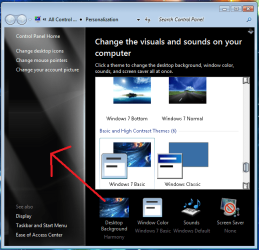
I have searched and have yet to find an answer to this annoying problem. I would like to know how to change the background of a certain window (see picture). It will not change when I switch themes.
 

Attachments

  • Capture.PNG
    Capture.PNG
    55.9 KB · Views: 238

My Computer

OS
WIndows 7
How did you get it to be that color to begin with? All Windows 7 installations I've ever seen have white backgrounds, not black.
 

My Computer

Computer Manufacturer/Model Number
Alienware X51
OS
Windows 7 Home Premium x64
CPU
Intel Core i7-2600 @3.40GHz
Memory
8.00GB DDR3
Graphics Card(s)
NVIDIA GeForce GTX 555 w/1.0GB RAM
Monitor(s) Displays
BenQ XL2420TX
Screen Resolution
1920x1080@120Hz
Hard Drives
1TB
PSU
330-watt
Keyboard
Logitech Wireless Illuminated Keyboard K800
Mouse
Razer Orochi
Internet Speed
Campus Internet
It's a modded version of Windows 7 Ultimate, thats the way it came. I figured changing themes would change it, but only the Windows Classic theme seems to modify it any (makes it white).
 

My Computer

OS
WIndows 7
Chances are no one here can help you with this. Changing that particular visual element is not a native feature of Windows 7, it's part of the "modded version". You will want to speak to the creators/distributors of the modded version about this.

And if you downloaded a modded version, I certainly hope you have paid for the standard retail version anyway; if not, it's considered piracy. And I'm going to guess that will not be tolerated on these forums.
 

My Computer

Computer Manufacturer/Model Number
Alienware X51
OS
Windows 7 Home Premium x64
CPU
Intel Core i7-2600 @3.40GHz
Memory
8.00GB DDR3
Graphics Card(s)
NVIDIA GeForce GTX 555 w/1.0GB RAM
Monitor(s) Displays
BenQ XL2420TX
Screen Resolution
1920x1080@120Hz
Hard Drives
1TB
PSU
330-watt
Keyboard
Logitech Wireless Illuminated Keyboard K800
Mouse
Razer Orochi
Internet Speed
Campus Internet
Back
Top
