change windows [explorer] colors?

marni

Banned
Local time
4:01 PM
Messages
12
Howdy-
I'm pathologically oversensitive [one of those guys who endlessly tweaks his tv picture, browser settings etc.], so i have a problem with 'windows windows' [i.e. windows explorer windows]. The bright white backgrounds are less visible than, say, white text on gray backgrounds.
Yes, you can change title bar [etc.] colors, but not the text color and main backgrounds. I've read that if you use non-Aero themes you can, but so far i haven't been able to [ever try to follow a tutorial when what you see on-screen differs from what the tutorial claims you'll see?], and, anyway, i prefer Aero's effects.

Yes, i know about how some themes are supposed to be tweakable but i've never been able to make that route work. And i've seen others comment on the general flakiness of that approach, so it's not just my incompetence.

There are also two little utilities [one, AvefoldersBG i think, and i forget the name of other], but neither takes [both lose settings, work erratically].
I'd be very grateful if anybody can help. Thanks for your time.
Marinus [call me sub! :D ]
 
Last edited:

My Computer

Computer type
PC/Desktop
Computer Manufacturer/Model Number
home built
OS
windows 7, 64bit
CPU
i5-3570K
Motherboard
ASUS
Memory
8GB
Graphics Card(s)
Intel HD4000
Hard Drives
3, varying sizes
Antivirus
avira
Browser
firefox

My Computer

Computer type
Laptop
Computer Manufacturer/Model Number
ASUS
OS
Microsoft Windows 7 Home Premium 64-bit 7601 Multiprocessor Free Service Pack 1
CPU
AMD C-60 APU with Radeon(tm) HD Graphics
Motherboard
ASUSTeK COMPUTER INC. X501U
Memory
4.00 GB
Graphics Card(s)
AMD Radeon HD 6290 Graphics
Sound Card
(1) AMD High Definition Audio Device (2) Realtek High Defi
Screen Resolution
1366 x 768 x 32 bits (4294967296 colors) @ 60 Hz
Hard Drives
Hitachi HTS545050A7E380 SATA Disk Device
Antivirus
Comodo CIS & FW, SecureAplus App Whitelisting, Threatfire
Browser
Cyberfox 64bit, Opera 64bit, Airfox
Other Info
Spy-The-Spy, HitmanPro.Alert, Norton Connect Safe, MJRegWatcher, BitDefender TrafficLight, Voodoo Shield, Zemana AntiMalware
Registry tweak didn't work for me. And the utility mentioned, Windows 7 Folder Background Changer, was the second utility i mentioned in my first post [that didn't reliably or consistently work for me].
 

My Computer

Computer type
PC/Desktop
Computer Manufacturer/Model Number
home built
OS
windows 7, 64bit
CPU
i5-3570K
Motherboard
ASUS
Memory
8GB
Graphics Card(s)
Intel HD4000
Hard Drives
3, varying sizes
Antivirus
avira
Browser
firefox
Hopefully you worked out that a reboot is required before the settings will work.

You might want to try Gammit if you just need less brightness in white backgrounds.

Gammit! Download

It's portable so runs without installation. Just make a note of the original setting that is shown when you run the program.
 

My Computer

Computer type
Laptop
Computer Manufacturer/Model Number
ASUS
OS
Microsoft Windows 7 Home Premium 64-bit 7601 Multiprocessor Free Service Pack 1
CPU
AMD C-60 APU with Radeon(tm) HD Graphics
Motherboard
ASUSTeK COMPUTER INC. X501U
Memory
4.00 GB
Graphics Card(s)
AMD Radeon HD 6290 Graphics
Sound Card
(1) AMD High Definition Audio Device (2) Realtek High Defi
Screen Resolution
1366 x 768 x 32 bits (4294967296 colors) @ 60 Hz
Hard Drives
Hitachi HTS545050A7E380 SATA Disk Device
Antivirus
Comodo CIS & FW, SecureAplus App Whitelisting, Threatfire
Browser
Cyberfox 64bit, Opera 64bit, Airfox
Other Info
Spy-The-Spy, HitmanPro.Alert, Norton Connect Safe, MJRegWatcher, BitDefender TrafficLight, Voodoo Shield, Zemana AntiMalware
Actually- the procedure called for log-off/-on, which i had done. But on your advice [that you hoped i'd "worked out"], i rebooted. Still nothing.
And simple screen darkeners i've always known about. [May i recommend Dlighter, the best of its type i've found]. For that kind of 'solution' one could always just wear sunglasses!
I'm grateful for responses from anybody willing to help but i'm not entirely stupid, i have tried the obvious.
 
Last edited:

My Computer

Computer type
PC/Desktop
Computer Manufacturer/Model Number
home built
OS
windows 7, 64bit
CPU
i5-3570K
Motherboard
ASUS
Memory
8GB
Graphics Card(s)
Intel HD4000
Hard Drives
3, varying sizes
Antivirus
avira
Browser
firefox
Not sure why reg tweak will not work for you. Maybe you have some theme/ theme tweak that overrides that setting.

Anyway here are screenshots from a portable utility that I sometimes use:

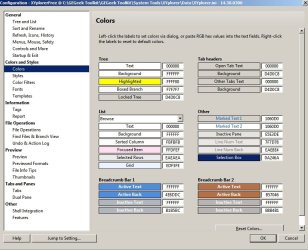
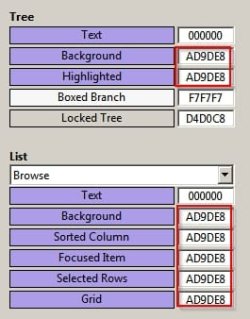
You can configure colors for pretty much anything shown here:

Configuration - XYplorerFree.jpg

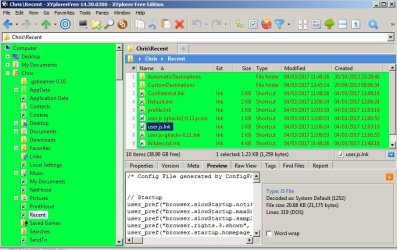
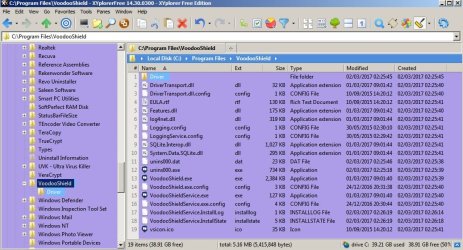
Quick example - just messing about with it:

Xyplorer 1.jpg

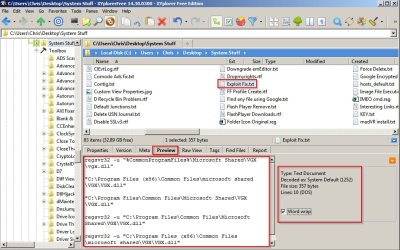
Default look:

XYplorerFree.jpg

There are options to add color filters to filenames based on certain criteria with the option to toggle on/ off.

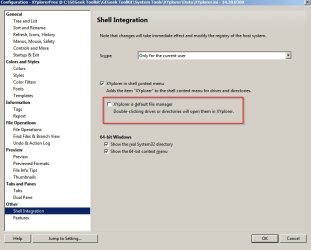
It can replace explorer:

Configuration 2 - XYplorerFree.jpg

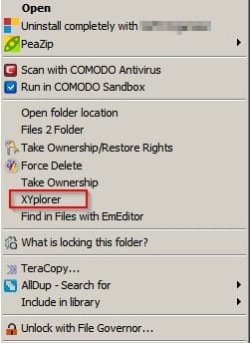
I prefer to launch it from right click context menu.

Context Menu.jpg

If you want to test it I reckon I could upload the version I use (they've given away fully functional free versions in the past and I have one of those) - currently you cannot get a fully functional free version from the manufacturer's website. The T&C's state "may be freely distributed in unmodified form"

Note: If you want a copy to test I will not be around for the next week or replying to any forum posts.
 

My Computer

Computer type
Laptop
Computer Manufacturer/Model Number
ASUS
OS
Microsoft Windows 7 Home Premium 64-bit 7601 Multiprocessor Free Service Pack 1
CPU
AMD C-60 APU with Radeon(tm) HD Graphics
Motherboard
ASUSTeK COMPUTER INC. X501U
Memory
4.00 GB
Graphics Card(s)
AMD Radeon HD 6290 Graphics
Sound Card
(1) AMD High Definition Audio Device (2) Realtek High Defi
Screen Resolution
1366 x 768 x 32 bits (4294967296 colors) @ 60 Hz
Hard Drives
Hitachi HTS545050A7E380 SATA Disk Device
Antivirus
Comodo CIS & FW, SecureAplus App Whitelisting, Threatfire
Browser
Cyberfox 64bit, Opera 64bit, Airfox
Other Info
Spy-The-Spy, HitmanPro.Alert, Norton Connect Safe, MJRegWatcher, BitDefender TrafficLight, Voodoo Shield, Zemana AntiMalware
I've PM'd you a link.
 

My Computer

Computer type
Laptop
Computer Manufacturer/Model Number
ASUS
OS
Microsoft Windows 7 Home Premium 64-bit 7601 Multiprocessor Free Service Pack 1
CPU
AMD C-60 APU with Radeon(tm) HD Graphics
Motherboard
ASUSTeK COMPUTER INC. X501U
Memory
4.00 GB
Graphics Card(s)
AMD Radeon HD 6290 Graphics
Sound Card
(1) AMD High Definition Audio Device (2) Realtek High Defi
Screen Resolution
1366 x 768 x 32 bits (4294967296 colors) @ 60 Hz
Hard Drives
Hitachi HTS545050A7E380 SATA Disk Device
Antivirus
Comodo CIS & FW, SecureAplus App Whitelisting, Threatfire
Browser
Cyberfox 64bit, Opera 64bit, Airfox
Other Info
Spy-The-Spy, HitmanPro.Alert, Norton Connect Safe, MJRegWatcher, BitDefender TrafficLight, Voodoo Shield, Zemana AntiMalware
I found a way to make Word / Excel / possibly other apps with grey background after meddling with an already created theme - the theme I liked.

I had to go to %USERPROFILE%\AppData\Local\Microsoft\Windows\Themes and copied my theme to desktop.
There, I renamed it to something suggestive (ie customized) then right clicked on it, open with - notepad.

Inside, I navigated to the bottom to find the exact registry entries from HKEY_CURRENT_USER\Control Panel\Colors.

I changed Window from 255 255 255 to 192 192 192, saved, copied it back to the Themes folder, went to desktop - right clicked, selected personalize - themes - theme settings and chose the customized theme.

Background changed immediately, but if you have Word / Excel / etc running, you might need to restart them.

This worked for me, at least for Word / Excel, not for folder backgrounds. I still have to look into that. That still remains my question. Is this possible for folder backgrounds too?

I will meddle some more when I have time and post the solution if I can find one.
 

My Computer

Computer type
PC/Desktop
Computer Manufacturer/Model Number
Custom
OS
Both Windows 7 64 & Windows 10 LTSB
CPU
Intel 2.8Ghz,
Motherboard
Gigabyte
Memory
8GB DDR2
Graphics Card(s)
Nvidia 260+
Monitor(s) Displays
42" Samsung Plasma Display
Screen Resolution
1080
Hard Drives
Too many to list!
Case
Custom
Cooling
Custom
Keyboard
MS Sidewinder
Mouse
2 dollar ali-express mouse! It is the best ever!
Internet Speed
100MB
Antivirus
Avast
Browser
Firefox & Opera
Other Info
Helpdesk Technician
If you have a fix, i [and everyone else bothered by windows explorer fixed color scheme] would still love to hear it. But i'm fairly confident in concluding that this particular problem is unfixable. See this thread and 2014 thread for proof. Bill Gates socked it to us again.
To those who responded- thanks for trying.

PS: If XYPlorer can alter windows explorer windows, the method is well-hidden. In my experience, it can't [save for leftmost directory tree pane].
 

My Computer

Computer type
PC/Desktop
Computer Manufacturer/Model Number
home built
OS
windows 7, 64bit
CPU
i5-3570K
Motherboard
ASUS
Memory
8GB
Graphics Card(s)
Intel HD4000
Hard Drives
3, varying sizes
Antivirus
avira
Browser
firefox
It can't change windows explorer colors but if using XYPlorer to navigate you should be able to use any colors you like.

I've just changed panes to purple as a test:

Purple.jpg

Purple 2.jpg

Have you installed any third party themes that might be taking control of color settings?
 
Last edited:

My Computer

Computer type
Laptop
Computer Manufacturer/Model Number
ASUS
OS
Microsoft Windows 7 Home Premium 64-bit 7601 Multiprocessor Free Service Pack 1
CPU
AMD C-60 APU with Radeon(tm) HD Graphics
Motherboard
ASUSTeK COMPUTER INC. X501U
Memory
4.00 GB
Graphics Card(s)
AMD Radeon HD 6290 Graphics
Sound Card
(1) AMD High Definition Audio Device (2) Realtek High Defi
Screen Resolution
1366 x 768 x 32 bits (4294967296 colors) @ 60 Hz
Hard Drives
Hitachi HTS545050A7E380 SATA Disk Device
Antivirus
Comodo CIS & FW, SecureAplus App Whitelisting, Threatfire
Browser
Cyberfox 64bit, Opera 64bit, Airfox
Other Info
Spy-The-Spy, HitmanPro.Alert, Norton Connect Safe, MJRegWatcher, BitDefender TrafficLight, Voodoo Shield, Zemana AntiMalware
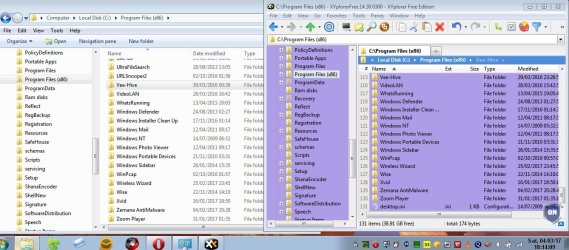
It's pretty odd. I just switched from Classic Theme to an Aero Theme. Here's what I see. Explorer on left vs XYPlorer on right.

Aero.jpg
 

My Computer

Computer type
Laptop
Computer Manufacturer/Model Number
ASUS
OS
Microsoft Windows 7 Home Premium 64-bit 7601 Multiprocessor Free Service Pack 1
CPU
AMD C-60 APU with Radeon(tm) HD Graphics
Motherboard
ASUSTeK COMPUTER INC. X501U
Memory
4.00 GB
Graphics Card(s)
AMD Radeon HD 6290 Graphics
Sound Card
(1) AMD High Definition Audio Device (2) Realtek High Defi
Screen Resolution
1366 x 768 x 32 bits (4294967296 colors) @ 60 Hz
Hard Drives
Hitachi HTS545050A7E380 SATA Disk Device
Antivirus
Comodo CIS & FW, SecureAplus App Whitelisting, Threatfire
Browser
Cyberfox 64bit, Opera 64bit, Airfox
Other Info
Spy-The-Spy, HitmanPro.Alert, Norton Connect Safe, MJRegWatcher, BitDefender TrafficLight, Voodoo Shield, Zemana AntiMalware
It seems that only 3rd party software is available as a solution. Dang MS'
 

My Computer

Computer type
PC/Desktop
Computer Manufacturer/Model Number
Custom
OS
Both Windows 7 64 & Windows 10 LTSB
CPU
Intel 2.8Ghz,
Motherboard
Gigabyte
Memory
8GB DDR2
Graphics Card(s)
Nvidia 260+
Monitor(s) Displays
42" Samsung Plasma Display
Screen Resolution
1080
Hard Drives
Too many to list!
Case
Custom
Cooling
Custom
Keyboard
MS Sidewinder
Mouse
2 dollar ali-express mouse! It is the best ever!
Internet Speed
100MB
Antivirus
Avast
Browser
Firefox & Opera
Other Info
Helpdesk Technician
Congrats to Callender for managing to change color of right pane of XYplorer. I couldn't.* And no, i don't have any third-party themes installed.
As to Word and Notepad tweaks- don't use either, so not interested. [Was worth posting tho: they'll be useful to somebody else, sooner or later.]

On [Windoze] computing in general: W7 is so pathetically unstable [MS's notoriously inept memory handling] that its plusses are about cancelled by its minuses [yeah, you go 10 steps forward, but you then go 8 or 9 back in errors etc.] so you never get anywhere, you spend half your time tinkering under the hood. Great if you like repairing engines. Like a lovely sports car breaking down every 100 miles. Me, i'm just tired, and would go linux in a hot new york minute if it had the apps i need.
Sub

*PS: XYPlorer needs no color picker- it produces color fields one can click on to instantly pick desired hues. [Or did i somehow misunderstand you, C.?]
 

My Computer

Computer type
PC/Desktop
Computer Manufacturer/Model Number
home built
OS
windows 7, 64bit
CPU
i5-3570K
Motherboard
ASUS
Memory
8GB
Graphics Card(s)
Intel HD4000
Hard Drives
3, varying sizes
Antivirus
avira
Browser
firefox
Back
Top