
Siciliano313
New member
- Local time
- 3:32 PM
- Messages
- 2
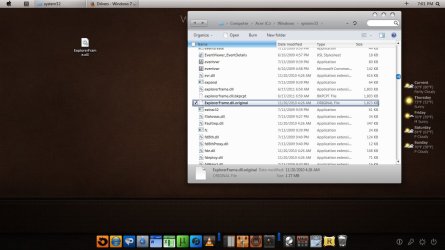
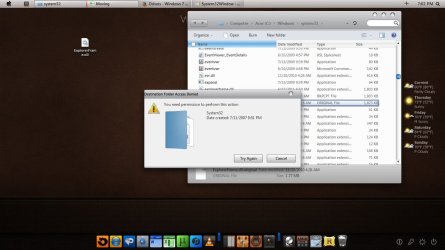
Hey how you guys doin. The other day I downloaded a theme that required you to copy the ExplorerFrame.dll, Shell32.dll and wmploc.dll. I renamed the originals to explorerframe.dll.original, etc. So last night I tried to install a CustoPack theme, and it had to make changed to the dll's. After installation, I restarted and it said explorerframe.dll couldn't run or something like that, so I restored my system to right before I installed that CustoPack (luckily I had one). Now, on a different theme i have running, everythings fine, except the explorer pane on the left of a window is the color of my old theme. It's no biggie but I just want my originals there. NOW, my issue is that I want to replace the current dlls (explorerframe.dll) with the backup (explorerframe.dll.backup). I tried to copy the backup to the desktop, change name, then copy to system32 to replace the themed one. It said I need some kind of permission (screen of that included). I included a couple of screenshots so maybe somebody can help me out. Sorry for the long post.
-I also forgot to mention that I have taken ownership over all .dll's in question.
-I also forgot to mention that I have taken ownership over all .dll's in question.
Attachments
Last edited:
My Computer
- Computer type
- Laptop
- Computer Manufacturer/Model Number
- Acer
- OS
- Microsoft Windows 7 Home Premium 64-bit 7601 Multiprocessor Free Service Pack 1
- CPU
- Intel(R) Core(TM) i3 CPU M 370 @ 2.40GHz
- Motherboard
- Acer ZR7
- Memory
- 4.00 GB
- Graphics Card(s)
- Intel(R) HD Graphics
- Sound Card
- (1) Realtek High Definition Audio (2) Intel(R) Display Aud
- Screen Resolution
- 1366 x 768 x 32 bits (4294967296 colors) @ 60 Hz
- Hard Drives
- (1) Hitachi HTS545050B9A300 (2) WD My Passport 0748 USB Device

