
Solved Changed my motherboard and im wondering if i can avoid format

darknight125

New member
Member
Local time
1:25 PM
Messages
91
Location
athens
Can i somehow install the drivers without formatting my pc?since windows wont start because of the hardware change.Maybe by installing a linux version so i can install the drivers?
 

My Computer My Computer

At a glance

windows 7Intel(R) Core(TM)2 Duo CPU E8200 @ 2.66GHzsymmetric 2048mbytes DDR2Nvidia geforce9600gt
OS
windows 7
CPU
Intel(R) Core(TM)2 Duo CPU E8200 @ 2.66GHz
Motherboard
gigabyte technology EX38-DS4
Memory
symmetric 2048mbytes DDR2
Graphics Card(s)
Nvidia geforce9600gt
Screen Resolution
1920x1080
Hard Drives
WDC caviar blue 1tb
WD 500BEV External usb device
Internet Speed
24mbs
There are steps to take, but not if you've already swapped the hardware. You're best, and quickest bet right now is to use a Live CD to access your data, so you can back it up, then wipe the drives and do a clean install.
 

My Computer My Computer

At a glance

Windows 7 Ultimate x64 SP1Intel Core i7-260012 GB Patriot Extreme DDR3-1333Nvidia GTX 470
OS
Windows 7 Ultimate x64 SP1
CPU
Intel Core i7-2600
Motherboard
Gigabyte GA-P67A-UD3P-B3
Memory
12 GB Patriot Extreme DDR3-1333
Graphics Card(s)
Nvidia GTX 470
Monitor(s) Displays
Dell UltraSharp 2209WA
Hard Drives
OCZ Agility3 240 GB, WD5001AALS, WD7501AALS
PSU
OCZ ModStream 700W
Case
CoolerMaster HAF 912 Advanced
Cooling
CoolerMaster Hyper 212 Plus
More information needed.
Does it start to load?
What error message do you get?
I have changed the Motherboard in 3 systems so far and they all started without loading Drivers
 

My Computer My Computer

At a glance

Windows 10 Pro x64i7-4770K16Gig DDR3-2400Gigabyte GT740
Computer type
PC/Desktop
Computer Manufacturer/Model Number
Self Built Custom Computer.
OS
Windows 10 Pro x64
CPU
i7-4770K
Motherboard
Asus Z87 Sabertooth
Memory
16Gig DDR3-2400
Graphics Card(s)
Gigabyte GT740
Sound Card
Onboard
Monitor(s) Displays
Benq 27" - Dell 23' - Benq 22"
Screen Resolution
1680x1050
Hard Drives
Samsung 840 Pro 128g SSD
1xWestern Digital Caviar Green 1tb
2xWestern Digital Caviar Green 2 tb
PSU
Seasonic 760 watt Platinum
Case
Coolermaster Haf - X
Cooling
Noctua NH-C12P CPU Cooler
Keyboard
Logitech illuminated keyboard
Mouse
Logitech Perfomance MX
Internet Speed
Cable = speeds to 20Mbps downsteam and 512kbps upsteam
Antivirus
Avast Internet Security
Browser
Firefox
More information needed.
Does it start to load?
What error message do you get?
I have changed the Motherboard in 3 systems so far and they all started without loading Drivers
I dont get any error message,but it always come up with the following message : windows failed to start a recent hardware change might be the cause and when i press the option start windows normally and it gets me to starting windows screen that when it stucks.
 

My Computer My Computer

At a glance

windows 7Intel(R) Core(TM)2 Duo CPU E8200 @ 2.66GHzsymmetric 2048mbytes DDR2Nvidia geforce9600gt
OS
windows 7
CPU
Intel(R) Core(TM)2 Duo CPU E8200 @ 2.66GHz
Motherboard
gigabyte technology EX38-DS4
Memory
symmetric 2048mbytes DDR2
Graphics Card(s)
Nvidia geforce9600gt
Screen Resolution
1920x1080
Hard Drives
WDC caviar blue 1tb
WD 500BEV External usb device
Internet Speed
24mbs
There are steps to take, but not if you've already swapped the hardware. You're best, and quickest bet right now is to use a Live CD to access your data, so you can back it up, then wipe the drives and do a clean install.
well the reason that i have swapped the hardware is because my old motherboard stopped working because it got burned so i cant swap it back and i really prefer not to format it since i had lot of program inside
 

My Computer My Computer

At a glance

windows 7Intel(R) Core(TM)2 Duo CPU E8200 @ 2.66GHzsymmetric 2048mbytes DDR2Nvidia geforce9600gt
OS
windows 7
CPU
Intel(R) Core(TM)2 Duo CPU E8200 @ 2.66GHz
Motherboard
gigabyte technology EX38-DS4
Memory
symmetric 2048mbytes DDR2
Graphics Card(s)
Nvidia geforce9600gt
Screen Resolution
1920x1080
Hard Drives
WDC caviar blue 1tb
WD 500BEV External usb device
Internet Speed
24mbs
A clean install never takes that long if you are properly organized ahead of time. That being said, you can always try to repair the current install using your Windows 7 media.
 

My Computer My Computer

At a glance

Windows 7 Ultimate x64 SP1Intel Core i7-260012 GB Patriot Extreme DDR3-1333Nvidia GTX 470
OS
Windows 7 Ultimate x64 SP1
CPU
Intel Core i7-2600
Motherboard
Gigabyte GA-P67A-UD3P-B3
Memory
12 GB Patriot Extreme DDR3-1333
Graphics Card(s)
Nvidia GTX 470
Monitor(s) Displays
Dell UltraSharp 2209WA
Hard Drives
OCZ Agility3 240 GB, WD5001AALS, WD7501AALS
PSU
OCZ ModStream 700W
Case
CoolerMaster HAF 912 Advanced
Cooling
CoolerMaster Hyper 212 Plus
few days back my friend changed her motherboard and installed a brand new one :confused: she din have to format or anything. it was like it never happened. i dont know wht she did later..but i guess just installed the few drivers that came with the motherboard.
 

My Computer My Computer

At a glance

Windows 7 Ultumate x64Intel Core i7 920 @ 2.67GHz6GB DDR32GB DDR5 ASUS Nvidia GTX 560 Ti
Computer Manufacturer/Model Number
Custom Built
OS
Windows 7 Ultumate x64
CPU
Intel Core i7 920 @ 2.67GHz
Motherboard
ASUSTeK Computer INC. P6T (LGA1366)
Memory
6GB DDR3
Graphics Card(s)
2GB DDR5 ASUS Nvidia GTX 560 Ti
Sound Card
Sound Blaster X-Fi Xtreme Audio
Monitor(s) Displays
LG Flatron E2241 22"
Screen Resolution
1920*1080
Hard Drives
977 Hitachi HDS721010CLA332 ATA device (SATA) * 2
Keyboard
Logitech K230
Mouse
HP KY620AA
Internet Speed
2Mbps
You can sometimes change major hardware like mobo without having to SysPrep the HD first on old hardware and it will start up but you can't count on it. SysPrep to move HD to another computer

If you don't have the old hardware to run SysPrep then you can boot Paragon Adaptive Restore CD, point it at Win7 partition to remove all drivers, SID and HID's.

The problem isn't always drivers alone but a combination of drivers and SID/HID's conflicting. However this stall is normally at the boot animation screen. In your case I would boot into the Win7 DVD Repair console or Repair CD to run Startup Repair repeatedly as it sounds like you might need the boot repaired.
 
Last edited:
A clean install never takes that long if you are properly organized ahead of time. That being said, you can always try to repair the current install using your Windows 7 media.

I second all of the above and can verify that doing a repair from the Win 7 media should be tried. Have replaced several MB's over the years. Some went in with no problems. A few required running a repair from the media. Never, fortunately, have I had to do a clean install.
 

My Computer My Computer

At a glance

Windows 7 Home Premium (Retail) Full version ...3.10 Gig Intel Core i5-3350P8192 Megabytes Usable Installed Memory
Computer type
PC/Desktop
Computer Manufacturer/Model Number
Dell XPS-8500
OS
Windows 7 Home Premium (Retail) Full version - With SP1
CPU
3.10 Gig Intel Core i5-3350P
Motherboard
Dell 0NW73C A00
Memory
8192 Megabytes Usable Installed Memory
Monitor(s) Displays
Samsung SyncMaster [Monitor] (19.1"vis, s/n HVELA10194, Octo
Screen Resolution
1024 X 768
Hard Drives
INTEL SSDSA2CW120G3 ATA Device [Hard drive] (120.03 GB)
INTEL SSDSA2CW080G3 ATA Device [Hard drive] (80.02 GB)
Keyboard
HID Keyboard Device (HP)
Mouse
Dell (came with computer)
Internet Speed
cox high speed
Other Info
The above taken with Bel Arc Advisor
This becomes really annoying i format my pc using my windows dvd(since windows startup repair couldnt fix the problem)and it worked just fine for about a day then it installed about 90 windows updates and when i restarted it,again the same error! it say windows has failed to start and when i press start windows normally it will stuck at starting windows(note: i installed all the drivers of my hardware while my pc was working that one day)so any idea what is problem?
 

My Computer My Computer

At a glance

windows 7Intel(R) Core(TM)2 Duo CPU E8200 @ 2.66GHzsymmetric 2048mbytes DDR2Nvidia geforce9600gt
OS
windows 7
CPU
Intel(R) Core(TM)2 Duo CPU E8200 @ 2.66GHz
Motherboard
gigabyte technology EX38-DS4
Memory
symmetric 2048mbytes DDR2
Graphics Card(s)
Nvidia geforce9600gt
Screen Resolution
1920x1080
Hard Drives
WDC caviar blue 1tb
WD 500BEV External usb device
Internet Speed
24mbs
Boot the Win7 DVD System Recovery Options
and run Startup Repair repeatedly. It should automate System Restore, but if not click through to the Recovery Tools list to run it manually to roll back to before you started Updating.

When Win7 starts, install the Updates in small groups starting with the drivers given in both Important and Optional Updates.

Each updates group will set a Restore point so that you can roll back if the group causes system to become unbootable.

If so install each of the updates in that group individually until you isolate the problem Update and restore before it, then post it up in our Updates forum or open a Support case via email on Windows Update website.
 
thanks will try what you suggested and will let you know.
 

My Computer My Computer

At a glance

windows 7Intel(R) Core(TM)2 Duo CPU E8200 @ 2.66GHzsymmetric 2048mbytes DDR2Nvidia geforce9600gt
OS
windows 7
CPU
Intel(R) Core(TM)2 Duo CPU E8200 @ 2.66GHz
Motherboard
gigabyte technology EX38-DS4
Memory
symmetric 2048mbytes DDR2
Graphics Card(s)
Nvidia geforce9600gt
Screen Resolution
1920x1080
Hard Drives
WDC caviar blue 1tb
WD 500BEV External usb device
Internet Speed
24mbs
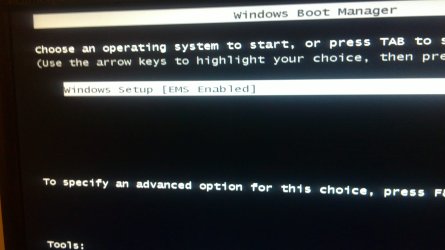
Ok that is weird,i insert the disc to my pc,booted it and now it stucks at starting windows any idea?
 

My Computer My Computer

At a glance

windows 7Intel(R) Core(TM)2 Duo CPU E8200 @ 2.66GHzsymmetric 2048mbytes DDR2Nvidia geforce9600gt
OS
windows 7
CPU
Intel(R) Core(TM)2 Duo CPU E8200 @ 2.66GHz
Motherboard
gigabyte technology EX38-DS4
Memory
symmetric 2048mbytes DDR2
Graphics Card(s)
Nvidia geforce9600gt
Screen Resolution
1920x1080
Hard Drives
WDC caviar blue 1tb
WD 500BEV External usb device
Internet Speed
24mbs
updated the topic with 2 screenshots.
 

Attachments

  • 27112011109.JPG
    27112011109.JPG
    247.9 KB · Views: 16
  • 27112011110.JPG
    27112011110.JPG
    210.3 KB · Views: 14

My Computer My Computer

At a glance

windows 7Intel(R) Core(TM)2 Duo CPU E8200 @ 2.66GHzsymmetric 2048mbytes DDR2Nvidia geforce9600gt
OS
windows 7
CPU
Intel(R) Core(TM)2 Duo CPU E8200 @ 2.66GHz
Motherboard
gigabyte technology EX38-DS4
Memory
symmetric 2048mbytes DDR2
Graphics Card(s)
Nvidia geforce9600gt
Screen Resolution
1920x1080
Hard Drives
WDC caviar blue 1tb
WD 500BEV External usb device
Internet Speed
24mbs
You may need to wait a little longer as sometimes it hangs on this screen for awhile.

You can try resetting the CMOS: Clear CMOS - 3 Ways to Clear the CMOS - Reset BIOS.

Set DVD drive to boot first in BIOS setup, or use one-time BIOS Boot Menu key.

Check all cables and connections.

Try writing Win7 ISO which can be extracted with ImgBurn to flashstick using Universal USB Installer with Win7 in dropdown menu. Unplug DVD/CD drives if necessary to get it to boot using one-time BIOS Boot menu, listed under USB, REmovable, or HD's.

If these fail, wipe the HD to clear the boot sector and reinstall. Use free Partition Wizard bootable CD which will autostart on its own, select Disk>Wipe, which will force installer to autostart itself.

Follow these steps for Reinstalling Windows 7
 
You may need to wait a little longer as sometimes it hangs on this screen for awhile.

You can try resetting the CMOS: Clear CMOS - 3 Ways to Clear the CMOS - Reset BIOS.

Set DVD drive to boot first in BIOS setup, or use one-time BIOS Boot Menu key.

Check all cables and connections.

Try writing Win7 ISO which can be extracted with ImgBurn to flashstick using Universal USB Installer with Win7 in dropdown menu. Unplug DVD/CD drives if necessary to get it to boot using one-time BIOS Boot menu, listed under USB, REmovable, or HD's.

If these fail, wipe the HD to clear the boot sector and reinstall. Use free Partition Wizard bootable CD which will autostart on its own, select Disk>Wipe, which will force installer to autostart itself.

Follow these steps for Reinstalling Windows 7
unfortunately universal usb installer and clear cmos methods didnt worked :/ seem i will have to wipe my hd.The problem is that i dont have a blank dvd at the moment so any idea if i can run partition wizard using a flash drive?
 

My Computer My Computer

At a glance

windows 7Intel(R) Core(TM)2 Duo CPU E8200 @ 2.66GHzsymmetric 2048mbytes DDR2Nvidia geforce9600gt
OS
windows 7
CPU
Intel(R) Core(TM)2 Duo CPU E8200 @ 2.66GHz
Motherboard
gigabyte technology EX38-DS4
Memory
symmetric 2048mbytes DDR2
Graphics Card(s)
Nvidia geforce9600gt
Screen Resolution
1920x1080
Hard Drives
WDC caviar blue 1tb
WD 500BEV External usb device
Internet Speed
24mbs
PW will write to flash stick in it's paid version.

You can get 5 good quality CD's or DVD's on the wall rack at Walgreens for $2.

If you booted the DVD to install earlier then it should boot now. What changed?
 
PW will write to flash stick in it's paid version.

You can get 5 good quality CD's or DVD's on the wall rack at Walgreens for $2.

If you booted the DVD to install earlier then it should boot now. What changed?
No idea nothing changed from last time,the only difference that i have noticed (probably has nothing to do with the problem) is that the first time starting windows screen showed some colours of windows logo before it would freeze this time it wont even show the colours.I even tried installing from a flash drive same problem anyway im going to buy some dvds now and i will let you know.
 

My Computer My Computer

At a glance

windows 7Intel(R) Core(TM)2 Duo CPU E8200 @ 2.66GHzsymmetric 2048mbytes DDR2Nvidia geforce9600gt
OS
windows 7
CPU
Intel(R) Core(TM)2 Duo CPU E8200 @ 2.66GHz
Motherboard
gigabyte technology EX38-DS4
Memory
symmetric 2048mbytes DDR2
Graphics Card(s)
Nvidia geforce9600gt
Screen Resolution
1920x1080
Hard Drives
WDC caviar blue 1tb
WD 500BEV External usb device
Internet Speed
24mbs
Where did you get Win7 ISO? If wiping the HD doesn't help then I'd confirm the ISO or download another, burn to DVD at 4x speed using ImgBurn or write to flash stick.
 
Back
Top