Changing a Cloned SSD with OS to be the Boot device or C Drive

johnnytorrance

New member
Local time
3:08 AM
Messages
4
I just successfully cloned my C drive, a 64GB SSD onto a new 128GB SSD which now reads as the G drive. my 1.5TB HHD is my F drive.

Im not too sure what the hell I'm doing. I can easily remove all my HDs and i removed my C drive and replaced the new G drive in the location. when i tried to boot the computer it obviously didnt work. i put the C Drive back in the case and it booted up fine.

obviously my cloned SSD cant boot my comp up. its cloned, i just dont know how to make it my boot device. any advice?
 

My Computer My Computer

At a glance

Windows 7 64 home edition
OS
Windows 7 64 home edition
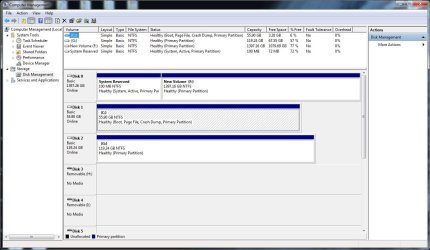
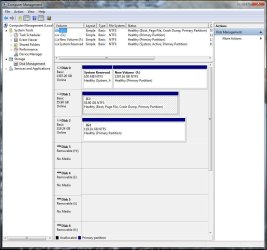
You are wanting to make your 128 GB your C: drive so it will boot, is that correct? What are you wanting to do with your 64 GB drive? We need to see a screenshot of your Disk Management. Click your Start button in the lower left of your screen. In the space above the Start button type "Disk Management" without the quotes. Expand the columns so we can read all of the print. Use this tutorial to post a screenshot of Disk Management using your Snipping Tool
http://www.sevenforums.com/tutorials/9733-screenshots-files-upload-post-seven-forums.html Plug in all HDD, SSD when you boot. Thanks,
 

My Computer My Computer

At a glance

Windows 7 Home Premium 32-Bit - Build 7600 SP1Intel Core i3-2120 3.30GhzKingston 4 GB DDR3 1333 mhzAMD Radeon HD6670
Computer type
PC/Desktop
Computer Manufacturer/Model Number
Custom Build
OS
Windows 7 Home Premium 32-Bit - Build 7600 SP1
CPU
Intel Core i3-2120 3.30Ghz
Motherboard
Asus P8Z68-V LX Intel Z68 Socket H2 ATX
Memory
Kingston 4 GB DDR3 1333 mhz
Graphics Card(s)
AMD Radeon HD6670
Sound Card
Sound Blaster Audigy SE 24-Bit
Monitor(s) Displays
Asus VE228
Screen Resolution
1440 X 900
Hard Drives
OCZ Vertex 3 120 GB Sata 3 SSD ==
Kingston SH103/S3 120 G Hyper X 120 GB SSD ==
Western Digital 500 GB Caviar Green 7200 RPM ==
PSU
Corsair CX600M == 600 Watt
Case
NZXT Apollo - Silver with Clear Side Panel
Cooling
Three 120 mm Fans
Keyboard
Microsoft Natural 4000
Mouse
Microsoft Custom Optical 3000
Internet Speed
AT&T Fiber Optic Wireless Network
Antivirus
Microsoft Security Essentials
Browser
Chrome
Other Info
120 mm Blue LED Fan -- Three Blue LED Lazer Light Sticks
Screen shot of disk mngmtWHC3.jpg
 

Attachments

  • WHC1.jpg
    WHC1.jpg
    96.9 KB · Views: 26
Last edited:

My Computer My Computer

At a glance

Windows 7 64 home edition
OS
Windows 7 64 home edition
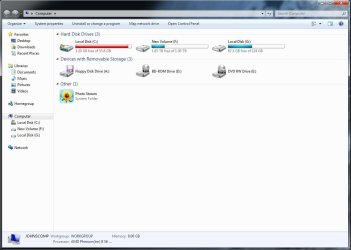
'My Computer' with G drive
WHC2.jpg
 

My Computer My Computer

At a glance

Windows 7 64 home edition
OS
Windows 7 64 home edition
I forgot to anser, i dont really care what I do with the 64GB SSD
 

My Computer My Computer

At a glance

Windows 7 64 home edition
OS
Windows 7 64 home edition
On your Disk 0, the disk that has the F: drive, there is also a 100 MB System Reserved partition. After you get your C: drive transfered, it needs to come off the Disk 0. == Just to be sure, you can boot your computer without the 120 GB SSD, right? There is a tutorial that tells you how to transfer your 64 GB to the 120 GB. http://www.sevenforums.com/tutorials/149969-ssd-install-transfer-operating-system.html The first few paragraphs tell about getting the bracket to put it in the PC, but you know that. You can start reading further down the page at "Transfering the Operating System". There are two ways to do it. The first option is free but has many steps and a lot of things to do. If you are not really up on PC's, it could be confusing. The second option is to pay $19.95 and get a program that does everything in a few minutes. Paragon Migrate OS to SSD - System migration to Solid State Drives (SSD) - Overview This link is in the tutorial but, I just wanted to make sure you found it. Before you do either step you need to format your 120 GB SSD so that nothing is on it. Let me know if you have any questions. == One more thing. When you transfer your OS, the 120 GB will become your C: automatically and the 64 GB will be assigned a new letter. == One more thing. When doing the transfer of OS, only the 64 GB SSD and the 120 GB SSD should be plugged into your Motherboard. This is to stop files from getting on wrong partitions.
 

My Computer My Computer

At a glance

Windows 7 Home Premium 32-Bit - Build 7600 SP1Intel Core i3-2120 3.30GhzKingston 4 GB DDR3 1333 mhzAMD Radeon HD6670
Computer type
PC/Desktop
Computer Manufacturer/Model Number
Custom Build
OS
Windows 7 Home Premium 32-Bit - Build 7600 SP1
CPU
Intel Core i3-2120 3.30Ghz
Motherboard
Asus P8Z68-V LX Intel Z68 Socket H2 ATX
Memory
Kingston 4 GB DDR3 1333 mhz
Graphics Card(s)
AMD Radeon HD6670
Sound Card
Sound Blaster Audigy SE 24-Bit
Monitor(s) Displays
Asus VE228
Screen Resolution
1440 X 900
Hard Drives
OCZ Vertex 3 120 GB Sata 3 SSD ==
Kingston SH103/S3 120 G Hyper X 120 GB SSD ==
Western Digital 500 GB Caviar Green 7200 RPM ==
PSU
Corsair CX600M == 600 Watt
Case
NZXT Apollo - Silver with Clear Side Panel
Cooling
Three 120 mm Fans
Keyboard
Microsoft Natural 4000
Mouse
Microsoft Custom Optical 3000
Internet Speed
AT&T Fiber Optic Wireless Network
Antivirus
Microsoft Security Essentials
Browser
Chrome
Other Info
120 mm Blue LED Fan -- Three Blue LED Lazer Light Sticks

My Computer My Computer

At a glance

Vista, Windows7, Mint Mate, Zorin, Windows 8from 1.6GHz Duo to i7
Computer Manufacturer/Model Number
HP, Dell, Gateway, Toshiba - 4 laptops and 2 desktops
OS
Vista, Windows7, Mint Mate, Zorin, Windows 8
CPU
from 1.6GHz Duo to i7
Monitor(s) Displays
2x HP w2207
Hard Drives
5x HDD, 7x SSD, 12x Externals
Keyboard
with trackball - no mices
Mouse
Trackball mice
Internet Speed
DSL 6000
Hiyya WHS Look I have done this a few times now and have never had a problem I always use your tutorial on prepping the SSD with DISKPART then clone away I wonder it the OP did that first? Would that make nay difference?
 

My Computer My Computer

At a glance

Desk1 7 Home Prem / Desk2 10 Pro / Main lap A...Desk1 i5 3750K / Laptop i7 GTX 860M / Desk2 i...Desk1 8GB (1866) / Desk2 16GB (1333) / Laptop...Desk 1& 2NVidia GTX 650 & Laptops on board Intel
Computer type
PC/Desktop
Computer Manufacturer/Model Number
Own build (new) Desk1 / Asus ROG Win 7 / Desk2 1st build
OS
Desk1 7 Home Prem / Desk2 10 Pro / Main lap Asus ROG 10 Pro 2 laptop Toshiba 7 Pro Asus P2520 7 & 10
CPU
Desk1 i5 3750K / Laptop i7 GTX 860M / Desk2 i5 2500
Motherboard
Desk1 Asus P877-V / Desk2 Gigabyte H67 UD3H / Laptop ?
Memory
Desk1 8GB (1866) / Desk2 16GB (1333) / Laptop 8Gb DDR3
Graphics Card(s)
Desk 1& 2NVidia GTX 650 & Laptops on board Intel
Sound Card
Desk 1 & 2 -XONAR DG Realtek High Def audio Laptop
Monitor(s) Displays
Desk 1 Benq HD 2450 / Desk2 Philips 24" / Laptop 17.5"
Screen Resolution
1920x1080 D1 & D2 & Laptop 1
Hard Drives
Desk1 Samsung 120GB 830 SSD
Asus ROG 256GB 850 Pro SSD
Desk2 Samsung 840 256 SSD
Toshiba 120GB EVO
PSU
Desk 1 Corsair HX 1050/ Laptop ? / Desk 2 Corsair HX 650
Case
Desk 1 Cooler HAF XM ? Toshiba laptop / Desk2 Coolermaster
Cooling
Fans on all Desk1 -2 Desk2 - all Coolermasters 5 Laptop ?
Keyboard
Desk 1 MS Sidewinder X6 Desk 2 MS Sidewinder X 4
Mouse
Desk 1&2 - Gigabyte MS 900 gamer - laptop - Logitec wireless
Internet Speed
ADSL2+
Other Info
One other Desktop (tester) and spare Toshba laptop both with SSD's
Running Kaspersky 2016 ISS on all machines config'd identically
Logitec audio stereo systems on each machine (x3)
Canon MG5250MFC
Router/modem TP-Link running WPA2SK
I am not sure what the OP did. For one I do not see an OS on his 120GB SSD. Then he certainly forgot the the bootmgr in the System partition. That's why I recommended to copy the bootmgr to C before he clones C to the 120GB SSD (Disk2).
 

My Computer My Computer

At a glance

Vista, Windows7, Mint Mate, Zorin, Windows 8from 1.6GHz Duo to i7
Computer Manufacturer/Model Number
HP, Dell, Gateway, Toshiba - 4 laptops and 2 desktops
OS
Vista, Windows7, Mint Mate, Zorin, Windows 8
CPU
from 1.6GHz Duo to i7
Monitor(s) Displays
2x HP w2207
Hard Drives
5x HDD, 7x SSD, 12x Externals
Keyboard
with trackball - no mices
Mouse
Trackball mice
Internet Speed
DSL 6000
Back
Top