Solved Changing a Dynamic Disk back to Basic

aggixx

New member
Member
Local time
5:29 AM
Messages
55
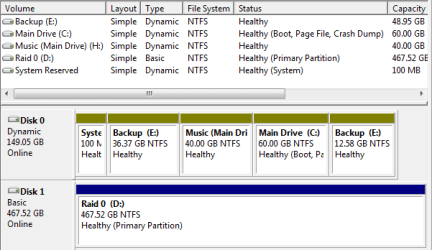
I was changing some partitions in the Disk Management tool in Control Panel > Administrative Tools > Computer Management, and I accidently changed my boot drive to a dynamic disk (I thought it would only change the volume to dynamic, not the whole disk). According to Windows 7, the OS can't boot if it's on a dynamic disk, so I need to change it back. Did some research and found that the only way to do this is to clear all partitions from the drive. So here's where am I at:

ddscreenshot.png


It seems that I need to move all of my data to Disk 1, so that I can revert the other two drives to Basic and then move the necessary data back. I've got the space to do this, so I was wondering: How does the process of moving (or copying) the OS's files go? And am I going about this the right way?

Thanks
 
Last edited:

My Computer

Computer Manufacturer/Model Number
Self-Built
OS
Windows 7 Ultimate x64 SP1
CPU
AMD Athlon(tm) II X4 640 Processor (4 CPUs), ~3.0GHz
Motherboard
ASUS M4A79XTD EVO
Memory
2x2GB DDR3 1600 G.Skill Ripjaws (F3-12800CL9D-4GBRL)
Graphics Card(s)
NVIDIA GeForce 9800 GT
Sound Card
Built-in 5.1 Surround Sound
Monitor(s) Displays
LG Flatron Wide 22" LCD
Screen Resolution
1440x900
Hard Drives
Western Digital Caviar 160GB IDE (WD1600AABB-56PUA0)
2x Western Digital Caviar 250GB SATA RAID 1 and RAID 0 (WD2500YD-01NVB1)
PSU
APEVIA ATX-AQ700W-BK 700W
Case
Rosewill DESTROYER
Cooling
CPU: CM Hyper 212+; Case: 1x Front, 2x Side, 2x Top, 1x Rear
Keyboard
Micro Innovations Wireless PS/2
Mouse
Razer Deathadder
Bump, just burning time until I find an answer, as I don't want to shut off my computer in it's current state.
 

My Computer

Computer Manufacturer/Model Number
Self-Built
OS
Windows 7 Ultimate x64 SP1
CPU
AMD Athlon(tm) II X4 640 Processor (4 CPUs), ~3.0GHz
Motherboard
ASUS M4A79XTD EVO
Memory
2x2GB DDR3 1600 G.Skill Ripjaws (F3-12800CL9D-4GBRL)
Graphics Card(s)
NVIDIA GeForce 9800 GT
Sound Card
Built-in 5.1 Surround Sound
Monitor(s) Displays
LG Flatron Wide 22" LCD
Screen Resolution
1440x900
Hard Drives
Western Digital Caviar 160GB IDE (WD1600AABB-56PUA0)
2x Western Digital Caviar 250GB SATA RAID 1 and RAID 0 (WD2500YD-01NVB1)
PSU
APEVIA ATX-AQ700W-BK 700W
Case
Rosewill DESTROYER
Cooling
CPU: CM Hyper 212+; Case: 1x Front, 2x Side, 2x Top, 1x Rear
Keyboard
Micro Innovations Wireless PS/2
Mouse
Razer Deathadder
After looking in more detail, it seems that pre-existing OS installations on a drive that was changed to dynamic, are still bootable?

Is this correct? Would love some confirmation before possibly messing up my computer.
 

My Computer

Computer Manufacturer/Model Number
Self-Built
OS
Windows 7 Ultimate x64 SP1
CPU
AMD Athlon(tm) II X4 640 Processor (4 CPUs), ~3.0GHz
Motherboard
ASUS M4A79XTD EVO
Memory
2x2GB DDR3 1600 G.Skill Ripjaws (F3-12800CL9D-4GBRL)
Graphics Card(s)
NVIDIA GeForce 9800 GT
Sound Card
Built-in 5.1 Surround Sound
Monitor(s) Displays
LG Flatron Wide 22" LCD
Screen Resolution
1440x900
Hard Drives
Western Digital Caviar 160GB IDE (WD1600AABB-56PUA0)
2x Western Digital Caviar 250GB SATA RAID 1 and RAID 0 (WD2500YD-01NVB1)
PSU
APEVIA ATX-AQ700W-BK 700W
Case
Rosewill DESTROYER
Cooling
CPU: CM Hyper 212+; Case: 1x Front, 2x Side, 2x Top, 1x Rear
Keyboard
Micro Innovations Wireless PS/2
Mouse
Razer Deathadder
Disk management has a nice GUI which may fool you into clicking around.

A good rule of thumb is to stay away from disk altering processes. Period. These tools are for experts only. You have a 90% chance of damaging your OS.

I call it crash and burn.

Just my two cents,

Nick

Sent from my PC36100 using Tapatalk
 

My Computer

Computer Manufacturer/Model Number
Optiplex 960
OS
Windows 7 Enterprise 64bit
CPU
Dual Quad-Core
Memory
8GB
Graphics Card(s)
NVidia Quadro NVS 450
Monitor(s) Displays
3 Monitors - ViewSonic VP2030b 21in-
Hard Drives
Raid configuration with 300GB
Other Info
Also owne a Tablet x61 Lenovo Laptop
I had that same problem when I first installed Win7. For weeks I searched for a way to change Dynamic back to Basic. I never found one and ended up using Win XP install disk to repartition the hard drive then reinstalled Win 7. This changed everything to basic and solved the problem even though it was worth it in the end.
 

My Computer

OS
Windows 7 Pro
CPU
Intel(R) Pentium(R) Duel CPU E2200 2.20 Ghz
Motherboard
GA-G41M-ES2L
Memory
4 gb 2.96 Usable
Graphics Card(s)
Onboard
Sound Card
Onboard
Hard Drives
2 - 1TB WD Sata Drives
Sorry to necro, but I thought I should update for potential future readers.

Turns out you can boot off of a dynamic disk, IF and ONLY IF the operating system was installed onto it when it was still a basic disk. So, I'm still running it as dynamic, not a single boot problem.

This turns out to be a bonus for me because I wanted to form a new partition in the unallocated space, but the space was split by the primary partition. Dynamic allows you to do this, so I've got my drives set up like I wanted them.

Screenshot attached for completeness I guess. E: is the split partition I was talking about, C: is the OS partition.
 

Attachments

  • partitions.png
    partitions.png
    9.7 KB · Views: 80

My Computer

Computer Manufacturer/Model Number
Self-Built
OS
Windows 7 Ultimate x64 SP1
CPU
AMD Athlon(tm) II X4 640 Processor (4 CPUs), ~3.0GHz
Motherboard
ASUS M4A79XTD EVO
Memory
2x2GB DDR3 1600 G.Skill Ripjaws (F3-12800CL9D-4GBRL)
Graphics Card(s)
NVIDIA GeForce 9800 GT
Sound Card
Built-in 5.1 Surround Sound
Monitor(s) Displays
LG Flatron Wide 22" LCD
Screen Resolution
1440x900
Hard Drives
Western Digital Caviar 160GB IDE (WD1600AABB-56PUA0)
2x Western Digital Caviar 250GB SATA RAID 1 and RAID 0 (WD2500YD-01NVB1)
PSU
APEVIA ATX-AQ700W-BK 700W
Case
Rosewill DESTROYER
Cooling
CPU: CM Hyper 212+; Case: 1x Front, 2x Side, 2x Top, 1x Rear
Keyboard
Micro Innovations Wireless PS/2
Mouse
Razer Deathadder
Back
Top