Solved Changing a file to read-only does not remain read-only

tcfox

New member
Local time
1:52 AM
Messages
3
I'm having the opposite problem from most of what I have read here. I am trying to set a file to read-only. Each time I do, the next time I open explorer the check-mark is gone making it writable to again.

The file is an LSO that (if I delete it) regenerates itself. I have tried to change the setting in Flash Player to Never allow, but it reverts back to allow there too.

"#images-na.ssl-images-amazon.com\settings.sol" is the file & I wouldn't mind so much if it only happened on Amazon, but it happens on the first site I open each day, which I find a bit unnerving.

Any help here would be appreciated, this is making me crazy! - TIA
 

My Computer My Computer

Computer type
PC/Desktop
OS
64 bit Windows 7 Home Premium
Welcome to the forum. Who is the owner of the file and who has rights on it?
 

My Computer My Computer

Computer type
PC/Desktop
OS
win 8 32 bit
Hi Tcfox,
LSO's otherwise known as Super cookies
Obviously some program/file you have on your system is requesting it :D
Everytime you reboot its "called" and updated and its original attributes are reset to default values
Its not part of Flash as such and therefor changes made there will be in effective.

I used to have an LSO controller program but cant remember its name.
Should point you in the right direction now you know what it is.


Roy
 

My Computer My Computer

Computer type
PC/Desktop
Computer Manufacturer/Model Number
medionl/Aspire 6930G/acer x55a
OS
W7 home premium 32bit/W7HP 64bit/w10 tp insider ring
CPU
E5300 dual core
Motherboard
medion MS7366
Memory
3gb
Graphics Card(s)
Nvidia Geforce 7100 Nforce 630i
Monitor(s) Displays
avixc
Internet Speed
n (isp resticted to 72)
Antivirus
mse/pands
Browser
palemoon
Other Info
Belkin Fd7050 n USB using Railink RT2870 drivers, more upto date
Thanks samuria! As far as I know, I am the owner & have rights to it. I believe I set this PC up so all users have all abilities since I am the only user.

Roy/torchwood, I believe the program you are referring to is BetterPrivacy. At least that is the one I use. That is how I am aware this file keeps regenerating every day, as BetterPrivacy alerts me when new LSOs are added. I don't think it's something I have on my PC since after a reboot, that file folder is missing from the Macromedia\Flashplayer section of Windows Explorer until I access the web (but I have been known to be wrong a time or two...lol)

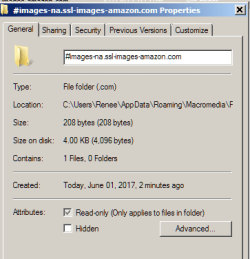
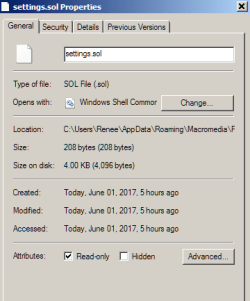
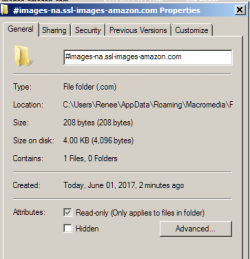
IDK, perhaps this isn't even a Windows issue & I need to go to a different forum, but I'll add some screen shots to see if that helps.

These are before a reboot:
SS1 before reboot.png SS2 before reboot.png SS3 before reboot.png

Here are the same shots after a reboot (the 2nd shot is the same in both):
SS1 after reboot.png SS2 after reboot.png SS3 after reboot.png
 

My Computer My Computer

Computer type
PC/Desktop
OS
64 bit Windows 7 Home Premium
Thanks so much for all your help. I figured this out on my own. I'm an idiot!!! This file/cookie was being deleted automatically by a program that runs when I shut down my PC at night - therefore regenerated the next day. Sorry I bothered you.
 

My Computer My Computer

Computer type
PC/Desktop
OS
64 bit Windows 7 Home Premium
Back
Top